Codex CLI Enterprise Deployment: Managed Policies and Team Configuration
Codex CLI Enterprise Deployment: Managed Policies and Team Configuration
Rolling Codex CLI out to a team of ten is a different proposition from running it on your own laptop. At scale you need guardrails that users cannot accidentally override, sensible defaults that land on every machine without a ticket to IT, and a paper trail that satisfies compliance reviewers. Codex CLI v0.116.0 ships a layered configuration system — spanning cloud-enforced requirements, MDM profiles, system-level TOML files, and per-repository Team Config — that addresses all of this.1 This article maps out the full stack and shows how each layer composes.
The Configuration Hierarchy
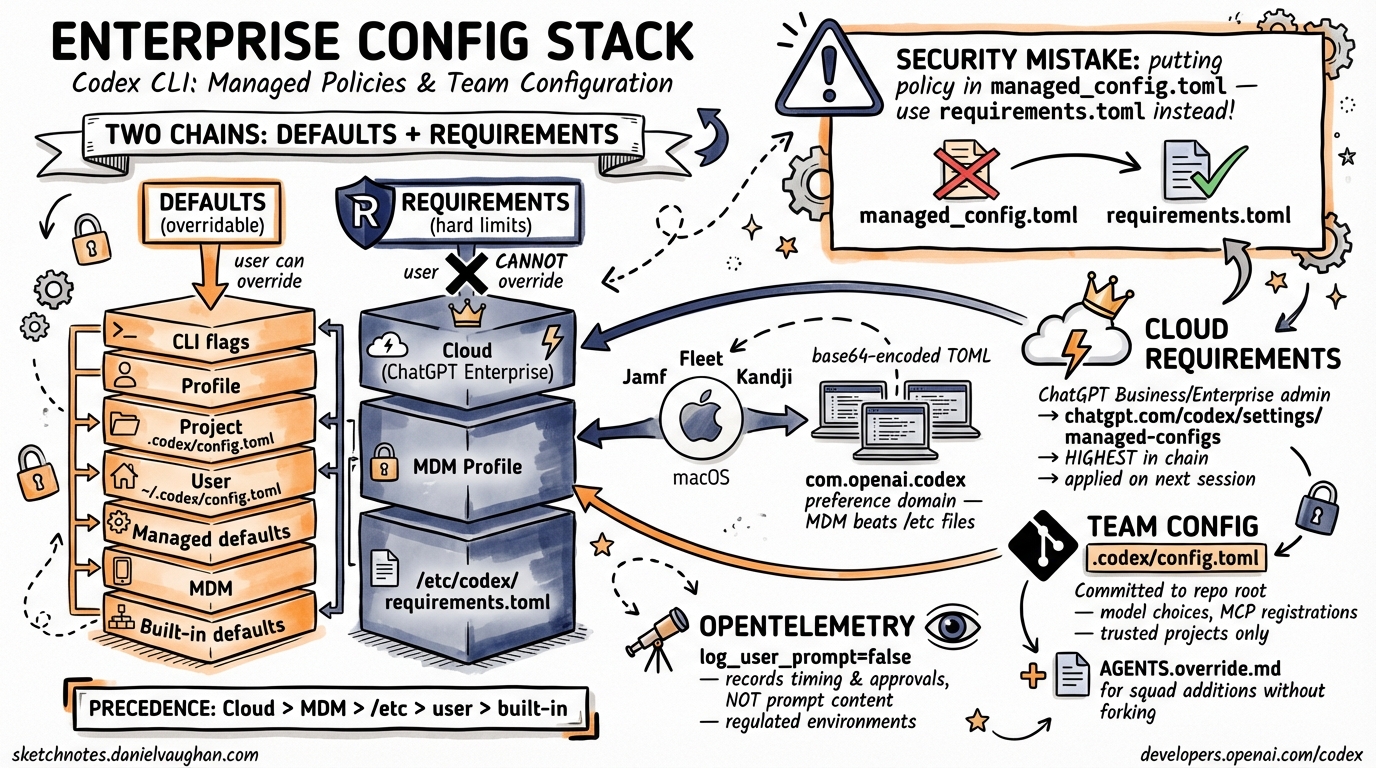
Codex CLI resolves settings by merging multiple sources in a well-defined precedence order. There are two parallel hierarchies — one for defaults (which users can override) and one for requirements (which users cannot override). Understanding the distinction is the starting point for any enterprise deployment.
graph TD
    A["CLI flags / --config overrides"] --> B["Active profile"]
    B --> C["Project .codex/config.toml (trusted projects only)"]
    C --> D["User ~/.codex/config.toml"]
    D --> E["Managed defaults (managed_config.toml)"]
    E --> F["macOS MDM config_toml_base64"]
    F --> G["Built-in defaults"]

    H["Cloud-managed requirements (ChatGPT Business/Enterprise)"] --> I["macOS MDM requirements_toml_base64"]
    I --> J["/etc/codex/requirements.toml"]

    style H fill:#ff9999
    style I fill:#ff9999
    style J fill:#ff9999
The left-hand chain resolves what Codex does by default. The right-hand chain establishes hard limits that no user-side setting can breach.2 Requirements are evaluated after the defaults chain is fully resolved; if a resolved value would violate a requirement, Codex refuses to start or surfaces an error at the point the policy is triggered.
Defaults vs. Requirements: Why the Distinction Matters
Managed defaults (managed_config.toml) set a starting value users can still override per-session. They are appropriate for opinionated baselines — a preferred model, a default reasoning effort level, an OpenTelemetry sink — where you want consistency without blocking individual experimentation.
Requirements (requirements.toml) express hard constraints. An engineer cannot set approval_policy = "never" if your requirements file disallows it. That makes requirements the right tool for security policy — not nudging defaults.2
A common mistake is encoding security intent in managed_config.toml and wondering why developers override it. Use requirements.toml for anything you actually need to enforce.
System-Level Configuration Files
On Unix systems (Linux and macOS), Codex CLI reads from two system-level paths:2
| File | Purpose |
|---|---|
/etc/codex/config.toml |
System-wide user defaults |
/etc/codex/managed_config.toml |
IT-managed defaults (higher precedence than user config) |
/etc/codex/requirements.toml |
Hard policy constraints |
On Windows (or where /etc is unavailable), managed defaults fall back to ~/.codex/managed_config.toml.
A typical managed_config.toml for a team standardising on workspace-write sandboxing with network isolation:
approval_policy = "on-request"
sandbox_mode    = "workspace-write"

[sandbox_workspace_write]
network_access = false

[otel]
environment = "prod"
exporter    = "otlp-http"
log_user_prompt = false
And a corresponding requirements.toml to prevent privilege escalation:
allowed_approval_policies = ["untrusted", "on-request"]
allowed_sandbox_modes     = ["read-only", "workspace-write"]
allowed_web_search_modes  = ["cached", "disabled"]

[rules]
prefix_rules = [
  { pattern = [{ token = "rm" }, { any_of = ["-rf", "-fr"] }], decision = "forbidden" },
  { pattern = [{ token = "git" }, { any_of = ["push", "force-push"] }], decision = "prompt" }
]
The prefix_rules array is evaluated against the tokenised command before execution. A decision of "forbidden" stops the command entirely; "prompt" surfaces it for explicit user approval regardless of the active approval_policy.2
MCP Server Allowlisting
Organisations can restrict which MCP servers Codex CLI may connect to. The [mcp_servers] table in requirements.toml works as an allowlist, matching servers by either command identity (for local stdio servers) or URL (for remote HTTP servers):2
[mcp_servers.internal-docs]
identity = { command = "codex-mcp" }

[mcp_servers.remote-api]
identity = { url = "https://tools.internal.example.com/mcp" }
Any server not listed is refused at connection time. This matters in regulated environments where you need certainty about what external surfaces an AI agent can reach.
macOS MDM Deployment
For macOS fleets managed via Jamf Pro, Fleet, or Kandji, Codex CLI honours the com.openai.codex preference domain.12 Both managed defaults and requirements can be pushed as MDM payloads. The values must be base64-encoded TOML without line wrapping.
Generate the encoded string:
base64 -i /path/to/managed_config.toml | tr -d '\n'
Set it in your MDM payload:
<key>com.openai.codex</key>
<dict>
  <key>config_toml_base64</key>
  <string><!-- base64-encoded managed_config.toml --></string>
  <key>requirements_toml_base64</key>
  <string><!-- base64-encoded requirements.toml --></string>
</dict>
MDM-pushed values sit above the system TOML files in the requirements chain — meaning MDM wins over /etc/codex/requirements.toml if both are present. This lets you distribute policy updates without SSH access to individual machines.2
Cloud-Managed Requirements (ChatGPT Business/Enterprise)
When a developer authenticates with Codex CLI using a ChatGPT Business or Enterprise account (device-code sign-in, introduced in v0.116.01), Codex fetches admin-enforced requirements from the Codex service. These cloud-managed requirements occupy the highest position in the requirements chain — they override both MDM and system-level TOML.3
Workspace admins configure these at https://chatgpt.com/codex/settings/managed-configs. Changes apply to all matching users immediately on their next Codex session, without any machine-level intervention.
graph LR
    Admin["ChatGPT Enterprise Admin\n(chatgpt.com/codex/settings/managed-configs)"] -->|"cloud push"| CLI["Developer's Codex CLI\n(on sign-in)"]
    MDM["MDM Profile\n(Jamf / Fleet / Kandji)"] -->|"mdm push"| CLI
    Sys["/etc/codex/requirements.toml"] -->|"read at launch"| CLI
    CLI -->|"merge (cloud wins)"| Enforced["Enforced policy"]
This is the right delivery mechanism for policy changes that need to land across a distributed team immediately — you change the cloud config and developers pick it up on their next session without touching anyone’s machine.
Team Config: Per-Repository Defaults
Below the system and MDM layers, Codex supports Team Config: a .codex/config.toml checked in to the repository root. When a developer opens a project, Codex loads this file as a project-level default (below user config in precedence, but above built-in defaults for trusted projects).4
Team Config is the right place for:
- Repository-specific model choices (e.g. a data-science repo that benefits from higher reasoning effort)
- Project-specific MCP server registrations
web_searchsettings appropriate to the codebase
Example .codex/config.toml in a monorepo:
model                   = "gpt-5.4"
model_reasoning_effort  = "medium"
web_search              = "cached"

[features]
multi_agent = true
Team Config loads only for trusted projects — Codex prompts the first time a new project config is encountered, avoiding supply-chain attacks from malicious repos.4
project_doc_fallback_filenames
Codex CLI searches for agent instruction files in a configurable priority list. The project_doc_fallback_filenames key (set in config.toml or managed_config.toml) lets you tell Codex what filenames to accept in addition to AGENTS.md:4
project_doc_fallback_filenames = ["AGENTS.md", "COPILOT-INSTRUCTIONS.md", "AI.md"]
This is useful during migrations — teams transitioning from another agent tool can keep their existing instruction file and point Codex at it without renaming anything.
AGENTS.override.md
Alongside AGENTS.md, Codex also picks up an AGENTS.override.md in the same directory. Override files merge on top of the base file, with the override content winning on any field-level collision. This lets platform teams publish a baseline AGENTS.md in a shared location (for example, the repo root) whilst individual teams extend it with squad-specific instructions without forking the original.4
A common pattern:
/                          ← repo root
  AGENTS.md                ← platform team baseline
  AGENTS.override.md       ← empty or repo-wide additions

/services/payments/
  AGENTS.md                ← payments squad additions
  AGENTS.override.md       ← temporary overrides, PR-specific notes
OpenTelemetry Integration
For teams that need audit trails or usage visibility, Codex CLI ships an OpenTelemetry exporter. Configure it in managed_config.toml to push spans to your existing observability stack:2
[otel]
environment     = "production"
exporter        = "otlp-http"
endpoint        = "https://otel.internal.example.com:4318"
log_user_prompt = false   # omit prompt text from spans (GDPR / legal hold)
log_user_prompt = false is the recommended default in regulated environments. With it off, spans record timing, model, approval events, and command outcomes without capturing the content of developer prompts.
Enterprise Analytics and Compliance APIs
For organisations on ChatGPT Business or Enterprise, OpenAI provides two programmatic APIs beyond the standard Codex surface:3
Analytics API — usage statistics, code-review counts, and review-response data. Requires a dedicated API key scoped via OpenAI support.
Compliance API — audit log endpoints, log file exports, and Codex task tracking. Designed for ingestion into SIEM tooling (Splunk, Elastic, etc.) or for responding to compliance audits (SOC 2, HIPAA, CMMC ⚠️ — verify current certification scope with OpenAI directly).
Deployment Checklist
graph TD
    A["Define policy tiers\n(forbidden / prompt / allow)"] --> B["Author requirements.toml\n(and test locally)"]
    B --> C{"Platform?"}
    C -->|macOS fleet| D["Encode to base64\nPush via MDM profile"]
    C -->|Linux servers| E["Deploy to /etc/codex/\nvia config management (Ansible/Chef)"]
    C -->|Enterprise SSO| F["Configure cloud-managed requirements\nchatgpt.com/codex/settings/managed-configs"]
    D --> G["Commit Team Config\n.codex/config.toml per repo"]
    E --> G
    F --> G
    G --> H["Add AGENTS.md + AGENTS.override.md\nto high-traffic repos"]
    H --> I["Enable OTel exporter\nin managed_config.toml"]
    I --> J["Validate with codex --config\nConfirm startup summary"]
Summary
Codex CLI’s enterprise configuration model separates defaults from requirements, distributes policy through three independent channels (cloud, MDM, filesystem), and provides per-repository Team Config for squad-level customisation. The key points to internalise:
- Use
requirements.toml— notmanaged_config.toml— for anything you actually need to enforce. - Cloud-managed requirements (ChatGPT Business/Enterprise) sit highest in the chain and are the best delivery mechanism for fleet-wide policy changes.
- MDM profiles are the right channel for macOS-managed machines where cloud sign-in is not universal.
- Team Config (
.codex/config.toml) belongs in source control; useAGENTS.override.mdto allow localised additions without forking shared baselines. - Enable OTel with
log_user_prompt = falsefrom day one in regulated environments.
Citations
-
OpenAI. “Codex Changelog.” developers.openai.com. 2026-03-19. https://developers.openai.com/codex/changelog ↩ ↩2 ↩3
-
OpenAI. “Managed Configuration – Codex.” developers.openai.com. https://developers.openai.com/codex/enterprise/managed-configuration ↩ ↩2 ↩3 ↩4 ↩5 ↩6 ↩7 ↩8
-
OpenAI. “Admin Setup – Codex.” developers.openai.com. https://developers.openai.com/codex/enterprise/admin-setup ↩ ↩2
-
OpenAI. “Config Basics – Codex.” developers.openai.com. https://developers.openai.com/codex/config-basic ↩ ↩2 ↩3 ↩4