Codex CLI Hooks Deep Dive: SessionStart, Stop and userpromptsubmit
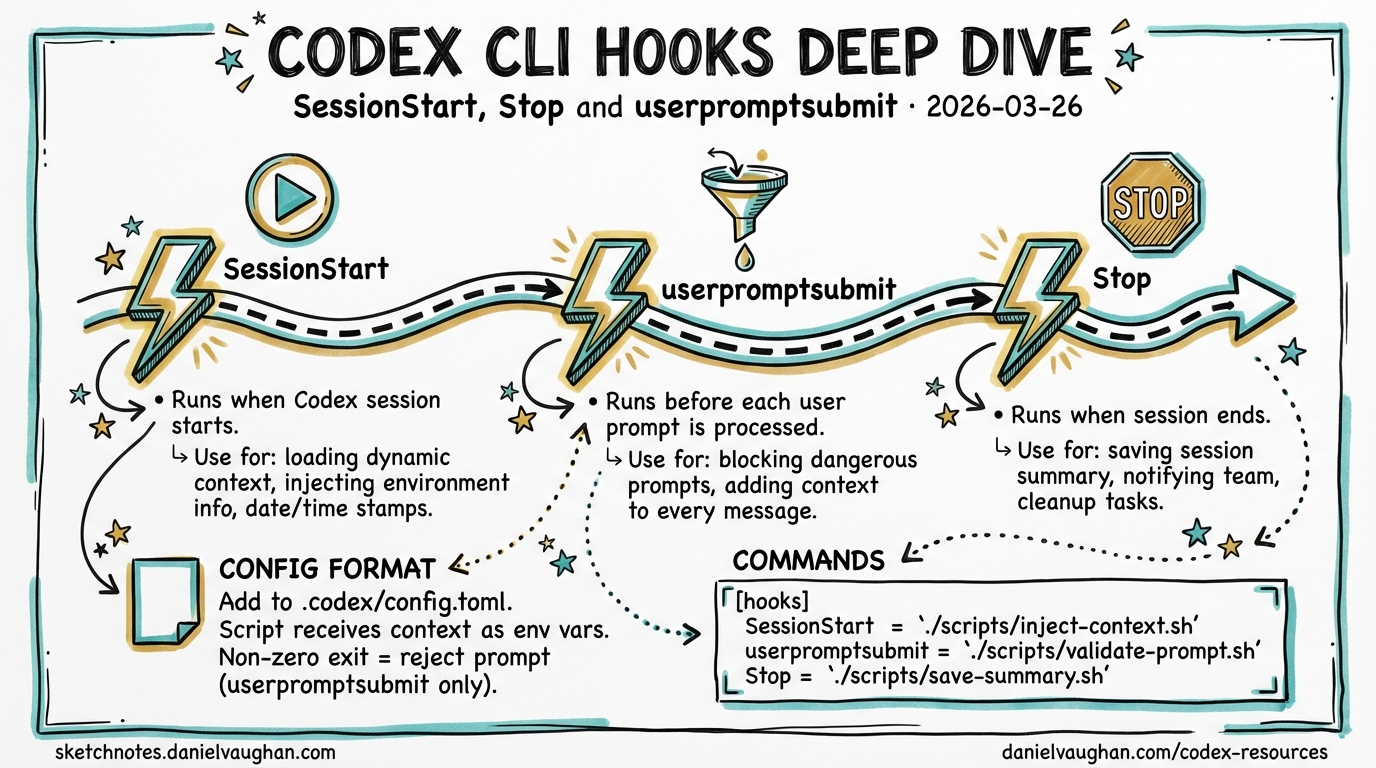
Codex CLI Hooks Deep Dive: SessionStart, Stop and userpromptsubmit
Codex CLI gained an experimental hooks engine in v0.114.0 (March 2026), introducing shell-command callbacks at key session lifecycle points.1 Three hook events are currently available: SessionStart, Stop, and userpromptsubmit. They allow you to inject dynamic context, react to session boundaries, and intercept or block user prompts — all without modifying AGENTS.md or relying on the model to take initiative.
This article documents the configuration format, exit-code protocol, and practical patterns for each event. All three hooks remain experimental; the interface may change between minor releases.
Enabling the Hooks Engine
Hooks are gated behind a feature flag. Pass it on the command line or set it in .codex/config.toml:2
# ad-hoc
codex -c features.codex_hooks=true

# persistent (add to .codex/config.toml)
[features]
codex_hooks = true
Once enabled, Codex reads .codex/hooks.json from the project root (or the global config directory). The file is hot-read on session start; you do not need to restart after editing it.
Configuration Format
Hooks are defined in .codex/hooks.json. The top-level structure is a hooks object keyed by event name. Each event maps to an array of hook groups; each group contains a hooks array of individual hook objects:3
{
  "hooks": {
    "SessionStart": [
      {
        "hooks": [
          {
            "type": "command",
            "command": "bash ~/.codex/scripts/inject-context.sh",
            "statusMessage": "Loading project context…",
            "timeout": 15
          }
        ]
      }
    ],
    "Stop": [
      {
        "hooks": [
          {
            "type": "command",
            "command": "echo 'Session complete' >> /tmp/codex-audit.log",
            "statusMessage": "Finalising session…",
            "timeout": 5
          }
        ]
      }
    ]
  }
}
Hook Object Fields
| Field | Type | Description |
|---|---|---|
type |
string | Currently only "command" is supported |
command |
string | Shell command string executed by /bin/sh -c |
statusMessage |
string | User-facing text shown in the TUI during execution |
timeout |
integer | Maximum wall-clock seconds before the hook is killed |
Hooks run synchronously by default; the session does not proceed until the hook command exits.3 There is no native async mode as of v0.116.0 — a requested community feature.4
Exit Code Protocol
Codex interprets hook exit codes as follows:
| Exit code | Meaning |
|---|---|
0 |
Success — stdout is processed per-event rules |
2 |
Blocking error — stderr is surfaced as an error message; behaviour varies by event |
| Other | Treated as non-blocking; hook output is ignored |
For SessionStart, stdout written by the command is injected verbatim into the model’s context before the first turn. For userpromptsubmit, exit code 2 causes the prompt to be rejected and the user to be shown the hook’s stderr output.5
flowchart TD
    A[Hook command runs] --> B{Exit code?}
    B -->|0| C[Read stdout]
    B -->|2| D[Read stderr]
    B -->|other| E[Ignore output]
    C --> F{Event type}
    F -->|SessionStart| G[Inject stdout into model context]
    F -->|userpromptsubmit| H[Augment prompt with stdout]
    F -->|Stop| I[No output processing]
    D --> J[Surface error message to user]
    J -->|userpromptsubmit| K[Block prompt execution]
    J -->|SessionStart| L[Log error, session continues]
SessionStart
When It Fires
SessionStart executes once, before the model processes any user input. It is ideal for injecting dynamic context that would otherwise be stale if baked into AGENTS.md — git branch, open issue count, last deployment time, environment variables, or the output of any script.1
Stdout Injection
Anything the hook writes to stdout is added to the model’s context as if it had been prepended to the conversation. Keep this output structured and concise; large injections slow time-to-first-token and consume context window.5
Practical Example: Inject Branch and Ticket Context
#!/usr/bin/env bash
# ~/.codex/scripts/inject-context.sh
BRANCH=$(git rev-parse --abbrev-ref HEAD 2>/dev/null || echo "unknown")
TICKET=$(echo "$BRANCH" | grep -oE '[A-Z]+-[0-9]+' | head -1)
DIRTY=$(git status --porcelain 2>/dev/null | wc -l | tr -d ' ')

echo "## Session Context"
echo "- Branch: $BRANCH"
echo "- Jira ticket: ${TICKET:-none detected}"
echo "- Uncommitted files: $DIRTY"
if [ -f ".codex/project-notes.md" ]; then
  echo ""
  cat .codex/project-notes.md
fi
Wire it in hooks.json:
{
  "hooks": {
    "SessionStart": [
      {
        "hooks": [
          {
            "type": "command",
            "command": "bash ~/.codex/scripts/inject-context.sh",
            "statusMessage": "Loading branch context…",
            "timeout": 10
          }
        ]
      }
    ]
  }
}
Compact / Resume Behaviour
⚠️ As of v0.116.0, Codex CLI does not expose the source field (seen in Claude Code’s SessionStart) that distinguishes startup from resume or compact triggers. Whether SessionStart re-fires after /clear or context compaction is not clearly documented in the official changelog. Treat this behaviour as unverified and test in your environment before relying on it.14
Stop
When It Fires
Stop fires when a session ends — the user exits the TUI or the process terminates. v0.115.0 refined stop_hook_active mechanics, adding internal state tracking to prevent the hook from running when a session is already in teardown.6
Stop is suited for:
- Logging session completion to an audit trail
- Playing a sound notification (a popular community use case)
- Posting a webhook notification to a Slack channel or CI system
Notification Example (macOS)
{
  "hooks": {
    "Stop": [
      {
        "hooks": [
          {
            "type": "command",
            "command": "afplay /System/Library/Sounds/Glass.aiff",
            "statusMessage": "Session ended",
            "timeout": 5
          }
        ]
      }
    ]
  }
}
Notification Example (Linux — notify-send)
{
  "hooks": {
    "Stop": [
      {
        "hooks": [
          {
            "type": "command",
            "command": "notify-send 'Codex' 'Session complete'",
            "statusMessage": "Notifying…",
            "timeout": 5
          }
        ]
      }
    ]
  }
}
Stop hook stdout is not injected into the model context — the session is ending so there is nothing to inject into. Exit code 2 logs an error but does not block teardown.3
userpromptsubmit
When It Fires
userpromptsubmit fires after the user submits a prompt but before the model processes it, and crucially before the prompt enters the session history.7 This makes it the right place for:
- Blocking prompts that violate a policy (e.g., requests to commit directly to
main) - Augmenting prompts with boilerplate the user should not have to type every time
- Logging prompts to a compliance audit log
Augmenting Prompts (Exit 0 + Stdout)
When the hook exits 0, any text written to stdout is appended to the user’s prompt as additional context:5
#!/usr/bin/env bash
# Append current test suite status to every prompt
FAILING=$(python -m pytest --tb=no -q 2>&1 | tail -3)
if [ -n "$FAILING" ]; then
  echo ""
  echo "### Current test status"
  echo "$FAILING"
fi
{
  "hooks": {
    "userpromptsubmit": [
      {
        "hooks": [
          {
            "type": "command",
            "command": "bash ~/.codex/scripts/append-test-status.sh",
            "statusMessage": "Checking test status…",
            "timeout": 30
          }
        ]
      }
    ]
  }
}
Blocking Prompts (Exit 2 + Stderr)
Exit code 2 rejects the prompt entirely. Write your rejection message to stderr; Codex surfaces it to the user:5
#!/usr/bin/env bash
# Block prompts that mention pushing to main
if echo "$CODEX_PROMPT" 2>/dev/null | grep -qi 'push.*main\|force.push\|--force'; then
  echo "Prompt blocked: direct push to main is prohibited. Open a PR instead." >&2
  exit 2
fi
⚠️ Whether the user’s original prompt text is available as an environment variable (e.g. $CODEX_PROMPT) is not confirmed in the official documentation as of v0.116.0. The mechanism for passing prompt content to the hook command is not explicitly documented.7 Community implementations have used stdin or temp-file approaches — test against your installed version.
Combining All Three Hooks
A production-ready hooks.json combining all three events:
{
  "hooks": {
    "SessionStart": [
      {
        "hooks": [
          {
            "type": "command",
            "command": "bash ~/.codex/scripts/inject-context.sh",
            "statusMessage": "Loading context…",
            "timeout": 15
          }
        ]
      }
    ],
    "Stop": [
      {
        "hooks": [
          {
            "type": "command",
            "command": "bash ~/.codex/scripts/on-stop.sh",
            "statusMessage": "Wrapping up…",
            "timeout": 10
          }
        ]
      }
    ],
    "userpromptsubmit": [
      {
        "hooks": [
          {
            "type": "command",
            "command": "bash ~/.codex/scripts/prompt-policy.sh",
            "statusMessage": "Checking policy…",
            "timeout": 5
          }
        ]
      }
    ]
  }
}
Session Lifecycle with All Hooks Active
sequenceDiagram
    participant U as User
    participant C as Codex CLI
    participant H as Hooks Engine
    participant M as Model (o3/o4-mini)

    U->>C: codex (session start)
    C->>H: SessionStart hook
    H-->>C: stdout → injected context
    C->>M: First turn (with injected context)
    loop Each prompt
        U->>C: Submit prompt
        C->>H: userpromptsubmit hook
        alt Exit 0
            H-->>C: stdout → prompt augmentation
            C->>M: Augmented prompt
            M-->>C: Response
            C-->>U: Display response
        else Exit 2
            H-->>C: stderr → rejection message
            C-->>U: Prompt rejected
        end
    end
    U->>C: Exit / Ctrl-C
    C->>H: Stop hook
    H-->>C: Side effects (log, notify)
    C-->>U: Session closed
What Hooks Cannot Yet Do (as of v0.116.0)
The current hooks engine deliberately covers lifecycle boundaries only. Notably absent compared to Claude Code’s hook model:
- No
PreToolUse/PostToolUse— you cannot inspect or block individual file writes or shell commands at the hook layer. Use sandbox approval modes instead.4 - No async hooks — all hooks block the session until they complete; long-running scripts will delay the user experience.4
- No matcher expressions — every registered hook fires for every matching event; there is no pattern-based filtering per hook entry.3
Community discussion around expanding the hook surface (pre-tool blocking, async execution) is active in the GitHub Discussions.4
Update — v0.117.0 alpha (March 2026): Two new hook events are landing:
AfterToolUse(fires after each individual tool call) andAfterAgent(fires after the agent completes a turn). These address the most-requested gap:AfterToolUsein particular enables “test on every save” patterns where the agent auto-runs the test suite after each file write. The hook configuration format changes slightly in v0.117.0 — hooks are defined as[[hooks]]TOML array entries with aneventfield, rather than the JSON format shown above. Watch the changelog for stable release details before migrating.7
Summary
| Event | Stable? | Fires when | Stdout effect | Exit 2 effect |
|---|---|---|---|---|
SessionStart |
Experimental | Session opens | Injected into model context | Error logged; session continues |
Stop |
Experimental | Session closes | None | Error logged; teardown continues |
userpromptsubmit |
Experimental | Before prompt is processed | Appended to prompt | Prompt rejected; user shown stderr |
Hooks are a lightweight, shell-native extension point that rewards existing automation skills. They complement AGENTS.md (declarative context) and sandbox modes (execution control) rather than replacing them — think of them as the event loop your Codex setup was previously missing.
Citations
-
OpenAI Codex CLI v0.114.0 release — “Added an experimental hooks engine with
SessionStartandStophook events.” (PR #13276, 2026-03-13). https://developers.openai.com/codex/changelog ↩ ↩2 ↩3 -
Codex CLI feature flags via
-c key=value. Demonstrated incodex-cli-hookscommunity repository. https://github.com/shanraisshan/codex-cli-hooks ↩ -
hooks.jsonconfiguration format, hook object fields, and synchronous execution behaviour. From community discussion and thecodex-cli-hooksrepository. https://github.com/openai/codex/discussions/2150 ↩ ↩2 ↩3 ↩4 -
Community discussion on async hooks, expanded hook events, and missing
PreToolUse/PostToolUse. https://github.com/openai/codex/discussions/2150 ↩ ↩2 ↩3 ↩4 ↩5 -
Exit-code protocol and stdout injection behaviour for
SessionStartanduserpromptsubmit. Documented in Codex CLI Definitive Technical Reference. https://blakecrosley.com/guides/codex ↩ ↩2 ↩3 ↩4 -
OpenAI Codex CLI v0.115.0 — “Stop continuation & stop_hook_active mechanics” (PR #14532, 2026-03-16). https://releasebot.io/updates/openai/codex ↩
-
OpenAI Codex CLI v0.116.0 — “Added a
userpromptsubmithook so prompts can be blocked or augmented before execution and before they enter history.” (PR #14626, 2026-03-19). https://developers.openai.com/codex/changelog ↩ ↩2 ↩3