Model Selection in Codex CLI: Current Models and When to Use Each
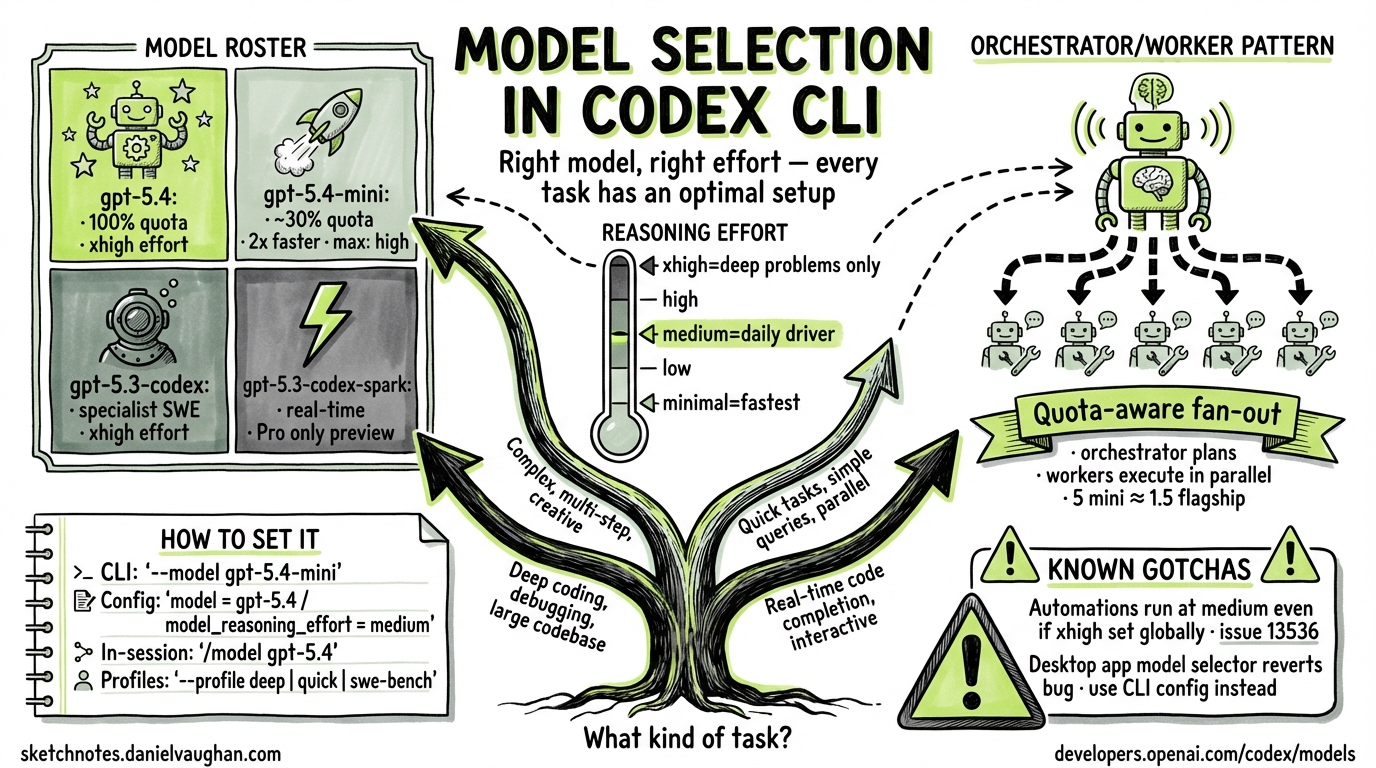
Model Selection in Codex CLI: Current Models and When to Use Each
Research date: 2026-03-26
Overview
Codex CLI exposes model selection as a first-class concern. You can specify a model on the command line for a single invocation, set a persistent default in config.toml, define named profiles for different workflows, and configure subagents to use different (usually cheaper) models than the orchestrating session. This article documents the current model roster, how each is configured, and how to match models and reasoning effort levels to task types.
The Model Roster (March 2026)
Four models are currently available in Codex CLI. They are documented at developers.openai.com/codex/models.
| Model ID | Role | Max effort | Quota cost |
|---|---|---|---|
gpt-5.4 |
Flagship: coding + reasoning + agentic workflows | xhigh |
100% (baseline) |
gpt-5.4-mini |
Fast, efficient: subagents and lighter tasks | high |
~30% of gpt-5.4 |
gpt-5.3-codex |
Specialist: deep software engineering only | xhigh |
— |
gpt-5.3-codex-spark |
Real-time iteration (research preview, Pro only) | — | — |
Default model: If you do not specify a model in config or on the command line, Codex defaults to a recommended model — currently gpt-5.4.
Quota note: gpt-5.4-mini uses approximately 30% as much of your included limits as gpt-5.4. Equivalent work lasts roughly 3.3× longer before you exhaust subscription quotas. Source: developers.openai.com/codex/models.
How to Set the Model
CLI Flag: --model / -m
Pass the model ID as a flag to override whatever is set in your configuration for one invocation:
codex --model gpt-5.4-mini "search this codebase for all usages of the deprecated API"
codex -m gpt-5.3-codex "refactor the authentication module to use OAuth2"
The flag is documented in the CLI reference as:
--model, -m <string>— Override the model set in configuration (for examplegpt-5-codex)
Config Override: --config / -c
The --config flag accepts arbitrary key=value pairs that override config.toml settings for one session:
codex -c model_reasoning_effort="high" "find and fix the memory leak in the worker pool"
This is equivalent to temporarily editing model_reasoning_effort in your config file without actually changing it.
In-Session: /model Slash Command
During an interactive Codex session, switch models without restarting:
/model gpt-5.4-mini
The /model and /reasoning slash commands were added in the March 18, 2026 changelog entry. Source: developers.openai.com/codex/changelog.
Persistent Default: config.toml
Set your model preference permanently in ~/.codex/config.toml:
model = "gpt-5.4"
model_reasoning_effort = "medium"
Codex resolves configuration in this priority order (highest first):
- CLI flags and
--configoverrides - Active profile values (
--profile <name>) - Project config (
.codex/config.tomlin the current or parent directory) - User config (
~/.codex/config.toml) - System config (
/etc/codex/config.tomlon Unix) - Built-in defaults
Source: developers.openai.com/codex/config-basic.
Model Reference
gpt-5.4 — The Recommended Default
gpt-5.4 is OpenAI’s flagship model for Codex. It combines the coding capability of gpt-5.3-codex with stronger general reasoning, native computer use, and broader agentic workflow support. It is the recommended starting point for any task you have not specifically profiled.
Supported effort levels: minimal, low, medium, high, xhigh
Default effort level: none (the model defaults to no extended reasoning unless you specify otherwise)
Key characteristics:
- Handles planning, coordination, and final judgment in multi-agent workflows
- Supports function calling, structured outputs, streaming, and prompt caching via the Responses API
- The only model that supports
xhighreasoning effort among the current lineup (apart fromgpt-5.3-codex) - Well-suited as the orchestrator in an orchestrator/worker subagent pattern
When to use gpt-5.4:
- Interactive development sessions (your daily driver)
- Tasks requiring both coding depth and reasoning (e.g., debugging with unknown root cause)
- Orchestrating subagent workflows where final judgment matters
- Any task that does not fit a more specialised model
gpt-5.4-mini — The Subagent Workhorse
gpt-5.4-mini was introduced in Codex v0.115.0 (released March 17, 2026). It is purpose-built for parallelisable, lower-complexity work where speed and quota efficiency are the priority. Source: developers.openai.com/codex/changelog.
Supported effort levels: minimal, low, medium, high
Maximum effort level: high — xhigh is not supported
Quota cost: ~30% of gpt-5.4
Speed: More than 2× faster than gpt-5.4 for comparable tasks
Key characteristics:
- Outperforms
gpt-5-miniacross coding, reasoning, image understanding, and tool use - Does not support
xhighreasoning effort - Accessible via the Codex app, CLI, IDE extension, web interface, and the API
Recommended use cases (from official documentation):
- Codebase exploration and search
- Large-file review
- Processing supporting documents
- Parallel subagent work where each subagent handles a narrow, bounded subtask
Economics insight: Five parallel gpt-5.4-mini subagents consume approximately the same quota as 1.5 gpt-5.4 queries. This makes wide fan-out agentic patterns practical at normal subscription tiers.
When to use gpt-5.4-mini:
- As a subagent worker under a
gpt-5.4orchestrator - Exploratory sessions where you want fast iteration without burning quota
- Any task where the subtask is bounded and does not require deep architectural reasoning
gpt-5.3-codex — The Software Engineering Specialist
gpt-5.3-codex is OpenAI’s specialist coding model. It was the industry-leading coding model before gpt-5.4 incorporated its capabilities, and remains available for workloads that specifically need maximum coding depth.
Supported effort levels: low, medium, high, xhigh
API: Responses API only (Chat Completions API support is deprecated for new Codex releases)
Key characteristics:
- Supports the full effort range including
xhigh - Supports function calling, structured outputs, streaming, and prompt caching
- Designed specifically for complex software engineering — not general-purpose tasks
When to use gpt-5.3-codex over gpt-5.4:
- Extended autonomous engineering runs (hours-long, SWE-bench–style tasks)
- Large-scale refactors spanning many files
- Tasks where coding depth is the single bottleneck and broader reasoning is not needed
Known issue: A reported desktop app bug (v0.112.0) causes the model selector to revert to gpt-5.3-codex within approximately one second of selecting any other model. The CLI is unaffected — it reads directly from config.toml. Source: github.com/openai/codex/issues/14008.
gpt-5.3-codex-spark — Research Preview
gpt-5.3-codex-spark is a text-only model optimised for near-instant, real-time coding iteration. It is currently restricted to ChatGPT Pro subscribers and is not generally available to all Codex CLI users as of March 2026.
Availability: Research preview, Pro only Optimised for: Speed — the lowest-latency coding iteration in the current lineup
When it reaches general availability, it will enable a qualitatively different interaction pattern for fast iteration loops. Track the changelog at developers.openai.com/codex/changelog for its GA announcement.
Reasoning Effort Levels
The model_reasoning_effort configuration key (and reasoning.effort in the API) controls how many tokens the model spends reasoning before generating a response. Lower effort reduces latency and cost; higher effort increases thoroughness at the cost of speed.
Valid Values
According to the configuration reference and reasoning guide:
minimal | low | medium | high | xhigh
There is also a model-specific none value (supported by some newer models, primarily relevant to plan_mode_reasoning_effort). Not all values are supported by every model — check the model-specific documentation.
Model support matrix:
| Effort level | gpt-5.4 |
gpt-5.4-mini |
gpt-5.3-codex |
|---|---|---|---|
minimal |
Yes | Yes | — |
low |
Yes | Yes | Yes |
medium |
Yes | Yes | Yes |
high |
Yes | Yes | Yes |
xhigh |
Yes | No | Yes |
What Each Level Does
The effort parameter controls how extensively the model reasons before responding. The official guidance (source: developers.openai.com/api/docs/guides/reasoning) characterises each level as follows:
minimal
The fastest setting, consuming the fewest reasoning tokens. Use for tasks where reasoning depth does not affect quality: extraction, routing, simple transforms, and lookups.
low
A small amount of additional thinking. Appropriate for simple tasks where modest reasoning can improve reliability without material latency increases.
medium (recommended default)
The general-purpose level. OpenAI recommends medium as the balanced setting for interactive coding work. Good for most routine development tasks.
high
More thorough reasoning. Suitable for complex bug investigation, architectural decisions, code review requiring synthesised judgment, or planning a multi-step refactor.
xhigh
Maximum reasoning depth. The model thinks extensively before responding. Noticeably slower and more expensive. The official recommendation is to use xhigh only when evaluation data shows a clear benefit that justifies the extra latency and cost. Not supported by gpt-5.4-mini.
Setting Reasoning Effort
In config.toml (persistent default):
model = "gpt-5.4"
model_reasoning_effort = "medium"
Per-session override via --config:
codex -c model_reasoning_effort="xhigh" "trace the root cause of this deadlock"
Plan-mode-specific override (does not affect regular sessions):
plan_mode_reasoning_effort = "high"
The plan_mode_reasoning_effort key overrides the effort level used specifically during Plan mode. When unset, Plan mode uses its built-in default (medium). Setting it to none means “no reasoning in plan mode”, not “inherit the global setting”.
The Automations Caveat
A known issue (github.com/openai/codex/issues/13536) reports that Codex automation runs (scheduled tasks) use medium reasoning effort even when the global model_reasoning_effort is set to xhigh. Automation definition files currently support schedule, prompt, and cwd fields but not a reasoning field. If you depend on higher effort for automated workflows, verify that your automation output meets quality expectations under medium effort or monitor this issue for a fix.
Persistent Configuration: config.toml
File Locations
| Scope | Path | Notes |
|---|---|---|
| User (global) | ~/.codex/config.toml |
Personal defaults, applies to all sessions |
| Project | .codex/config.toml |
Per-repo overrides, only loaded in trusted projects |
| System | /etc/codex/config.toml |
Unix only, lowest priority above built-in defaults |
Project config files are only loaded in trusted projects for security. Untrusted projects fall back to user, system, and built-in defaults.
Minimal Model Configuration
# ~/.codex/config.toml

# Primary model
model = "gpt-5.4"

# Reasoning effort: minimal | low | medium | high | xhigh
model_reasoning_effort = "medium"
Full Model Configuration Block
# ~/.codex/config.toml

# Core model selection
model = "gpt-5.4"
model_provider = "openai"                   # provider ID

# Reasoning
model_reasoning_effort = "medium"           # minimal | low | medium | high | xhigh
plan_mode_reasoning_effort = "high"         # plan-mode override
model_reasoning_summary = "concise"         # auto | concise | detailed | none

# Verbosity (GPT-5 Responses API)
model_verbosity = "medium"                  # low | medium | high

# Context limits
model_context_window = 200000               # token count for active model
model_auto_compact_token_limit = 160000     # auto-compact history above this threshold

# Subagent limits
[agents]
max_threads = 6                             # max concurrent subagent threads
max_depth = 1                               # max nested spawn depth (0 = root)
Named Profiles
Profiles let you define named configuration presets and switch between them with --profile <name>. They are documented in Advanced Configuration.
Note: Profiles are currently experimental and may change or be removed in future releases. They are not currently supported in the Codex IDE extension.
Example Profile Configuration
# ~/.codex/config.toml

# Active profile (optional — omit to use top-level settings as default)
profile = "daily"

[profiles.daily]
model = "gpt-5.4"
model_reasoning_effort = "medium"
approval_policy = "on-request"
sandbox_mode = "workspace-write"

[profiles.deep]
model = "gpt-5.4"
model_reasoning_effort = "xhigh"
approval_policy = "on-request"
sandbox_mode = "workspace-write"

[profiles.quick]
model = "gpt-5.4-mini"
model_reasoning_effort = "low"
approval_policy = "never"
sandbox_mode = "read-only"

[profiles.swe-bench]
model = "gpt-5.3-codex"
model_reasoning_effort = "high"
approval_policy = "never"
sandbox_mode = "danger-full-access"
Switch profiles on invocation:
codex --profile deep "find and fix all uses of deprecated APIs across the codebase"
codex --profile quick "what does this function return?"
codex --profile swe-bench "implement the RFC-defined behaviour for this edge case"
Subagent Model Configuration
Architecture: Orchestrator / Worker Pattern
The recommended pattern for multi-agent Codex workflows is:
- Orchestrator runs on
gpt-5.4— handles planning, coordination, and final judgment - Workers run on
gpt-5.4-mini— handle narrow, parallelisable subtasks
This matches the quota economics: five parallel gpt-5.4-mini workers use roughly the same quota as 1.5 gpt-5.4 queries, making wide fan-out practical.
Defining Custom Agents
Custom agents are defined as individual TOML files. Place them in:
~/.codex/agents/for personal agents (available in all sessions).codex/agents/for project-scoped agents (available in that project)
Each file defines one agent. A minimal example:
# ~/.codex/agents/file-reviewer.toml

name = "file-reviewer"
description = "Reviews individual files for code quality, deprecated patterns, and obvious bugs. Works best on files under 1000 lines."
developer_instructions = """
You are a focused code reviewer. When given a file path, read the file, identify issues, and return a structured report. Do not edit files. Do not spawn additional agents.
"""

# Override the model for this agent — inherit from parent session if omitted
model = "gpt-5.4-mini"
model_reasoning_effort = "low"
sandbox_mode = "read-only"
Fields that inherit from the parent session if omitted:
modelmodel_reasoning_effortsandbox_modemcp_serversskills.config
Source: developers.openai.com/codex/subagents.
Built-in Agents
Codex ships with three built-in agents:
| Agent | Purpose |
|---|---|
default |
General-purpose fallback |
worker |
Execution-focused, for implementation tasks |
explorer |
Read-heavy, for codebase analysis |
Custom agents with the same name as a built-in agent take precedence.
Global Subagent Settings
[agents]
max_threads = 6                     # max concurrent open agent threads (default: 6)
max_depth = 1                       # max nested spawn depth (default: 1)
job_max_runtime_seconds = 1800      # per-worker timeout for CSV batch jobs
max_depth caution: The default of 1 allows direct child agents to spawn but prevents deeper nesting. Increase this only if you specifically need recursive delegation — unbounded nesting depth can result in runaway token consumption.
Decision Guide
The following flowchart covers the most common model selection decisions.
flowchart TD
    A[New task] --> B{Is this a subagent\ndoing narrow parallel work?}
    B -- Yes --> C[gpt-5.4-mini\neffort: low or medium]
    B -- No --> D{Is this pure SWE work:\nlarge refactor, hours-long,\nor SWE-bench style?}
    D -- Yes --> E[gpt-5.3-codex\neffort: high]
    D -- No --> F{How hard is\nthe reasoning?}
    F -- Simple lookup,\nextraction, routing --> G[gpt-5.4\neffort: minimal or low]
    F -- Routine development,\ninteractive session --> H[gpt-5.4\neffort: medium]
    F -- Complex bug,\narchitectural decision --> I[gpt-5.4\neffort: high]
    F -- Hardest problems only,\neval shows clear benefit --> J[gpt-5.4\neffort: xhigh]
    K{Need real-time\niteration speed?} --> L{ChatGPT Pro\nsubscriber?}
    L -- Yes --> M[gpt-5.3-codex-spark\nresearch preview]
    L -- No --> N[gpt-5.4-mini with\neffort: low]
    A --> K
Decision Table: Effort Level by Task Type
| Task type | Recommended model | Recommended effort |
|---|---|---|
| Quick lookup, grep, extraction | gpt-5.4 |
minimal |
| File search, codebase exploration (subagent) | gpt-5.4-mini |
low |
| Routine feature implementation | gpt-5.4 |
medium |
| Code review of a PR | gpt-5.4 |
medium |
| Complex bug investigation | gpt-5.4 |
high |
| Architectural design or refactor planning | gpt-5.4 |
high |
| Large-scale multi-file refactor | gpt-5.3-codex |
high |
| Hours-long autonomous engineering run | gpt-5.3-codex |
high |
Hardest problem where evals show xhigh benefit |
gpt-5.4 or gpt-5.3-codex |
xhigh |
Real-World Recommendations
Interactive Daily Development
model = "gpt-5.4"
model_reasoning_effort = "medium"
This is the baseline for most developers. medium effort on gpt-5.4 provides the best balance of response quality and latency for routine coding work. Override to high when you hit a genuinely difficult problem.
Quota-Conscious Teams
If you are working within a shared subscription or want to extend your monthly quota, use gpt-5.4-mini for exploratory work:
# Explore the codebase, understand structure
codex --model gpt-5.4-mini "give me an overview of the authentication flow in this codebase"

# Switch to gpt-5.4 for the actual implementation decision
codex --model gpt-5.4 "now implement the session expiry feature we just mapped out"
Long-Running Automated Tasks
For automation runs (scheduled tasks), be aware of the known issue where model_reasoning_effort = "xhigh" in the global config does not propagate to automation sessions (they run at medium). Either design your automation prompts to work well at medium effort, or track github.com/openai/codex/issues/13536 for when per-automation reasoning config is available.
For autonomous software engineering tasks that run for extended periods, prefer gpt-5.3-codex with high effort in a dedicated profile:
codex --profile swe-bench "implement all failing tests in the test suite"
Multi-File Refactors
For large refactors, the orchestrator/worker pattern reduces quota consumption and speeds up the work:
- Orchestrator (
gpt-5.4,mediumeffort): Plans the refactor, identifies files, coordinates workers - Workers (
gpt-5.4-mini,loweffort): Each processes one file or one module independently - Orchestrator again: Reviews, resolves conflicts, handles edge cases
Define the worker agent once and reuse it:
# .codex/agents/refactor-worker.toml
name = "refactor-worker"
description = "Applies a single, well-defined refactor to one file. Takes exact instructions. Does not make judgment calls."
developer_instructions = "Apply the specified transformation to the specified file. Make only the changes described. Return a summary of what was changed."
model = "gpt-5.4-mini"
model_reasoning_effort = "low"
sandbox_mode = "workspace-write"
Per-Project Configuration
For projects with different requirements, use project-scoped config:
# /path/to/project/.codex/config.toml
# Security-sensitive project: require approval for all commands
model = "gpt-5.4"
model_reasoning_effort = "high"
approval_policy = "untrusted"
sandbox_mode = "read-only"
# /path/to/prototype/.codex/config.toml
# Prototype project: move fast
model = "gpt-5.4-mini"
model_reasoning_effort = "low"
approval_policy = "never"
sandbox_mode = "workspace-write"
Summary Reference
CLI Flags
| Flag | Short | Purpose |
|---|---|---|
--model <id> |
-m |
Override model for this invocation |
--config key=value |
-c |
Override any config key for this invocation |
--profile <name> |
-p |
Activate a named profile |
Config Keys (model-related)
| Key | Type | Valid values | Default |
|---|---|---|---|
model |
string | Any valid model ID | gpt-5.4 |
model_provider |
string | Provider ID | openai |
model_reasoning_effort |
string | minimal \| low \| medium \| high \| xhigh |
medium |
plan_mode_reasoning_effort |
string | none \| minimal \| low \| medium \| high \| xhigh |
unset (uses Plan preset) |
model_reasoning_summary |
string | auto \| concise \| detailed \| none |
auto |
model_verbosity |
string | low \| medium \| high |
medium |
Model Quick Reference
| Model ID | Quota | Max effort | Best for |
|---|---|---|---|
gpt-5.4 |
100% | xhigh |
Daily driver, orchestration, complex tasks |
gpt-5.4-mini |
~30% | high |
Subagents, exploration, quota-sensitive work |
gpt-5.3-codex |
— | xhigh |
SWE-heavy tasks, long autonomous runs |
gpt-5.3-codex-spark |
— | — | Real-time iteration (Pro, research preview) |
Citations
- Models — Codex Developer Docs
- Configuration Reference — Codex Developer Docs
- Config Basics — Codex Developer Docs
- Advanced Configuration — Codex Developer Docs
- Sample Configuration — Codex Developer Docs
- CLI Reference: Command Line Options — Codex Developer Docs
- Features — Codex CLI Developer Docs
- Subagents — Codex Developer Docs
- Reasoning Models Guide — OpenAI API Docs
- Changelog — Codex Developer Docs
- Issue #13536: Automations run at medium reasoning even when global effort is xhigh
- Issue #14008: Model selection reverts to gpt-5.3-codex in desktop app