Codex CLI Subagents: TOML Format, Parallelism and spawn_agents_on_csv
Codex CLI Subagents: TOML Format, Parallelism and spawn_agents_on_csv
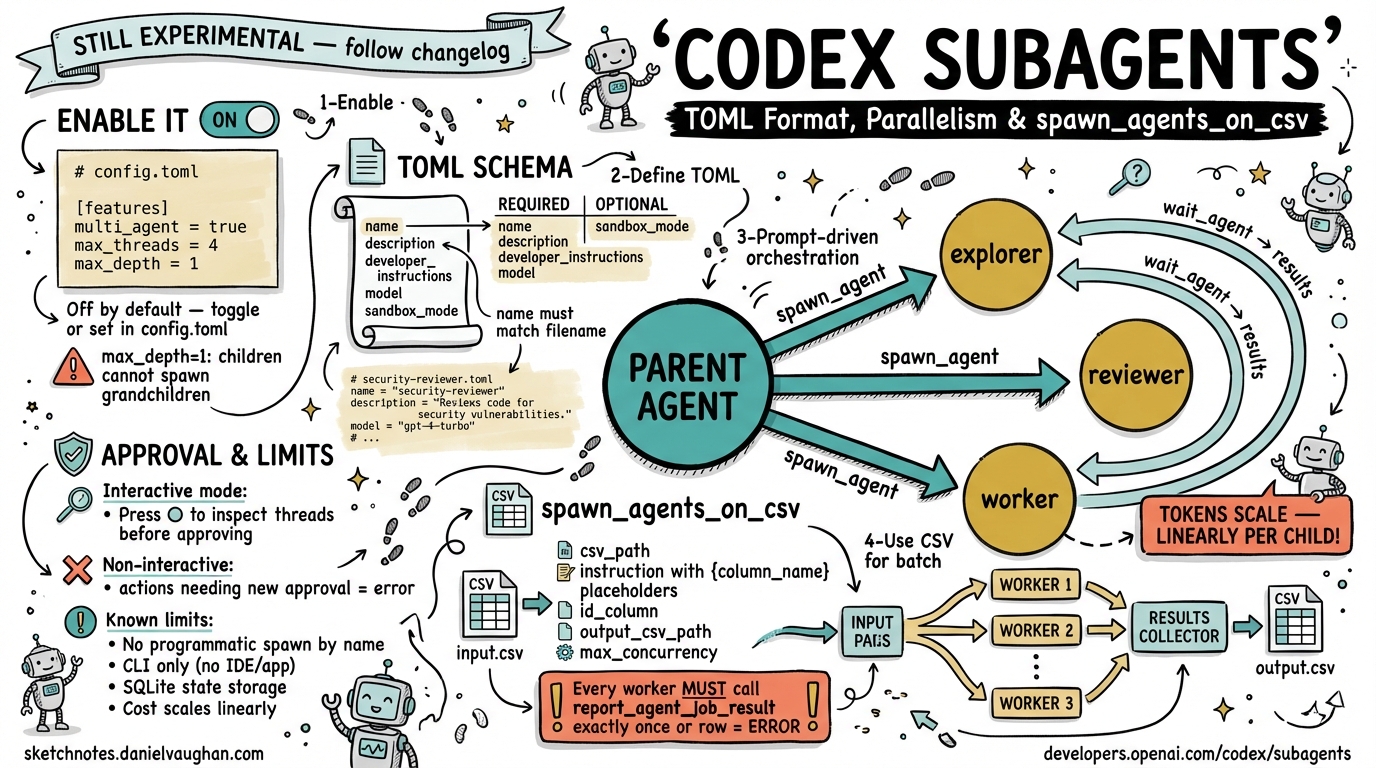
Codex CLI’s multi-agent system lets a single session delegate specialised work to parallel child agents. This article covers the TOML agent definition schema, the global concurrency knobs in
config.toml, thespawn_agents_on_csvbatch tool, and the practical constraints you need to understand before reaching for subagents in production.
Why Subagents?
Large software tasks — exhaustive code review, batch refactoring across dozens of files, parallel exploration of competing implementation paths — hit a natural ceiling in single-agent mode. Context windows fill up, sequentialised tool calls stack latency, and a single reasoning chain struggles to hold diverse concerns simultaneously.
Codex CLI addresses this with a first-class multi-agent system that lets a parent session spawn child agents, route work to them, wait for results, and synthesise a consolidated response.1 The model drives the orchestration; the CLI runtime handles thread scheduling, approval forwarding, and result collection.
Important caveat: subagents are still marked experimental and consume tokens across every spawned thread. Each child performs its own model inference and tool invocations — there is no free parallelism here.2 Reach for them when the latency or context benefits outweigh the cost, not as a default.
Enabling Multi-Agent Mode
Multi-agent support is off by default. Enable it either interactively — run /experimental inside a session and toggle Enable Multi-agents — or permanently via config.toml:3
# ~/.codex/config.toml

[features]
multi_agent = true

[agents]
max_threads = 4        # concurrent open agent threads (default: 6)
max_depth   = 1        # nesting depth; 0 = root session only (default: 1)
job_max_runtime_seconds = 900  # per-worker timeout for CSV batch jobs (default: 1800)
max_depth = 1 — the default — allows the root session to spawn direct children but prevents those children from spawning grandchildren. This is almost always the right setting for deterministic, auditable workflows. Increase it cautiously: deeper trees multiply token consumption and make approval chains harder to reason about.
Architecture of a Multi-Agent Session
flowchart TD
    U([User Prompt]) --> P[Parent Agent\nroot session]
    P -->|spawn_agent| A1[Child: explorer]
    P -->|spawn_agent| A2[Child: reviewer]
    P -->|spawn_agent| A3[Child: worker]
    A1 -->|results| P
    A2 -->|results| P
    A3 -->|results| P
    P --> R([Consolidated Response])

    style P fill:#1a1a2e,color:#fff,stroke:#4a4a8a
    style A1 fill:#16213e,color:#fff,stroke:#4a4a8a
    style A2 fill:#16213e,color:#fff,stroke:#4a4a8a
    style A3 fill:#16213e,color:#fff,stroke:#4a4a8a
The parent issues spawn_agent, send_input, resume_agent, wait, and close_agent events over the live event stream. These are model-mediated behaviours — they appear as tool calls in the parent’s reasoning trace, not as a programmable host-side API.4 You direct them through prompting, not code.
Defining Custom Agents: TOML Schema
Codex ships three built-in agent types — default, worker, and explorer.5 You can define custom agents as TOML files in ~/.codex/agents/ (global) or .codex/agents/ (project-scoped):
# .codex/agents/security-reviewer.toml

name        = "security-reviewer"
description = "Audits code for injection, auth, and dependency vulnerabilities. Use when reviewing PRs or new API endpoints."
developer_instructions = """
You are a security-focused code reviewer.
Focus exclusively on: SQL/NoSQL injection, authentication bypasses,
insecure deserialisation, supply-chain risks in new dependencies,
and OWASP Top 10 patterns.
Do NOT implement fixes — only report findings with file paths and line numbers.
Call report_agent_job_result with a JSON object containing:
  { "findings": [...], "severity_summary": {...} }
"""

# Optional overrides — inherits from parent session if omitted
model                  = "o4-mini"
model_reasoning_effort = "high"
sandbox_mode           = "workspace-write"
Required Fields
| Field | Purpose |
|---|---|
name |
Identifier used by the parent when invoking the agent. The filename conventionally matches this value, but name is the authoritative key.6 |
description |
Helps the parent model decide when to invoke this agent. Write it as a capability statement. |
developer_instructions |
Core system-level instructions. Equivalent to the developer role in the Responses API. |
Optional Fields
| Field | Notes |
|---|---|
model |
Override model. Useful for assigning a cheaper/faster model to read-heavy explorers. |
model_reasoning_effort |
"low", "medium", or "high" |
sandbox_mode |
Inherits from parent if omitted. |
mcp_servers |
Attach MCP tools specific to this agent. |
skills.config |
Inject a skills configuration. |
nickname_candidates |
Pool of display names shown in the CLI’s thread list. |
Custom agents override built-ins if their name field matches a built-in name.
Invoking Subagents Through Prompting
There is no host-side spawn_agent() function you call programmatically.4 The parent model decides to spawn based on your prompt. Effective patterns:
Review this branch for production readiness. Spawn three specialist agents:
  1. security-reviewer — audit for vulnerabilities
  2. test-auditor — identify missing test coverage
  3. perf-profiler — flag N+1 queries and slow paths

Wait for all three. Produce a single report grouped by category with file
references. Do not spawn additional agents beyond these three.
The explicit enumeration and the “do not spawn additional agents” constraint are load-bearing: without bounding the depth and breadth, the model may choose to spawn further sub-children, increasing cost unpredictably.
Batch Processing with spawn_agents_on_csv
For tasks that decompose cleanly into rows — reviewing every microservice, migrating every component, auditing every endpoint — spawn_agents_on_csv fan-out is more efficient than manually enumerating work items in a prompt.7
How It Works
flowchart LR
    CSV[Input CSV\none row per item] --> S[spawn_agents_on_csv]
    S -->|one worker per row| W1[Worker Agent\nrow 1]
    S -->|one worker per row| W2[Worker Agent\nrow 2]
    S -->|one worker per row| Wn[Worker Agent\nrow N]
    W1 -->|report_agent_job_result| R[Result Collector]
    W2 -->|report_agent_job_result| R
    Wn -->|report_agent_job_result| R
    R --> OUT[Output CSV\noriginal + result_json]
Invocation Parameters
| Parameter | Required | Notes |
|---|---|---|
csv_path |
Yes | Source CSV. |
instruction |
Yes | Template with {column_name} placeholders resolved per row. |
id_column |
No | Stable item identifier for output correlation. |
output_schema |
No | Expected JSON structure per worker result. |
output_csv_path |
Yes | Destination for merged results. |
max_concurrency |
No | Per-call concurrency cap; cannot exceed agents.max_threads. |
max_runtime_seconds |
No | Per-call timeout. Falls back to agents.job_max_runtime_seconds (default 1800s).8 |
Example: Component Risk Review
# components.csv
path,owner,last_modified
src/auth/token.ts,platform-team,2026-01-15
src/payments/checkout.ts,payments-team,2026-02-03
src/api/graphql.ts,api-team,2026-03-01
Prompt Codex:
Use spawn_agents_on_csv with:
  csv_path: components.csv
  id_column: path
  output_csv_path: review-results.csv
  instruction: |
    Review {path} owned by {owner} (last modified {last_modified}).
    Identify security risks and maintainability concerns.
    Call report_agent_job_result exactly once with JSON:
    { "path": "{path}", "risk": "low|medium|high", "summary": "...", "follow_up": [...] }
The output CSV will contain the original columns plus job_id, item_id, status, last_error, and result_json.9
Critical Rule: report_agent_job_result
Every CSV worker must call report_agent_job_result exactly once before exiting. A worker that completes without this call is marked as an error in the output — its row receives status: error and last_error is populated.7 Include this requirement explicitly in your instruction template.
Approval Forwarding in Interactive Mode
In the interactive CLI, approval requests from child agents surface in the parent’s terminal with a thread label so you can see which agent is asking. Press o to inspect the active threads before approving. Approval modes set via /approvals or --yolo propagate to all child agents unless a custom agent TOML specifies different defaults.1
In non-interactive mode (codex exec), any action requiring new approval causes an error that surfaces back to the parent. Design non-interactive subagent workflows so workers operate within their inherited sandbox without requiring fresh approvals.
Known Limitations
No programmatic spawning by agent name. The spawn_agent interface accepts agent_type plus model/prompt overrides, but there is currently no parameter to say “spawn the agent defined in .codex/agents/security-reviewer.toml”.4 The workaround is to read the TOML’s developer_instructions and inject them as prompt overrides when spawning a generic worker — functional but verbose.
IDE and app integration is absent. Multi-agent activity is currently CLI-only; the Codex web app and IDE plugins do not surface child thread activity.3
SQLite-backed state. Agent job state and CSV results are persisted to a SQLite database. The sqlite_home config key controls its location.8 Be aware of this if running Codex CLI in ephemeral CI environments.
Cost scales linearly. Each spawned child consumes model tokens independently. A fan-out to eight workers at o4-mini is meaningfully cheaper than the same fan-out at o3, but the cost is not negligible at scale. Profile before committing to large CSV batch jobs.
Summary
Codex CLI’s subagent system is genuinely useful for parallelisable workloads, but it requires deliberate configuration. Key takeaways:
- Define custom agents as TOML files in
.codex/agents/;name,description, anddeveloper_instructionsare required. - Set
max_threadsandmax_depthinconfig.tomlto bound concurrency and prevent runaway nesting. - Use
spawn_agents_on_csvfor structured batch work; always mandatereport_agent_job_resultin your instruction template. - Orchestration is prompt-driven, not code-driven — invest in precise, bounded prompts.
- The feature is still experimental; follow the official changelog for breaking changes.
Citations
-
OpenAI. Subagents – Codex. OpenAI Developers. https://developers.openai.com/codex/subagents ↩ ↩2
-
OpenAI. Features – Codex CLI. OpenAI Developers. https://developers.openai.com/codex/cli/features ↩
-
FlowDevs. Boost Your Workflow with Codex CLI Multi-Agent Capabilities. 2026. https://www.flowdevs.io/blog/post/boost-your-workflow-with-codex-cli-multi-agent-capabilities ↩ ↩2
-
GitHub. Subagent configuration and orchestration · Issue #11701 · openai/codex. https://github.com/openai/codex/issues/11701 ↩ ↩2 ↩3
-
Simon Willison. Use subagents and custom agents in Codex. 16 March 2026. https://simonwillison.net/2026/Mar/16/codex-subagents/ ↩
-
GitHub. Custom subagents in .codex/agents are not accessible from tool-backed Codex sessions as docs imply · Issue #15250 · openai/codex. https://github.com/openai/codex/issues/15250 ↩
-
OpenAI. Subagents – Codex (spawn_agents_on_csv section). https://developers.openai.com/codex/subagents ↩ ↩2
-
OpenAI. Subagents – Codex (job_max_runtime_seconds and sqlite_home). https://developers.openai.com/codex/subagents ↩ ↩2
-
FlowDevs. Boost Your Workflow with Codex CLI Multi-Agent Capabilities (CSV output format). https://www.flowdevs.io/blog/post/boost-your-workflow-with-codex-cli-multi-agent-capabilities ↩