Migrating a Workflow from Claude Code to Codex CLI
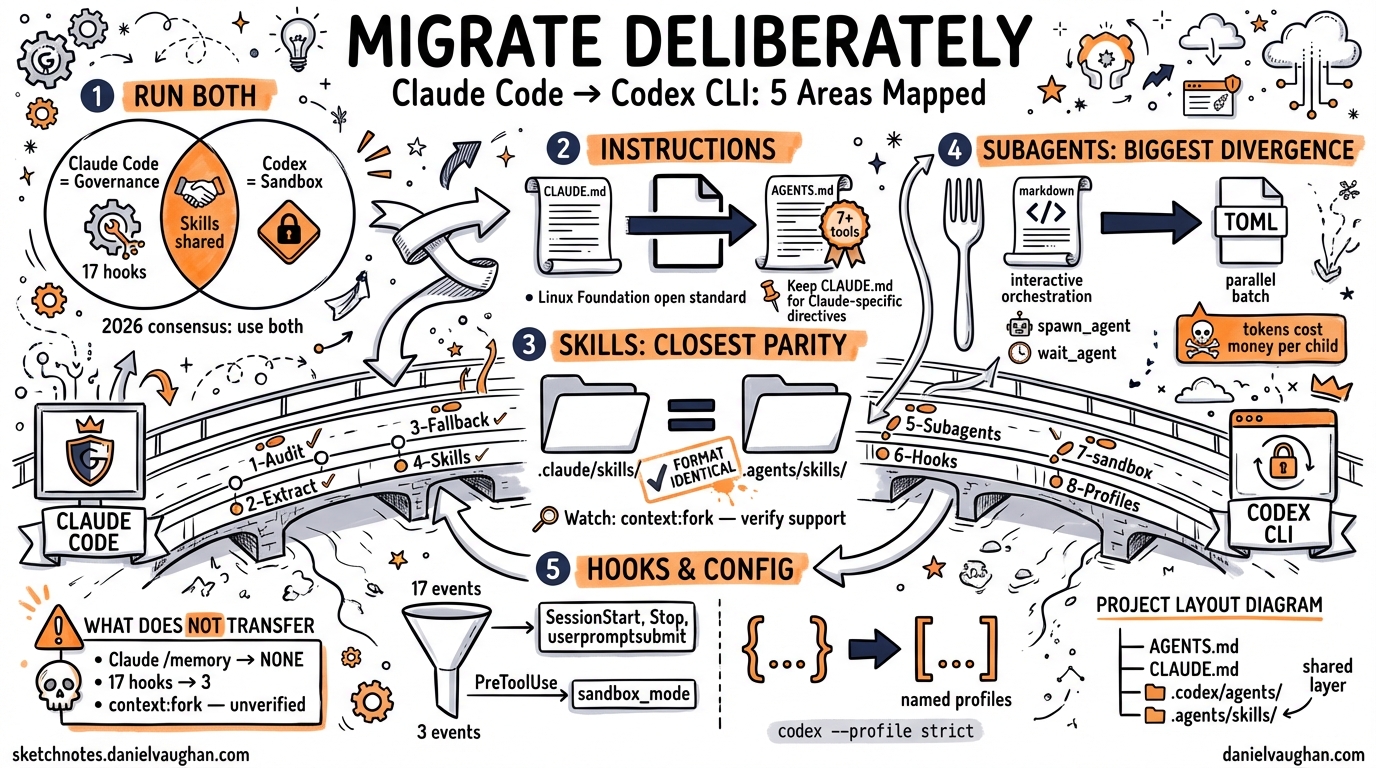
Migrating a Workflow from Claude Code to Codex CLI
Full replacement is rarely the right call. This guide covers what maps cleanly between Claude Code and Codex CLI, what requires re-engineering, and what simply has no equivalent — so you can migrate deliberately rather than in a rush.
Why Teams Migrate (and Why Most Shouldn’t Fully)
Claude Code and Codex CLI are not substitutes for each other — they have distinct architectural philosophies. Claude Code applies governance at the application layer via its 17 lifecycle hook events, layered CLAUDE.md hierarchies, and tightly integrated subagent system1. Codex CLI enforces restrictions at the kernel level (macOS Seatbelt, Linux Landlock + seccomp), operates entirely via named profiles, and is open-source under Apache 2.02.
The prevailing 2026 consensus: run both. Use Codex for sandboxed code review, batch cloud tasks, and untrusted repositories. Use Claude Code for programmable governance, multi-file refactoring, and security-sensitive workflows3. What follows assumes you need Codex CLI to handle work currently done by Claude Code, while preserving as much investment as possible.
The Migration Map
flowchart LR
    subgraph CC["Claude Code"]
        CM["CLAUDE.md"]
        CS["/.claude/skills/"]
        CH["Hooks (PreToolUse, Stop…)"]
        CSA["Subagents (.md definitions)"]
        CCONF["~/.claude/settings.json"]
    end

    subgraph CX["Codex CLI"]
        AM["AGENTS.md"]
        SK["/.agents/skills/"]
        HK["Hooks (SessionStart, Stop, userpromptsubmit)"]
        SA["/.codex/agents/*.toml"]
        XCONF["~/.codex/config.toml"]
    end

    CM -- "direct rename + fallback config" --> AM
    CS -- "SKILL.md compatible" --> SK
    CH -- "partial overlap, protocol differs" --> HK
    CSA -- "re-author in TOML" --> SA
    CCONF -- "convert JSON → TOML" --> XCONF
Step 1: CLAUDE.md → AGENTS.md
AGENTS.md is an open standard now stewarded by the Linux Foundation’s Agentic AI Foundation and read natively by Codex CLI, Cursor, Copilot, Windsurf, Amp, and Gemini CLI4. CLAUDE.md is Claude Code-specific.
The recommended migration strategy is not to delete CLAUDE.md but to restructure:
- Move universal conventions — code style, build commands, test runner invocations, architecture notes — into
AGENTS.md. - Keep
CLAUDE.mdfor Claude-specific directives (hook references, subagent definitions, memory configuration). - In
CLAUDE.md, add a reference so Claude Code reads the shared file:See @AGENTS.md for build commands, architecture, and conventions.
For repos where you cannot maintain two files, configure Codex to treat CLAUDE.md as a fallback:
# ~/.codex/config.toml
project_doc_fallback_filenames = ["CLAUDE.md", "COPILOT.md"]
project_doc_max_bytes = 65536
Codex checks directories in this order: AGENTS.override.md → AGENTS.md → any names in project_doc_fallback_filenames5. The 32 KiB default byte limit applies across the entire concatenated chain — raise it to 65536 for large monorepos.
Discovery Hierarchy Side-by-Side
| Scope | Claude Code | Codex CLI |
|---|---|---|
| Global | ~/.claude/CLAUDE.md |
~/.codex/AGENTS.md |
| Project root | CLAUDE.md |
AGENTS.md (or fallback) |
| Subdirectory | CLAUDE.md (narrowest wins) |
AGENTS.md (narrowest wins) |
| Local override | CLAUDE.local.md |
AGENTS.override.md |
| Config format | JSON (~/.claude/settings.json) |
TOML (~/.codex/config.toml) |
Step 2: Skills
Skills are the area of closest parity. The SKILL.md format follows the Agent Skills open standard — the same files work across Claude Code, Codex CLI, Cursor, and Gemini CLI6.
Claude Code stores skills under .claude/skills/<name>/SKILL.md. Codex CLI loads skills from .agents/skills/. The directory name differs; the file format does not.
A skill that deploys to staging looks identical in both tools:
---
name: deploy-staging
description: Run the staging deployment pipeline
allowed-tools:
  - Bash
disable-model-invocation: true
---

Run `./scripts/deploy.sh --env staging` and tail the log until deployment completes or fails.
Report the final status and any error lines.
What to watch for:
- The
context: forkfrontmatter key (runs the skill in an isolated subagent) is a Claude Code extension — ⚠️ verify current Codex CLI support before relying on it. user-invocable: false(autonomous-only invocation) is similarly Claude Code-specific7.- Skills that use
$ARGUMENTSinterpolation work in both tools. - Skills invoking other skills via Claude Code’s subagent system need re-authoring for Codex (see Step 3).
Migration action: Copy .claude/skills/ to .agents/skills/. Skills using only name, description, allowed-tools, and disable-model-invocation will work without changes. Audit frontmatter keys individually for any others.
Step 3: Subagents
This is the biggest architectural divergence.
Claude Code subagents are defined as Markdown files and support interactive orchestration: the parent agent sees the reasoning, can intervene, and synthesises results in real time8. Codex CLI subagents are defined in TOML and are better suited to parallel batch workloads where you fire tasks and collect results.
Claude Code subagent (Markdown)
---
name: code-reviewer
description: Reviews pull request diffs for security issues
model: claude-opus-4-5
allowed-tools: [Read, Bash]
---

Review the diff at $ARGUMENTS. Flag any use of eval(), unsanitised user input,
hardcoded credentials, or missing authentication checks.
Equivalent Codex CLI subagent (TOML)
# .codex/agents/code-reviewer.toml
nickname_candidates = ["code-reviewer"]
model = "gpt-5-codex"
model_reasoning_effort = "high"
sandbox_mode = "workspace-write"

[instructions]
text = """
Review the diff provided. Flag any use of eval(), unsanitised user input,
hardcoded credentials, or missing authentication checks.
"""
Key differences:
- Codex subagents are spawned via
spawn_agent/wait_agenttools in a TOML workflow, not via natural language9. agents.max_depthdefaults to1— a subagent cannot spawn further subagents without explicit config9.- Enable experimental multi-agent workflows with
features.multi_agent = truein.codex/config.toml. - Codex subagents consume more tokens per run than equivalent single-agent runs; factor this into cost comparisons10.
sequenceDiagram
    participant P as Parent Agent
    participant A1 as Subagent: reviewer
    participant A2 as Subagent: tester
    P->>A1: spawn_agent(task="review PR #42")
    P->>A2: spawn_agent(task="run test suite")
    A1-->>P: wait_agent → review result
    A2-->>P: wait_agent → test results
    P->>P: synthesise and respond
Step 4: Hooks
Claude Code provides 17 lifecycle hook event types (e.g. PreToolUse, PostToolUse, Stop, UserPromptSubmit) via a JSON protocol over stdin/stdout11. You write a bash or Python script; Claude Code calls it at the appropriate event.
Codex CLI hooks cover a narrower surface: SessionStart, Stop, and userpromptsubmit12. The configuration format is similar — a command string in config.toml:
# ~/.codex/config.toml
[hooks]
session_start = "~/.codex/hooks/on-session-start.sh"
stop = "~/.codex/hooks/on-stop.sh"
userpromptsubmit = "~/.codex/hooks/on-prompt.sh"
What doesn’t transfer:
PreToolUse/PostToolUsehooks — Codex enforces restrictions at the kernel/sandbox level, not via application-layer hooks. Move any pre-execution validation logic intoAGENTS.mdinstructions or sandbox policy instead.SubagentStop— no equivalent in Codex.- Hooks that validate commands before execution rely on Claude Code’s application-layer interception model. In Codex, equivalent safety is enforced by
sandbox_mode, not by hooks.
If your Claude Code hooks perform side-effects (logging, Slack notifications, audit trails), port the Stop and SessionStart equivalents directly. Validation hooks need to be reimagined as sandbox configuration.
Step 5: Configuration (JSON → TOML)
Claude Code organises configuration as a five-layer cascade: managed settings → command line → local project → shared project → user defaults1. The active layer is implicit — it depends on which directory you’re in and which flags you passed.
Codex CLI uses explicitly named profiles. You always know which configuration is active because you selected it:
# ~/.codex/config.toml

model = "gpt-5-codex"
model_reasoning_effort = "medium"
approval_policy = "unless-allow-listed"

[profiles.strict]
model_reasoning_effort = "high"
approval_policy = "on-failure"
sandbox_mode = "workspace-write"

[profiles.fast]
model = "gpt-5-codex"
model_reasoning_effort = "low"
approval_policy = "never"
sandbox_mode = "read-only"
Switch profiles at the CLI: codex --profile strict "review the auth module".
Model naming: Claude Code models use Anthropic names (claude-opus-4-5, claude-sonnet-4-5). Codex CLI uses OpenAI model names. Current defaults as of March 2026: gpt-5-codex for most tasks, gpt-5-codex-mini for fast/cheap runs13. ⚠️ Verify current model names against the OpenAI changelog before hardcoding them in CI pipelines.
What Doesn’t Transfer
Some Claude Code capabilities have no direct Codex equivalent:
| Claude Code feature | Codex CLI equivalent | Notes |
|---|---|---|
| 17 lifecycle hook events | 3 hooks only | Move validation to sandbox config |
CLAUDE.local.md (gitignored) |
AGENTS.override.md |
Same concept, different filename |
| Layered settings JSON (5 layers) | Named profiles | Explicit rather than implicit |
Claude memory (/memory) |
None | No built-in memory system |
context: fork in skills |
⚠️ Verify support | May not be supported |
Custom /slash-commands in UI |
Skills via .agents/skills/ |
Works via /name invocation |
| MCP elicitation (v0.117.0+) | Full MCP support | Both tools support MCP; protocol compatible |
Recommended Project Layout Post-Migration
your-project/
├── AGENTS.md                    ← Universal instructions (Codex, Cursor, Copilot, etc.)
├── CLAUDE.md                    ← Claude-specific additions (reference @AGENTS.md)
├── .codex/
│   ├── config.toml              ← Codex profiles and settings
│   └── agents/
│       ├── reviewer.toml        ← Subagent definitions
│       └── tester.toml
└── .agents/
    └── skills/
        ├── deploy/SKILL.md      ← Shared with Claude Code
        └── review/SKILL.md
The .agents/skills/ directory is the critical shared layer — skills authored to the Agent Skills open standard require no duplication between tools6.
Migration Checklist
flowchart TD
    A[Audit CLAUDE.md] --> B[Extract universal content to AGENTS.md]
    B --> C[Add project_doc_fallback_filenames if keeping CLAUDE.md]
    C --> D[Copy skills to .agents/skills/, audit frontmatter]
    D --> E[Re-author subagents as .codex/agents/*.toml]
    E --> F[Port Stop and SessionStart hooks]
    F --> G[Map PreToolUse hooks to sandbox_mode policy]
    G --> H[Convert settings.json to config.toml profiles]
    H --> I[Test with codex --profile strict in sandbox]
Citations
-
Codex CLI vs Claude Code in 2026: Architecture Deep Dive — Blake Crosley, 2026 ↩ ↩2
-
Codex CLI Features — OpenAI Developer Documentation ↩
-
Claude Code CLI Migration Guide — Jangwook, 2026 ↩
-
CLAUDE.md, AGENTS.md, and Every AI Config File Explained — DeployHQ Blog, 2026 ↩
-
Custom instructions with AGENTS.md – Codex — OpenAI Developer Documentation ↩
-
Extend Claude with skills – Claude Code Docs — Anthropic, 2026 ↩ ↩2
-
Essential Claude Code Skills and Commands — Bozhidar Batsov, March 2026 ↩
-
Create custom subagents – Claude Code Docs — Anthropic, 2026 ↩
-
Subagents – Codex — OpenAI Developer Documentation ↩ ↩2
-
Codex CLI Cheatsheet: config, commands, AGENTS.md, + best practices — Shipyard, 2026 ↩
-
Codex CLI Hooks Deep Dive — Daniel Vaughan’s Codex KB, 2026-03-26 ↩
-
Configuration Reference – Codex — OpenAI Developer Documentation ↩
-
Introducing upgrades to Codex — OpenAI Blog, 2026 ↩