Writing Effective SKILL.md Files for Codex CLI
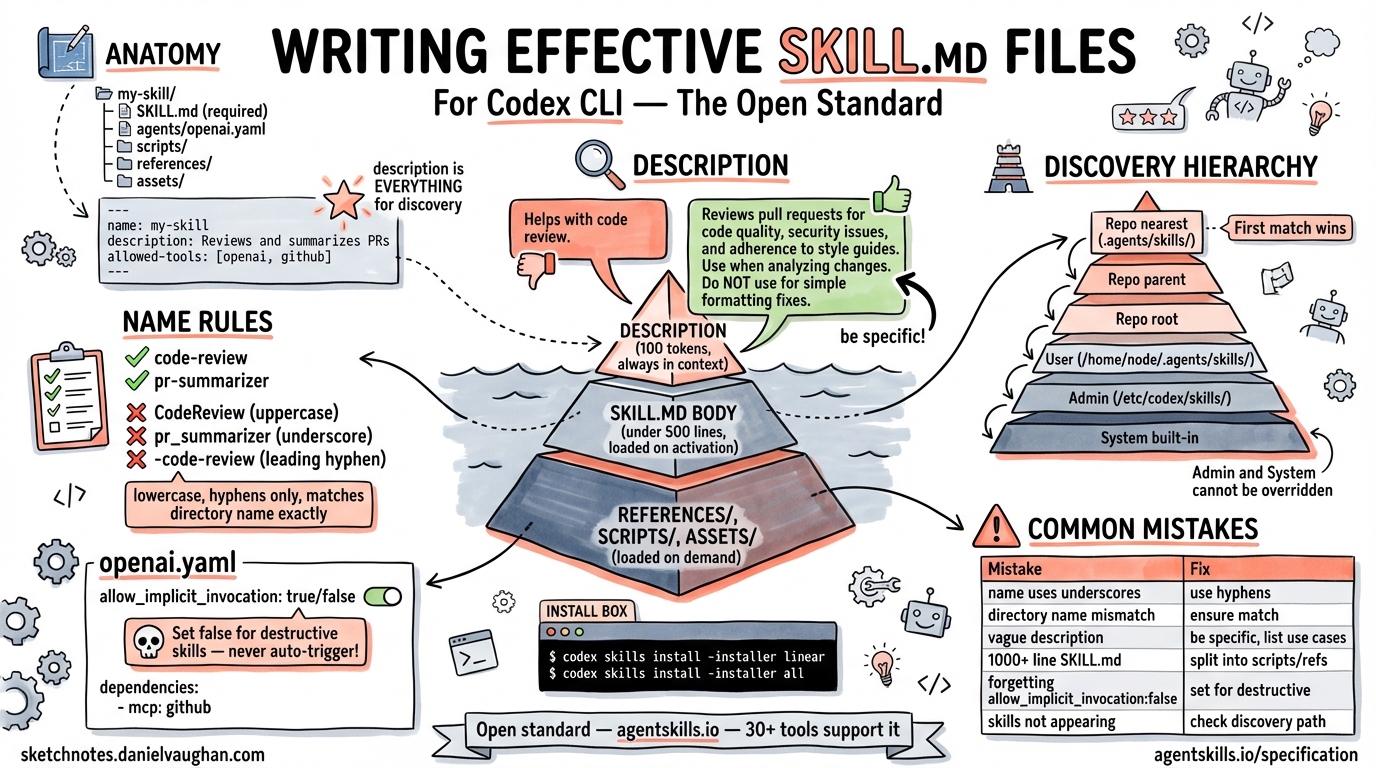
Writing Effective SKILL.md Files for Codex CLI
| *Published: 2026-03-26 | Source: agentskills.io/specification + developers.openai.com/codex/skills* |
What is a Skill?
A skill is a directory of instructions, scripts, and resources that an agent can discover and load on demand. Skills solve a core problem: agents are increasingly capable but lack the procedural knowledge and domain-specific context needed to do real work reliably.
The SKILL.md format originates from Anthropic but is now an open standard maintained at agentskills.io. Codex CLI, Claude Code, Gemini CLI, Cursor, VS Code Copilot, GitHub Copilot, and 30+ other tools all support it.
Directory Structure
my-skill/
├── SKILL.md              ← Required: metadata + instructions
├── agents/
│   └── openai.yaml       ← Codex-specific: invocation policy, MCP deps
├── scripts/              ← Optional: executable code
├── references/           ← Optional: reference docs (loaded on demand)
└── assets/               ← Optional: templates, data files
The SKILL.md file is loaded when the skill is activated. Everything else is loaded on demand.
The SKILL.md Format
---
name: skill-name
description: |
  Exactly when this skill should and should not trigger. Use specific
  keywords that help agents identify relevant tasks.
license: Apache-2.0                         # optional
compatibility: Requires Python 3.14+ and uv  # optional
allowed-tools: Bash(git:*) Read             # optional, experimental
metadata:
  author: example-org
  version: "1.0"
---

## Instructions

Step-by-step instructions for the agent follow here.
Frontmatter Field Reference
| Field | Required | Notes |
|---|---|---|
name |
✅ Yes | 1–64 chars. Lowercase letters, numbers, hyphens only. Must match the parent directory name. |
description |
✅ Yes | 1–1024 chars. Describe both what the skill does AND when to invoke it. This is the only part loaded at startup. |
license |
No | License name or reference to a bundled file. |
compatibility |
No | Up to 500 chars. Use only when the skill has specific env requirements (e.g., Python version, required binaries, network access). |
allowed-tools |
No | Experimental. Pre-approved tools so the agent doesn’t ask for permission every time. Space-delimited. |
metadata |
No | Arbitrary key-value pairs. Good for versioning, author, team attribution. |
name Rules (Strict)
- Lowercase alphanumeric + hyphens only (
a-z,0-9,-) - No uppercase, no underscores, no spaces
- Must match the parent directory name exactly
- No leading/trailing hyphens; no consecutive hyphens (
--)
✅ code-review
✅ pr-summarizer
❌ CodeReview      (uppercase)
❌ pr_summarizer   (underscore)
❌ -code-review    (leading hyphen)
Writing a Good description
The description is everything for skill discovery — it’s the only part of your skill loaded at startup, and the agent uses it to decide whether to invoke your skill at all.
# Poor — too vague:
description: Helps with code review.

# Good — specific, keyword-rich:
description: |
  Reviews pull requests: checks for bugs, security issues, test coverage,
  and style violations. Use when the user asks to review a PR, check a diff,
  or audit code changes. Do NOT use for general code questions unrelated
  to reviewing a specific diff.
Codex-Specific: agents/openai.yaml
Codex reads an optional agents/openai.yaml file for UI configuration and behaviour settings:
interface:
  display_name: "PR Reviewer"
  short_description: "Automated pull request review"
  icon_small: "./assets/icon.svg"
  brand_color: "#3B82F6"
  default_prompt: "Review the current PR against our standards"

policy:
  allow_implicit_invocation: false   # true = auto-trigger; false = explicit $skill only

dependencies:
  tools:
    - type: "mcp"
      value: "github"
      description: "GitHub API access for reading PR diffs"
      transport: "streamable_http"
      url: "https://mcp.github.com"
allow_implicit_invocation (default: true)
true— Codex automatically selects this skill when user prompts match the descriptionfalse— Skill only runs when the user explicitly types$skill-name
Set this to false for powerful or destructive skills that should never auto-trigger.
Where Skills Live (Discovery Hierarchy)
Codex scans directories in this order. First match wins — but if two skills share the same name, both appear rather than merging.
| Scope | Location | Best for |
|---|---|---|
| Repo (nearest) | ./.agents/skills/ |
Skills for this specific project |
| Repo (parent) | ../.agents/skills/ |
Monorepo sub-package skills |
| Repo (root) | $REPO_ROOT/.agents/skills/ |
Team-wide skills committed to the repo |
| User | $HOME/.agents/skills/ |
Personal cross-project skills |
| Admin | /etc/codex/skills/ |
Enterprise-managed, machine-wide skills |
| System | Built-in | OpenAI-bundled defaults |
Symlinked skill folders are followed. Skills at the ADMIN and SYSTEM level cannot be overridden by user skills (they always appear in the skill list).
Disabling a Skill Without Deleting
# ~/.codex/config.toml
[[skills.config]]
path = "/path/to/skill/SKILL.md"
enabled = false
Restart Codex after changing config.
Installing Community Skills
# Inside Codex, use the built-in installer:
$skill-installer linear
$skill-installer gh-fix-ci
$skill-installer deploy-vercel
Or install the official OpenAI skills catalog:
# Entire openai/skills catalog (35 curated skills as of Mar 2026)
$skill-installer all    # or pick individually
Skills appear immediately after installation. Restart if Codex doesn’t detect them automatically.
Progressive Disclosure Pattern
Design your skill in three layers:
Layer 1: description (100 tokens) ← always in context
   ↓ agent decides to activate
Layer 2: SKILL.md body (<5000 tokens recommended) ← loaded on activation
   ↓ agent decides it needs more detail
Layer 3: references/, scripts/, assets/ ← loaded on demand
Practical rules:
- Keep
SKILL.mdbody under 500 lines (≈5000 tokens) - Move detailed API docs, large reference tables, or long examples to
references/REFERENCE.md - Move runnable logic to
scripts/and reference it by path fromSKILL.md - Move templates and data files to
assets/
Example skill that uses all three layers:
pr-review/
├── SKILL.md             ← steps: "run scripts/check.py, then read references/rules.md"
├── agents/openai.yaml   ← invocation policy
├── scripts/
│   └── check.py         ← linting/analysis script
├── references/
│   └── rules.md         ← team coding standards (loaded only when needed)
└── assets/
    └── template.md      ← PR comment template
Practical Patterns for Daniel’s Agentic Pod
Pattern 1: Repo-committed team skill
Commit skills to .agents/skills/ in your repo so all Codex sessions pick them up automatically, no installation required.
.agents/skills/
├── pr-review/
│   └── SKILL.md
├── release-notes/
│   └── SKILL.md
└── test-triage/
    └── SKILL.md
Pattern 2: Explicit-only enterprise skills
For skills that run tests, deploy, or modify infra — set allow_implicit_invocation: false so they only run when explicitly called:
# agents/openai.yaml
policy:
  allow_implicit_invocation: false
Now only $deploy-staging (explicit) triggers the skill, never a stray prompt about “deploying”.
Pattern 3: Admin-managed shared skills
For an engineering team, drop skills into /etc/codex/skills/ via config management (Chef, Ansible, Puppet). Every developer’s Codex session inherits the same skills without any per-user installation.
Pattern 4: Personal cross-project skills
Put skills you use across all projects into $HOME/.agents/skills/. Good candidates: commit-message, daily-standup, log-triage, security-review.
Validation
# Install the reference library
npm install -g @agentskills/skills-ref

# Validate a skill
skills-ref validate ./my-skill/

# Check all skills in a directory
skills-ref validate ./.agents/skills/
The validator checks:
- Valid frontmatter fields and constraints
namematches directory name- No consecutive hyphens or invalid characters
Common Mistakes
| Mistake | Fix |
|---|---|
name uses underscores |
Switch to hyphens (code_review → code-review) |
Directory name doesn’t match name |
Rename one to match |
| Description too vague | Add when-to-use and when-NOT-to-use |
| Everything in one SKILL.md file (1000+ lines) | Split into references/, scripts/ |
Forgetting allow_implicit_invocation: false for destructive skills |
Add agents/openai.yaml |
| Skills not appearing | Check directory name matches name field exactly; restart Codex |
Key Links
- Standard spec: https://agentskills.io/specification
- Codex-specific docs: https://developers.openai.com/codex/skills/
- OpenAI official skills: https://github.com/openai/skills
- Community skills: https://github.com/ComposioHQ/awesome-codex-skills
- Validator: https://github.com/agentskills/agentskills/tree/main/skills-ref