Using Claude Code and Codex Together: The Multi-Tool Strategy
Using Claude Code and Codex Together: The Multi-Tool Strategy
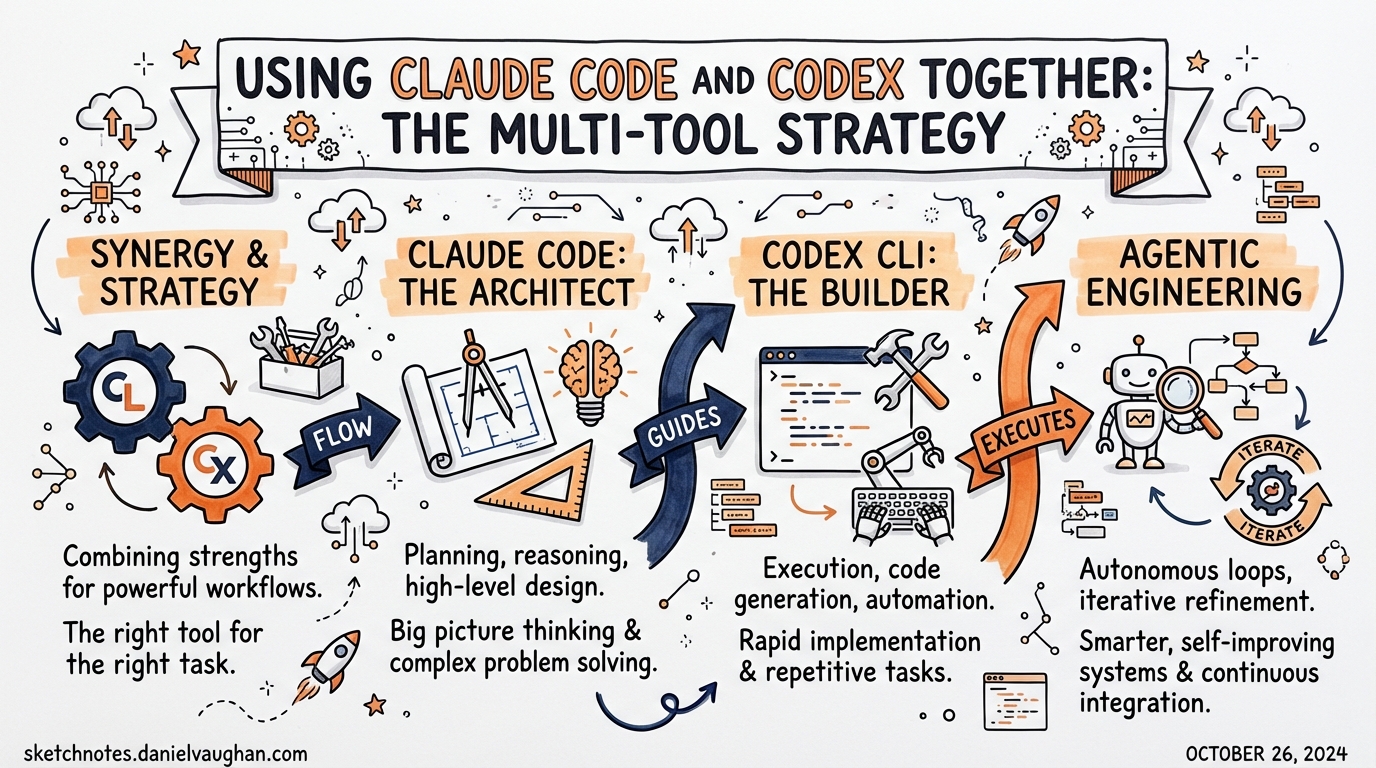
Claude Code and Codex CLI are not competitors. The practitioners who get the most out of AI-assisted development treat them as complementary tools with different personalities, strengths, and ideal task shapes. This article documents when to reach for each, how to hand off between them, and the shared conventions that make it practical.
The Core Difference
The most useful mental model: Claude Code is an explorer, Codex is an executor.
Claude Code maintains a continuous, deep conversation. It reasons about ambiguity, considers multiple approaches, and is comfortable sitting with uncertainty for a turn before committing to a direction. It suits tasks where the right action isn’t obvious before you start working — architecture discussions, debugging sessions where the root cause isn’t known, generating ideas, or reviewing complex diffs.
Codex CLI is optimised for throughput on well-specified tasks. Given a clear instruction (“add unit tests to every function in src/auth/”), it executes reliably, in parallel if needed, with strong sandboxing and deterministic tool use. It suits tasks where you know what you want done and just need it done correctly across many files or branches simultaneously.
Neither is universally better. The common mistake is picking one and using it for everything.
When to Use Each
Reach for Claude Code when:
- You’re starting a feature and don’t yet know the full design
- You need to understand an unfamiliar codebase (exploration → reasoning)
- The task requires architectural judgement (“should we use X or Y?”)
- You’re debugging something with an unclear cause
- You want to iterate on UI design or copy (Claude’s creative register)
- You need a detailed plan before executing
Reach for Codex CLI when:
- The task is well-specified and repeatable
- You want to run multiple sub-tasks in parallel (different files, branches, services)
- You’re in a CI pipeline or automation context
- The task is tedious but mechanical (rename all usages of X, upgrade all deps, add docstrings)
- You want deterministic, auditable execution with hooks and sandbox constraints
- You have a plan and just want it executed
Use both together when:
- Claude Code produces a plan → Codex CLI executes it
- Claude Code explores and identifies a set of changes → Codex runs them in parallel worktrees
- Codex hits a blocker it can’t reason past → hand off to Claude Code for diagnosis
Handoff Patterns
Pattern 1: Plan in Claude, Execute in Codex
The most common pattern. Claude Code is better at reasoning about “what should be done” — use it to produce a detailed task breakdown. Then paste that breakdown into a Codex prompt and let Codex execute.
[Claude Code session]
"I need to refactor the payment module to support multiple currencies.
 Analyse the current implementation and give me a step-by-step plan
 with specific file changes."

→ Claude produces 8 concrete steps

[Codex CLI — new session]
"Execute the following refactoring plan: [paste Claude's output]"
Claude’s structured output format maps cleanly to Codex’s execution loop. Codex is good at following numbered steps and verifying each against tests.
Pattern 2: Parallel Execution via Worktrees
When Claude has identified a set of independent changes, dispatch them to parallel Codex sessions in separate worktrees. Claude Code’s dispatch_agent tool (or simply opening multiple terminal tabs) enables this.
# Create three worktrees for parallel Codex sessions
git worktree add ../feature-auth main
git worktree add ../feature-payments main
git worktree add ../feature-notifications main

# In each worktree, kick off a Codex session
cd ../feature-auth && codex "Implement the auth module changes from PLAN.md §1"
cd ../feature-payments && codex "Implement the payments changes from PLAN.md §2"
cd ../feature-notifications && codex "Implement the notifications changes from PLAN.md §3"
Each Codex session is isolated. Claude Code reviews the PRs once complete.
Pattern 3: Codex Execution → Claude Code Review
For automated code changes (CI, scheduled tasks, overnight batch work), Codex runs unattended and produces a PR. Claude Code then does a deep review — reasoning about architecture, not just syntax.
# Codex runs overnight (scheduled automation)
codex exec --full-auto "Upgrade all Python deps, fix any breaking tests"

# Next morning: Claude Code reviews the diff
# Claude Code has better context for architectural implications
# of dependency upgrades than Codex does in exec mode
Pattern 4: MCP Bridge
For tighter integration, run Codex CLI as an MCP server and connect Claude Code as a client:
# In Claude Code's settings.json MCP config
{
  "mcpServers": {
    "codex": {
      "command": "codex",
      "args": ["mcp-server"],
      "cwd": "/path/to/project"
    }
  }
}
Claude Code can then call codex() and codex-reply() tools directly from its session — delegating execution sub-tasks to Codex without leaving the Claude Code session. The inverse also works: Codex can connect to a Claude Code MCP server.
Shared Conventions That Make This Work
When using both tools on the same project, shared conventions reduce friction:
Use a unified project documentation file
Both tools read different files by default (CLAUDE.md for Claude Code, AGENTS.md for Codex). Keep a single canonical file and symlink or reference it:
# Option A: symlink
ln -s AGENTS.md CLAUDE.md

# Option B: include from both
# AGENTS.md imports: @./PROJECT.md
# CLAUDE.md also reads PROJECT.md
Put shared context (architecture, conventions, testing commands) in PROJECT.md and tool-specific configuration in each tool’s own file.
Define the handoff protocol in AGENTS.md
Explicitly document which tasks go to which tool. This helps both agents self-select appropriately when context is ambiguous:
# Task Routing

- Exploratory/design tasks → use Claude Code (open new CC session)
- Execution/implementation tasks → use Codex CLI
- If unsure: start with /plan in Codex; if more reasoning needed, switch to Claude Code
Structured planning outputs
When Claude Code produces plans for Codex to execute, use a consistent format:
## Implementation Plan

### Step 1: [filename] — [action]
**Files to change:** src/auth.ts, src/types.ts
**What to do:** [precise instruction]
**Verify:** Run `npm test auth` — should pass

### Step 2: ...
Codex handles numbered steps, file lists, and verification commands reliably. Prose-heavy plans with embedded reasoning are less suited to Codex execution.
Tool Selection Heuristic
A simple decision rule that works well in practice:
Is the task fully specified?
  YES → Does it need to run in parallel or in CI?
    YES → Codex CLI
    NO  → Either (Codex slightly preferred for determinism)
  NO  → Does it need exploration or architectural reasoning?
    YES → Claude Code
    NO  → Start with /plan in Codex; escalate to Claude Code if blocked
What Doesn’t Transfer Between Tools
Some things work in one tool but not the other, and assuming parity leads to confusion:
| Feature | Claude Code | Codex CLI |
|---|---|---|
| Long exploratory conversations | ✅ Strong | ⚠️ Works but not the design centre |
| Parallel worktree execution | ⚠️ Via dispatch_agent | ✅ Native |
| AGENTS.md / CLAUDE.md | CLAUDE.md | AGENTS.md |
| Skills (SKILL.md) | ⚠️ Limited | ✅ First-class |
| Subagents (TOML) | ❌ | ✅ Native |
| Hooks (SessionStart, PreToolUse, etc.) | ❌ | ✅ Native |
| MCP server mode | ✅ | ✅ |
Code review (/review) |
✅ Strong | ✅ Via workflow |
| Reasoning about diffs/PRs | ✅ Strong | ✅ Good |
| CI/non-interactive mode | ⚠️ Possible | ✅ codex exec |
Including GitHub Copilot
For teams already using Copilot in VS Code or JetBrains, the three-tool stack (Copilot + Claude Code + Codex) can be coherent:
- Copilot: inline completions, small in-editor changes, quick autocomplete
- Claude Code: session-length exploration, reasoning, PR reviews
- Codex: multi-file execution, parallel work, automation
The key is not to expect any one tool to cover all cases. Copilot won’t do what Codex does across 50 files. Codex won’t do what Claude Code does when you’re not sure what to build. Build the habit of switching tools when you feel friction — friction usually means you’re using the wrong tool for the task shape.
Practical Starting Point
If you’re new to the multi-tool approach:
- Start with what you have. Use Codex for mechanical tasks, Claude Code for reasoning. Get comfortable with the boundary.
- Add the symlink.
ln -s AGENTS.md CLAUDE.mdor use a sharedPROJECT.md. Reduce the “which file does this agent read?” friction immediately. - Try one handoff. Next time you have a complex feature, use Claude Code to write the plan, then paste it into Codex. See how far Codex gets with a good spec.
- Add MCP when ready. Once handoffs are comfortable, wire up the MCP bridge for tighter integration.
Sources: Codex CLI docs, Claude Code docs, transcripts: GuTQDXKwdJQ, 3CSi8QAoN-s, 97FYys-kj58. See also: Claude Code ↔ Codex Bidirectional MCP for the MCP integration deep-dive.