Codex App-Server TUI: The Architecture Shift That Enables Remote Sessions
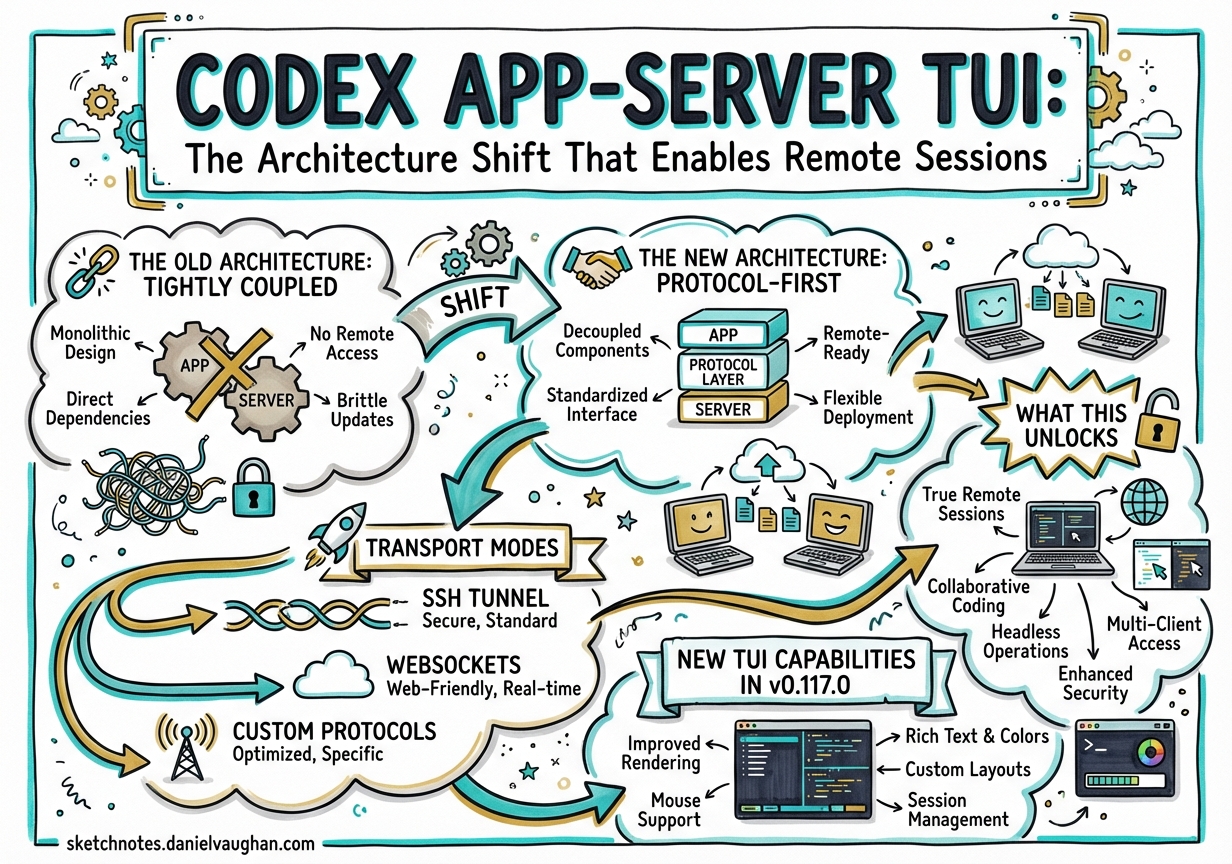
Codex App-Server TUI: The Architecture Shift That Enables Remote Sessions
Codex CLI v0.117.0 (released March 26, 2026) quietly shipped what may be its most significant architectural change to date: the app-server-backed TUI is now enabled by default.1 This isn’t just a cosmetic switch — it decouples the terminal interface from the agent loop entirely, opening the door to remote sessions, multi-client architectures, and a unified protocol surface across every Codex frontend.
The Old Architecture: Tightly Coupled
Prior to this change, the CLI TUI was a native client running in the same process as the agent loop. It communicated directly with Rust core types — no protocol intermediary. That design was fast to iterate on during early development but had a fundamental limitation: the TUI was a special case. You couldn’t swap it out, run it remotely, or treat it like any other client.
The New Architecture: Protocol-First
With the app-server backing the TUI, the design is now protocol-first:
┌───────────────────────────┐
│  Terminal (TUI client)    │
│  speaks JSON-RPC / JSONL  │
└─────────────┬─────────────┘
              │ stdio (default) or WebSocket (experimental)
              ▼
┌───────────────────────────┐
│  Codex App Server         │
│  (Rust, manages agent     │
│  loop & session state)    │
└─────────────┬─────────────┘
              │ spawns
              ▼
┌───────────────────────────┐
│  Agent Loop               │
│  (model calls, tools,     │
│  sandbox execution)       │
└───────────────────────────┘
The TUI is now just another client. It launches an App Server child process, speaks JSON-RPC over stdio (JSONL), and renders the same streaming events and approvals that any other client would receive.2
Transport Modes
The App Server supports two transport modes:
| Mode | Command | Status |
|---|---|---|
| JSONL over stdio | codex app-server --listen stdio:// |
Default, stable |
| WebSocket | codex app-server --listen ws://IP:PORT |
Experimental |
The WebSocket transport is the key to remote sessions. With it, the Codex App Server can run on a remote machine (a cloud VM, a home server, a powerful Mac Mini), while the TUI connects from a laptop over a local network or VPN.3
What This Unlocks
1. Remote Sessions and Connection Continuity
The most consequential implication: the agent keeps running even if your laptop sleeps or disconnects. Because the agent loop is now in the App Server process (not in the TUI process), the TUI can disconnect and reconnect without interrupting work. Long-running tasks — deep refactors, multi-hour research agents, overnight builds — no longer require a persistently open terminal.4
2. Shell Commands and Filesystem Watching from Clients
As of v0.117.0, app-server clients can now send shell commands, watch filesystem changes, and connect to remote WebSocket servers with bearer-token authentication.1 This means the TUI (and any other client) can observe file events without polling, trigger shell actions, and integrate with authenticated external services as a first-class operation.
3. Unified Multi-Client Surface
Because all clients speak the same JSON-RPC protocol, Codex integrations written in Go, Python, TypeScript, Swift, and Kotlin all behave consistently.2 The TUI, the VS Code extension, JetBrains, Xcode, and the Codex desktop app all connect to the same protocol surface. This is the architecture that makes per-surface feature parity achievable — new features land in the App Server protocol and all clients benefit simultaneously.
4. Enterprise Central Server
For regulated environments or large teams, the App Server can be deployed as a centralised service. Multiple developers connect via WebSocket (bearer-token authenticated). The server enforces the same network policies, approval rules, and audit hooks for every client. This is a cleaner deployment model than distributing config.toml files to every engineer’s laptop.
New TUI Capabilities in v0.117.0
The v0.117.0 TUI update also ships several concrete quality-of-life improvements:1
- Prompt history recall now works across sessions (not just within a single session)
- No duplicate reasoning summaries — the deduplication bug that showed live reasoning twice is fixed
- Terminal state on exit — quitting Codex no longer leaves the terminal in a broken state
- Parallel session titles —
/titlepicker works in both classic and app-server TUI, making it practical to run several sessions in parallel tmux windows
What Was Removed
The v0.117.0 release also retired the legacy artifact tool and the old read_file / grep_files handlers.1 These were holdovers from the pre-app-server architecture. Their removal simplifies the tool surface and signals that the protocol-first design is not a transitional phase — it is the canonical architecture going forward.
Practical Guidance
Running a persistent remote agent:
# On the server
codex app-server --listen ws://0.0.0.0:7681 --ws-auth bearer:TOKEN

# On the client (TUI or SDK)
CODEX_APP_SERVER_URL=ws://server:7681 \
CODEX_APP_SERVER_AUTH=TOKEN \
codex
Checking which TUI mode is active:
codex --version
# Output includes "app-server TUI: enabled" since v0.117.0 with default build
Pinning classic TUI (if needed for scripts):
# config.toml
[features]
use_app_server_tui = false
This pin should be treated as temporary — the classic TUI is not the path forward.
Summary
The app-server TUI becoming default in v0.117.0 is not a feature. It is an architectural maturation that brings the CLI into alignment with the rest of the Codex platform. For practitioners, the immediate practical gains are the connection-continuity of remote sessions and the cleaner multi-client story for enterprise deployments. For the longer term, it means every future Codex capability lands in one protocol and every client picks it up automatically.
-
Codex CLI v0.117.0 Changelog — March 26, 2026. ↩ ↩2 ↩3 ↩4
-
Unlocking the Codex Harness: How We Built the App Server — OpenAI Blog. ↩ ↩2
-
App Server Reference — OpenAI Developer Docs. ↩
-
App Server README — openai/codex on GitHub. ↩