Codex App Theming and Customisation: codex-theme-v1, Partner Themes, and the CLI /theme Command
Codex App Theming and Customisation: codex-theme-v1, Partner Themes, and the CLI /theme Command
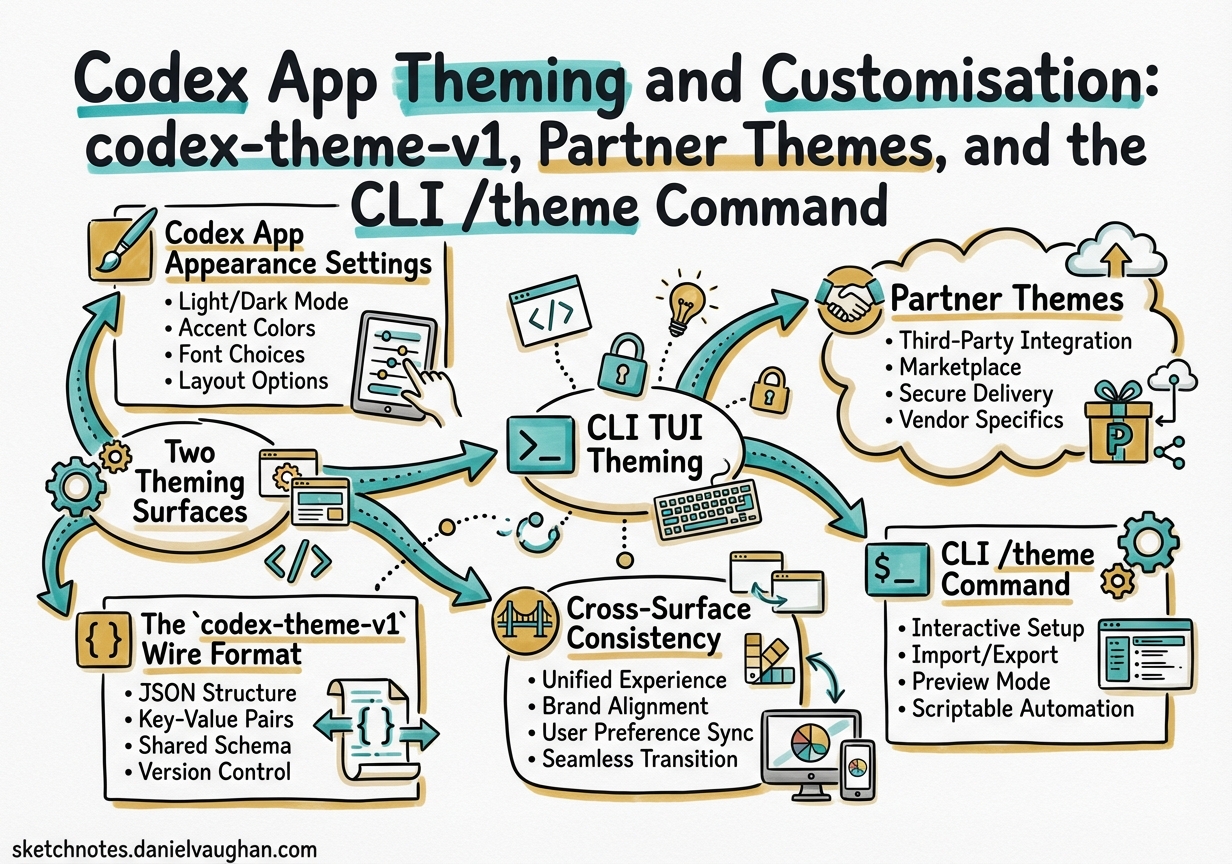
OpenAI shipped full appearance customisation for the Codex app in late March 2026, adding base theme selection, per-channel colour controls, font overrides, and a portable codex-theme-v1 JSON format for sharing themes with your team.1 The Codex CLI gained its own theming path earlier in the year, routed through a live-preview /theme picker and .tmTheme files.2 The two surfaces are architecturally distinct but share nomenclature — this article maps both systems, explains the codex-theme-v1 wire format, and shows how to keep your desktop app and terminal consistent.
Two Theming Surfaces
Codex now ships as three surfaces that each manage appearance differently:
flowchart LR
    A[Codex App\n macOS desktop] -->|Settings → Appearance| B[codex-theme-v1 JSON\n stored in app prefs]
    C[Codex CLI\n terminal TUI] -->|/theme + tui.theme| D[.tmTheme files\n ~/.codex/themes/]
    E[VS Code Extension] -->|Inherits| A
The Codex app uses a bespoke JSON format (codex-theme-v1) that describes the entire visual chrome: surface colours, accent, ink, semantic diff colours, font choices, and window opacity.1 The Codex CLI TUI uses .tmTheme files — the same format that TextMate and most syntax-highlighting toolchains understand — scoped to syntax highlighting and diff colouring only.2
Codex App Appearance Settings
Open the Settings panel with Cmd+, (macOS) and navigate to Appearance.3 The panel is divided into:
| Control | What it changes |
|---|---|
| Base theme | Light, dark, or system (auto) |
| Accent colour | Interactive highlights, selection ring, link colour |
| Background colour | Surface behind the main content area |
| Foreground / ink colour | Body text and code text |
| Opacity | Translucent vs opaque window chrome |
| UI font | Font used throughout the app interface |
| Code font | Monospace font used in the editor and diff views |
| Semantic colours | diffAdded, diffRemoved, skill callout colours |
Changes apply immediately with a live preview. Selecting a built-in theme populates all fields at once; you can then override individual values.
Built-in and Partner Themes
The Codex app ships with classic themes and a set built in collaboration with third-party products:4
Classic themes: Catppuccin, Monokai, Solarized (light and dark variants)
Partner themes:
- Linear — matches Linear’s own app chrome, useful if you keep both open side by side
- Notion — warm off-white surfaces with Notion’s signature typography
- OpenClaw — dark high-contrast theme used by the viral AI tool built entirely with Codex5
To apply a partner theme, select it from the base theme dropdown. Colours populate but fonts remain at your current choice — partner themes do not enforce font overrides.
The codex-theme-v1 Wire Format
Themes are shared as a compact URI-prefixed JSON string. The prefix codex-theme-v1: is stripped before parsing; the remainder is standard JSON.6
codex-theme-v1:{
  "codeThemeId": "one",
  "theme": {
    "accent": "#5c99d6",
    "contrast": 48,
    "fonts": {
      "code": "Fira Code",
      "ui": null
    },
    "ink": "#d8dee9",
    "opaqueWindows": true,
    "semanticColors": {
      "diffAdded": "#99c794",
      "diffRemoved": "#ec5f66",
      "skill": "#c695c6"
    },
    "surface": "#303841"
  },
  "variant": "dark"
}
Field Reference
| Field | Type | Description |
|---|---|---|
codeThemeId |
string |
Base built-in theme identifier ("one", "catppuccin", "matrix", …) |
theme.accent |
hex string | Interactive highlight colour |
theme.contrast |
integer | Contrast level; higher values increase foreground–background ratio |
theme.fonts.code |
string | null | Monospace font name; null = system default |
theme.fonts.ui |
string | null | UI font name; null = system default |
theme.ink |
hex string | Primary text colour |
theme.opaqueWindows |
boolean | false = translucent sidebars/chrome |
theme.semanticColors.diffAdded |
hex string | Added line highlight in diffs |
theme.semanticColors.diffRemoved |
hex string | Removed line highlight in diffs |
theme.semanticColors.skill |
hex string | Skill callout badge colour |
theme.surface |
hex string | Main background surface colour |
variant |
"dark" | "light" |
Base variant; drives default text contrast calculations |
Importing a Shared Theme
Navigate to Settings → Appearance → Dark Theme (or Light Theme) → Import, and paste the full codex-theme-v1:… string.6
Known Limitation: Custom codeThemeId Values
As of March 2026, the theme importer rejects codeThemeId values that do not match an existing built-in dropdown entry.7 A payload using "codeThemeId":"custom" fails silently; the same payload with "codeThemeId":"one" (or any valid built-in ID) succeeds. The expected fix is to validate the payload schema rather than gate on the identifier — this is tracked in the upstream issue and is expected to ship before the next major app release. In the interim, always set codeThemeId to an existing built-in (e.g., "matrix", "one", "catppuccin") even when overriding all colour values.
CLI TUI Theming
The CLI TUI is a Ratatui-based terminal interface with syntax highlighting powered by a TextMate grammar engine.8 Its theming is entirely separate from the app’s JSON format.
The /theme Picker
Type /theme in any Codex CLI session to open the live-preview theme picker.2 As you scroll, syntax-highlighted code samples and diff examples update in real time. Selecting a theme writes the kebab-case identifier to tui.theme in ~/.codex/config.toml automatically.
[tui]
theme = "catppuccin-mocha"
Custom .tmTheme Files
Drop any .tmTheme file into $CODEX_HOME/themes/ (typically ~/.codex/themes/) and it will appear in the /theme picker.2
mkdir -p ~/.codex/themes
cp ~/Downloads/my-custom-theme.tmTheme ~/.codex/themes/
# Restart Codex CLI or start a new session — the theme will appear in /theme
TextMate-format themes are available from many sources: textmate.org, the Catppuccin project (which publishes .tmTheme exports), and the rainglow collection.
Known Rendering Bug
In v0.105.0 and later, markup.inserted, markup.deleted, and markup.changed background overrides from custom .tmTheme files are ignored in diff views, which always render with hardcoded bright-green/red backgrounds.9 ⚠️ This is a known upstream issue. Workaround: set theme.semanticColors.diffAdded and .diffRemoved in the app settings (Codex App only), or accept the diff colouring as-is in the CLI.
Profile-Scoped Themes
You can assign different themes to different profiles, so your CI automation profile uses a minimal high-contrast theme and your interactive deep-work profile uses your preferred custom theme:
[profiles.ci.tui]
theme = "gruvbox-dark"

[profiles.deep-work.tui]
theme = "tokyonight-storm"
Profile-scoped [tui] keys merge with (and override) the root [tui] section.10
Cross-Surface Consistency
The Codex app and CLI use different theming engines, so perfect pixel parity is not achievable. However, you can achieve reasonable consistency:
flowchart TD
    A["Choose a base theme\n(e.g., Catppuccin)"]
    B["Export Codex App theme\nas codex-theme-v1 JSON"]
    C["Match colours manually\nin CLI .tmTheme file"]
    D["Set matching\ntui.theme = 'catppuccin-mocha'"]
    E["Consistent appearance\nacross app and CLI"]

    A --> B
    A --> C
    B --> E
    C --> D
    D --> E
Practical steps:
- Pick a base theme in the Codex app and export it via Settings → Appearance → Export.
- Note the
surface,accent, andinkhex values. - Find or create a matching
.tmThemefile for the CLI. - Set
tui.themeinconfig.tomlto the matching name. - Set your terminal emulator’s background to match
surfacefor seamless integration.
The codex-themes community tool (GitHub: ychampion/codex-themes) automates steps 3–5 by generating matching terminal palette configs for Alacritty, iTerm2, and WezTerm from an exported codex-theme-v1 JSON string.11
Sharing Themes in a Team
The codex-theme-v1 format is designed to be portable. Practical sharing patterns:
Via dotfiles: Commit your exported theme string to a ~/.dotfiles repo and restore it with a bootstrap script.
Via AGENTS.md: Embed a comment in your project’s AGENTS.md with the team’s preferred theme string so new contributors can paste it directly.
Via a company plugin: Package the theme JSON inside a Codex plugin under plugin.json → appConfig, so the theme applies automatically when the plugin is installed.
Quick Reference
| Task | How |
|---|---|
| Open app theme picker | Settings → Appearance (Cmd+,) |
| Import a shared theme | Settings → Appearance → Import → paste codex-theme-v1:… |
| Export your theme | Settings → Appearance → Export |
| Open CLI theme picker | Type /theme in a CLI session |
| Add custom CLI theme | Drop .tmTheme into ~/.codex/themes/ |
| Set CLI theme in config | [tui] theme = "theme-name" in ~/.codex/config.toml |
| Profile-scoped CLI theme | [profiles.myprofile.tui] theme = "name" |
Citations
-
OpenAI, “Codex App 26.323 — theming, automations, thread search”, Codex Changelog, March 2026. https://developers.openai.com/codex/changelog ↩ ↩2
-
OpenAI, “Features – Codex CLI:
/themepicker andtui.theme”, Codex Developer Documentation. https://developers.openai.com/codex/cli/features ↩ ↩2 ↩3 ↩4 -
OpenAI, “Settings – Codex app”, Codex Developer Documentation. https://developers.openai.com/codex/app/settings ↩
-
OpenAI, “OpenAI Upgrades Its Codex App With Customizable Themes”, March 2026. https://www.eyerys.com/articles/news/openai-upgrades-its-codex-app-customizable-themes-and-automated-workflows ↩
-
“OpenAI launches Codex app to bring its coding models, used to build OpenClaw, to more users”, Fortune, February 2026. https://fortune.com/2026/02/02/openai-launches-codex-app-to-bring-coding-models-to-more-users-openclaw-ai-agents/ ↩
-
Dominik Kundel (@dkundel),
codex-theme-v1JSON example, X (formerly Twitter), March 2026. https://x.com/dkundel/status/2032224113025302535 ↩ ↩2 -
“Theme importer rejects custom codeThemeId values unless they match dropdown IDs”, GitHub Issue #14766, openai/codex. https://github.com/openai/codex/issues/14766 ↩
-
OpenAI, “codex-rs Architecture: Ratatui TUI and TextMate syntax engine”, Codex Developer Documentation. https://developers.openai.com/codex ↩
-
“Enable voice transcription in Linux/WSL builds”, GitHub Issue #12894, openai/codex (references v0.105.0 diff-view rendering regression). https://github.com/openai/codex/issues/12894 ↩
-
OpenAI, “Sample Configuration – Codex: profile-scoped
[tui]overrides”. https://developers.openai.com/codex/config-sample ↩ -
codex-themescommunity tool for generating matching terminal palette configs, GitHub:ychampion/codex-themes. ⚠️ Community project — verify current status before using in production. ↩