Codex CLI for Java and Spring Boot Teams: AGENTS.md, Maven Sandboxing, and Gradle Workflows
Codex CLI for Java and Spring Boot Teams: AGENTS.md, Maven Sandboxing, and Gradle Workflows
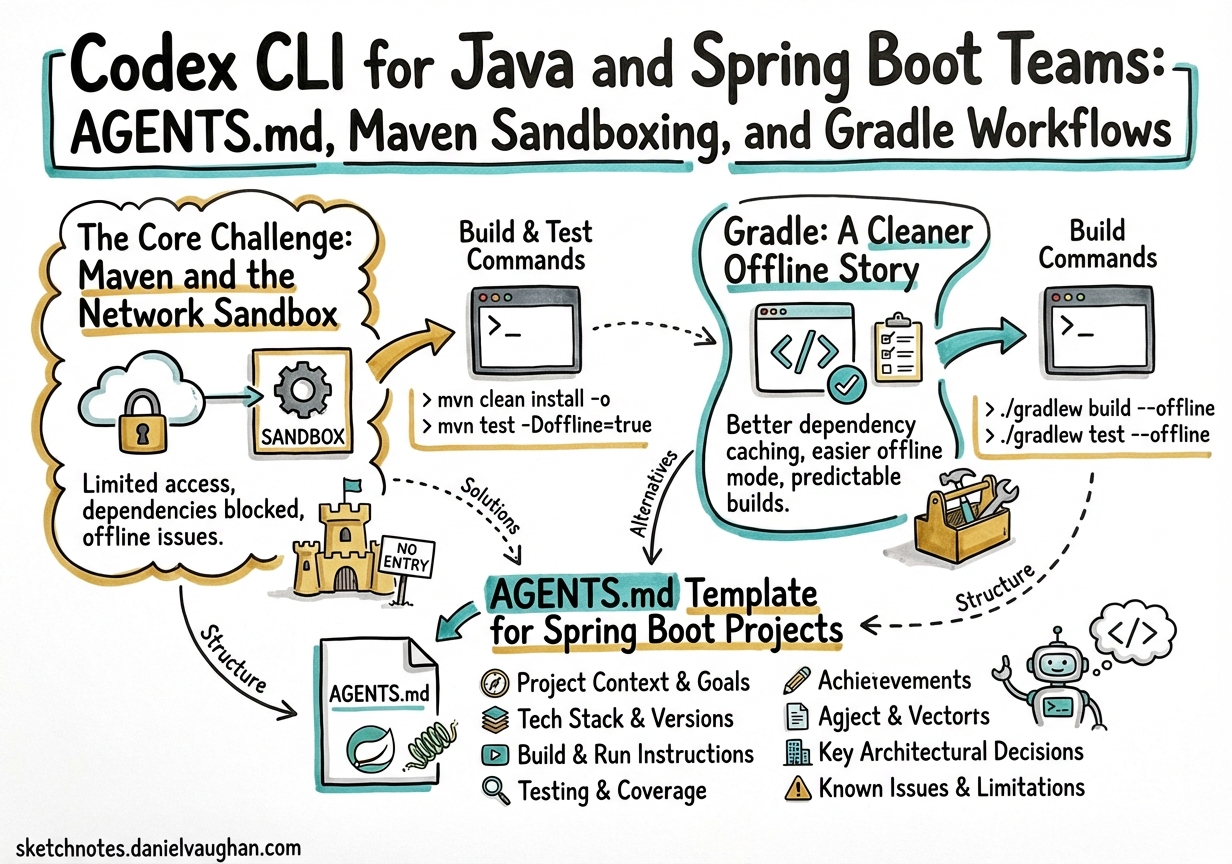
Java is one of the most-used languages in enterprise software, yet Codex CLI guidance skews heavily toward Python, TypeScript, and Go. This article fills that gap: AGENTS.md templates, the Maven Central proxy workaround that trips up every new Java team, Gradle’s cleaner offline story, and workflow patterns for Spring Boot projects that need Testcontainers, Spotless, and package-by-feature architecture.
The Core Challenge: Maven and the Network Sandbox
Before writing a single line of AGENTS.md, every Java team hits the same wall. Codex CLI’s default workspace-write sandbox blocks outbound network calls at the IP-tables level.1 curl and apt-get work because they honour the transparent proxy:8080 tunnel Codex provisions — but Maven’s HTTP client does not pick up that proxy automatically.
The result is a deeply unhelpful error on the first ./mvnw test:
[ERROR] Non-resolvable import POM: The following artifacts could not be
resolved: org.springframework.boot:spring-boot-dependencies:pom:3.4.1
(absent): Could not transfer artifact ... Network is unreachable
This is not a bug you can fix by toggling “allow internet access” in the app — that permission controls something else entirely. The fix is a two-step setup script.
Step 1: Route Maven Through Codex’s Internal Proxy
Drop the following into Environment → Setup Script (cloud environments) or run it as part of your SessionStart hook (local):
#!/usr/bin/env bash
set -euo pipefail

# Point all HTTP(S) traffic at Codex's built-in proxy
export http_proxy="http://proxy:8080"
export https_proxy="http://proxy:8080"
export JAVA_TOOL_OPTIONS="-Dhttps.proxyHost=proxy -Dhttps.proxyPort=8080 \
  -Dhttp.proxyHost=proxy -Dhttp.proxyPort=8080 \
  -Dhttps.proxySet=true -Dhttp.proxySet=true"

# Write Maven settings.xml that routes through the proxy
mkdir -p ~/.m2
cat > ~/.m2/settings.xml <<'EOF'
<settings xmlns="http://maven.apache.org/SETTINGS/1.0.0">
  <proxies>
    <proxy>
      <id>codex</id>
      <active>true</active>
      <protocol>http</protocol>
      <host>proxy</host>
      <port>8080</port>
    </proxy>
    <proxy>
      <id>codex-https</id>
      <active>true</active>
      <protocol>https</protocol>
      <host>proxy</host>
      <port>8080</port>
    </proxy>
  </proxies>
</settings>
EOF

# Pre-warm the local Maven cache while the network is still open
mvn -B -q dependency:go-offline -f pom.xml 2>/dev/null || true
This script runs once when the Codex cloud environment is provisioned.2 After dependency:go-offline completes, all subsequent mvn invocations can resolve from ~/.m2/repository without touching the network — which is exactly what happens once Codex’s agent loop takes over.
Step 2: Tell AGENTS.md to Use Offline Mode
## Build & Test Commands

Always run Maven with `-o` (offline) after the initial setup:

```bash
# Run all tests
./mvnw -o verify

# Run a single test class
./mvnw -o test -Dtest=UserServiceTest

# Run integration tests only
./mvnw -o verify -Dit.test=UserRepositoryIT -DskipUnitTests=true
The -o flag prevents Maven from attempting remote artifact resolution.
Network is unavailable during agentic tool calls; builds that require
downloads will fail.
---

## Gradle: A Cleaner Offline Story

Gradle teams generally have fewer sandboxing headaches because the `--offline` flag is a first-class concept built deeply into Gradle's dependency resolution.[^3] The Temporal team, who used Codex to improve their Java SDK — generating seven merged pull requests across three repositories — relied exclusively on `--offline` for all test runs:[^4]

```bash
# Format before committing
./gradlew --offline spotlessApply

# Run a targeted test suite
./gradlew --offline :temporal-sdk:test --tests "io.temporal.workflow.*"

# Full build
./gradlew --offline clean build
The key constraint: run ./gradlew dependencies once with the network proxy configured (same JAVA_TOOL_OPTIONS trick above) before agent sessions begin. After that, --offline is reliable.
For Gradle projects, add a wrapper/gradle-wrapper.properties enforcement to AGENTS.md:
## Build Commands

Use the Gradle wrapper. Never install Gradle globally.

- Format: `./gradlew --offline spotlessApply`
- Unit tests: `./gradlew --offline test`
- Targeted: `./gradlew --offline :<module>:test --tests "<pkg.Class>"`
- All checks: `./gradlew --offline check`

Run `./gradlew --offline check` before marking any task complete.
AGENTS.md Template for Spring Boot Projects
The community-maintained Spring Boot AGENTS.md template (originally written for Kotlin but fully applicable to Java) codifies several patterns that prevent common Codex mistakes in large Spring applications.3
# AGENTS.md — Spring Boot Project

## Architecture

This project uses **package-by-feature** (not package-by-layer).

Structure: `com.example.<feature>/{controller,service,repository,model,config}/`

- Features are self-contained. Never import a repository from another feature package.
- Repositories are `package-private` / `internal` to enforce encapsulation.
- Services own transactions. Multiple service calls can share one transaction.

## Bean Configuration

**Never** use `@Component`, `@Service`, or `@Repository` on implementation classes.
**Always** use `@Configuration` + `@Bean` methods for explicit dependency wiring.

Correct:
```java
@Configuration
public class UserConfig {
    @Bean
    public UserService userService(UserRepository repo) {
        return new UserServiceImpl(repo);
    }
}
Wrong (do not do this):
@Service   // ← forbidden
public class UserServiceImpl implements UserService { ... }
Dependency Versions
Always pin versions as properties in pom.xml:
<properties>
    <mapstruct.version>1.6.3</mapstruct.version>
    <resilience4j.version>2.3.0</resilience4j.version>
</properties>
Spring Boot parent-managed dependencies (e.g. spring-boot-starter-web) do not
need explicit version properties.
Testing
- Unit tests:
@WebMvcTestfor controllers (mock service layer with@MockBean).@ExtendWith(MockitoExtension.class)for services. - Integration tests: extend
BaseITwhich starts Testcontainers PostgreSQL. Use@BeforeEach+repository.deleteAll()for isolation between tests. - Never use reflection to set entity IDs in tests — use the test-subclass pattern.
Logging
Use SLF4J with Logback. private static final Logger log = LoggerFactory.getLogger(Foo.class);
- INFO: entity modified
- DEBUG: retrieval path
- WARN: recoverable errors
- ERROR: unrecoverable failures
- Never log PII or user identifiers.
Error Handling
Return appropriate HTTP status codes:
- 503 for downstream unavailability
- 504 for timeout
- 500 for unexpected failures
Wrap external calls with Resilience4j circuit breakers for production services.
---

## Testcontainers and the Sandbox

Testcontainers spins up Docker containers during tests — this works correctly inside Codex's `workspace-write` sandbox because Docker socket access is **not** blocked by the network firewall.[^6]

However, pulling new images requires network access. Pull your test images during the setup script:

```bash
# In setup script, before network closes
docker pull postgres:17-alpine
docker pull redis:8-alpine
docker pull localstack/localstack:3.5
Then in AGENTS.md:
## Testcontainers

All Docker images required for integration tests are pre-pulled. Do not attempt
to `docker pull` during test execution — the network is unavailable.

Integration tests inherit from `BaseIT`:

```java
@Testcontainers
public abstract class BaseIT {
    @Container
    static PostgreSQLContainer<?> postgres =
        new PostgreSQLContainer<>("postgres:17-alpine");

    @DynamicPropertySource
    static void props(DynamicPropertyRegistry r) {
        r.add("spring.datasource.url", postgres::getJdbcUrl);
        r.add("spring.datasource.username", postgres::getUsername);
        r.add("spring.datasource.password", postgres::getPassword);
    }
}
---

## Multi-Agent Pattern: Parallel Module Work

Large multi-module Maven or Gradle projects are well-suited to Codex CLI's multi-agent model.[^7] A dispatcher agent fans out work to specialist agents scoped to individual modules:

```mermaid
flowchart TD
    D[Dispatcher Agent\n/root] --> A[api-agent\n/root/api]
    D --> S[service-agent\n/root/service]
    D --> R[repo-agent\n/root/repository]
    A --> T1[mvn -o test -pl api]
    S --> T2[mvn -o test -pl service]
    R --> T3[mvn -o verify -pl repository\nIntegration tests]
    T1 & T2 & T3 --> D
The dispatcher’s TOML configuration in .codex/agents/java-dispatcher.toml:
[agent]
name = "java-dispatcher"
model = "gpt-5-codex"
description = "Orchestrates parallel module work across Maven sub-modules"

[agent.spawn]
max_threads = 4

[[agent.tasks]]
name = "api"
model = "gpt-5-codex-mini"
working_directory = "api/"

[[agent.tasks]]
name = "service"
model = "gpt-5-codex-mini"
working_directory = "service/"

[[agent.tasks]]
name = "repository"
model = "gpt-5-codex-mini"
working_directory = "repository/"
Each sub-agent inherits the sandbox policy and runs ./mvnw -o test -pl <module> in its scoped directory.
Database Schema Conventions
Guide Codex to generate consistent schema via AGENTS.md so you don’t get mixed conventions across generated migrations (Flyway and Liquibase are both common in Spring teams):
## Database Schema Conventions

- Table names: plural snake_case (`user_events`, not `UserEvent`)
- Column names: snake_case (`created_at`, not `createdAt`)
- Primary keys: `BIGSERIAL` or `UUID` — follow existing table convention
- Always include `created_at TIMESTAMPTZ DEFAULT NOW()` and
  `updated_at TIMESTAMPTZ DEFAULT NOW()` on every table
- Foreign keys: `<referenced_table>_id` (e.g. `order_id`)
- Flyway migrations: `V{next}__description_in_snake_case.sql`
- Never modify existing Flyway migration files — always create a new version

Prefer keyset pagination over `LIMIT/OFFSET`:

```sql
-- Correct
WHERE id > :lastSeenId ORDER BY id ASC LIMIT :pageSize

-- Avoid for large tables
LIMIT :pageSize OFFSET :offset
---

## CI/CD Integration with GitHub Actions

```yaml
# .github/workflows/codex-java.yml
name: Codex Java Review

on:
  pull_request:
    paths: ['src/**', 'pom.xml', 'build.gradle.kts']

jobs:
  codex-review:
    runs-on: ubuntu-latest
    steps:
      - uses: actions/checkout@v4

      - name: Cache Maven repository
        uses: actions/cache@v4
        with:
          path: ~/.m2/repository
          key: $-maven-$

      - name: Set up Java 21
        uses: actions/setup-java@v4
        with:
          java-version: '21'
          distribution: 'temurin'

      - name: Codex review
        uses: openai/codex-action@v1
        with:
          prompt: |
            Review the changed files in this PR. Focus on:
            - Spring Boot best practices (explicit bean config, layered architecture)
            - Test coverage for new service methods
            - N+1 query risks in JPA associations
            - Missing circuit breakers on external service calls
          model: gpt-5-codex
          approval_policy: never
        env:
          OPENAI_API_KEY: $
The Maven cache step is critical — codex exec in CI inherits the same dependency resolution constraints as interactive mode.4
Known Limitations
- JPMS module path: Projects using Java Platform Module System (
module-info.java) may confuse Codex’s path resolution. Add explicitmodulestructure to AGENTS.md so the agent understands the module graph. ⚠️ - Annotation processors: Lombok, MapStruct, and QueryDSL generate code at compile time. Codex will sometimes edit generated source files. Add a note to AGENTS.md: “Never edit files under
target/generated-sources/.” - Reactive WebFlux: Codex tends to produce blocking code. If your project is reactor-based, explicitly state this in AGENTS.md and include a note forbidding
.block()calls outside test code. - GitHub Packages: If your project pulls internal artifacts from GitHub Packages, add the
<server>block tosettings.xmland configureGITHUB_TOKENas a Codex environment secret.5
Putting It Together
The single biggest enabler for Java + Codex is the Maven proxy configuration. Once dependencies resolve correctly, the rest follows standard AGENTS.md practice. The Spring Boot community AGENTS.md template is a strong starting point; layer in your team’s specific conventions — architecture style, naming rules, approved dependencies — and you get consistent, reviewable output that respects your existing codebase patterns.
Citations
-
OpenAI Developer Community — “Codex unable to access Java Maven repository”: https://community.openai.com/t/codex-unable-to-access-java-maven-repository/1266455 ↩
-
Below the Line Blog — “Getting Java & Spring Boot builds to run inside OpenAI Codex when Maven Central is ‘unreachable’”: https://belowtheline.blog/2025/06/23/getting-java-spring-boot-builds-to-run-inside-openai-codex-when-maven-central-is-unreachable/ ↩
-
GitHub Gist (sflandergan) — “AGENTS.md Template for Spring Boot Kotlin”: https://gist.github.com/sflandergan/3eab31b1e9efe8d405b03102e7f5b7a5 ↩
-
OpenAI Codex Action — GitHub Actions integration: https://github.com/openai/codex-action ↩
-
OpenAI Developer Community — “Issue with Running Java Maven Tests in Codex – Dependency Resolution Failure”: https://community.openai.com/t/issue-with-running-java-maven-tests-in-codex-dependency-resolution-failure/1283045 ↩