Codex CLI Plugin System: Bundling Skills, MCP Servers, and App Connectors
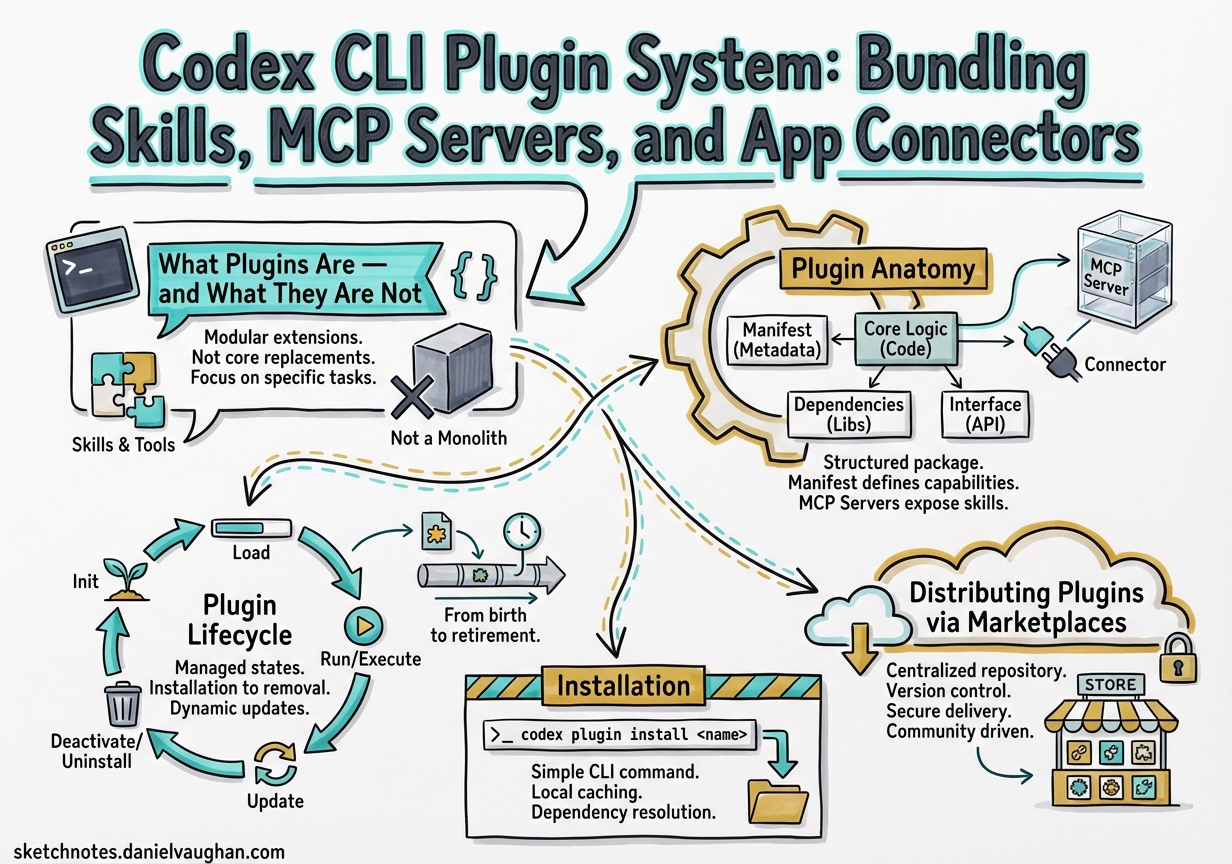
Codex CLI Plugin System: Bundling Skills, MCP Servers, and App Connectors
Codex CLI v0.117.0 (released March 26, 2026) elevated plugins to a first-class workflow primitive.1 Where previously you might wire up an MCP server in config.toml, add a SKILL.md to a directory, and configure an app connector separately, plugins collapse all three into a single installable, shareable package. This article is a complete technical reference for building, distributing, and managing Codex plugins.
What Plugins Are — and What They Are Not
A Codex plugin is a manifest-driven bundle that can package three types of component:2
- Skills — Markdown instruction files that Codex loads contextually to guide behaviour on specific tasks.
- MCP Servers — External tool-provider processes defined in
.mcp.jsonand registered with theMcpConnectionManager, with tool names prefixed asmcp__<server>__<tool>to avoid collisions.3 - App Connectors — Authenticated connections to external platforms (GitHub, Slack, Linear, etc.) defined in
.app.json.
A plugin is not a replacement for an MCP server. An MCP server is still an independent process; a plugin is the packaging layer on top of it that makes it discoverable, installable, and removable as a named unit.4 The distinction matters: you can run an MCP server without a plugin, but you cannot ship a plugin without understanding what its components do.
Plugin Anatomy
Every plugin has a mandatory entry point at .codex-plugin/plugin.json. All other artefacts live at the plugin root, not inside .codex-plugin/.
my-plugin/
├── .codex-plugin/
│   └── plugin.json          ← required
├── skills/
│   └── my-skill/
│       └── SKILL.md
├── .mcp.json                 ← optional MCP server config
├── .app.json                 ← optional app connector config
└── assets/                   ← optional icons, logos, screenshots
The plugin.json Manifest
The manifest has three responsibilities: identify the plugin, point to its bundled components, and provide install-surface metadata.5
Minimal manifest (skills-only plugin):
{
  "name": "my-first-plugin",
  "version": "1.0.0",
  "description": "Reusable greeting workflow",
  "skills": "./skills/"
}
Complete manifest (all component types, full interface metadata):
{
  "name": "my-plugin",
  "version": "1.2.0",
  "description": "Full-featured plugin example",
  "author": {
    "name": "Your Name",
    "email": "you@example.com",
    "url": "https://yoursite.example"
  },
  "homepage": "https://yoursite.example/my-plugin",
  "repository": "https://github.com/yourorg/my-plugin",
  "license": "MIT",
  "keywords": ["workflow", "automation"],
  "skills": "./skills/",
  "mcpServers": "./.mcp.json",
  "apps": "./.app.json",
  "interface": {
    "displayName": "My Plugin",
    "shortDescription": "One-line pitch for the plugin browser",
    "longDescription": "Longer markdown description shown on the detail page",
    "developerName": "YourOrg",
    "category": "Productivity",
    "capabilities": ["code", "search"],
    "websiteURL": "https://yoursite.example/my-plugin",
    "privacyPolicyURL": "https://yoursite.example/privacy",
    "termsOfServiceURL": "https://yoursite.example/terms",
    "defaultPrompt": [
      "Summarise the changes in this PR",
      "Create a release note for version ${VERSION}"
    ],
    "brandColor": "#4A90D9",
    "composerIcon": "./assets/icon.png"
  }
}
Key naming rule: name must be a stable, kebab-case identifier. Codex uses it as the plugin identifier and component namespace throughout the session.5
Bundling MCP Servers
If your plugin wraps one or more MCP servers, point mcpServers at a .mcp.json file in the plugin root:
{
  "mcpServers": {
    "my-service": {
      "command": "npx",
      "args": ["-y", "@myorg/my-mcp-server"],
      "env": {
        "API_KEY": "${MY_SERVICE_API_KEY}"
      }
    }
  }
}
The McpConnectionManager prefixes every tool from this server as mcp__my-service__<tool_name>, preventing collisions when multiple plugins are active.3 If the server requires OAuth or additional setup at runtime, Codex triggers an Elicitation Request — an interactive prompt that appears before the tool is first called.6
Writing Skills for Plugins
Skills within a plugin follow the standard SKILL.md format, placed under skills/<skill-name>/SKILL.md:
---
name: summarise-pr
description: Summarises a GitHub pull request with context from linked issues
---

When asked to summarise a PR:
1. Retrieve the PR description, commits, and any linked issue titles.
2. Identify the change type: feature, fix, refactor, or chore.
3. Write a three-sentence summary: what changed, why, and what to watch for in review.
The skills field in plugin.json points to the directory; Codex discovers all SKILL.md files within it automatically.7
Plugin Lifecycle
flowchart TD
    A[Marketplace JSON] -->|PluginsManager reads| B[Discovery]
    B -->|Policy check: AVAILABLE / INSTALLED_BY_DEFAULT| C{User installs?}
    C -- Yes --> D[Cache: ~/.codex/plugins/cache/marketplace/plugin/version/]
    D --> E[config.toml updated]
    C -- No --> F[Not loaded]
    E -->|Session start| G[Skills → SkillsManager]
    E -->|Session start| H[MCP Servers → McpConnectionManager]
    E -->|Session start| I[App Connectors → AppsManager]
    G & H & I --> J[Active Session]
Session injection is the critical step: every time a new Codex thread starts, the PluginsManager provides its LoadedPlugin set to McpManager, SkillsManager, and AppsManager simultaneously.3 There is no hot-reload; plugin changes take effect on the next session.
Distributing Plugins via Marketplaces
Plugins are surfaced through marketplace manifests. Three scopes are supported:8
| Scope | File location | Who sees it |
|---|---|---|
| OpenAI Curated | Built-in | All Codex users |
| Repository | $REPO_ROOT/.agents/plugins/marketplace.json |
Anyone opening that repo in Codex |
| Personal | ~/.agents/plugins/marketplace.json |
You only |
Marketplace JSON Structure
{
  "name": "my-team-marketplace",
  "interface": {
    "displayName": "My Team Plugins"
  },
  "plugins": [
    {
      "name": "my-plugin",
      "source": {
        "source": "local",
        "path": "./plugins/my-plugin"
      },
      "policy": {
        "installation": "AVAILABLE",
        "authentication": "ON_INSTALL"
      },
      "category": "Productivity"
    },
    {
      "name": "onboarding-plugin",
      "source": {
        "source": "local",
        "path": "./plugins/onboarding"
      },
      "policy": {
        "installation": "INSTALLED_BY_DEFAULT",
        "authentication": "ON_INSTALL"
      },
      "category": "Developer Tools"
    }
  ]
}
installation policy options:8
AVAILABLE— browseable and installable, not auto-installed.INSTALLED_BY_DEFAULT— installed automatically when Codex opens the repo.NOT_AVAILABLE— hidden from the browser (useful for staged rollouts).
Paths in source.path must be relative to the marketplace root and prefixed with ./.
Installation
Via the CLI /plugins command
From any Codex CLI session:
/plugins
This opens an interactive plugin directory. Navigate to your target plugin, select Install plugin, complete any authentication prompts, then start a new thread.9 The PluginsManager resolves the source, validates the policy, and writes the resolved bundle to ~/.codex/plugins/cache/$MARKETPLACE_NAME/$PLUGIN_NAME/local/.
Manual Installation (repository-scoped)
# 1. Create plugin in repo
mkdir -p .codex/plugins/my-plugin
cp -r /path/to/my-plugin/* .codex/plugins/my-plugin/

# 2. Create or update marketplace manifest
cat > .agents/plugins/marketplace.json <<'EOF'
{
  "name": "repo-marketplace",
  "interface": { "displayName": "Repo Plugins" },
  "plugins": [
    {
      "name": "my-plugin",
      "source": { "source": "local", "path": "./plugins/my-plugin" },
      "policy": { "installation": "AVAILABLE", "authentication": "ON_INSTALL" },
      "category": "Developer Tools"
    }
  ]
}
EOF

# 3. Restart Codex — plugin appears in /plugins on next session
Configuration Management
Installed plugins appear in ~/.codex/config.toml under the [plugins] table:9
[plugins."my-plugin@repo-marketplace"]
enabled = true

[plugins."another-plugin@openai-curated"]
enabled = false
The config layer follows the standard resolution hierarchy: CLI arguments > environment variables > project .codex/config.toml > global ~/.codex/config.toml > defaults.3 Setting enabled = false keeps the plugin installed but prevents it from contributing to sessions — useful for temporarily disabling a noisy MCP server without losing your auth state.
To uninstall completely, use the plugin browser: Uninstall plugin removes the bundle from ~/.codex/plugins/cache/, but any bundled app connectors remain installed in ChatGPT until removed separately.9
Scaffolding Plugins with $plugin-creator
The built-in $plugin-creator skill is the fastest path from idea to testable plugin:8
@plugin-creator scaffold a plugin for our internal Jira instance that wraps the mcp-jira server
$plugin-creator generates:
.codex-plugin/plugin.jsonwith metadata stubsskills/directory with a starterSKILL.md.mcp.jsonreferencing the target server- A
marketplace.jsonentry for local testing
Review the scaffolded output before sharing — in particular verify name is stable and unique, and that source.path values are relative to the marketplace root.
Using Installed Plugins
Once installed and a new thread is started, plugins surface in two ways:
- Contextual loading — Codex loads relevant skills automatically based on the task.
- Explicit
@invocation — Type@in the composer to browse installed plugins and skills by name.9
@my-plugin summarise the last 10 commits on this branch
Plugin-backed MCP tools are available transparently; you do not need to invoke them by their prefixed mcp__ name unless you want to reference a specific tool explicitly.
Multi-Agent v2 and Plugin Propagation
With multi-agent v2 (also introduced in v0.117.0), spawned subagents at path-based addresses like /root/agent_a inherit the parent session’s loaded plugins.1 This means a plugin-provided MCP server available in the root session is also available to worker agents without additional configuration — the PluginsManager injects the full LoadedPlugin set at session initialisation for every agent in the tree.
If a subagent requires a different plugin set, you can override via a custom agent file under .codex/agents/:
# .codex/agents/restricted-worker.toml
name = "restricted-worker"
description = "Runs with minimal plugin surface"
developer_instructions = "..."

[plugins."noisy-plugin@repo-marketplace"]
enabled = false
Summary
The Codex plugin system turns the previous ad-hoc combination of config.toml MCP entries, scattered SKILL.md files, and manual app configuration into a single, versioned, discoverable unit. The key principles:
- One manifest (
plugin.json) governs identity, components, and install-surface metadata. - Marketplaces control discoverability and default installation policy.
- Session injection is synchronous at thread start — changes require a new session.
config.tomlis the source of truth for per-installation enable/disable state.- Subagents in multi-agent v2 trees inherit the parent plugin set by default.