Codex CLI and Vercel: AI Gateway, Skills and the Vercel Plugin Ecosystem
Codex CLI and Vercel: AI Gateway, Skills and the Vercel Plugin Ecosystem
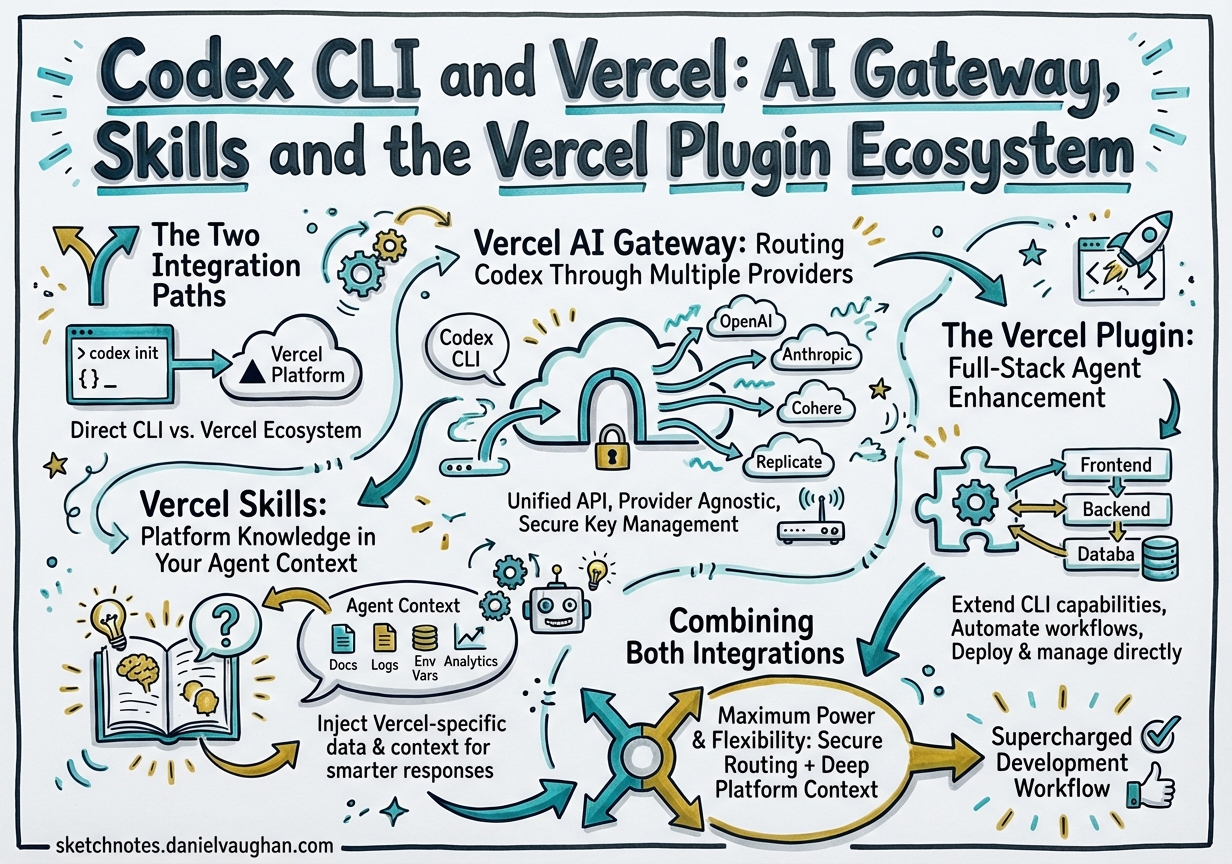
Vercel’s investment in AI coding agents reached critical mass in March 2026 with two distinct — but complementary — integration surfaces for Codex CLI teams: the Vercel AI Gateway (a unified proxy that routes your Codex requests through any supported model provider) and the Vercel Plugin (a knowledge-dense bundle of 38 skills, three specialist agents, and a set of slash commands for Vercel platform work).12 This article covers both paths, when to reach for each, and how to wire them together in a production-grade config.toml.
The Two Integration Paths
graph LR
    subgraph YourMachine["Your machine"]
        CodexCLI["Codex CLI"]
        ConfigTOML["~/.codex/config.toml"]
    end

    subgraph VercelPlatform["Vercel platform"]
        AIGateway["AI Gateway\nai-gateway.vercel.sh"]
        Skills["Vercel Skills\nvercel-labs/agent-skills"]
        Plugin["Vercel Plugin\nvercel/vercel-plugin"]
    end

    subgraph Providers["Model providers"]
        OpenAI["OpenAI\ngpt-5.2-codex / o3"]
        Anthropic["Anthropic\nclaude-sonnet-4.5"]
        Google["Google\ngemini-3-flash"]
    end

    CodexCLI -->|"wire_api = responses"| AIGateway
    ConfigTOML -->|"profile config"| CodexCLI
    AIGateway --> OpenAI
    AIGateway --> Anthropic
    AIGateway --> Google
    Skills -->|"injected into context"| CodexCLI
    Plugin -->|"lifecycle hooks"| CodexCLI
Vercel AI Gateway is a network-layer proxy: your Codex CLI connects to https://ai-gateway.vercel.sh/v1 instead of directly to OpenAI. You gain unified billing, traffic monitoring, spend dashboards, and the ability to swap models from a single profile flip — without touching your agent prompts.1
Vercel Skills / Plugin is a context-layer enhancement: it injects Vercel platform knowledge into your agent at the right moment — when you edit a next.config.ts, run vercel deploy, or import from @ai-sdk/react.3 The skills run as lifecycle hooks inside the agent, not as a network proxy.
You can use one without the other. For most Vercel-focused teams, using both gives you model flexibility and deep platform expertise.
Vercel AI Gateway: Routing Codex Through Multiple Providers
Why Route Through the Gateway?
Direct API keys hard-wire you to one provider at wire_api format. The Gateway gives you:
- Multi-provider routing — switch between
openai/gpt-5.2-codex,anthropic/claude-sonnet-4.5,google/gemini-3-flash, and 100+ other models by changing one config line1 - Centralised cost tracking — per-team, per-project spend visible in the Vercel dashboard under AI Gateway Overview
- OpenTelemetry traces — every Codex request appears in Vercel Observability → AI with token counts, latency, and tool-call breakdowns
- Failover policies — route to a backup model if the primary is rate-limited or unavailable
Configuration
Generate an AI Gateway API key at vercel.com/[team]/~/ai-gateway, then configure Codex:
export AI_GATEWAY_API_KEY="vgw_..."
# ~/.codex/config.toml

[model_providers.vercel]
name    = "Vercel AI Gateway"
base_url = "https://ai-gateway.vercel.sh/v1"
env_key  = "AI_GATEWAY_API_KEY"
wire_api = "responses"   # OpenAI Responses API format

# Default profile: gpt-5.2-codex through the gateway
[profiles.vercel]
model_provider = "vercel"
model          = "openai/gpt-5.2-codex"

# Fast profile: lightweight tasks
[profiles.fast]
model_provider = "vercel"
model          = "openai/gpt-4o-mini"

# Reasoning profile: complex design tasks
[profiles.reasoning]
model_provider = "vercel"
model          = "openai/o3"

# Cross-model review: use a different vendor for adversarial critique
[profiles.claude]
model_provider = "vercel"
model          = "anthropic/claude-sonnet-4.5"
Invoke with codex --profile vercel for standard work and codex --profile claude when you want a cross-model review pass.1 The wire_api = "responses" key is required; it tells Codex to use the OpenAI Responses API wire format, which the Gateway forwards to whichever provider you target — including non-OpenAI backends.1
⚠️ Non-OpenAI models through the Gateway may produce metadata-not-found warnings at startup; these are cosmetic and do not affect functionality.
Vercel Skills: Platform Knowledge in Your Agent Context
How Skills Work
Skills are lazy-loaded Markdown files that the agent ingests on demand. The Vercel skills library (vercel-labs/agent-skills) provides deep-dive guidance for every major Vercel product, activated automatically when glob patterns, import statements, or bash regexes match what you’re working on.3
For agents that do not yet support the full plugin system (see below), npx skills is the recommended path:
npx skills add vercel-labs/agent-skills
This installs to .codex/skills/ (or your agent-specific skills directory) and writes a skills lock file with exact GitHub tree SHAs for reproducible environments.4
Highlights from the library relevant to Codex CLI teams:
| Skill | Fires when |
|---|---|
nextjs |
Editing next.config.ts, app-router files, RSC imports |
ai-sdk |
Importing useChat, streamText, generateText from @ai-sdk/* |
vercel-functions |
Working in /api routes, Edge functions, Cron Jobs |
turborepo |
Editing turbo.json, running turbo build |
vercel-sandbox |
Referencing Firecracker microVMs or untrusted code execution |
workflow |
Using Workflow DevKit, DurableAgent, or step-based execution |
investigation-mode |
Triggered on debugging prompts; orchestrates logs → browser verify → triage |
The injection engine deduplicates across the session — a skill already loaded in turn 3 is not re-injected in turn 12 — keeping your context window lean.3
The Vercel Plugin: Full-Stack Agent Enhancement
Scope
The Vercel Plugin (vercel/vercel-plugin) is a superset of the skills library, bundling 38 skills, three specialist agents, five slash commands, and automated lifecycle hooks into a single installable unit.3 It launched on 17 March 2026 with Claude Code and Cursor support; Codex CLI support was extended in the March 26 update.5
Installation
# For Codex CLI (plugin system)
npx plugins add vercel/vercel-plugin

# Alternative: skills-only path (all agent types)
npx skills add vercel-labs/agent-skills
Lifecycle Hooks
The plugin operates across seven lifecycle stages inside the agent loop:3
sequenceDiagram
    participant Agent as Codex CLI
    participant Plugin as Vercel Plugin

    Agent->>Plugin: SessionStart
    Plugin->>Agent: Inject ecosystem graph (vercel.md)
    Plugin->>Agent: Scan repo for config/deps (profiler)

    Agent->>Plugin: PreToolUse (read/edit/bash)
    Plugin->>Agent: Match skill patterns → inject ≤3 relevant skills

    Agent->>Plugin: PreWrite
    Plugin->>Agent: Validate: deprecated APIs, sunset packages, renamed files

    Agent->>Plugin: PostToolUse
    Plugin->>Agent: Track injected skills, update dedup registry
The session-start ecosystem graph injection is the most impactful: every session begins with vercel.md, a text-form relational graph covering all Vercel products, their relationships, decision matrices, and migration awareness for sunset APIs.3 This is loaded once and does not count against per-tool-call injection limits.
Specialist Agents
The three bundled specialist agents are invocable via your agent’s delegation syntax:3
| Agent | Expertise |
|---|---|
deployment-expert |
CI/CD pipelines, deploy strategies, environment variables, rollbacks |
performance-optimizer |
Core Web Vitals, rendering strategies, caching, asset optimisation |
ai-architect |
AI application design, model selection, streaming architecture, MCP integration |
In a Codex multi-agent workflow, delegate to these agents using the standard TOML subagent syntax:
[[spawn_agents]]
id   = "perf"
role = "deployment-expert"
task = "Analyse the current deploy pipeline and identify any caching misconfigurations"
Slash Commands
Five slash commands are available directly in your session:3
| Command | Purpose |
|---|---|
/vercel-plugin:bootstrap |
Link project, provision env vars, set up database |
/vercel-plugin:deploy |
Deploy preview; add prod for production |
/vercel-plugin:env |
List, pull, add, diff environment variables |
/vercel-plugin:status |
Project status, recent deployments, environment overview |
/vercel-plugin:marketplace |
Discover and install Vercel Marketplace integrations |
Debugging
# Verbose skill injection logs
export VERCEL_PLUGIN_LOG_LEVEL=debug   # summary | debug | trace

# Self-diagnosis: manifest parity, hook timeouts, dedup health
npx vercel-plugin doctor
Combining Both Integrations
The Gateway and the Plugin are orthogonal layers. A production config.toml for a Vercel team might look like:
[model_providers.vercel]
name     = "Vercel AI Gateway"
base_url = "https://ai-gateway.vercel.sh/v1"
env_key  = "AI_GATEWAY_API_KEY"
wire_api = "responses"

[profiles.default]
model_provider = "vercel"
model          = "openai/gpt-5.2-codex"

[profiles.review]
model_provider = "vercel"
model          = "anthropic/claude-sonnet-4.5"

[features]
multi_agent = true
Run with codex --profile default for day-to-day development; switch to --profile review for adversarial cross-model critique of your own agent’s output. The Vercel Plugin skills inject platform knowledge regardless of which model is active behind the gateway.
When to Use Skills-Only vs. Full Plugin
| Scenario | Recommended path |
|---|---|
| Team uses Claude Code + Codex side-by-side | Plugin on Claude Code; skills-only on Codex |
| Codex-first team on Vercel | Full plugin via npx plugins add |
Read-only CI pipeline (codex exec) |
Skills-only; plugins add unnecessary session overhead |
| Debugging unexpected injection behaviour | Plugin + VERCEL_PLUGIN_LOG_LEVEL=trace |
Summary
Two distinct integration points serve different problems. The Vercel AI Gateway solves model routing, cost visibility, and provider redundancy at the network layer — configure once in config.toml and forget. The Vercel Plugin solves context quality at the agent layer — 38 skills injected on demand, three specialist agents for deep platform work, and pre-write validation that catches deprecated APIs before they ship. For Vercel-focused teams running Codex CLI at scale, both layers together give you the flexibility of multi-provider routing with the platform expertise of a specialist Vercel engineer in every session.
Citations
-
Vercel Docs — “OpenAI Codex” (AI Gateway configuration): https://vercel.com/docs/agent-resources/coding-agents/openai-codex ↩ ↩2 ↩3 ↩4 ↩5
-
Vercel Changelog — “Vercel plugin now supported on OpenAI Codex and Codex CLI” (March 26, 2026): https://vercel.com/changelog/vercel-plugin-openai-codex-and-codex-cli-support ↩
-
Vercel Docs — “Vercel Plugin for AI Coding Agents” (skills, agents, hooks): https://vercel.com/docs/agent-resources/vercel-plugin ↩ ↩2 ↩3 ↩4 ↩5 ↩6 ↩7 ↩8
-
vercel-labs/skills GitHub repository — skills package manager: https://github.com/vercel-labs/skills ↩
-
Vercel Changelog — “Introducing the Vercel plugin for coding agents” (March 17, 2026 original launch): https://vercel.com/changelog/introducing-vercel-plugin-for-coding-agents ↩