Codex CLI for .NET and C# Teams: Skills, AGENTS.md, NuGet Sandboxing and Azure OpenAI
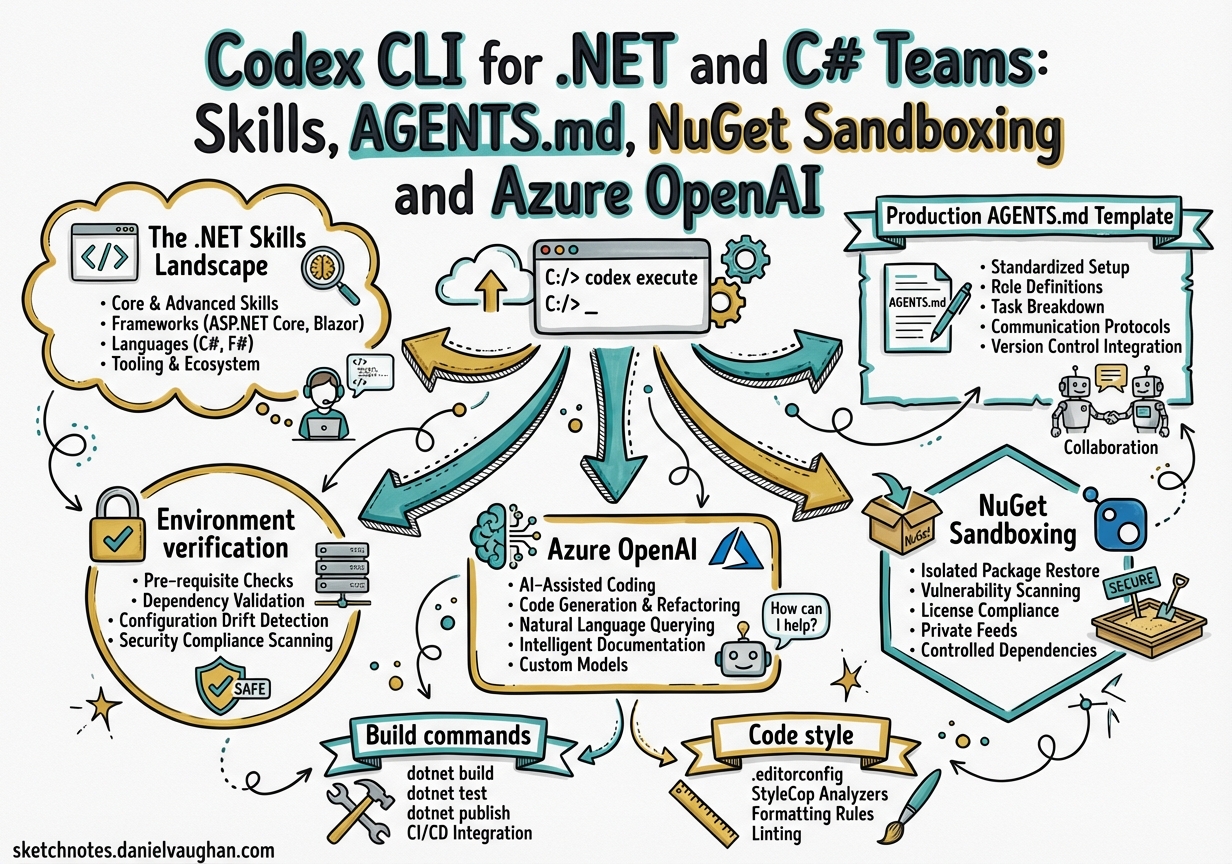
Codex CLI for .NET and C# Teams: Skills, AGENTS.md, NuGet Sandboxing and Azure OpenAI
The .NET ecosystem has a richer Codex integration story than most developers realise. Between the official dotnet/skills catalogue published by the .NET platform team in March 20261, the community managedcode/dotnet-skills CLI with 83+ skills2, and first-class Azure AI Foundry support3, a well-configured C# repo can get near-continuous autonomous quality improvements with minimal friction. This article covers the full stack: skill installation, production AGENTS.md templates, the NuGet sandbox pitfall that affects every first-time user, and multi-agent patterns for large solutions.
The .NET Skills Landscape
Two catalogues serve different needs.
dotnet/skills (GitHub: dotnet/skills) is maintained by the .NET platform team and ships ten curated plugins following the agentskills.io open standard1:
| Plugin | Purpose |
|---|---|
dotnet |
Core coding conventions and idiomatic C# |
dotnet-data |
Entity Framework Core and data-access patterns |
dotnet-diag |
Performance debugging, dotnet-trace, dotnet-counters |
dotnet-msbuild |
Build diagnostics and MSBuild target authoring |
dotnet-nuget |
Package management and lock-file workflows |
dotnet-upgrade |
Framework migration (upgrade-assistant) |
dotnet-maui |
Mobile/desktop cross-platform development |
dotnet-ai |
Semantic Kernel, ML.NET, and Microsoft.Extensions.AI |
dotnet-template-engine |
Project scaffolding with dotnet new |
dotnet-test |
xUnit/NUnit/MSTest execution and diagnostics |
Install individual skills via the skill-installer CLI:
skill-installer install https://github.com/dotnet/skills/tree/main/plugins/dotnet-test/skills/analyzing-dotnet-test-failures
managedcode/dotnet-skills takes a broader, community-driven approach — 83+ skills across ASP.NET Core, Blazor, gRPC, SignalR, Aspire, Orleans, WPF, WinUI, MAUI, Semantic Kernel, and more2. It ships its own dotnet tool:
dotnet tool install --global dotnet-skills

# Scan local .csproj files and recommend skills
dotnet skills recommend

# Install a curated multi-skill package
dotnet skills install package ai      # Semantic Kernel + ML.NET + M.E.AI
dotnet skills install package orleans # Orleans distributed skills

# Install a single skill explicitly
dotnet skills install dotnet-aspnet-core
When you run dotnet skills install without specifying --agent, the tool auto-detects your active agent root — .codex, .claude, .github, or .gemini — and installs into every found target, falling back to .agents/skills if none exist2.
Production AGENTS.md Template
Put this at your repository root. Adjust verify_dotnet_version, test project paths, and the primary framework as needed.
# C# / .NET Project — Codex Guidance

## Environment verification
Before any coding task, confirm the toolchain:
```bash
dotnet --version        # must be 9.0.x or later
dotnet --list-sdks
dotnet --list-runtimes
Build commands
- Restore:
dotnet restore --locked-mode(prefer lock file; see NuGet section) - Build:
dotnet build --no-restore -c Release - Test:
dotnet test --no-build -c Release --logger "console;verbosity=normal" - Single-threaded build (sandbox fallback):
dotnet build -m:1
Code style
- Target framework:
net9.0(ornet9.0-windowsfor desktop) - Nullable reference types are enabled project-wide — never disable them
- Use
file-scoped namespaces; no nested namespace blocks - Async/await all the way — no
.Resultor.Wait()except inMain() - Prefer primary constructors (C# 12+) for DI-only classes
- Use
ILogger<T>fromMicrosoft.Extensions.Logging, notConsole.Write
Testing conventions
- xUnit for all new tests
- One test class per production class, mirroring the source tree under
tests/ - Use
Testcontainersfor integration tests requiring databases or queues - Name tests:
MethodName_Scenario_ExpectedResult
Pull request scope
- One logical change per PR
- Update
CHANGELOG.mdunder## [Unreleased] - Run
dotnet formatbefore committing
NuGet sandboxing
See NuGet section below. If dotnet restore fails with access-denied errors, set:
export NUGET_PACKAGES="$HOME/.nuget/packages"
dotnet restore --locked-mode -m:1
Sensitive files — never modify
*.pfx,*.p12,appsettings.Production.json,secrets.json- Migration history files (
Migrations/) — usedotnet ef migrations addinstead
## NuGet Sandboxing: The Critical Pitfall

The single biggest friction point for .NET teams adopting Codex is NuGet package restore inside sandboxed sessions.

### The Root Cause

In Codex CLI's sandbox mode the agent runs under a restricted user account. On Windows, the sandbox user's profile path differs from the host user's path, causing `dotnet restore` to attempt to write to a path it cannot access. The symptom is a generic `Build FAILED` with no mention of permissions — the real `Access to the path '...' is denied` error is buried in the MSBuild binary log[^4].

On Linux (including Docker and the `codex-universal` base image), the equivalent issue surfaces when the sandbox restricts write access to `~/.nuget/packages`.

### Recommended Workaround

Override the cache path **and** force single-threaded MSBuild[^4]:

```bash
# Linux / macOS
export NUGET_PACKAGES="$HOME/.nuget/packages"
dotnet restore --locked-mode -m:1

# Windows (PowerShell in WSL2 session)
$env:NUGET_PACKAGES = Join-Path $env:USERPROFILE '.nuget\packages'
dotnet restore .\MySolution.sln -m:1
dotnet build  .\MySolution.sln -m:1 --no-restore
Pre-Warm the Cache
The most robust approach is to restore before any agent session:
# Pre-warm before launching Codex
dotnet restore --locked-mode
codex "Implement the feature described in JIRA-1234"
Add this to your AGENTS.md under ## Build commands and Codex will know to attempt the pre-warm step before building:
## Pre-warm NuGet cache if restore fails
If `dotnet restore` fails, run:
`export NUGET_PACKAGES="$HOME/.nuget/packages" && dotnet restore -m:1`
Lock Files
Enable NuGet lock files to make offline restores deterministic. Add to every .csproj or Directory.Build.props:
<PropertyGroup>
  <RestorePackagesWithLockFile>true</RestorePackagesWithLockFile>
  <!-- Enforce lock file in CI / sandbox — remove for local development -->
  <!-- <RestoreLockedMode>true</RestoreLockedMode> -->
</PropertyGroup>
Commit packages.lock.json to source control. With a populated ~/.nuget/packages and a matching lock file, dotnet restore --locked-mode succeeds without any network access — ideal for network-restricted sandboxes.
Azure OpenAI Integration
Enterprises deploying Codex via Azure AI Foundry3 can point any Codex model at an Azure-hosted deployment. Supported models include gpt-5-codex, gpt-5, gpt-5-mini, and gpt-5.3-codex3.
config.toml for Azure
model = "gpt-5-codex"
model_provider = "azure"
model_reasoning_effort = "medium"

[model_providers.azure]
name        = "Azure OpenAI"
base_url    = "https://YOUR_RESOURCE_NAME.openai.azure.com/openai/v1"
env_key     = "AZURE_OPENAI_API_KEY"
wire_api    = "responses"
Key constraints from the Microsoft documentation3:
- Use the
/v1Responses API path — the v1 API no longer requires anapi-versionquery parameter env_keymust name an environment variable, not a literal string- Entra ID / managed identity authentication is not yet supported — use an API key3
Export the key and launch:
export AZURE_OPENAI_API_KEY="${AZURE_OPENAI_API_KEY}"
codex "Add integration tests for the OrderService"
For CI, store the key as a repository secret and reference it in your workflow:
- name: Codex code review via Azure OpenAI
  env:
    AZURE_OPENAI_API_KEY: $
  run: codex -p azure exec --full-auto "review uncommitted changes against main"
GitHub Actions CI Pattern
A full workflow combining pre-warm, Codex exec, and a build verification gate:
name: Codex .NET Quality Gate

on:
  pull_request:
    branches: [main]

jobs:
  codex-review:
    runs-on: ubuntu-latest
    steps:
      - uses: actions/checkout@v4

      - name: Setup .NET 9
        uses: actions/setup-dotnet@v4
        with:
          dotnet-version: '9.0.x'

      - name: Restore NuGet cache
        run: |
          export NUGET_PACKAGES="$HOME/.nuget/packages"
          dotnet restore --locked-mode -m:1

      - name: Build
        run: dotnet build --no-restore -c Release

      - name: Test
        run: dotnet test --no-build -c Release

      - name: Codex review
        env:
          OPENAI_API_KEY: $
        run: |
          npm install -g @openai/codex
          codex exec --full-auto "/review"
Multi-Agent Pattern for Large Solutions
Large .NET solutions — typical in enterprise monorepos with dozens of projects — benefit from parallel agent execution. Define specialist agents in .codex/agents/:
# .codex/agents/dotnet-test-writer.toml
name        = "dotnet-test-writer"
description = "Writes xUnit tests for a given C# class"
model       = "gpt-5-codex-mini"
instructions = """
You are a C# testing specialist. Write xUnit tests using the Arrange/Act/Assert pattern.
Use Testcontainers for any integration tests requiring external services.
Never mock types you don't own.
"""
# .codex/agents/dotnet-reviewer.toml
name        = "dotnet-reviewer"
description = "Reviews C# code for idiomatic .NET patterns"
model       = "gpt-5-codex"
model_reasoning_effort = "high"
instructions = """
Review C# code for: nullable correctness, async patterns, DI lifetime issues,
EF Core N+1 queries, and security (SQL injection, SSRF). Output as markdown diff comments.
"""
Enable multi-agent in your config.toml:
[features]
multi_agent = true

[agents]
max_threads = 4
max_depth   = 2
Invoke from a prompt:
Spawn dotnet-test-writer for src/Services/OrderService.cs
and dotnet-reviewer for src/Controllers/OrderController.cs
in parallel, then summarise both outputs.
Skill Discovery in Context
With dotnet/skills installed, Codex surfaces skill guidance automatically when it encounters relevant code. For example, editing an Entity Framework migration triggers the dotnet-data skill context; a failing test emits diagnostics guided by dotnet-test. You can also invoke skills directly via slash commands in the TUI:
/dotnet-diag:analyzing-dotnet-performance
The managedcode/dotnet-skills CLI adds a recommend command that scans your .csproj files and suggests the most relevant skills — useful when onboarding a new repo:
dotnet skills recommend
# → Detected: Blazor, Aspire, EF Core
# → Suggested: dotnet-blazor, dotnet-aspire, dotnet-entity-framework-core
Known Limitations
- Entra ID / managed identity: Azure OpenAI authentication via Entra ID is not yet supported — API key only3
- NuGet lock files on Windows sandbox: Even with
NUGET_PACKAGESset, certain.nupkgextraction operations require-m:1to avoid access contention4 - Source generators: Codex can write source generators but cannot execute them inside a network-blocked sandbox without pre-restored dependencies — pre-warm with
dotnet buildbefore the session - Windows-only targets:
.codexsandbox on macOS cannot buildnet9.0-windowsTFMs that depend onWindows.winmd— use a Windows CI agent or WSL2
Citations
-
dotnet/skills — GitHub — Official .NET agent skills catalogue by the .NET platform team (March 2026) ↩ ↩2
-
managedcode/dotnet-skills — GitHub — Community .NET skill catalog and CLI (83+ skills) ↩ ↩2 ↩3
-
Codex with Azure OpenAI in Microsoft Foundry Models — Microsoft Learn — Official Azure AI Foundry guide for Codex CLI (updated 2026-03-20) ↩ ↩2 ↩3 ↩4 ↩5 ↩6
-
Windows Codex sandbox: dotnet solution build fails unless NUGET_PACKAGES is overridden and -m:1 is used — GitHub Issue #13183 — Root cause and workaround for NuGet sandbox permission failures ↩