Codex CLI Network Security: requirements.toml Enforcement, Landlock, and Air-Gapped Deployments
Codex CLI Network Security: requirements.toml Enforcement, Landlock, and Air-Gapped Deployments
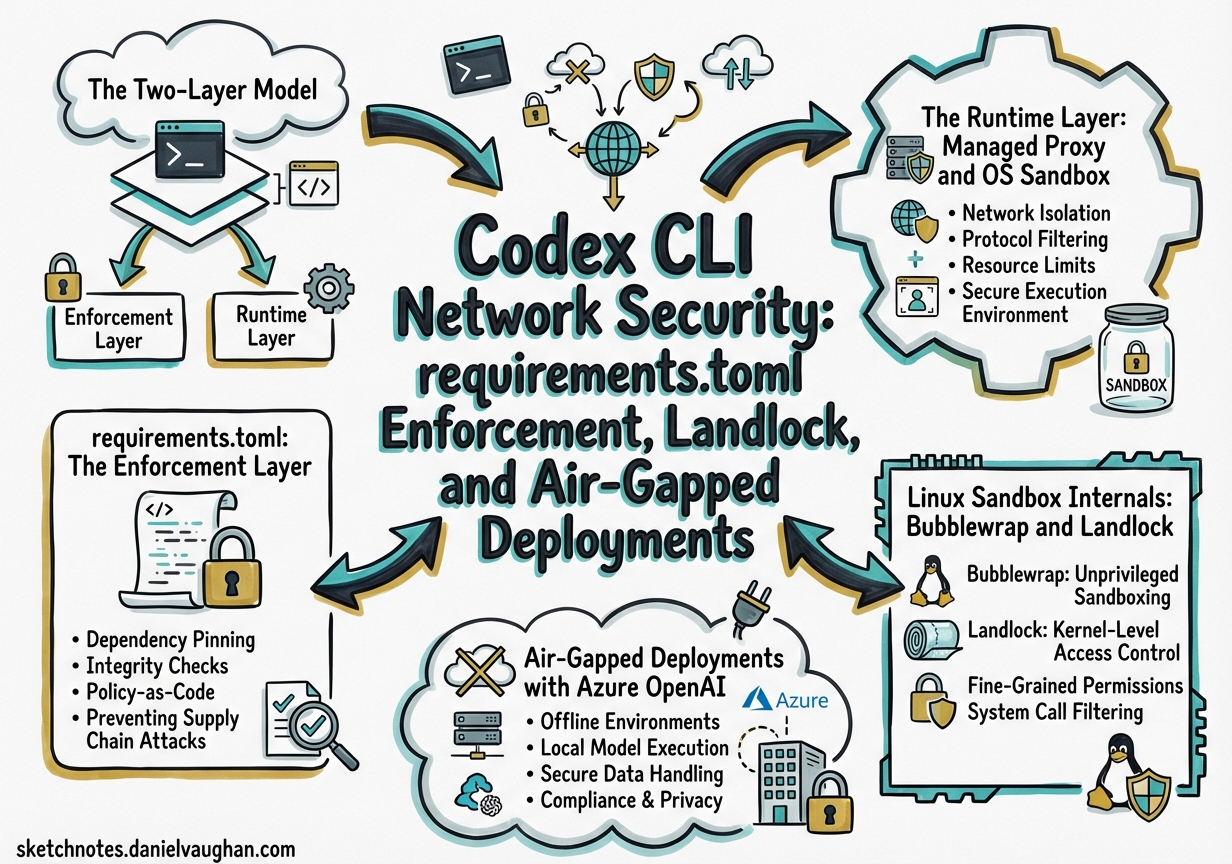
Enterprise teams deploying Codex CLI face two distinct network security challenges. The first is operator enforcement: ensuring that individual developers cannot weaken security policies set by the organisation. The second is runtime isolation: ensuring that the agent itself can only reach the network endpoints it genuinely needs. Codex addresses both through a layered architecture — requirements.toml for policy enforcement and the managed proxy plus OS-level sandbox primitives for runtime isolation — but the two layers are frequently confused. This article separates them clearly and shows how to configure each for regulated and air-gapped environments.
The Two-Layer Model
flowchart TD
    A["IT/MDM Admin"] -->|deploys| B["requirements.toml\n(enforcement layer)"]
    B -->|constrains| C["Developer's config.toml"]
    C -->|configures| D["Managed Proxy\n(runtime layer)"]
    D -->|filters egress| E["Network"]
    D -->|enforced by| F["OS Sandbox\n(Landlock / bwrap / Seatbelt)"]
    F -->|kernel-enforced| E
The enforcement layer (requirements.toml) prevents a developer from configuring a policy that violates organisational rules. The runtime layer (managed proxy + OS sandbox) enforces those policies on actual subprocess network calls, regardless of whether the developer configured them correctly.1
requirements.toml: The Enforcement Layer
requirements.toml is an admin-controlled file that constrains security-sensitive configuration. Developers cannot override values that requirements.toml disallows — when a conflict is detected, Codex falls back to the nearest compatible value and notifies the user.2
Deployment Locations
| Platform | Path |
|---|---|
| Linux / macOS (system) | /etc/codex/requirements.toml |
| macOS (MDM) | com.openai.codex pref key requirements_toml_base64 |
| Windows | ~/.codex/managed_config.toml |
| ChatGPT Business/Enterprise | Cloud-fetched automatically at sign-in |
Cloud-fetched requirements (from ChatGPT Business/Enterprise plans) take precedence over local system files, providing a single source of truth for organisations managing both local CLI and cloud surfaces.2
Core Enforcement Keys
# /etc/codex/requirements.toml

# Prevent developers from disabling approvals entirely
allowed_approval_policies = ["on-request", "untrusted"]

# Prevent full-access sandbox mode
allowed_sandbox_modes = ["read-only", "workspace-write"]

# Restrict web search — empty array means "disabled only"
allowed_web_search_modes = ["disabled"]

# Lock specific feature flags
[features]
use_legacy_landlock = false   # force bubblewrap, not legacy Landlock
voice_transcription = false   # disable in regulated environments

# MCP server allowlist — only named, identity-matched servers permitted
[[mcp_servers]]
name = "internal-docs"
command = "/usr/local/bin/docs-mcp-server"

# Command rules — require prompt before git push, forbid curl to public internet
[[rules.prefix_rules]]
prefix = ["git", "push"]
policy = "prompt"

[[rules.prefix_rules]]
prefix = ["curl", "https://"]
policy = "forbidden"
Web Search Mode Enforcement
The web_search configuration key accepts three values: disabled, cached (OpenAI-maintained index, no live egress), and live (real-time fetch).3 In regulated environments, lock to disabled:
# requirements.toml
allowed_web_search_modes = ["disabled"]
This blocks both the built-in web search tool and any MCP servers that perform live searches, since the MCP allowlist enforcement also applies.2
The Runtime Layer: Managed Proxy and OS Sandbox
When requirements.toml has constrained the policy, the runtime layer enforces it at the OS level. There are two mechanisms at play: the managed proxy (for domain-level filtering) and the OS sandbox primitive (for syscall-level enforcement).
Domain Allow-Lists via Managed Proxy
Domain-level filtering requires a named permissions profile with the managed proxy enabled. The CLI’s binary network_access flag only turns network on or off — for per-domain control, you must use the permissions.<name>.network table:3
# ~/.codex/config.toml  (or project .codex/config.toml)

[permissions.corp-egress.network]
enabled = true
mode = "limited"                          # proxy-only; blocks direct sockets
allowed_domains = [
  "registry.npmjs.org",
  "pypi.org",
  "github.com",
  "*.internal.corp.example.com",
]
denied_domains = [
  "pastebin.com",
  "webhook.site",
]
allow_local_binding = false
proxy_url = "http://127.0.0.1:40301"     # managed proxy listener address

default_permissions = "corp-egress"       # apply this profile by default
Wildcard domains (*.internal.corp.example.com) are supported for subdomain matching.3 The denied_domains list operates as an explicit blocklist that takes precedence over the allowlist, useful for blocking known exfiltration endpoints even when broader access is permitted.
Corporate Upstream Proxy Chaining
In environments where all egress must traverse a corporate HTTPS proxy (e.g., Zscaler, Netskope), chain the managed proxy to the upstream:
[permissions.corp-egress.network]
enabled = true
mode = "limited"
allowed_domains = ["registry.npmjs.org", "pypi.org"]
allow_upstream_proxy = true
proxy_url = "http://127.0.0.1:40301"
# Upstream proxy injected via environment variable HTTPS_PROXY, or:
# socks_url = "socks5://proxy.corp.example.com:1080"
For authenticated upstream proxies, inject credentials via env_http_headers on the model provider entry — this keeps secrets out of the TOML file and reads them from environment variables at runtime:3
[model_providers.azure-corp]
name = "Azure Corp"
base_url = "https://my-instance.openai.azure.com/openai"
api_key_env_var = "AZURE_OPENAI_API_KEY"

[model_providers.azure-corp.env_http_headers]
"Proxy-Authorization" = "PROXY_AUTH_HEADER"  # value read from $PROXY_AUTH_HEADER env var
"api-version" = "AZURE_API_VERSION"
Linux Sandbox Internals: Bubblewrap and Landlock
On Linux, Codex uses two distinct sandboxing approaches. Understanding which is active matters for container deployments and air-gapped environments.
Bubblewrap Pipeline (Default)
The current default is the bubblewrap pipeline.4 When bwrap is present on PATH, Codex uses it to:
- Mount the filesystem read-only by default via
--ro-bind / / - Layer writable roots with
--bind <root> <root> - Re-apply
.git, resolvedgitdir:entries, and.codexas read-only even within writable roots - Isolate the user namespace (
--unshare-user) and PID namespace (--unshare-pid) - When network is restricted without proxy: isolate the network namespace (
--unshare-net)
In managed proxy mode, the sandbox uses --unshare-net plus an internal TCP→UDS→TCP routing bridge rather than full network isolation, so the proxy itself remains reachable. After the bridge activates, seccomp blocks new AF_UNIX/socketpair creation for the user command.4 The helper also applies PR_SET_NO_NEW_PRIVS to prevent privilege escalation.
flowchart LR
    subgraph bwrap_namespace ["bwrap namespace"]
        CMD["Tool subprocess"] -->|"TCP connect"| BRIDGE["UDS→TCP bridge"]
    end
    BRIDGE -->|filtered domains only| PROXY["Managed proxy\n(loopback)"]
    PROXY -->|allowed domains| NET["External network"]
    PROXY -->|blocked domains| DROP["✗ Connection refused"]
Legacy Landlock Fallback
Legacy Landlock + mount protections remain available for environments where bubblewrap is unavailable or undesirable. Force it explicitly:4
# config.toml
[features]
use_legacy_landlock = true
Or via CLI flag: codex -c use_legacy_landlock=true.
Note that requirements.toml can prevent use of legacy Landlock by setting features.use_legacy_landlock = false, ensuring all deployments use the bubblewrap pipeline.2
Container Deployments
Docker and other OCI containers often restrict the kernel features that bubblewrap requires. When bwrap cannot build valid loopback proxy routes, it fails closed — the agent cannot execute tool calls at all.4 The recommended pattern for containerised deployments:
# Dockerfile — let the container provide isolation
FROM ubuntu:24.04
RUN apt-get install -y codex
# The container IS the sandbox; no nested bubblewrap needed
# Run Codex with full access inside an already-isolated container
codex --sandbox danger-full-access --full-auto "your task"
Use --add-dir <path> rather than --sandbox danger-full-access when you only need to extend writable roots beyond the project directory.5
Air-Gapped Deployments with Azure OpenAI
For environments with no outbound internet access to OpenAI’s API, configure Codex to use an Azure OpenAI endpoint exclusively. The requirements.toml MCP server allowlist and allowed_web_search_modes = ["disabled"] prevent accidental calls to public endpoints.2
# ~/.codex/config.toml — air-gapped profile

[model_providers.azure-airgapped]
name = "Azure Air-Gapped"
base_url = "https://codex-prod.openai.azure.com/openai"
api_key_env_var = "AZURE_OPENAI_KEY"
model = "gpt-4.5-codex"

[model_providers.azure-airgapped.env_http_headers]
"api-version" = "AZURE_API_VERSION"    # e.g. "2025-01-01-preview"

[profiles.airgapped]
model = "azure-airgapped/gpt-4.5-codex"
web_search = "disabled"
sandbox_mode = "workspace-write"

[profiles.airgapped.sandbox_workspace_write]
network_access = false

default_profile = "airgapped"
# /etc/codex/requirements.toml — enforce air-gapped posture org-wide

allowed_web_search_modes = ["disabled"]
allowed_sandbox_modes = ["read-only", "workspace-write"]
allowed_approval_policies = ["on-request", "untrusted"]

# Only the internal Azure MCP server is permitted
[[mcp_servers]]
name = "internal-tools"
url = "https://mcp.internal.corp.example.com"
⚠️ Entra ID (Azure AD) token authentication for Azure AI Foundry endpoints currently requires a workaround — see issue #13241 — as Codex does not yet natively support the az login token exchange flow. Use API key authentication via api_key_env_var for production air-gapped deployments until this is resolved.
JSONL Audit Logging for Compliance
Codex automatically writes per-session JSONL logs to $CODEX_HOME/sessions/YYYY/MM/DD/rollout-*.jsonl.6 Each file contains the full session: user/assistant messages, tool calls, approvals, and errors. These logs are the primary audit trail for demonstrating compliance.
For explicit audit workflows:
# Capture a specific session to a named transcript
codex --full-auto \
  --transcript analysis/$(date +%Y-%m-%d)_network-audit.jsonl \
  "run npm install and build"

# Review all tool calls in a session
jq 'select(.type == "tool_call")' \
  ~/.codex/sessions/2026/03/31/rollout-*.jsonl
For structured telemetry, opt in to OpenTelemetry export — off by default:
[otel.exporter.corp-collector]
endpoint = "https://otel.internal.corp.example.com:4318"
protocol = "http/protobuf"

[otel.exporter.corp-collector.headers]
"Authorization" = "Bearer <token>"
Enable JSON-format app-server logs for integration with your SIEM:
LOG_FORMAT=json codex --full-auto "your task" 2> /var/log/codex/session.jsonl
Putting It Together: Enterprise Hardening Checklist
flowchart TD
    A["Start: Enterprise Codex Deployment"] --> B{"Air-gapped?"}
    B -->|Yes| C["Configure azure model_provider\nSet network_access = false\nSet web_search = disabled"]
    B -->|No| D["Configure permissions profile\nwith allowed_domains"]
    C --> E["Deploy requirements.toml via MDM\nallowed_web_search_modes = disabled\nallowed_sandbox_modes = workspace-write"]
    D --> E
    E --> F{"Linux?"}
    F -->|Yes| G["Verify bubblewrap present\n(apt install bubblewrap)\nOr use_legacy_landlock = true"]
    F -->|macOS| H["Seatbelt active by default"]
    F -->|Docker container| I["Run --sandbox danger-full-access\nContainer provides isolation"]
    G --> J["Enable JSONL rollout audit logs\nOptionally configure OTel exporter"]
    H --> J
    I --> J
    J --> K["Review: codex --sandbox-test\nVerify domain blocks with curl in sandbox"]
| Layer | Mechanism | Key Config |
|---|---|---|
| Policy enforcement | requirements.toml |
allowed_* keys, MDM deployment |
| Domain filtering | Managed proxy | permissions.<n>.network.allowed_domains |
| Binary network control | Sandbox | sandbox_workspace_write.network_access |
| OS enforcement (Linux) | bubblewrap + seccomp | features.use_legacy_landlock |
| Egress audit | JSONL rollouts + OTel | $CODEX_HOME/sessions/ + otel.exporter |
| Web search lockdown | requirements.toml |
allowed_web_search_modes = ["disabled"] |
The enforcement layer and runtime layer must both be configured — requirements.toml alone does not apply network filtering; it only prevents developers from disabling the filtering you configure in config.toml. Deploying both is the only way to achieve defence-in-depth.
Citations
-
[Agent approvals & security – Codex OpenAI Developers](https://developers.openai.com/codex/agent-approvals-security) -
[Managed configuration – Codex OpenAI Developers](https://developers.openai.com/codex/enterprise/managed-configuration) -
[Configuration Reference – Codex OpenAI Developers](https://developers.openai.com/codex/config-reference) -
[Sandboxing – Codex OpenAI Developers](https://developers.openai.com/codex/concepts/sandboxing) -
Session/Rollout Files discussion – openai/codex GitHub Discussions #3827 ↩