Codex Plugin Discovery: @Mentions, the In-TUI Browser and Marketplace Navigation
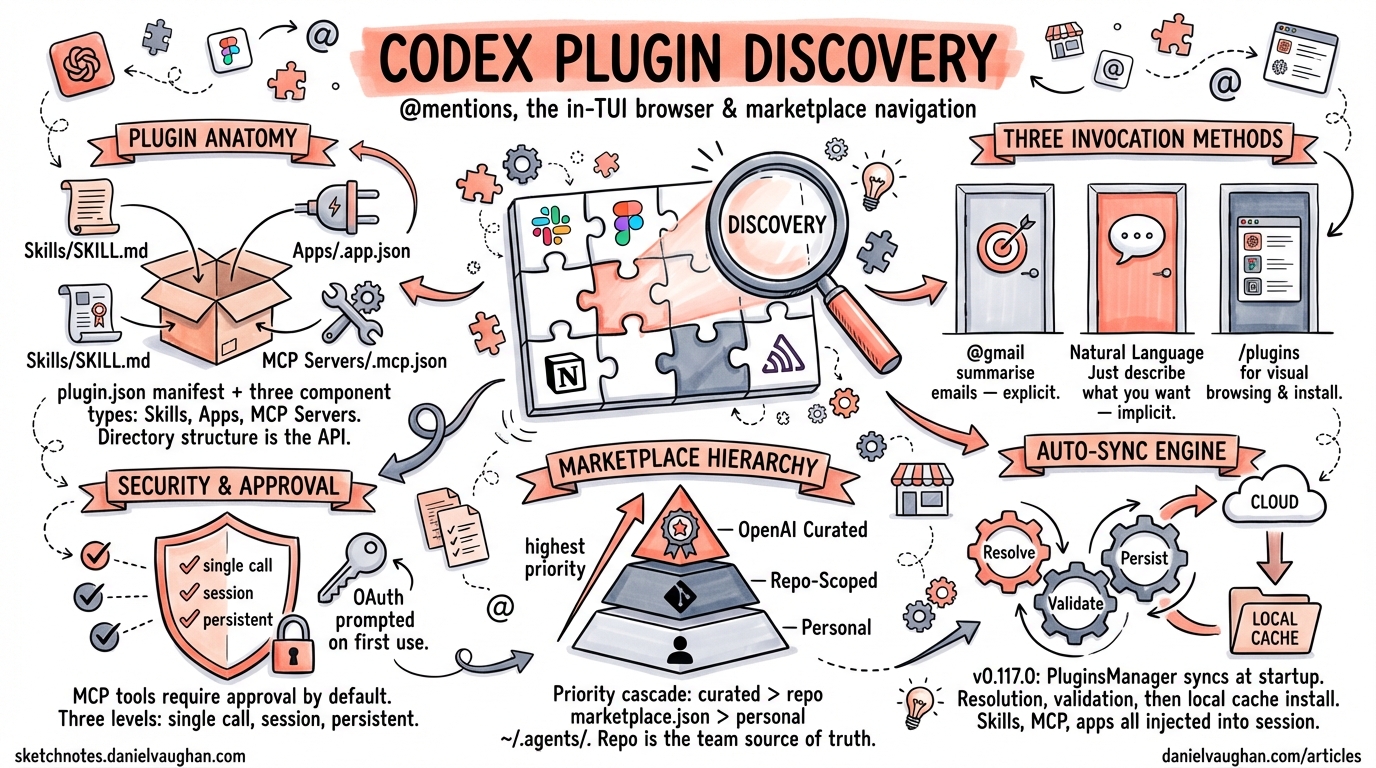
Codex Plugin Discovery: @Mentions, the In-TUI Browser and Marketplace Navigation
On 26 March 2026, Codex v0.117.0 shipped plugins as a first-class workflow1. Skills, MCP server configurations and third-party app integrations — previously scattered across dotfiles and ad-hoc scripts — now ship as installable bundles that Codex can discover, install and surface inside a session. More than twenty launch partners (Slack, Figma, Notion, Sentry and others) published on day one2. This article walks through the discovery and interaction model: how you find plugins, how you invoke them, and how the marketplace hierarchy works under the hood.
Plugin Anatomy (Refresher)
A plugin is a directory with a required .codex-plugin/plugin.json manifest3. Everything else is optional:
my-plugin/
├── .codex-plugin/
│   └── plugin.json        # required manifest
├── skills/
│   └── review-pr/
│       └── SKILL.md       # natural-language instructions
├── .app.json              # app / connector mappings
├── .mcp.json              # MCP server definitions
└── assets/                # icons, screenshots
The manifest declares three component types3:
| Component | Purpose | Reference field |
|---|---|---|
| Skills | Reusable prompt-based instructions | "skills" |
| Apps | OAuth/API connectors (GitHub, Slack, etc.) | "apps" → .app.json |
| MCP Servers | External tool providers | "mcpServers" → .mcp.json |
A minimal plugin.json:
{
  "name": "my-plugin",
  "version": "0.1.0",
  "description": "A brief summary of what this plugin does",
  "skills": ["./skills"],
  "mcpServers": "./.mcp.json",
  "apps": "./.app.json",
  "interface": {
    "displayName": "My Plugin",
    "shortDescription": "One-liner for the browser",
    "category": "Productivity",
    "capabilities": ["Read", "Write"]
  }
}
Three Ways to Invoke a Plugin
Once a plugin is installed, Codex exposes it through three interaction patterns4:
1. @Mention — Explicit Invocation
Type @plugin-name (or @plugin-name/skill-name) directly in your prompt. This is the precision tool: mentioning a plugin causes its full context — capabilities, tools, configuration — to be injected into the model’s context window automatically4. No need to describe what the plugin does; the agent already knows.
@gmail Summarise unread threads from the last 24 hours
@sentry List unresolved errors in the payments service tagged critical
@figma Export the onboarding-flow frame as SVG
Version 0.117.0 fixed cases where explicit mentions lost context during multi-turn conversations1. If you notice a plugin “forgetting” mid-session, ensure you are running at least v0.117.0.
2. Natural Language — Implicit Discovery
Simply describe what you want. If an installed plugin matches, Codex selects the appropriate tools without an explicit mention:
Summarise my unread emails from today
Codex maps this to the Gmail plugin if installed. This works because the model is made aware of all enabled plugins at session start1.
3. /plugins — The In-TUI Browser
The /plugins command opens an interactive browser inside the terminal1. From here you can:
- Browse featured and categorised plugins
- Search by keyword
- View plugin detail cards (description, capabilities, screenshots)
- Install or uninstall with a single action
- Trigger authentication flows (OAuth, API key) during install
flowchart TD
    A["/plugins command"] --> B["Plugin Browser TUI"]
    B --> C{"Browse / Search"}
    C --> D["Featured Plugins"]
    C --> E["Category Filter"]
    C --> F["Keyword Search"]
    D --> G["Plugin Detail Card"]
    E --> G
    F --> G
    G --> H{"Action"}
    H --> I["Install"]
    H --> J["Uninstall"]
    I --> K{"Auth Required?"}
    K -->|Yes| L["OAuth / API Key Flow"]
    K -->|No| M["Cached Locally"]
    L --> M
Marketplace Hierarchy
Not all plugins come from the same place. Codex reads plugin catalogues in a strict priority order[^5]3:
flowchart LR
    A["OpenAI Curated\nDirectory"] -->|highest priority| B["Repo-Scoped\nMarketplace"]
    B --> C["Personal\nMarketplace"]
    C -->|lowest priority| D["Resolved\nPlugin Set"]
1. OpenAI Curated Directory
The official directory, maintained by OpenAI, hosts vetted plugins from launch partners2. These appear in the /plugins browser under “Featured”. The directory is fetched at startup and cached locally.
2. Repo-Scoped Marketplace
A marketplace.json at $REPO_ROOT/.agents/plugins/marketplace.json scopes plugins to a specific repository3. This is the team distribution channel — commit a marketplace manifest and every collaborator gets the same plugin set:
{
  "name": "acme-internal",
  "interface": {
    "displayName": "Acme Engineering Plugins"
  },
  "plugins": [
    {
      "name": "acme-deploy",
      "source": {
        "source": "local",
        "path": "./plugins/acme-deploy"
      },
      "policy": {
        "installation": "AVAILABLE",
        "authentication": "ON_INSTALL"
      },
      "category": "DevOps"
    }
  ]
}
3. Personal Marketplace
~/.agents/plugins/marketplace.json holds plugins scoped to a single developer3. Use this for personal workflow automation or plugins under development.
When a plugin name appears in multiple marketplaces, the highest-priority source wins. This means an organisation can override a curated plugin with a repo-scoped fork if needed.
Product-Scoped Auto-Sync
Starting with v0.117.0, Codex syncs product-scoped plugins at startup1. The PluginsManager performs three steps during session initialisation[^5]:
- Resolution — reads each
marketplace.jsonviaresolve_marketplace_pluginto locate plugin sources - Validation — checks
MarketplacePluginPolicyto ensure the plugin is available for the current product surface (CLI, Desktop, VS Code) - Persistence — installs or updates files into the local
plugins/cache/directory viaPluginStore
After sync, LoadedPlugin objects are injected into the session. Skills become natural-language instructions, MCP servers register with McpConnectionManager, and app connectors enable remote tools[^5].
Plugin Configuration in config.toml
Individual plugins can be toggled without uninstalling them4:
[plugins."gmail@openai-curated"]
enabled = false

[plugins."acme-deploy@acme-internal"]
enabled = true
The key format is "plugin-name@marketplace-name". Setting enabled = false prevents the plugin from loading at session start without removing it from cache.
Security and Approval Model
Plugin-provided MCP tools default to requiring user approval on each call unless explicitly configured otherwise[^5]. The approval system offers three granularity levels:
- Single call — approve once, for this invocation only
- Session — approve for the remainder of the current session
- Persistent — remember the decision across sessions
The connectors::app_tool_policy function determines whether a tool is enabled and what approval level applies[^5]. If an MCP server requires OAuth or API keys, Codex triggers an McpServerElicitationRequest — the authentication prompt you see during install or first use[^5].
CLI Management Commands
Beyond the TUI browser, plugins can be managed from the command line5:
# Install from the curated directory
codex plugin install @openai/build-web-apps

# Install a local plugin for testing
codex plugin install ./path/to/plugin --local

# List installed plugins
codex plugin list

# Scaffold a new plugin
codex plugin create my-plugin
The built-in @plugin-creator skill can also scaffold a plugin interactively, generating the plugin.json manifest and directory structure3.
Known Issues
At the time of writing, a Cloudflare challenge intermittently blocks the featured-plugins API endpoint from the Desktop app, preventing the marketplace from populating6. The CLI’s /plugins browser is unaffected when fetching from repo-scoped or personal marketplaces. If you hit a 403 on the curated directory, check the GitHub issue tracker for status updates.
⚠️ Self-serve publishing to the OpenAI curated directory is not yet available — the documentation states it is “coming soon”3.
Practical Workflow: Onboarding a Team
Putting this together, here is a typical flow for rolling out plugins to an engineering team:
sequenceDiagram
    participant Lead as Tech Lead
    participant Repo as Repository
    participant Dev as Developer
    participant Codex as Codex CLI

    Lead->>Repo: Commit marketplace.json<br/>to .agents/plugins/
    Lead->>Repo: Commit plugin directories<br/>with plugin.json manifests
    Dev->>Repo: git pull
    Dev->>Codex: codex (start session)
    Codex->>Codex: Auto-sync detects<br/>repo marketplace
    Codex->>Dev: Prompts for auth<br/>(if required)
    Dev->>Codex: @acme-deploy deploy staging
    Codex->>Dev: Executes plugin skill
- The tech lead commits a
marketplace.jsonand plugin directories to the repo - Developers pull and start a Codex session — auto-sync picks up the repo marketplace
- Authentication prompts fire on first use
- Developers invoke plugins via
@mentionor natural language
No manual install steps, no Slack messages explaining where to find the config file. The repo is the source of truth.
Summary
The plugin discovery model in v0.117.0 is built around three layers: the curated directory for vetted integrations, repo-scoped marketplaces for team-specific tooling, and personal marketplaces for individual workflows. The @mention syntax gives precise control, /plugins provides visual browsing, and auto-sync ensures everyone on a team runs the same plugin set. The main gap remains self-serve publishing — until that ships, custom plugins are distributed through marketplace manifests committed to repositories or personal directories.
Citations
| [^5]: DeepWiki, “Plugins System | openai/codex,” https://deepwiki.com/openai/codex/5.11-plugins-system |
-
OpenAI, “Codex Changelog — v0.117.0 (2026-03-26),” OpenAI Developers, https://developers.openai.com/codex/changelog ↩ ↩2 ↩3 ↩4 ↩5
-
WinBuzzer, “OpenAI Launches Plugin Marketplace for Codex with Enterprise Controls,” 31 March 2026, https://winbuzzer.com/2026/03/31/openai-launches-plugin-marketplace-codex-enterprise-controls-xcxwbn/ ↩ ↩2
-
OpenAI, “Build plugins – Codex,” OpenAI Developers, https://developers.openai.com/codex/plugins/build ↩ ↩2 ↩3 ↩4 ↩5 ↩6 ↩7
-
OpenAI, “Plugins – Codex,” OpenAI Developers, https://developers.openai.com/codex/plugins ↩ ↩2 ↩3
-
BSWEN, “What Are OpenAI Codex Plugins and How Do They Work?,” 27 March 2026, https://docs.bswen.com/blog/2026-03-27-what-are-openai-codex-plugins/ ↩
-
GitHub, “Codex desktop plugin marketplace unreachable — Cloudflare challenge blocks plugins/featured API, preventing new plugin installs · Issue #16808,” https://github.com/openai/codex/issues/16808 ↩