Building a Codex CLI Plugin: Skills, Hooks, MCP Servers and Project-Specific Automation
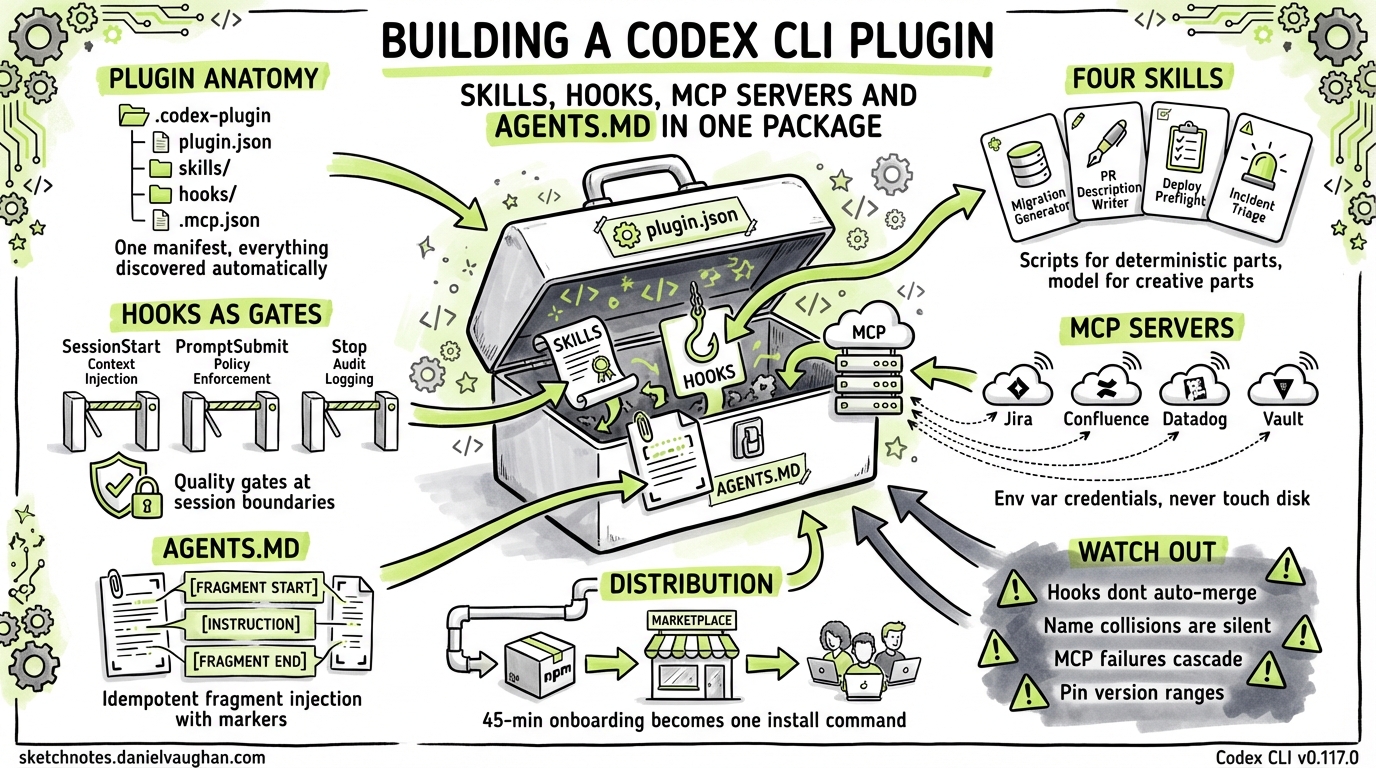
Building a Codex CLI Plugin: Skills, Hooks, MCP Servers and Project-Specific Automation
Codex CLI plugins bundle skills, hooks, MCP server declarations, and AGENTS.md fragments into a single installable unit. A plugin can reduce onboarding from a 45-minute walkthrough document to codex plugins install ./plugins/acme-platform, giving every developer and CI runner identical agent behaviour from that point forward.
This article covers the full anatomy of a Codex CLI plugin, how each piece connects to the discovery mechanisms, and the practical pitfalls that emerge during real use. The plugin system shipped in v0.117.0 (March 26, 2026)1.
Plugin Anatomy
A plugin is a directory with one required file — .codex-plugin/plugin.json — and optional directories for skills, MCP configs, hooks, and AGENTS.md fragments. Here is the full layout for a representative platform plugin:
acme-platform/
├── .codex-plugin/
│   └── plugin.json              ← manifest (required)
├── skills/
│   ├── migration-generator/
│   │   ├── SKILL.md
│   │   ├── scripts/
│   │   │   └── generate-migration.sh
│   │   └── references/
│   │       └── flyway-conventions.md
│   ├── pr-description-writer/
│   │   ├── SKILL.md
│   │   └── assets/
│   │       └── pr-template.md
│   ├── deploy-preflight/
│   │   ├── SKILL.md
│   │   └── scripts/
│   │       └── preflight-check.sh
│   └── incident-triage/
│       ├── SKILL.md
│       └── agents/
│           └── openai.yaml
├── .mcp.json                    ← MCP server declarations
├── hooks/
│   └── hooks.json               ← hook definitions
├── agents-fragment.md           ← AGENTS.md injection content
└── assets/
    └── icon.png
Each component maps to a specific Codex CLI discovery mechanism:
- Skills follow the standard SKILL.md format and land in the plugin’s
skills/directory. When installed, Codex registers them alongside any project or user skills.2 - MCP servers declared in
.mcp.jsonuse the same format as.codex/mcp.jsonand are registered automatically on install.1 - Hooks need manual wiring into the project’s
.codex/hooks.json— the plugin install does not auto-merge hooks as of April 2026. More on this below. - AGENTS.md fragments are injected via a postinstall script. Codex does not natively merge AGENTS.md content from plugins, so you handle this yourself.
The Manifest
{
  "name": "acme-platform",
  "version": "2.1.0",
  "description": "Platform plugin for Acme Corp Spring Boot monorepo: migration generation, PR descriptions, deployment preflight, and incident triage.",
  "author": {
    "name": "Acme Platform Team",
    "email": "platform@acme.dev"
  },
  "repository": "https://github.com/acme-corp/codex-plugin-platform",
  "license": "MIT",
  "skills": "./skills/",
  "mcpServers": "./.mcp.json",
  "interface": {
    "displayName": "Acme Platform",
    "shortDescription": "Spring Boot monorepo automation",
    "category": "Engineering",
    "capabilities": ["Read", "Write", "Bash"],
    "defaultPrompt": [
      "Generate a Flyway migration for the new payments table",
      "Write a PR description for the current branch",
      "Run deployment preflight checks for staging"
    ],
    "brandColor": "#2563EB",
    "composerIcon": "./assets/icon.png"
  }
}
The name field is kebab-case and becomes the namespace. The defaultPrompt array surfaces example prompts in the Codex UI — write these as things a developer would actually type on day one, not marketing copy.1
Project-Specific Skills: Four Worked Examples
A typical enterprise plugin starts with three or four skills targeting the team’s most common workflows. The examples below cover migration generation, PR descriptions, deployment preflight, and incident triage — four distinct concerns that benefit from different skill designs.
Skill 1: Migration Generator
Teams using Flyway with a strict naming convention (V{timestamp}__{description}.sql) and rules about what belongs in a migration versus a seed script benefit from a skill that encodes those conventions. Without it, new developers commonly get the naming wrong.
---
name: migration-generator
description: |
  Generates Flyway SQL migrations for the Acme Spring Boot services.
  Use when creating database schema changes, adding tables, columns,
  or indexes. Follows Acme naming conventions (V{timestamp}__description.sql).
  Do NOT use for seed data or test fixtures — those go in db/seeds/.
metadata:
  author: acme-platform-team
  version: "2.1"
allowed-tools: Bash(bash:*) Read Write
---

## Migration Generation Workflow

1. Read the current schema state from `db/migrations/` to understand existing tables
2. Run `scripts/generate-migration.sh` to create the migration file with the correct timestamp and naming
3. Write the SQL DDL into the generated file
4. Validate by running `./gradlew flywayValidate -Dflyway.locations=filesystem:db/migrations`

## Naming Rules

- Format: `V{YYYYMMDDHHmmss}__{snake_case_description}.sql`
- Double underscore between version and description
- Description must be lowercase with underscores, no hyphens
- One logical change per migration — do not combine table creation with data backfill

## Anti-Patterns

- Never use `DROP TABLE` without a preceding data backup migration
- Never modify a migration that has already been applied (check `flyway_schema_history`)
- Indexes on large tables (>10M rows) must use `CREATE INDEX CONCURRENTLY` (Postgres)

See `references/flyway-conventions.md` for the full team style guide.
The script is short — it generates the filename:
#!/usr/bin/env bash
# scripts/generate-migration.sh
TIMESTAMP=$(date +%Y%m%d%H%M%S)
DESC="${1:?Usage: generate-migration.sh <description>}"
DESC_CLEAN=$(echo "$DESC" | tr '[:upper:]' '[:lower:]' | tr ' -' '__' | tr -cd 'a-z0-9_')
FILENAME="V${TIMESTAMP}__${DESC_CLEAN}.sql"
SERVICE="${2:-core}"
TARGET="services/${SERVICE}/src/main/resources/db/migrations/${FILENAME}"
mkdir -p "$(dirname "$TARGET")"
echo "-- Migration: ${DESC}" > "$TARGET"
echo "-- Generated: $(date -Iseconds)" >> "$TARGET"
echo "" >> "$TARGET"
echo "$TARGET"
The skill delegates the deterministic part (naming, timestamping, file placement) to the script and the creative part (writing the actual DDL) to the model. This split matters — the model is good at SQL generation but unreliable at remembering that the team uses double underscores and not single ones.
Skill 2: PR Description Writer
Every team has a PR template. Most developers ignore it. This skill reads the diff, the linked ticket (if the branch name contains a Jira key), and the template, then generates a description.
---
name: pr-description-writer
description: |
  Writes pull request descriptions following the Acme PR template.
  Use when the user asks to write, draft, or generate a PR description,
  or when preparing a branch for review. Reads the current diff and
  linked Jira ticket context via MCP.
metadata:
  author: acme-platform-team
  version: "2.1"
---

## Workflow

1. Run `git diff main...HEAD --stat` to get the change summary
2. Run `git log main..HEAD --oneline` to get commit messages
3. Extract the Jira ticket key from the branch name (pattern: `[A-Z]+-[0-9]+`)
4. If a ticket key exists, use the Jira MCP server to fetch the ticket summary and acceptance criteria
5. Read `assets/pr-template.md` for the team's PR template structure
6. Generate the PR description following the template

## Template Sections (Required)

- **Summary**: 2-3 sentences describing the change
- **Ticket**: Link to Jira ticket with key acceptance criteria
- **Changes**: Bulleted list of files changed with brief rationale
- **Testing**: What was tested, how to verify
- **Rollback**: How to revert if something goes wrong

## Rules

- Never fabricate a Jira ticket link — if no ticket is detected, leave the section as "No linked ticket"
- Keep the summary under 100 words
- List breaking changes first, in bold
Skill 3: Deployment Preflight Checker
This skill should be set to allow_implicit_invocation: false because it runs checks that take 20-30 seconds and should not fire on a stray mention of “deploy” in conversation.
# agents/openai.yaml
policy:
  allow_implicit_invocation: false
The SKILL.md itself runs a series of validation checks:
---
name: deploy-preflight
description: |
  Runs deployment preflight checks for Acme services before promoting
  to staging or production. Validates environment variables, dependency
  versions, migration status, and health endpoints. Explicit invocation
  only — call with $deploy-preflight.
allowed-tools: Bash(bash:*) Read
---

## Preflight Checklist

Run each check in order. Stop on first failure and report.

1. **Environment vars**: Run `scripts/preflight-check.sh env` — validates required env vars are set for the target environment
2. **Dependency audit**: Run `./gradlew dependencyCheckAnalyze` — check for CVEs above CVSS 7.0
3. **Migration status**: Run `./gradlew flywayInfo` — ensure no pending migrations
4. **Docker build**: Run `docker build --target=test .` — confirm the image builds and tests pass
5. **Health check**: If deploying to staging, `curl -sf https://staging.acme.dev/actuator/health`

## Output Format

Produce a markdown checklist:
- [x] Environment variables: all 12 required vars present
- [x] Dependencies: no CVEs above 7.0
- [ ] Migration: 1 pending migration (V20260409120000__add_payments_index.sql)
- [x] Docker build: passed (3m 22s)
- [ ] Health check: skipped (not deploying to staging)

## Failure Handling

If any check fails, do NOT proceed. Report the failure clearly and suggest the fix.
Skill 4: Incident Triage
This skill connects to Datadog via MCP to pull recent error rates and logs during an incident. It is the newest of the four and the least proven — the Datadog MCP server is still rough around the edges.
---
name: incident-triage
description: |
  Assists with production incident triage for Acme services. Pulls recent
  error rates, log patterns, and deployment history. Use when investigating
  a production issue, alert, or outage. Requires Datadog MCP server.
metadata:
  author: acme-platform-team
  version: "1.0"
---

## Triage Workflow

1. Ask which service is affected
2. Use the Datadog MCP server to query error rate for the last 30 minutes
3. Use the Datadog MCP server to pull recent error logs (last 100 entries)
4. Check recent deployments: `git log --since='6 hours ago' --oneline`
5. Cross-reference error timestamps with deployment timestamps
6. Produce a triage summary: what changed, when errors started, likely cause, suggested next steps
Hooks as Quality Gates
Hooks run at session lifecycle boundaries — not at the file-operation level.3 This limits what you can enforce, but three patterns work well as quality gates.
Pattern 1: Pre-Prompt Policy Enforcement
The userpromptsubmit hook fires before the model processes a prompt. Use it to block operations that violate team policy:
#!/usr/bin/env bash
# hooks/prompt-policy.sh
# Block attempts to modify infrastructure files without explicit approval

if echo "$CODEX_PROMPT" 2>/dev/null | grep -qiE '(terraform|pulumi|cloudformation|\.tf$)'; then
  if [ "$CODEX_APPROVAL_MODE" != "full-access" ]; then
    echo "Infrastructure changes require full-access approval mode." >&2
    echo "Re-run with: codex --approval-mode full-access" >&2
    exit 2
  fi
fi

# Augment every prompt with current branch context
BRANCH=$(git rev-parse --abbrev-ref HEAD 2>/dev/null || echo "unknown")
echo "Current branch: $BRANCH"
Pattern 2: Session Start Context Injection
Inject project-specific context so the model knows what it is working with before the first turn:
#!/usr/bin/env bash
# hooks/session-context.sh
echo "## Acme Platform Context"
echo "- Services: $(ls services/ 2>/dev/null | tr '\n' ', ')"
echo "- Active profile: ${SPRING_PROFILES_ACTIVE:-default}"
echo "- Last deploy: $(git log --format='%h %s (%cr)' --all --grep='deploy' -1 2>/dev/null || echo 'unknown')"

# Inject any open incident context
if [ -f ".incident-active" ]; then
  echo ""
  echo "⚠ ACTIVE INCIDENT — see .incident-active for details"
  cat .incident-active
fi
Pattern 3: Stop Hook for Audit Logging
Log what happened in each session for compliance:
#!/usr/bin/env bash
# hooks/audit-log.sh
LOG_DIR="${HOME}/.codex/audit"
mkdir -p "$LOG_DIR"
echo "$(date -Iseconds) | session_end | branch=$(git rev-parse --abbrev-ref HEAD 2>/dev/null) | pwd=$(pwd)" >> "$LOG_DIR/sessions.log"
The hooks.json Wiring
{
  "hooks": {
    "SessionStart": [
      {
        "hooks": [
          {
            "type": "command",
            "command": "bash ./plugins/acme-platform/hooks/session-context.sh",
            "statusMessage": "Loading Acme context…",
            "timeout": 10
          }
        ]
      }
    ],
    "userpromptsubmit": [
      {
        "hooks": [
          {
            "type": "command",
            "command": "bash ./plugins/acme-platform/hooks/prompt-policy.sh",
            "statusMessage": "Checking policy…",
            "timeout": 5
          }
        ]
      }
    ],
    "Stop": [
      {
        "hooks": [
          {
            "type": "command",
            "command": "bash ./plugins/acme-platform/hooks/audit-log.sh",
            "statusMessage": "Logging session…",
            "timeout": 5
          }
        ]
      }
    ]
  }
}
One limitation: Codex does not auto-merge hook configs from plugins. The postinstall script (covered in Packaging below) handles this by merging the plugin’s hooks into the project’s .codex/hooks.json.
MCP Server Integration
The plugin declares four MCP server connections in .mcp.json:
{
  "mcpServers": {
    "jira": {
      "command": "npx",
      "args": ["-y", "@anthropic/mcp-server-atlassian"],
      "env": {
        "JIRA_API_TOKEN": "${JIRA_API_TOKEN}",
        "JIRA_BASE_URL": "https://acme.atlassian.net"
      }
    },
    "confluence": {
      "command": "npx",
      "args": ["-y", "@anthropic/mcp-server-atlassian"],
      "env": {
        "CONFLUENCE_API_TOKEN": "${CONFLUENCE_API_TOKEN}",
        "CONFLUENCE_BASE_URL": "https://acme.atlassian.net/wiki"
      }
    },
    "datadog": {
      "command": "npx",
      "args": ["-y", "@anthropic/mcp-server-datadog"],
      "env": {
        "DD_API_KEY": "${DD_API_KEY}",
        "DD_APP_KEY": "${DD_APP_KEY}"
      }
    },
    "vault": {
      "command": "npx",
      "args": ["-y", "mcp-server-vault"],
      "env": {
        "VAULT_ADDR": "${VAULT_ADDR}",
        "VAULT_TOKEN": "${VAULT_TOKEN}"
      }
    }
  }
}
Each server references environment variables rather than embedding credentials. The ${VAR} syntax in env fields is resolved by Codex at server startup — the values never touch disk.4
Key observations from production use:
Jira context transforms PR descriptions. The PR description writer skill goes from generating vague summaries to producing descriptions that reference acceptance criteria verbatim once it can read the linked ticket.
Datadog MCP is useful but noisy. The server exposes dozens of tools. Use enabled_tools in your project’s .codex/config.toml to restrict the agent to the three or four queries that matter:
[mcp_servers.datadog]
enabled_tools = ["query_metrics", "search_logs", "get_monitor_status"]
Vault integration is sensitive. The Vault MCP server should only run in sessions where the developer genuinely needs secret values — not in every Codex session. Mark it as required = false and document when to enable it.
Confluence for architectural context. Pointing the agent at an ADR (Architecture Decision Record) space in Confluence gives it the “why” behind design choices. When the migration generator skill needs to decide between adding a column and creating a join table, the ADRs provide the reasoning the model cannot infer from code alone.
AGENTS.md Composition
Codex loads AGENTS.md files hierarchically — repo root, then directory-level overrides.5 A plugin cannot overwrite the project’s existing AGENTS.md without destroying team-maintained content. The composition strategy that works:
Fragment File
The plugin ships an agents-fragment.md:
## Acme Platform Plugin Context

This project uses the Acme Platform Codex plugin (v2.1.0).

### Available Skills
- `$migration-generator` — generate Flyway migrations following team conventions
- `$pr-description-writer` — draft PR descriptions from diff + Jira ticket
- `$deploy-preflight` — run deployment preflight checklist (explicit only)
- `$incident-triage` — production incident triage with Datadog context

### Conventions
- All database migrations use Flyway with V{timestamp} naming
- PR descriptions follow the template in `.github/PULL_REQUEST_TEMPLATE.md`
- Infrastructure files (`terraform/`, `pulumi/`, `.github/workflows/`) require full-access approval mode
- Spring Boot services live in `services/{name}/` with standard Gradle layout

### MCP Servers Available
- Jira: ticket context, sprint backlog, acceptance criteria
- Confluence: ADRs, runbooks, architecture docs
- Datadog: error rates, log search, monitor status
- Vault: secret retrieval (disabled by default)
Merge Strategy
The postinstall script appends the fragment to the project’s AGENTS.md with a delimiter:
#!/usr/bin/env bash
# postinstall.sh — merge AGENTS.md fragment
AGENTS_FILE="AGENTS.md"
FRAGMENT="./plugins/acme-platform/agents-fragment.md"
MARKER="<!-- acme-platform-plugin-start -->"
END_MARKER="<!-- acme-platform-plugin-end -->"

if [ ! -f "$AGENTS_FILE" ]; then
  echo "No AGENTS.md found — creating from fragment"
  cp "$FRAGMENT" "$AGENTS_FILE"
  exit 0
fi

# Remove any existing plugin section
if grep -q "$MARKER" "$AGENTS_FILE"; then
  sed -i "/$MARKER/,/$END_MARKER/d" "$AGENTS_FILE"
fi

# Append the fragment with markers
echo "" >> "$AGENTS_FILE"
echo "$MARKER" >> "$AGENTS_FILE"
cat "$FRAGMENT" >> "$AGENTS_FILE"
echo "$END_MARKER" >> "$AGENTS_FILE"
echo "AGENTS.md updated with Acme Platform plugin context"
The markers make updates idempotent — running the install again replaces the plugin section without touching the rest of the file. This pattern is recommended until Codex adds native AGENTS.md fragment merging from plugins.
Packaging and Distribution
npm Package
The plugin is distributed as an npm package with a postinstall script:
{
  "name": "@acme/codex-plugin-platform",
  "version": "2.1.0",
  "description": "Codex CLI plugin for Acme platform services",
  "scripts": {
    "postinstall": "bash ./postinstall.sh"
  },
  "files": [
    ".codex-plugin/",
    "skills/",
    "hooks/",
    ".mcp.json",
    "agents-fragment.md",
    "assets/",
    "postinstall.sh"
  ],
  "codexPlugin": {
    "minCodexVersion": "0.117.0",
    "maxCodexVersion": "0.x"
  }
}
The postinstall script handles three tasks:
- Symlinks the skills directory into
.agents/skills/for immediate discovery - Merges the hooks config into
.codex/hooks.json - Appends the AGENTS.md fragment
#!/usr/bin/env bash
# postinstall.sh
set -euo pipefail

PLUGIN_DIR="$(cd "$(dirname "$0")" && pwd)"
PROJECT_ROOT="$(git rev-parse --show-toplevel 2>/dev/null || pwd)"

# 1. Symlink skills
SKILLS_DIR="${PROJECT_ROOT}/.agents/skills"
mkdir -p "$SKILLS_DIR"
for skill in "$PLUGIN_DIR/skills/"*/; do
  SKILL_NAME=$(basename "$skill")
  if [ ! -L "$SKILLS_DIR/$SKILL_NAME" ]; then
    ln -sf "$skill" "$SKILLS_DIR/$SKILL_NAME"
    echo "Linked skill: $SKILL_NAME"
  fi
done

# 2. Merge hooks (simple append — production version should do JSON merge)
HOOKS_FILE="${PROJECT_ROOT}/.codex/hooks.json"
if [ -f "$PLUGIN_DIR/hooks/hooks.json" ]; then
  if [ ! -f "$HOOKS_FILE" ]; then
    mkdir -p "$(dirname "$HOOKS_FILE")"
    cp "$PLUGIN_DIR/hooks/hooks.json" "$HOOKS_FILE"
    echo "Created hooks.json from plugin"
  else
    echo "hooks.json exists — manual merge may be needed"
    echo "Plugin hooks: $PLUGIN_DIR/hooks/hooks.json"
  fi
fi

# 3. AGENTS.md fragment
# (uses the marker-based merge from the Composition section)
MARKER="<!-- acme-platform-plugin-start -->"
END_MARKER="<!-- acme-platform-plugin-end -->"
AGENTS_FILE="${PROJECT_ROOT}/AGENTS.md"
FRAGMENT="$PLUGIN_DIR/agents-fragment.md"

if [ -f "$AGENTS_FILE" ] && grep -q "$MARKER" "$AGENTS_FILE"; then
  sed -i "/$MARKER/,/$END_MARKER/d" "$AGENTS_FILE"
fi
echo "" >> "$AGENTS_FILE"
echo "$MARKER" >> "$AGENTS_FILE"
cat "$FRAGMENT" >> "$AGENTS_FILE"
echo "$END_MARKER" >> "$AGENTS_FILE"

echo "Acme Platform plugin installed successfully"
Repository Marketplace
For team distribution, add the plugin to the repo’s marketplace manifest:
{
  "name": "acme-plugins",
  "plugins": [
    {
      "name": "acme-platform",
      "source": {
        "source": "local",
        "path": "./plugins/acme-platform"
      },
      "policy": {
        "installation": "INSTALLED_BY_DEFAULT",
        "authentication": "ON_INSTALL"
      },
      "category": "Engineering"
    }
  ]
}
Save this at $REPO_ROOT/.agents/plugins/marketplace.json. With INSTALLED_BY_DEFAULT, every developer who opens the project in Codex gets the plugin without asking.1
Version Pinning
Pin to Codex CLI version ranges in the manifest. The plugin system is young and breaking changes are expected. The codexPlugin.minCodexVersion field in package.json lets consumers know when the plugin might not work.
Testing the Plugin
Skill Validation
Run the skills-ref validator against each skill before publishing:
npx skills-ref validate ./skills/migration-generator
npx skills-ref validate ./skills/pr-description-writer
npx skills-ref validate ./skills/deploy-preflight
npx skills-ref validate ./skills/incident-triage
Diff-Based Regression with codex exec
codex exec runs Codex non-interactively — ideal for CI. Test each skill against a fixture prompt and compare the output to a known-good baseline:
#!/usr/bin/env bash
# test/test-skills.sh
set -euo pipefail

FIXTURES="test/fixtures"
RESULTS="test/results"
mkdir -p "$RESULTS"

# Test migration generator
codex exec "Generate a Flyway migration to add a payments table with columns: id (uuid), amount (decimal), currency (varchar 3), created_at (timestamp)" \
  > "$RESULTS/migration.txt" 2>&1

# Verify output contains expected patterns
grep -q "V[0-9]\{14\}__" "$RESULTS/migration.txt" || { echo "FAIL: migration naming"; exit 1; }
grep -qi "CREATE TABLE" "$RESULTS/migration.txt" || { echo "FAIL: no CREATE TABLE"; exit 1; }

# Test PR description writer
codex exec "Write a PR description for the current branch" \
  > "$RESULTS/pr-description.txt" 2>&1

grep -q "## Summary" "$RESULTS/pr-description.txt" || { echo "FAIL: missing Summary section"; exit 1; }
grep -q "## Testing" "$RESULTS/pr-description.txt" || { echo "FAIL: missing Testing section"; exit 1; }

echo "All skill tests passed"
TOML Subagent Parallel Validation
For larger plugin suites, run skill tests in parallel using Codex’s subagent orchestration. Define a test orchestrator in .codex/agents.toml:
[orchestrator]
model = "o4-mini"
strategy = "parallel"

[[agents]]
name = "test-migration"
prompt = "Generate a test migration and validate the output follows Flyway conventions"
model = "o4-mini"

[[agents]]
name = "test-pr-desc"
prompt = "Write a PR description for the current branch and validate it matches the template"
model = "o4-mini"

[[agents]]
name = "test-preflight"
prompt = "Run $deploy-preflight and verify the checklist output format"
model = "o4-mini"
Run with codex exec --agents agents.toml. Each subagent validates one skill independently, and the orchestrator collects pass/fail results.
CI Integration
# .github/workflows/plugin-test.yml
name: Test Codex Plugin
on: [push, pull_request]

jobs:
  validate-skills:
    runs-on: ubuntu-latest
    steps:
      - uses: actions/checkout@v4
      - uses: actions/setup-node@v4
        with:
          node-version: 22
      - name: Validate skill format
        run: |
          npx skills-ref validate ./plugins/acme-platform/skills/migration-generator
          npx skills-ref validate ./plugins/acme-platform/skills/pr-description-writer
          npx skills-ref validate ./plugins/acme-platform/skills/deploy-preflight
          npx skills-ref validate ./plugins/acme-platform/skills/incident-triage

  test-skills:
    runs-on: ubuntu-latest
    needs: validate-skills
    steps:
      - uses: actions/checkout@v4
      - uses: openai/codex-action@v1
        with:
          openai-api-key: $
          prompt: "Run bash test/test-skills.sh and report results"
          sandbox: workspace-write
Worked Example: Node.js Monorepo with Four Services
To tie everything together, here is the full lifecycle for a plugin targeting a Node.js monorepo with four services: api-gateway, user-service, billing-service, and notification-service.
Step 1: Scaffold
mkdir -p plugins/acme-platform/.codex-plugin
mkdir -p plugins/acme-platform/skills
mkdir -p plugins/acme-platform/hooks
Or use the built-in scaffolder:
@plugin-creator Create a plugin for our Node.js monorepo with four services
Step 2: Author Skills
Each service has shared patterns (Express routes, Prisma models, Jest tests) but also service-specific conventions. The skills target the shared patterns:
- migration-generator — Prisma migration instead of Flyway, but the same idea: deterministic naming, script-based file creation, model validates the SQL
- pr-description-writer — reads
git diff, fetches the Linear ticket (Linear instead of Jira for this project), produces a structured description - deploy-preflight — checks
package.jsonengine fields, runsnpm audit, validates.env.examplematches required vars, confirms Docker builds succeed for all four services - incident-triage — pulls Grafana dashboards instead of Datadog, because this team uses the Grafana stack
Step 3: Wire MCP Servers
{
  "mcpServers": {
    "linear": {
      "command": "npx",
      "args": ["-y", "mcp-server-linear"],
      "env": { "LINEAR_API_KEY": "${LINEAR_API_KEY}" }
    },
    "grafana": {
      "command": "npx",
      "args": ["-y", "@anthropic/mcp-server-grafana"],
      "env": {
        "GRAFANA_URL": "${GRAFANA_URL}",
        "GRAFANA_API_KEY": "${GRAFANA_API_KEY}"
      }
    }
  }
}
Step 4: Configure Hooks
Same three-hook pattern: session context injection, prompt policy enforcement (block direct pushes to main, require approval mode for Terraform changes), and stop-hook audit logging.
Step 5: Test
# Format validation
npx skills-ref validate ./plugins/acme-platform/skills/*

# Functional tests
bash test/test-skills.sh

# Full integration (requires API key)
codex exec "Install the acme-platform plugin and verify all skills are listed"
Step 6: Publish
# To the repo marketplace (team use)
# Just commit the plugins/ directory and marketplace.json

# To npm (cross-team distribution)
cd plugins/acme-platform
npm publish --access=restricted
Step 7: Install
Any team member:
# From marketplace (auto if INSTALLED_BY_DEFAULT)
codex plugins install acme-platform

# From npm
npm install --save-dev @acme/codex-plugin-platform
What Breaks
Several failure modes surface in practice:
Hooks do not auto-merge. This is the single biggest gap in the plugin system as of April 2026. If the project already has a .codex/hooks.json, the postinstall script needs to merge JSON objects, not overwrite. The naive script above handles it with a warning message; a production version needs proper JSON merging via jq or a Node script that combines hook arrays per event type. A common failure: a teammate’s session-start hook stops firing because a plugin install silently replaced their hooks file.
Skill name collisions are silent. If the project already has a skill called deploy-preflight in .agents/skills/, the plugin’s version does not override it — both appear in the skill list, which confuses the agent into picking arbitrarily between them. Namespace your skill names with a project prefix: acme-deploy-preflight instead of deploy-preflight. This is ugly but reliable.
MCP server startup failures cascade. If the Jira MCP server fails to start (expired token, network issue, npm registry timeout), the PR description writer skill degrades silently — it cannot fetch ticket context and produces a generic description instead. The fix is two-part: mark non-critical servers as required = false in your config, and write skills that explicitly check for MCP availability and tell the user when context is missing rather than generating something that looks plausible but is incomplete.
AGENTS.md fragment drift causes confusion. The marker-based merge works reliably for machine-driven updates, but creates problems when someone edits the plugin section manually. Their changes get overwritten on the next install without warning. Document clearly — both in the AGENTS.md markers themselves and in the plugin README — that the section between markers is plugin-managed. If someone needs to override plugin conventions, they should do it in a separate section outside the markers.
Version pinning is not optional. The plugin system is evolving rapidly. A plugin built for v0.117.0 may behave differently on v0.118.0 — manifest fields get added or renamed, skill discovery paths shift, MCP registration semantics change. Pin the Codex CLI version range in your package.json metadata and test against each new release before bumping. In practice, running CI skill tests against both the pinned version and the latest alpha catches regressions early.
Context window pressure from MCP tool schemas. Each MCP server injects its tool schemas into the context window at session start. Four servers with 10-15 tools each can consume 2,000-3,000 tokens before the agent does anything useful. Use enabled_tools aggressively to expose only the tools each skill actually needs, and consider whether all four servers need to be active in every session. The incident triage skill, for example, only needs Datadog/Grafana — there is no reason to load the Jira and Confluence servers during an outage.
Summary
- A Codex CLI plugin bundles skills, MCP servers, hooks, and AGENTS.md fragments into one installable unit. The manifest lives at
.codex-plugin/plugin.json. - Skills handle procedural knowledge — migration conventions, PR templates, preflight checklists. Delegate deterministic operations to scripts; let the model handle the creative parts.
- Hooks provide quality gates at session boundaries: context injection on start, policy enforcement on prompt submit, audit logging on stop. They do not intercept individual file operations.
- MCP servers connect the plugin to external services — Jira, Confluence, Datadog, Vault, Linear, Grafana. Reference credentials via environment variables, never embed them.
- AGENTS.md fragments inject plugin context using marker-delimited sections for idempotent updates.
- Distribute via the repo marketplace for team use (
INSTALLED_BY_DEFAULT) or npm for cross-team distribution. - Test with
skills-ref validatefor format,codex execfor functional regression, and TOML subagent orchestration for parallel validation. - Namespace skill names, handle MCP failures gracefully, and pin version ranges. The plugin system is young and will keep changing.
Citations
-
Codex CLI v0.117.0 release — first-class plugin support with
plugin.jsonmanifest, marketplace system, andINSTALLED_BY_DEFAULTpolicy. https://developers.openai.com/codex/changelog ↩ ↩2 ↩3 ↩4 -
Agent Skills specification — SKILL.md format, progressive disclosure model, skill discovery hierarchy. https://agentskills.io/specification ↩
-
Codex CLI hooks engine —
SessionStart,Stop,userpromptsubmitevents, exit-code protocol, synchronous execution. Introduced v0.114.0, expanded v0.116.0. https://github.com/openai/codex/discussions/2150 ↩ -
Codex CLI MCP configuration —
config.tomlformat, environment variable resolution,enabled_toolsrestriction. https://blakecrosley.com/guides/codex ↩ -
Codex CLI AGENTS.md hierarchical loading — repo root, directory-level overrides,
AGENTS.override.mdfor enterprise policy. https://developers.openai.com/codex/agents-md ↩