OpenCode vs Codex CLI: The Open-Source Challenger With 75+ Model Providers
OpenCode vs Codex CLI: The Open-Source Challenger With 75+ Model Providers
The terminal coding agent landscape in 2026 has consolidated around three serious contenders: Claude Code, Codex CLI, and OpenCode. While Claude Code occupies the Anthropic-native lane, the more interesting rivalry is between Codex CLI and OpenCode — two tools with fundamentally different philosophies on vendor lock-in, model flexibility, and what “open” actually means.
This article provides a technical head-to-head comparison as of April 2026, covering architecture, model support, performance, pricing, ecosystem integration, and the strategic question underpinning both tools: does the future favour single-vendor optimisation or multi-provider openness?
Architecture
OpenCode: Go + Bun Client-Server
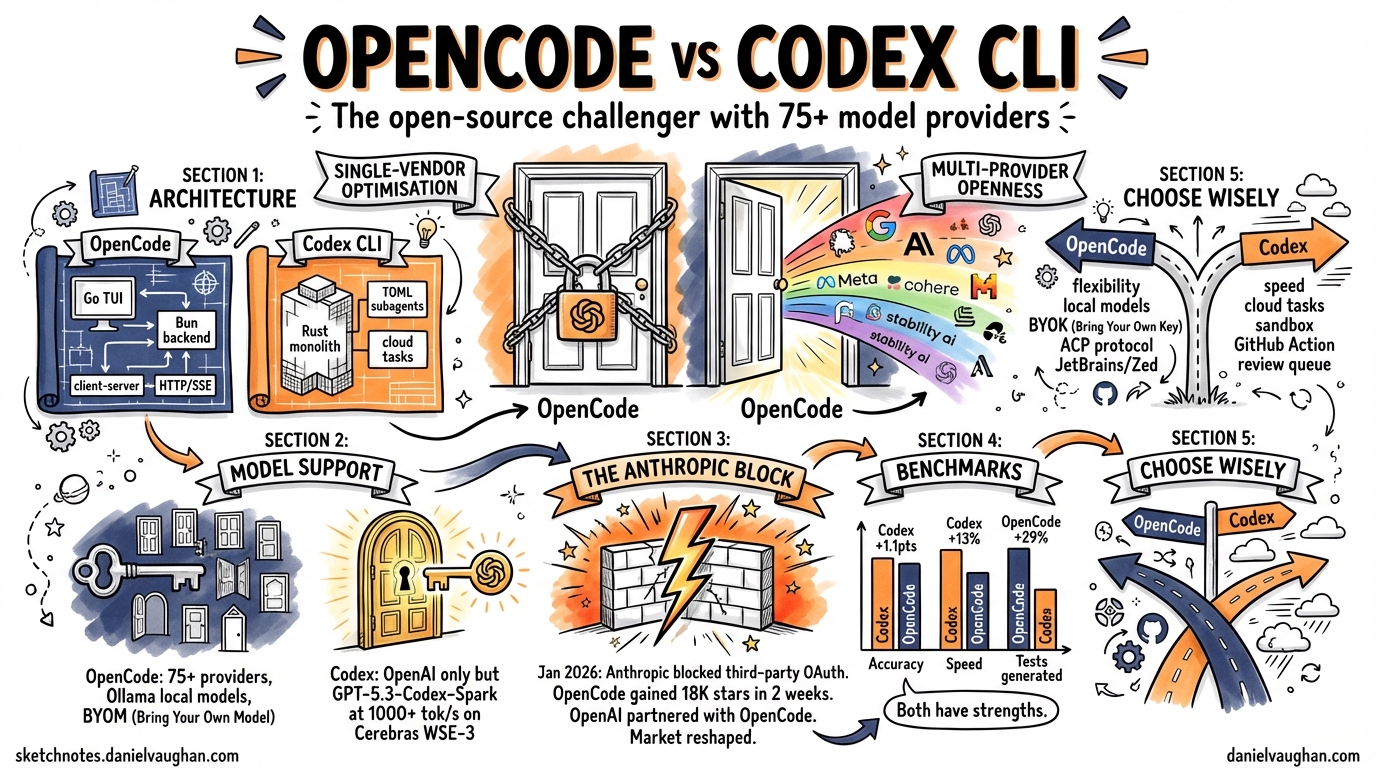
OpenCode is built as a client-server application1. The TUI is a Go binary using Bubble Tea2, while the backend is a TypeScript process running on Bun that exposes an HTTP API and pushes real-time updates via Server-Sent Events3. This separation allows the same backend to serve the terminal TUI, a Tauri-based desktop application, and IDE extensions simultaneously.
The architecture supports two built-in agent modes: build (full filesystem and shell access) and plan (read-only analysis)4.
Codex CLI: Rust Monolith
Codex CLI is a Rust-based single binary5 with a richer agent system. Sub-agents are defined in TOML with path-based addresses like /root/agent_a, and the multi-agent v2 system supports structured messaging between agents with configurable thread limits6. Cloud tasks offload heavy work to sandboxed environments with full networking.
graph LR
    subgraph OpenCode
        A[Go TUI - Bubble Tea] -->|HTTP/SSE| B[Bun Backend]
        C[Tauri Desktop] -->|HTTP/SSE| B
        D[VS Code Extension] -->|Terminal| A
        B --> E[75+ LLM Providers]
    end
    subgraph Codex CLI
        F[Rust Binary] --> G[TOML Sub-agents]
        F --> H[Cloud Tasks]
        F --> I[OpenAI Models Only]
        G -->|Path Addressing| G
    end
Model Support: BYOM vs Single-Vendor Optimisation
This is the fundamental divide between the two tools.
OpenCode: Bring Your Own Model
OpenCode supports 75+ LLM providers out of the box7: OpenAI, Anthropic (via API key), Google Gemini, AWS Bedrock, Azure OpenAI, Groq, DeepSeek, and — critically — local model runtimes like Ollama, LM Studio, and llama.cpp. You can point it at any OpenAI-compatible endpoint.
This flexibility means you can run OpenCode entirely offline with a local model, use a cheap provider for routine tasks and a premium model for complex refactors, or avoid vendor lock-in entirely.
Codex CLI: OpenAI-Only, But Optimised
As of the April 7 2026 model availability update, Codex CLI supports8:
- gpt-5.4 — the flagship model
- gpt-5.4-mini — cost-optimised variant
- gpt-5.3-codex — the dedicated coding model
- gpt-5.3-codex-spark — ultra-fast coding on Cerebras WSE-3
The older gpt-5.2-codex, gpt-5.1 variants, and gpt-5 have been removed from the model picker8. Custom model providers with dynamic bearer tokens were added in v0.118.09, but the ecosystem remains OpenAI-centric.
The trade-off is clear: Codex CLI cannot run a local Llama model, but its tight integration with OpenAI’s infrastructure enables optimisations that OpenCode cannot match.
Performance: Speed vs Flexibility
GPT-5.3-Codex-Spark, running on Cerebras WSE-3 hardware, delivers over 1,000 tokens per second10 — roughly 15× faster than the standard GPT-5.3-Codex path. On SWE-Bench Pro and Terminal-Bench 2.0, Spark demonstrates strong performance while completing tasks in a fraction of the time10. This is a genuine hardware-level advantage that no multi-provider tool can replicate.
Comparative benchmarks tell a more nuanced story. In head-to-head testing11:
| Metric | Codex CLI | OpenCode |
|---|---|---|
| Accuracy | +1.1 points | — |
| Consistency | — | +0.3 points |
| Speed | +2.8 points | — |
| Median runtime | 420s | 474s |
The 13% speed advantage for Codex CLI is meaningful in iterative workflows. However, OpenCode generates approximately 29% more tests in real-world task benchmarks12, suggesting its multi-step planning produces more thorough outputs at the cost of speed.
The Anthropic Block: January 2026
On 9 January 2026, Anthropic deployed server-side checks that rejected OAuth tokens from third-party tools, including OpenCode13. The error was unambiguous: “This credential is only authorized for use with Claude Code and cannot be used for other API requests.”14
Anthropic cited technical instability — unauthorised harnesses introduce bugs and usage patterns that Anthropic cannot diagnose13. The developer community pointed to economics: the $200/month Max subscription offers unlimited usage, but Anthropic controls consumption speed through its official client15.
The consequences reshaped the competitive landscape:
- OpenCode gained 18,000 GitHub stars in two weeks as developers rallied around the project16
- OpenCode launched Black and Zen — first-party model gateways providing access to Claude and other models without relying on consumer OAuth17
- OpenAI officially partnered with OpenCode, allowing ChatGPT subscribers to use their subscriptions directly in OpenCode13
This last point is particularly significant: OpenAI saw a strategic opportunity to capture developers fleeing Anthropic’s walled garden, and OpenCode became the bridge.
Pricing
OpenCode
OpenCode itself is free and open-source (MIT licence). Model access follows three paths17:
- BYOK (Bring Your Own Key) — free, use any provider’s API key
- Zen — pay-as-you-go gateway, from $0.45/1M input tokens (budget models) to $10/1M (Opus)
- Black — $20 / $100 / $200 per month, tiered model access with generous limits
Codex CLI
Codex CLI requires a ChatGPT subscription5:
- Plus — $20/month (limited Codex access)
- Pro — $200/month (full access including Spark)
The pricing comparison depends heavily on usage patterns. A developer using OpenCode with a cheap local model pays nothing. A developer wanting Spark-level performance must pay $200/month for ChatGPT Pro.
IDE and Desktop Integration
OpenCode
OpenCode ships a Tauri v2 desktop application for macOS, Windows, and Linux18. It uses a sidecar pattern: the desktop app manages a local CLI server instance, providing native notifications, auto-updates, and deep linking. Extensions exist for VS Code, Cursor, and Zed.
Critically, OpenCode integrates the Agent Client Protocol (ACP)19 — a JSON-RPC standard co-developed with JetBrains and Zed. Running opencode acp starts an ACP-compatible subprocess, enabling OpenCode to function as a first-class agent inside JetBrains IDEs and Zed’s agent panel20.
Codex CLI
Codex CLI offers a dedicated Desktop app with automations and a review queue, a VS Code extension, and MCP (Model Context Protocol) server integration6. Plugins became a first-class workflow in v0.117.0, with product-scoped plugin support6.
graph TD
    subgraph "OpenCode Ecosystem"
        OC[OpenCode CLI] --> ACP[ACP Protocol]
        OC --> TAURI[Tauri Desktop]
        OC --> VSCODE1[VS Code / Cursor]
        ACP --> ZED[Zed Agent Panel]
        ACP --> JB[JetBrains IDEs]
    end
    subgraph "Codex CLI Ecosystem"
        CC[Codex CLI] --> MCP[MCP Protocol]
        CC --> DESK[Codex Desktop App]
        CC --> VSCODE2[VS Code Extension]
        CC --> GHA[GitHub Action]
        CC --> CLOUD[Cloud Tasks]
    end
Community and Adoption
The numbers as of April 2026165:
| Metric | OpenCode | Codex CLI |
|---|---|---|
| GitHub stars | ~126,000 | ~62,000 |
| Monthly active developers | 2.5M+ | Not disclosed |
| Licence | MIT | Apache 2.0 |
OpenCode’s star count is somewhat inflated by the January 2026 Anthropic incident, which drove significant protest-starring. Nevertheless, the gap is substantial and reflects genuine adoption, particularly among developers who value provider independence.
When to Choose Each
Choose OpenCode when:
- Provider flexibility matters — you want to switch between models or use local inference
- You work in air-gapped or privacy-sensitive environments requiring Ollama or llama.cpp
- You use JetBrains IDEs or Zed and want native ACP integration
- You want to avoid single-vendor lock-in on principle
- Budget constraints favour BYOK with cheaper providers
Choose Codex CLI when:
- Raw speed matters — GPT-5.3-Codex-Spark’s 1,000+ tok/s is unmatched
- You need cloud task sandboxing for heavy workloads
- You want the richer TOML-based sub-agent system with path addressing
- You’re already in the OpenAI ecosystem (ChatGPT Pro, API usage)
- Enterprise features, GitHub Action integration, and the review queue are priorities
The Strategic Question
The deeper question is whether terminal coding agents will converge on single-vendor optimisation or multi-provider openness. OpenAI’s partnership with OpenCode13 suggests even they see value in the multi-provider approach — or at least in capturing Anthropic refugees. Meanwhile, Codex CLI’s Spark integration with Cerebras demonstrates what’s possible when model and runtime are co-optimised.
History suggests both approaches survive. Databases have both managed single-vendor offerings and provider-agnostic ORMs. Cloud computing has both AWS-native services and Terraform. The terminal coding agent market is likely heading the same way: Codex CLI as the optimised, integrated choice for OpenAI-committed shops, and OpenCode as the flexible, provider-agnostic alternative for everyone else.
The real winner is the developer who understands both tools well enough to choose the right one for each context.