Production Guardrails for Codex CLI: What Must Be in Place Before Agents Touch Production Code
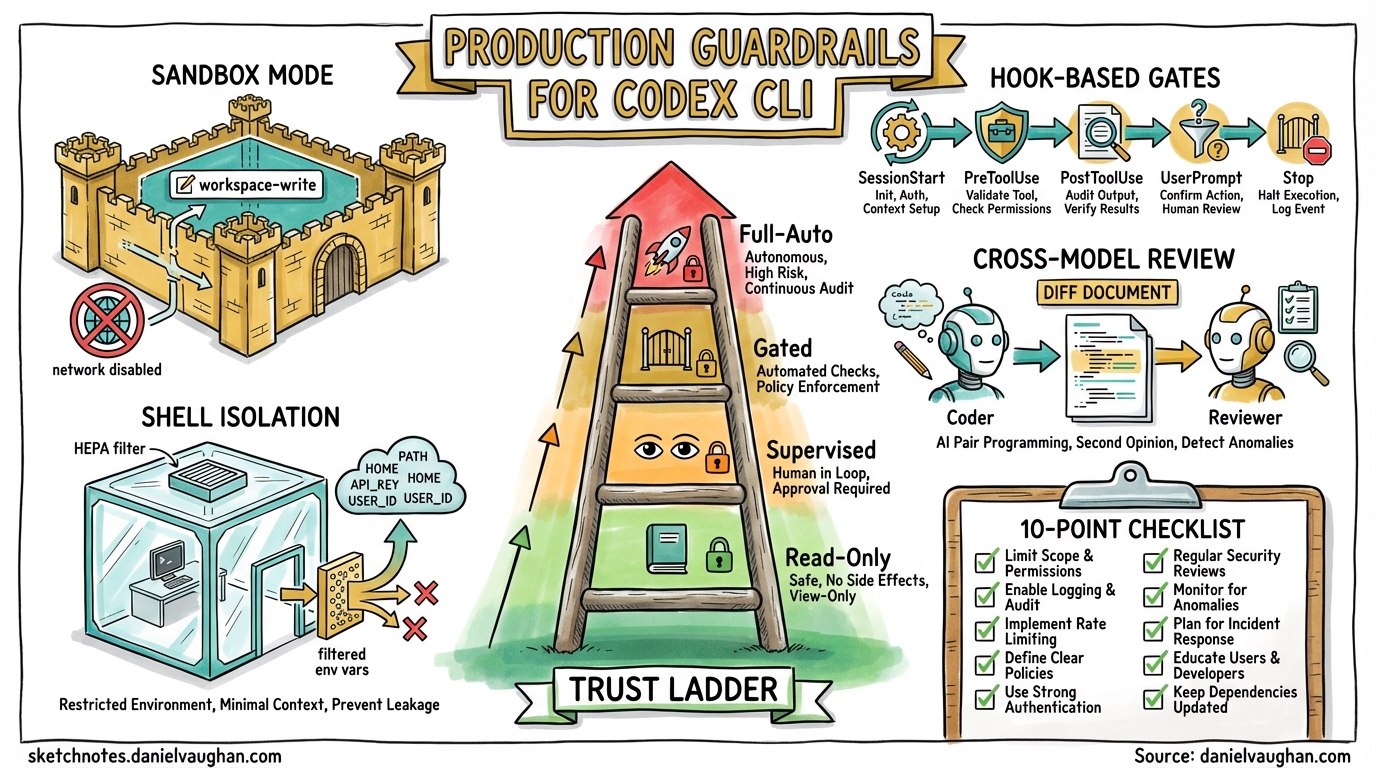
Production Guardrails for Codex CLI: What Must Be in Place Before Agents Touch Production Code
Codex CLI is a powerful local coding agent, but “powerful” and “production-safe” are not synonyms. Letting an AI agent loose on a production codebase without guardrails is the engineering equivalent of handing an intern the root password on their first day. This article provides a concrete, layered framework for teams preparing to deploy Codex CLI against codebases that matter.
The Trust Ladder
Production adoption is not binary. Teams should climb a trust ladder, expanding agent autonomy only after demonstrating safety at each rung.
graph TD
    L0["Level 0: Read-Only Auditing"]
    L1["Level 1: Supervised Hotfixes"]
    L2["Level 2: Autonomous Maintenance with Gates"]
    L3["Level 3: Fully Automated CI"]

    L0 -->|"Proven safe reads"| L1
    L1 -->|"Approval workflow validated"| L2
    L2 -->|"Hook-based gates passing consistently"| L3

    style L0 fill:#e8f5e9
    style L1 fill:#fff3e0
    style L2 fill:#fff9c4
    style L3 fill:#ffebee
Level 0 uses read-only sandbox mode — the agent can inspect code, generate reports, and answer questions but cannot modify a single file [^1]. Level 1 moves to workspace-write with untrusted approval policy, meaning every state-mutating command requires explicit human approval [^1]. Level 2 relaxes to on-request approvals but adds hook-based policy gates (covered below). Level 3 uses codex exec in CI with --full-auto, but only inside pre-isolated environments with branch protection and mandatory test passage.
Sandbox Mode: workspace-write Is the Floor
For any production-adjacent work, workspace-write is the minimum acceptable sandbox mode [^1]. It constrains the agent to:
- Read files anywhere in the workspace
- Write only within the workspace directory (and optionally
$TMPDIR) - Execute commands sandboxed via OS-level enforcement — macOS Seatbelt, Linux Bubblewrap + seccomp, or Windows Sandbox [^2]
- Network access disabled by default [^3]
The .git/ and .codex/ directories remain read-only even in writable mode, preventing the agent from rewriting its own configuration or corrupting version history [^1].
Never use danger-full-access (aliased as --yolo) on production code. If a workflow genuinely requires elevated access, run it inside a pre-isolated container or VM and treat the entire environment as disposable [^3].
# .codex/config.toml — production baseline
sandbox_mode = "workspace-write"
approval_policy = "untrusted"
allow_login_shell = false

[sandbox_workspace_write]
network_access = false
exclude_slash_tmp = true
Hook-Based Policy Gates
Hooks are the enforcement layer that transforms Codex CLI from a developer tool into a production-grade agent [^4]. Five hook events provide injection points across the agent loop:
| Event | Fires When | Production Use |
|---|---|---|
SessionStart |
Session begins or resumes | Inject compliance context, log session metadata |
PreToolUse |
Before a tool call executes | Block dangerous commands, enforce path restrictions |
PostToolUse |
After a tool call completes | Validate outputs, scan for secrets in results |
UserPromptSubmit |
User submits a prompt | Block prompts containing sensitive data |
Stop |
Agent turn completes | Trigger cross-model review, enforce quality gates |
Branch Protection Hook
A PreToolUse hook can prevent the agent from operating on protected branches:
{
  "hooks": {
    "PreToolUse": [
      {
        "matcher": "Bash",
        "hooks": [
          {
            "type": "command",
            "command": "/opt/codex-hooks/branch-guard.sh",
            "statusMessage": "Checking branch policy..."
          }
        ]
      }
    ]
  }
}
The backing script inspects the command for git checkout main, git push origin main, or similar patterns and exits with code 2 to block execution [^4]. Exit code 2 with a message on stderr triggers a denial, whilst exit code 0 permits the operation.
Secrets Scanner Hook
A PostToolUse hook can scan tool outputs for leaked credentials:
#!/usr/bin/env bash
# secrets-scan.sh — PostToolUse hook
INPUT=$(cat)
RESPONSE=$(echo "$INPUT" | jq -r '.tool_response // empty')

if echo "$RESPONSE" | grep -qiE '(AKIA[0-9A-Z]{16}|ghp_[a-zA-Z0-9]{36}|sk-[a-zA-Z0-9]{48})'; then
  echo '{"decision":"block","reason":"Potential secret detected in tool output"}'
  exit 2
fi
echo '{}'
Change-Size Limiter
A Stop hook can enforce maximum diff size before the agent’s changes are accepted:
#!/usr/bin/env bash
# change-size-gate.sh — Stop hook
DIFF_LINES=$(git diff --stat | tail -1 | grep -oE '[0-9]+ insertion' | grep -oE '[0-9]+')
MAX_LINES=500

if [ "${DIFF_LINES:-0}" -gt "$MAX_LINES" ]; then
  echo "{\"decision\":\"block\",\"reason\":\"Change exceeds ${MAX_LINES} line limit (${DIFF_LINES} insertions). Break into smaller changes.\"}"
  exit 2
fi
echo '{}'
Enable hooks in your configuration [^4]:
[features]
codex_hooks = true
Cross-Model Review as a Production Gate
One of the most effective guardrails is having a second model review the first model’s work. The Stop hook enables this pattern: when the coding agent completes a turn, fire a hook that invokes a separate Codex session (or a direct API call) with a review-focused prompt [^5].
sequenceDiagram
    participant Dev as Developer
    participant C1 as Codex (Coder)
    participant Hook as Stop Hook
    participant C2 as Codex (Reviewer)

    Dev->>C1: "Fix the auth bug"
    C1->>C1: Generate patch
    C1->>Hook: Turn complete
    Hook->>C2: "Review this diff as a staff engineer"
    C2->>Hook: Approval / rejection with rationale
    Hook->>Dev: Result + review summary
Configure the review model separately from the coding model using review_model in config.toml [^5]. A cheaper, faster model (such as gpt-5.4-mini) often suffices for review whilst the heavier model handles generation.
model = "gpt-5.4"
review_model = "gpt-5.4-mini"
Guardian AI: Experimental but Promising
The features.smart_approvals flag routes eligible approval requests through a guardian reviewer subagent — a separate LLM that independently evaluates tool call requests before execution [^6]. This is not rule-based filtering; the guardian reasons about whether the proposed action is appropriate given the current context.
[features]
smart_approvals = true
⚠️ Guardian AI remains experimental as of April 2026. PR #17061 overhauled the guardian output schema into structured risk, authorization, outcome, and rationale fields, but the feature is off by default and should not be the sole production gate [^6].
OpenTelemetry: The Audit Trail
Production deployments need observability. Codex CLI’s OpenTelemetry integration emits structured events covering API requests, tool approvals, tool results, and conversation metadata 1.
[otel]
exporter = "otlp-http"
environment = "production"
log_user_prompt = false

[otel.otlp_http]
endpoint = "https://otel-collector.internal:4318"
Key events to monitor:
- Tool approval decisions — track what the agent asked to do and whether it was permitted
- API request metrics — token consumption per session, model usage, latency histograms
- SSE/WebSocket stream events — detect stuck or unusually long agent turns
Setting log_user_prompt = false redacts prompt content from telemetry, which is essential for codebases containing proprietary logic 1.
Shell Environment Isolation
By default, Codex CLI inherits the parent shell’s environment variables. In production, this is a liability — AWS_SECRET_ACCESS_KEY, DATABASE_URL, and similar secrets become visible to the agent [^8].
[shell_environment_policy]
inherit = "none"
exclude = ["AWS_*", "AZURE_*", "DATABASE_*", "SECRET_*"]
include = ["PATH", "HOME", "LANG", "TERM"]
The inherit = "none" policy starts with a clean slate, selectively including only the variables the agent needs [^8]. Combined with allow_login_shell = false, this prevents the agent from sourcing ~/.bashrc or ~/.zshrc and picking up credentials from dotfiles.
Cost Controls and Rate Limiting
Runaway agent sessions can consume significant API credits. Production deployments should implement cost boundaries at multiple levels:
- Session-level: Use OpenAI’s API usage limits to cap per-session spend 2
- Turn-level: Hook-based turn counters that terminate sessions after a configurable number of agent turns
- History capping: Prevent unbounded context growth with
[history] max_bytes[^8]
[history]
max_bytes = 104857600  # 100 MB cap
The 10-Point Production Readiness Checklist
Before any Codex CLI agent touches production code, verify:
| # | Check | Config Key / Mechanism |
|---|---|---|
| 1 | Sandbox mode is workspace-write or read-only |
sandbox_mode |
| 2 | Network access is disabled unless explicitly required | sandbox_workspace_write.network_access |
| 3 | Approval policy matches trust level | approval_policy |
| 4 | Branch protection hook blocks protected branches | PreToolUse hook |
| 5 | Secrets scanning hook active on PostToolUse |
PostToolUse hook |
| 6 | Change-size limits enforced | Stop hook |
| 7 | Cross-model review configured | review_model |
| 8 | Shell environment isolated | shell_environment_policy |
| 9 | OpenTelemetry audit trail enabled | [otel] block |
| 10 | Login shell disabled | allow_login_shell = false |
Rollback Strategy
Even with guardrails, agent-generated changes can introduce defects. Production workflows should ensure:
- Atomic commits: One logical change per commit, enabling clean reverts [^10]
- Feature branches: Never allow agents to commit directly to
main— enforce via the branch protection hook - Git worktrees: Run each agent session in an isolated worktree for parallel work without cross-contamination [^10]
- CI as the final gate: Merge only after CI passes — the agent’s
Stophook should verify test results before declaring success
graph LR
    A["Agent generates patch"] --> B["Stop hook: cross-model review"]
    B --> C["Stop hook: change-size check"]
    C --> D["Push to feature branch"]
    D --> E["CI pipeline runs"]
    E -->|Pass| F["Human reviews PR"]
    E -->|Fail| G["Agent notified via webhook"]
    F --> H["Merge to main"]

    style E fill:#e3f2fd
    style F fill:#fff3e0
    style H fill:#e8f5e9
When Not to Use Codex CLI in Production
Guardrails reduce risk; they do not eliminate it. Avoid automated agent workflows for:
- Database migrations — schema changes require human judgement about data preservation
- Security-critical paths — authentication, authorisation, and encryption logic
- Compliance-sensitive code — anything subject to SOC 2, HIPAA, or PCI-DSS audit requirements where AI-generated code introduces attestation complexity
For these domains, use Codex CLI at Level 0 (read-only auditing) or Level 1 (supervised hotfixes) only.
Citations
| [^1]: [Agent Approvals & Security — Codex | OpenAI Developers](https://developers.openai.com/codex/agent-approvals-security) |
| [^2]: [Sandboxing — Codex | OpenAI Developers](https://developers.openai.com/codex/concepts/sandboxing) |
| [^3]: [Advanced Configuration — Codex | OpenAI Developers](https://developers.openai.com/codex/config-advanced) |
| [^4]: [Hooks — Codex | OpenAI Developers](https://developers.openai.com/codex/hooks) |
| [^5]: [Best Practices — Codex | OpenAI Developers](https://developers.openai.com/codex/learn/best-practices) |
| [^6]: [Configuration Reference — Codex | OpenAI Developers](https://developers.openai.com/codex/config-reference) |
| [^8]: [Advanced Configuration — Codex | OpenAI Developers](https://developers.openai.com/codex/config-advanced) |
| [^10]: [Best Practices — Codex | OpenAI Developers](https://developers.openai.com/codex/learn/best-practices) |