Codex Marketplace: Plugin Distribution and the Plugin Marketplace Add Command
Codex Marketplace: Plugin Distribution and the Plugin Marketplace Add Command
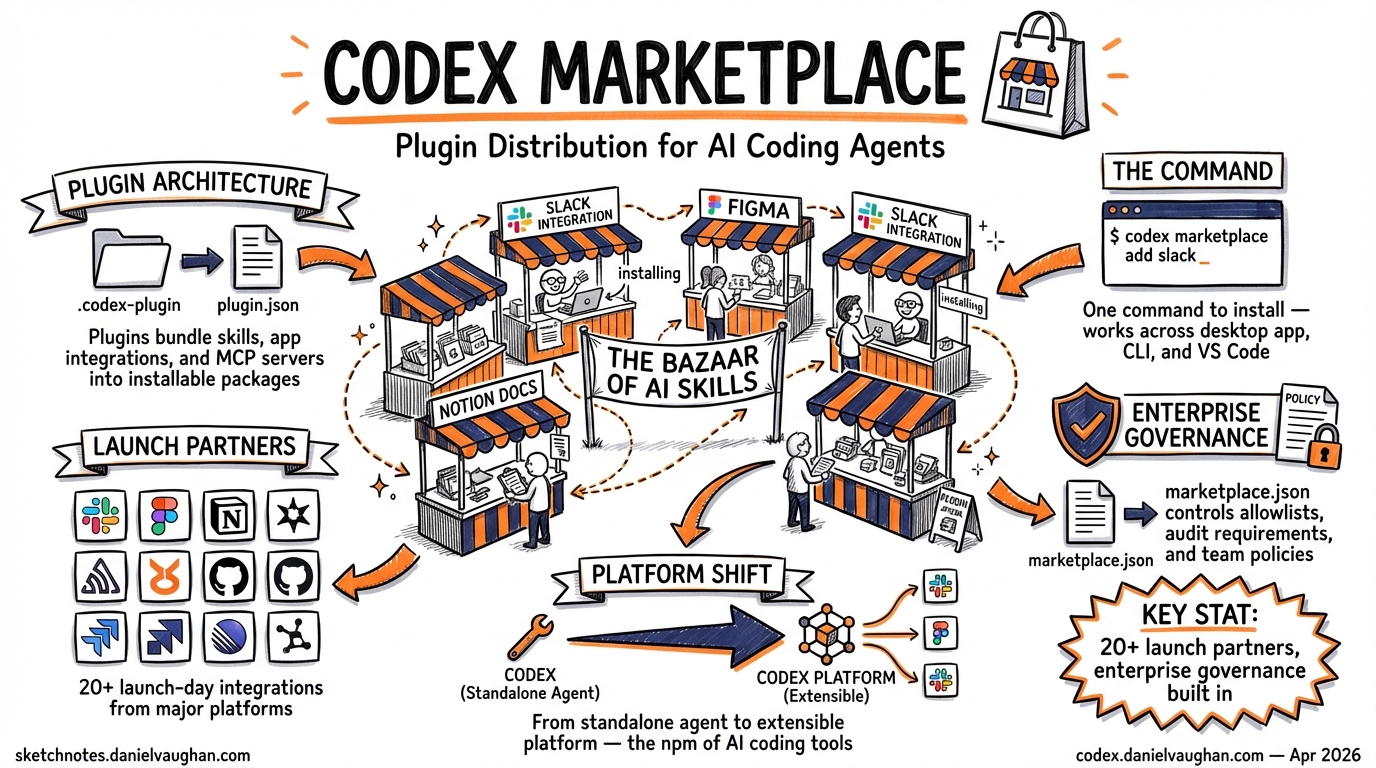
OpenAI’s plugin marketplace, launched on 27 March 20261, transforms Codex from a standalone coding agent into an extensible platform. Plugins bundle skills, app integrations, and MCP server configurations into installable packages that work across the desktop app, CLI, and VS Code extension2. With over 20 launch-day integrations from partners including Slack, Figma, Notion, and Sentry1, the marketplace introduces a distribution model that borrows from package managers whilst adding enterprise governance controls absent from competing tools.
This article covers the marketplace architecture, the CLI commands for plugin management, the marketplace.json configuration format, and enterprise policy controls — everything a senior developer needs to integrate plugins into team workflows.
Plugin Architecture
A Codex plugin is a directory containing a manifest and optional component bundles. The only required file is .codex-plugin/plugin.json; everything else is optional3.
my-plugin/
├── .codex-plugin/
│   └── plugin.json          # required manifest
├── skills/                   # optional skill definitions
│   └── review-standards/
│       └── SKILL.md
├── .app.json                 # optional app integrations
├── .mcp.json                 # optional MCP server config
└── assets/                   # optional icons/screenshots
    ├── icon.svg
    └── screenshot-01.png
Plugins bundle three component types2:
- Skills — reusable instruction sets defined in
SKILL.mdfiles that the agent discovers and executes on demand - Apps — external service connections (GitHub, Slack, Google Drive, Gmail) that authenticate via OAuth or API tokens
- MCP servers — Model Context Protocol services providing additional tools and shared context
This tripartite structure means a single plugin can wire up an MCP server, register authentication flows, and provide skills that orchestrate both — without requiring the user to configure anything manually.
The Plugin Manifest
The plugin.json manifest declares metadata and pointers to bundled components3:
{
  "name": "code-review-standards",
  "version": "2.1.0",
  "description": "Enforce team code review standards with configurable rulesets",
  "author": "acme-corp",
  "license": "MIT",
  "skills": "./skills/",
  "mcpServers": "./.mcp.json",
  "apps": "./.app.json",
  "displayName": "Code Review Standards",
  "shortDescription": "Automated code review against team standards",
  "category": "Code Quality",
  "capabilities": ["code-review", "linting", "standards-enforcement"],
  "websiteURL": "https://github.com/acme-corp/codex-review-standards",
  "privacyPolicyURL": "https://acme-corp.dev/privacy"
}
Key constraints: the name field must be stable kebab-case (Codex uses it as the plugin identifier), and all paths must be relative to the plugin root, starting with ./3.
CLI Plugin Management
Browsing and Installing
In the CLI, the /plugins slash command opens the plugin browser to search and install curated plugins2. For plugins distributed through Git-hosted marketplaces, the workflow uses two commands:
# Step 1: Register a marketplace source
/plugin marketplace add openai/codex-plugin-cc

# Step 2: Install a specific plugin from that marketplace
/plugin install codex@openai-codex

# Step 3: Reload to activate
/reload-plugins
The marketplace add command accepts GitHub org/repo references and supports version pinning with @branch or #tag suffixes4:
# Pin to a specific branch
/plugin marketplace add callstackincubator/agent-skills@main

# Pin to a release tag
/plugin marketplace add acme-corp/codex-plugins#v2.1.0
Verification and Status
After installation, plugins may expose setup commands. For example, the codex-plugin-cc plugin (which bridges Codex into Claude Code) provides4:
/codex:setup      # verify installation and configuration
/codex:status     # monitor active and recent jobs
Disabling and Uninstalling
Plugins can be disabled without removal via ~/.codex/config.toml2:
[plugins."gmail@openai-curated"]
enabled = false
To uninstall entirely, reopen the plugin details in the CLI browser and select “Uninstall plugin”.
Marketplace Configuration
Marketplaces are JSON catalogues that expose plugins to Codex. They can be scoped to three levels3:
graph TD
    A[Marketplace Scopes] --> B[Official Curated<br/>OpenAI-managed directory]
    A --> C[Repository-scoped<br/>$REPO_ROOT/.agents/plugins/marketplace.json]
    A --> D[Personal<br/>~/.agents/plugins/marketplace.json]

    B --> E[Browse via /plugins]
    C --> F[Team-shared plugins<br/>committed to repo]
    D --> G[Individual developer<br/>private plugins]

    style B fill:#e8f5e9,stroke:#4caf50
    style C fill:#e3f2fd,stroke:#2196f3
    style D fill:#fff3e0,stroke:#ff9800
The marketplace.json Format
A marketplace file declares a catalogue of available plugins with their sources and policies3:
{
  "name": "acme-team-plugins",
  "interface": {
    "displayName": "Acme Engineering Plugins"
  },
  "plugins": [
    {
      "name": "code-review-standards",
      "source": {
        "source": "local",
        "path": "./plugins/code-review-standards"
      },
      "policy": {
        "installation": "INSTALLED_BY_DEFAULT",
        "authentication": "ON_INSTALL"
      },
      "category": "Code Quality"
    },
    {
      "name": "slack-notifications",
      "source": {
        "source": "local",
        "path": "./plugins/slack-notifications"
      },
      "policy": {
        "installation": "AVAILABLE",
        "authentication": "ON_FIRST_USE"
      },
      "category": "Communication"
    }
  ]
}
Critical path rules: source.path must be relative to the marketplace root, must start with ./, and must remain inside the marketplace root directory3. This prevents path-traversal issues that could reference arbitrary filesystem locations.
Scaffolding with the Plugin Creator
Rather than hand-crafting manifests, Codex ships a built-in @plugin-creator skill that scaffolds the directory structure, generates plugin.json, and creates a local marketplace entry for testing3. This eliminates the boilerplate friction of getting a new plugin registered.
Enterprise Governance
The marketplace’s policy system maps directly to enterprise IT governance patterns. Each plugin entry in marketplace.json carries an installation policy with three states56:
| Policy | Behaviour | Enterprise Use Case |
|---|---|---|
INSTALLED_BY_DEFAULT |
Plugin is pre-installed for all users | Standard tooling rollout |
AVAILABLE |
Plugin appears in browser but requires manual install | Approved optional tools |
NOT_AVAILABLE |
Plugin is hidden and blocked | Unapproved or restricted tools |
A separate authentication field controls when credentials are exchanged with third-party services5:
ON_INSTALL— authenticate immediately during installationON_FIRST_USE— defer authentication until the plugin is actually invoked
flowchart LR
    A[IT Admin] -->|Defines| B[marketplace.json]
    B -->|Committed to| C[Repo Root]
    C -->|Developers clone| D[Codex reads policies]
    D -->|INSTALLED_BY_DEFAULT| E[Auto-installed]
    D -->|AVAILABLE| F[Visible in /plugins]
    D -->|NOT_AVAILABLE| G[Hidden & blocked]

    style E fill:#c8e6c9,stroke:#388e3c
    style F fill:#bbdefb,stroke:#1976d2
    style G fill:#ffcdd2,stroke:#d32f2f
This mirrors the allow-list patterns familiar from mobile device management (MDM) and IDE extension governance6. By committing marketplace.json to the repository root, IT teams can version-control plugin policies alongside the code they govern.
Practical Governance Workflow
For an organisation with 200+ developers, a typical deployment pattern looks like:
{
  "name": "megacorp-approved",
  "interface": {
    "displayName": "MegaCorp Approved Plugins"
  },
  "plugins": [
    {
      "name": "internal-review-bot",
      "source": { "source": "local", "path": "./plugins/review-bot" },
      "policy": { "installation": "INSTALLED_BY_DEFAULT", "authentication": "ON_INSTALL" },
      "category": "Code Quality"
    },
    {
      "name": "slack-integration",
      "source": { "source": "local", "path": "./plugins/slack" },
      "policy": { "installation": "AVAILABLE", "authentication": "ON_FIRST_USE" },
      "category": "Communication"
    },
    {
      "name": "untrusted-community-tool",
      "source": { "source": "local", "path": "./plugins/community-x" },
      "policy": { "installation": "NOT_AVAILABLE" },
      "category": "Experimental"
    }
  ]
}
The review bot is mandatory infrastructure; Slack is opt-in for teams that want it; the community tool is explicitly blocked pending security review.
Comparison with Competing Ecosystems
The Codex plugin marketplace enters a space with established alternatives:
| Feature | Codex Marketplace | Claude Code Skills | Cursor Extensions |
|---|---|---|---|
| Distribution | Git repos + JSON catalogues | Git repos + /plugin marketplace add |
Built-in extension store |
| Enterprise policy | INSTALLED_BY_DEFAULT / AVAILABLE / NOT_AVAILABLE |
No built-in policy tiers | Limited admin controls |
| Component bundling | Skills + Apps + MCP servers | Skills + MCP servers | Extensions |
| Self-serve publishing | Coming soon5 | Available | Available |
| Offline/air-gapped | Local marketplace.json | Local plugin repos | Limited |
Codex’s JSON-based policy system is its differentiator for enterprise adoption. Claude Code’s skill ecosystem (which, notably, can run Codex as a plugin via codex-plugin-cc4) offers a more open distribution model but lacks the tiered governance controls that enterprise security teams require.
⚠️ Self-serve publishing to the official Codex Plugin Directory is not yet available as of April 2026. OpenAI’s documentation states this is “coming soon”3.
Current Limitations
- No official directory publishing — distribution is currently limited to Git-hosted and local marketplaces3
- Plugin management UI — still described as “in development” in the official documentation3
- No dependency resolution — plugins cannot declare dependencies on other plugins
- Cache reliability — v0.119 included fixes for “more reliable plugin cache refreshes”, suggesting earlier instability7
Getting Started
For teams looking to adopt the marketplace today:
- Create a repo-scoped marketplace — add
.agents/plugins/marketplace.jsonto your repository - Scaffold a plugin — use the
@plugin-creatorskill inside Codex to generate the boilerplate - Set policies — mark essential plugins as
INSTALLED_BY_DEFAULT, optional ones asAVAILABLE - Commit and distribute — the marketplace file travels with the repo, so every clone gets the same plugin configuration
- Iterate — use
/plugin marketplace addin the CLI to test external marketplace sources before committing them
Citations
-
OpenAI Launches Plugin Marketplace for Codex with Enterprise Controls — WinBuzzer, 31 March 2026 ↩ ↩2
-
Build Plugins — Codex, OpenAI Developers Documentation ↩ ↩2 ↩3 ↩4 ↩5 ↩6 ↩7 ↩8 ↩9 ↩10
-
OpenAI adds plugin system to Codex to help enterprises govern AI coding agents — InfoWorld ↩ ↩2 ↩3
-
OpenAI Introduces Plugin Feature for Codex for Enterprise AI Coding Governance — MLQ.ai ↩ ↩2