Squad vs Codex CLI: Multi-Agent Orchestration Compared and Replicated
Squad vs Codex CLI: Multi-Agent Orchestration Compared and Replicated
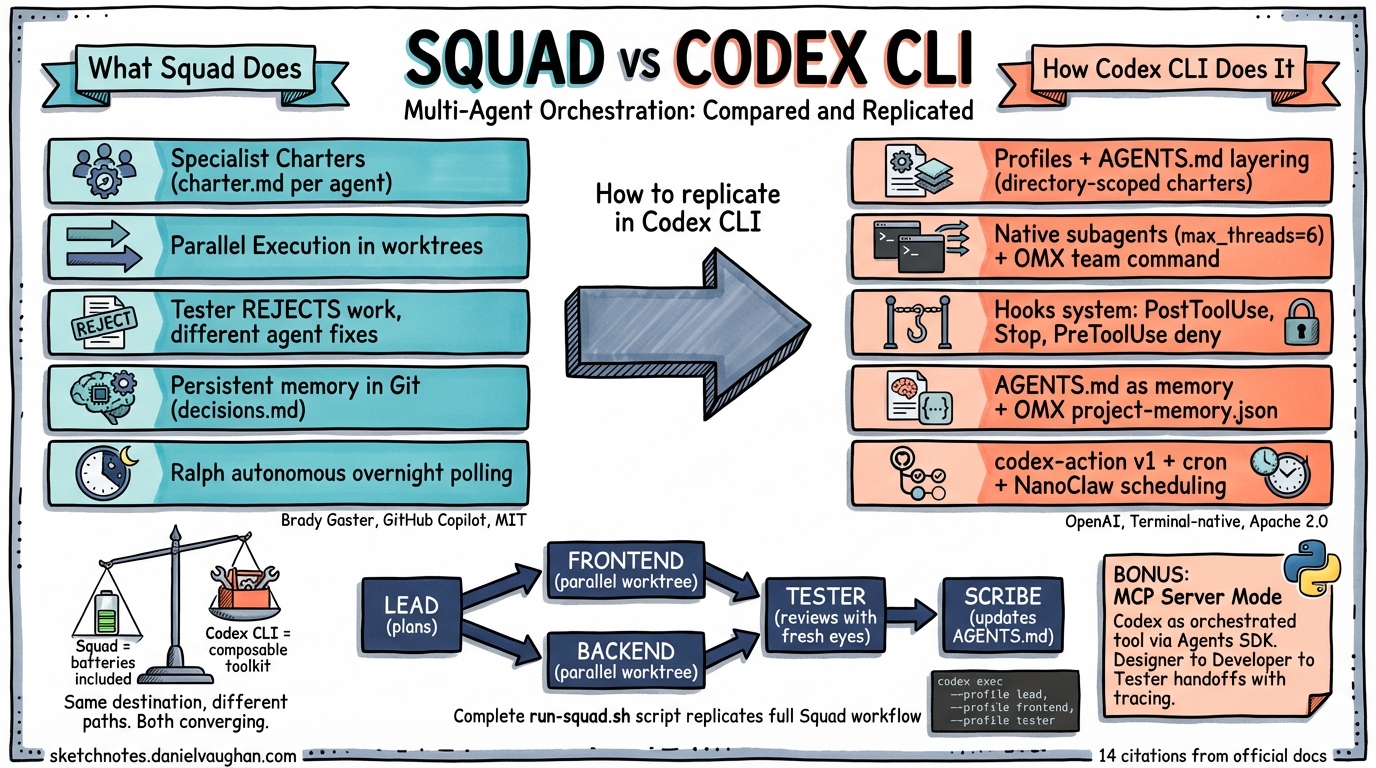
Brady Gaster’s Squad provides multi-agent orchestration on top of GitHub Copilot — a team of specialised agents that live in your repository as plain-text files1. Codex CLI, at first glance, is a single-agent tool. But as of April 2026, Codex CLI has native subagent spawning, hook-based review gates, profile-based specialist roles, MCP server mode for external orchestration, and a growing ecosystem of orchestration layers (OMX, Gas Town, NanoClaw) that replicate — and in some cases exceed — Squad’s capabilities.
This article compares each Squad feature side by side with how you achieve the same thing in Codex CLI, with concrete configuration and code examples.
Squad in 60 Seconds
Squad scaffolds a .squad/ directory into your repository containing agent charters, routing rules, shared decision logs, and persistent memory files12. When you describe a task, a coordinator routes it to specialist agents (frontend, backend, tester, scribe) that execute in parallel — each with its own context window, charter, and accumulated project history. Everything is committed to Git.
.squad/
  team.md              # Roster — who's on the team
  routing.md           # Who handles what
  decisions.md         # Shared brain — architectural decisions
  agents/
    lead/charter.md    # Identity, expertise, voice
    frontend/charter.md
    backend/charter.md
    tester/charter.md
    scribe/charter.md  # Silent memory manager
  skills/              # Compressed learnings
  log/                 # Session history
The key innovation: the Tester agent can reject work, forcing a different agent to provide the fix — not the original author revising its own output2. And the Ralph agent can poll for new issues and dispatch agents autonomously overnight.
Feature-by-Feature: Squad vs Codex CLI
1. Specialist Agent Roles
Squad: Each agent has a charter.md defining its identity, expertise, and voice. The coordinator routes tasks based on routing.md rules.
Codex CLI: Combine profiles and AGENTS.md layering to create equivalent specialists.
Profiles as specialists (config.toml):
[profiles.reviewer]
model = "gpt-5.4"
sandbox_mode = "read-only"
model_instructions_file = "./prompts/reviewer-instructions.md"

[profiles.implementer]
model = "gpt-5.3-codex"
sandbox_mode = "workspace-write"
model_instructions_file = "./prompts/implementer-instructions.md"

[profiles.tester]
model = "gpt-5.4-mini"
sandbox_mode = "workspace-write"
model_instructions_file = "./prompts/tester-instructions.md"
AGENTS.md layering as directory-scoped charters:
repo/
  AGENTS.md                           # Global project conventions
  services/
    payments/
      AGENTS.override.md              # "Use make test-payments; never log raw card numbers"
    frontend/
      AGENTS.md                       # "Run vitest, use Tailwind, follow design system"
    api/
      AGENTS.md                       # "Use Go conventions, run golangci-lint"
Codex CLI walks from the Git root to the current working directory, concatenating every AGENTS.md it finds3. When a subagent spawns to work in services/payments/, it automatically receives the payments-specific charter — no explicit routing needed. This is implicit routing by directory structure, which is arguably more elegant than Squad’s explicit routing.md.
Invoke a specialist: codex --profile reviewer "review the auth module" or codex --profile implementer "build the login page"4.
2. Parallel Agent Execution
Squad: The coordinator dispatches multiple agents simultaneously. Each works in its own context window across isolated git worktrees. In the Azure CLI case study, six agents processed 78 issues in a single day5.
Codex CLI (native subagents): Codex CLI has first-class subagent support configured in config.toml6:
[agents]
max_threads = 6                    # Up to 6 concurrent subagents
max_depth = 1                      # One level of nesting

[agents.reviewer]
description = "Find correctness, security, and test risks in code."
config_file = "./.codex/agents/reviewer.toml"

[agents.implementer]
description = "Write production code following project conventions."
config_file = "./.codex/agents/implementer.toml"
Custom agent definition (.codex/agents/reviewer.toml):
name = "reviewer"
description = "Find correctness, security, and test risks in code."
developer_instructions = "Focus on edge cases, null checks, SQL injection..."
model = "gpt-5.4"
sandbox_mode = "read-only"
The parent agent orchestrates: spawning children, routing instructions, waiting for results, and closing threads. To trigger parallel work, prompt the parent: “use subagents to review, implement, and test this feature in parallel”6.
For CSV-driven batch processing, the experimental spawn_agents_on_csv tool spawns one worker per row — useful for processing lists of issues, files, or migration tasks.
Codex CLI (OMX $team): Oh-My-Codex’s $team command spawns N parallel workers in automatically created git worktrees7:
# Spawn 3 parallel workers with different roles
$team 3:frontend "build login page components"
$team 3:backend "implement auth API endpoints"
$team 2:tester "write integration tests for auth flow"
Each worker gets an isolated worktree at .omx/team/<n>/worktrees/worker-N, runs in its own tmux session, and can even use a different AI provider via OMX_TEAM_WORKER_CLI_MAP (Codex, Claude, and Gemini workers side by side)7.
| Aspect | Squad | Codex CLI (native) | Codex CLI (OMX) |
|---|---|---|---|
| Max parallel agents | ~5-6 | 6 (max_threads) |
Unlimited (tmux) |
| Worktree isolation | Automatic | Manual (App has native) | Automatic |
| Cross-provider agents | No (Copilot only) | No (OpenAI only) | Yes (Codex + Claude + Gemini) |
3. Review and Quality Gates
Squad: The Tester agent can reject work, forcing a different agent to provide the fix. This cross-agent review catches blind spots that self-review misses2.
Codex CLI (hooks): The hooks system injects validation scripts at key points in the agentic loop8:
// .codex/hooks.json
{
  "hooks": {
    "PostToolUse": [
      {
        "matcher": "Bash",
        "hooks": [
          {
            "type": "command",
            "command": "./scripts/lint-and-test.sh",
            "timeout": 120
          }
        ]
      }
    ],
    "Stop": [
      {
        "hooks": [
          {
            "type": "command",
            "command": "./scripts/quality-gate.sh"
          }
        ]
      }
    ],
    "PreToolUse": [
      {
        "matcher": "Bash",
        "hooks": [
          {
            "type": "command",
            "command": "./scripts/block-dangerous-commands.sh",
            "timeout": 10
          }
        ]
      }
    ]
  }
}
The PreToolUse hook can block operations by returning exit code 2 with a denial reason — equivalent to Squad’s Tester rejecting work:
{
  "hookSpecificOutput": {
    "hookEventName": "PreToolUse",
    "permissionDecision": "deny",
    "permissionDecisionReason": "Blocked: rm -rf detected in command"
  }
}
Cross-agent review via orchestration:
#!/bin/bash
# squad-style-review.sh — implement, then review with a DIFFERENT agent

# Step 1: Implement with the implementer profile
codex exec --profile implementer --full-auto \
  -o /tmp/implementation.md \
  "implement the auth module as specified in SPEC.md"

# Step 2: Review with a separate reviewer profile (different model, read-only)
codex exec --profile reviewer --full-auto \
  "review the changes made to the auth module. \
   Check for security issues, edge cases, and test coverage gaps. \
   If you find problems, list them clearly."

# Step 3: If reviewer found issues, fix with a THIRD agent run
codex exec --profile implementer --full-auto \
  "fix the issues identified by the reviewer: $(cat /tmp/review-output.md)"
This is Squad’s Tester pattern — the reviewer is a different agent invocation with a different profile, model, and sandbox mode. It cannot see the implementer’s reasoning, only its output — exactly the “fresh perspective” that Squad enforces.
MCP + Agents SDK (full Squad-like orchestration):
Codex CLI can run as an MCP server (codex mcp-server), enabling external orchestrators like the OpenAI Agents SDK to coordinate multi-agent workflows9:
from agents import Agent, Runner
from agents.mcp import MCPServerStdio

async with MCPServerStdio(
    name="Codex CLI",
    params={"command": "npx", "args": ["-y", "codex", "mcp-server"]},
    client_session_timeout_seconds=360000,
) as codex:

    designer = Agent(name="Designer", mcp_servers=[codex],
                     handoffs=[developer])
    developer = Agent(name="Developer", mcp_servers=[codex],
                      handoffs=[tester])
    tester = Agent(name="Tester", mcp_servers=[codex],
                   handoffs=[pm])
    pm = Agent(name="PM", handoffs=[designer, developer, tester])

    result = await Runner.run(pm, "Build a snake game with tests")
Each agent calls Codex via MCP with scoped permissions. The PM routes work to the Designer, who hands off to the Developer, who hands off to the Tester — with full automatic tracing at platform.openai.com/trace9. This is architecturally equivalent to Squad’s coordinator + specialist pattern.
4. Persistent Memory
Squad: Agent history files, decisions.md, and skills files accumulate institutional knowledge. Committed to Git, they travel with the repository12.
Codex CLI (native): Session resume via codex exec resume --last or codex exec resume <SESSION_ID> preserves the full transcript and plan history10. But this is per-session, not per-project — sessions are stored locally, not in Git.
Codex CLI (AGENTS.md as memory): You can approximate Squad’s persistent memory by maintaining project context in AGENTS.md:
<!-- AGENTS.md — updated after each significant decision -->

## Architecture Decisions
- 2026-04-10: Chose PostgreSQL over MongoDB for the payments service (ACID compliance required)
- 2026-04-09: Frontend uses React Server Components — no client-side state management library
- 2026-04-08: API authentication via JWT with 15-minute expiry, refresh tokens in httpOnly cookies

## Conventions
- All API responses use the envelope format: { data, error, meta }
- Test files colocated with source: `foo.ts` → `foo.test.ts`
- No default exports — named exports only
This is manual — you maintain it yourself or instruct the agent to append decisions after each session. Squad automates this via the Scribe agent.
Codex CLI (OMX): OMX maintains a .omx/project-memory.json that persists across sessions — the closest equivalent to Squad’s automatic memory7.
Codex CLI (Gas Town): Gas Town’s .events.jsonl logs enable agents to query predecessor sessions via the “Seance” feature — discovering what previous agents learned and decided11.
| Memory Pattern | Squad | Codex CLI |
|---|---|---|
| Automatic decision logging | Scribe agent | Manual (AGENTS.md) or OMX |
| Session history | .squad/log/ |
$CODEX_HOME/sessions/ JSONL |
| Cross-session discovery | History files | Gas Town Seance / OMX project-memory |
| Committed to Git | Yes (always) | AGENTS.md yes; sessions no |
5. Autonomous Watch Mode
Squad: Ralph polls for new issues, triages them, and dispatches agents autonomously — including overnight scheduling with configurable start and end times2.
Codex CLI: No native scheduling exists yet (it is a requested feature). But three external mechanisms achieve the same result:
GitHub Action (official):
name: Nightly Code Review
on:
  schedule:
    - cron: '0 21 * * *'     # 9 PM daily
  issues:
    types: [opened, labeled]

jobs:
  codex-triage:
    runs-on: ubuntu-latest
    steps:
      - uses: actions/checkout@v4
      - uses: openai/codex-action@v1
        with:
          prompt: |
            Check for open issues labeled 'auto-fix'.
            For each: attempt a fix, run tests, submit a PR.
          model: gpt-5.4-mini
          sandbox: workspace-write
          safety-strategy: unprivileged-user
        env:
          CODEX_API_KEY: $
Cron + codex exec:
# crontab -e
*/10 * * * * cd /repo && codex exec --full-auto --ephemeral \
  "check for new issues labeled 'auto-fix', attempt fixes, submit PRs" \
  2>> /var/log/codex-ralph.log
NanoClaw MCP scheduling:
NanoClaw (an MCP-based task orchestrator) provides schedule_task with cron expressions, enabling any MCP-capable agent to schedule recurring autonomous work — equivalent to Ralph but more flexible12.
6. Structured Execution Logging
Squad: Session logs in .squad/log/ provide a searchable archive of all agent work.
Codex CLI: codex exec --json streams structured JSONL events10:
{"type":"thread.started","threadId":"abc-123"}
{"type":"turn.started","turnId":"t1"}
{"type":"item.command_execution","command":"npm test","exit_code":0}
{"type":"item.file_change","path":"src/auth.ts","action":"create"}
{"type":"turn.completed","turnId":"t1"}
Every session also writes a full transcript to $CODEX_HOME/sessions/YYYY/MM/DD/rollout-*.jsonl. These logs can be consumed by an external orchestrator to:
- Monitor progress of parallel
codex execinstances - Detect failures (
turn.failed) and trigger retries or fallback agents - Aggregate file changes across multiple agent runs for a unified PR
- Pipe into
jqfor conditional workflow logic
The Full Comparison
| Squad Feature | Squad Implementation | Codex CLI Native | Codex CLI + Ecosystem |
|---|---|---|---|
| Specialist agents | charter.md per agent |
Profiles + AGENTS.md layering | OMX $team N:role |
| Parallel execution | Copilot worktrees | Subagents (max_threads=6) |
OMX $team (tmux + worktrees) |
| Cross-agent review | Tester rejects → different agent fixes | Hooks (PostToolUse, Stop) |
Shell script orchestration |
| Persistent memory | History files + decisions.md (Git) | AGENTS.md (manual, Git) | OMX project-memory / Gas Town Seance |
| Autonomous polling | Ralph watch mode | Not native | GitHub Actions / cron / NanoClaw |
| Session logs | .squad/log/ |
JSONL transcripts (--json) |
— |
| Routing | routing.md rules |
AGENTS.md directory hierarchy | OMX $ralplan |
| Cross-provider agents | No (Copilot only) | No (OpenAI only) | OMX + Gas Town (Codex + Claude + Gemini) |
| External orchestration | Not supported | MCP server mode + Agents SDK | Full SDK-based multi-agent pipelines |
| Setup overhead | squad init (scaffolds .squad/) |
Config + AGENTS.md + hooks | OMX: npm i -g omx-cli && omx init |
Replicating a Full Squad Setup in Codex CLI
Here is a complete configuration that replicates Squad’s five-agent team (Lead, Frontend, Backend, Tester, Scribe) using native Codex CLI features:
config.toml
[agents]
max_threads = 4
max_depth = 1

[agents.reviewer]
description = "Code review specialist. Finds bugs, security issues, and test gaps."
config_file = ".codex/agents/reviewer.toml"

[agents.implementer]
description = "Production code writer. Follows project conventions strictly."
config_file = ".codex/agents/implementer.toml"

[profiles.lead]
model = "gpt-5.4"
model_instructions_file = ".codex/prompts/lead.md"

[profiles.frontend]
model = "gpt-5.4-mini"
model_instructions_file = ".codex/prompts/frontend.md"
sandbox_mode = "workspace-write"

[profiles.backend]
model = "gpt-5.3-codex"
model_instructions_file = ".codex/prompts/backend.md"
sandbox_mode = "workspace-write"

[profiles.tester]
model = "gpt-5.4-mini"
model_instructions_file = ".codex/prompts/tester.md"
sandbox_mode = "workspace-write"

[features]
codex_hooks = true
.codex/hooks.json (quality gates)
{
  "hooks": {
    "Stop": [
      {
        "hooks": [
          {
            "type": "command",
            "command": ".codex/scripts/run-quality-gate.sh",
            "timeout": 120
          }
        ]
      }
    ]
  }
}
AGENTS.md (project memory — updated incrementally)
# Project Conventions

## Architecture Decisions
<!-- Append new decisions after each significant session -->

## Code Standards
- TypeScript strict mode, no `any`
- React Server Components by default
- API: Express + Zod validation
- Tests: Vitest, colocated with source files

## Recent Context
<!-- Last 5 sessions' key outcomes -->
Orchestration script (squad-style workflow)
#!/bin/bash
# run-squad.sh — Squad-equivalent multi-agent workflow

TASK="$1"

echo "=== LEAD: Planning ==="
codex exec --profile lead -o /tmp/plan.md \
  "Create an implementation plan for: $TASK. \
   Break it into frontend, backend, and test tasks."

echo "=== PARALLEL: Frontend + Backend ==="
# Run in parallel using background processes + worktrees
git worktree add /tmp/wt-frontend -b squad-frontend 2>/dev/null
git worktree add /tmp/wt-backend -b squad-backend 2>/dev/null

(cd /tmp/wt-frontend && codex exec --profile frontend --full-auto \
  "Implement the frontend tasks from this plan: $(cat /tmp/plan.md)") &
PID_FE=$!

(cd /tmp/wt-backend && codex exec --profile backend --full-auto \
  "Implement the backend tasks from this plan: $(cat /tmp/plan.md)") &
PID_BE=$!

wait $PID_FE $PID_BE
echo "=== Frontend and Backend complete ==="

echo "=== TESTER: Review with fresh eyes ==="
codex exec --profile tester --full-auto \
  "Review ALL changes in /tmp/wt-frontend and /tmp/wt-backend. \
   Run tests. Report any issues. Do NOT fix them yourself — \
   only report what needs fixing."

echo "=== SCRIBE: Update project memory ==="
codex exec --profile lead --full-auto \
  "Append a summary of what was built, any decisions made, and \
   any issues found to the AGENTS.md file under 'Recent Context'."

# Cleanup worktrees
git worktree remove /tmp/wt-frontend 2>/dev/null
git worktree remove /tmp/wt-backend 2>/dev/null
This script replicates Squad’s core workflow: Lead plans → Frontend and Backend work in parallel on isolated worktrees → Tester reviews with a fresh perspective → Scribe updates project memory. All using native Codex CLI features plus basic shell scripting.
Where Squad Still Wins
Despite Codex CLI’s multi-agent capabilities, Squad has genuine advantages:
-
Zero-config team setup.
squad initgives you a working multi-agent team immediately. The Codex CLI equivalent requires config.toml, agent definitions, hooks, profiles, AGENTS.md, and an orchestration script. -
Automatic memory management. Squad’s Scribe agent silently logs decisions and learnings without being asked. Codex CLI requires you to explicitly instruct the agent to update AGENTS.md or rely on OMX’s project-memory.
-
Integrated review protocol. Squad’s Tester-rejects-to-different-agent pattern is a first-class feature, not a shell script. The rejection routes to a genuinely different agent context, not just a different profile of the same tool.
-
VS Code integration. If your workflow lives in VS Code, Squad is native. Codex CLI’s terminal-first approach requires switching contexts.
Where Codex CLI Wins
-
External orchestration via MCP. Codex CLI can run as an MCP server, enabling the OpenAI Agents SDK (or any MCP client) to build sophisticated multi-agent pipelines with handoffs, tracing, and custom logic9. Squad has no equivalent external orchestration API.
-
Model and cost control. Profiles let you assign different models per specialist — GPT-5.4 for the lead, GPT-5.3-Codex for the implementer, GPT-5.4-mini for the tester. Squad uses whatever Copilot provides.
-
CI/CD and headless operation.
codex execruns anywhere with a terminal. The official GitHub Action (openai/codex-action@v1) provides native CI/CD integration13. Squad requires VS Code. -
Cross-provider orchestration. OMX’s
$teamcommand can run Codex, Claude, and Gemini workers side by side in the same workflow7. Gas Town supports Codex CLI, Claude Code, and Copilot as interchangeable runtimes11. Squad is Copilot-only. -
Sandbox security. Codex CLI executes in network-disabled sandboxed containers with configurable approval policies14. Squad relies on git worktrees for isolation.
The Verdict
Squad is a batteries-included multi-agent framework — one command and you have a working team. Codex CLI is a composable multi-agent toolkit — more powerful and flexible, but you assemble the pieces yourself (or use OMX/Gas Town to do it for you).
For a team that wants multi-agent coding with minimal setup and lives in VS Code, Squad is the faster path. For a team that wants terminal-native operation, CI/CD integration, model control, cross-provider agents, and external orchestration via MCP, Codex CLI’s native subagents plus its ecosystem provide more capability — at the cost of more configuration.
The most interesting observation: both tools are converging on the same architecture. Squad’s .squad/ directory and Codex CLI’s .codex/agents/ + AGENTS.md serve the same purpose. Squad’s Tester and Codex CLI’s hooks solve the same problem. Squad’s Ralph and Codex CLI’s GitHub Action do the same job. The abstractions are different; the destination is the same.
Citations
-
Squad Documentation — Brady Gaster. Installation,
.squad/directory structure, agent charters, routing, CLI commands. https://bradygaster.github.io/squad/ ↩ ↩2 ↩3 -
How Squad Runs Coordinated AI Agents Inside Your Repository — GitHub Blog. Context replication, parallel execution, review enforcement, Ralph watch mode, worktree spawning. https://github.blog/ai-and-ml/github-copilot/how-squad-runs-coordinated-ai-agents-inside-your-repository/ ↩ ↩2 ↩3 ↩4 ↩5
-
Custom Instructions with AGENTS.md — OpenAI Developers. Discovery hierarchy, directory-scoped instructions, override behaviour. https://developers.openai.com/codex/guides/agents-md ↩
-
Codex CLI Config Reference — OpenAI Developers. Profiles, model selection, sandbox modes, instruction files. https://developers.openai.com/codex/config-reference ↩
-
How I Used Squad to Tackle 78 Azure CLI Issues in a Day — Jordan Selig. Six-agent deployment, 78 issues triaged, 46 addressed, 8 PRs, 80+ tests. https://jordan-selig.net/blog/squad-azure-cli-backlog/ ↩
-
Codex CLI Subagents — OpenAI Developers. Agent configuration in config.toml, max_threads, max_depth, custom agent TOML files, spawn_agents_on_csv. https://developers.openai.com/codex/subagents ↩ ↩2
-
Oh-My-Codex (OMX) — Yeachan Heo. $team parallel workers, automatic git worktrees, tmux sessions, mixed-provider support, project-memory.json. https://github.com/Yeachan-Heo/oh-my-codex ↩ ↩2 ↩3 ↩4
-
Codex CLI Hooks — OpenAI Developers. PreToolUse, PostToolUse, Stop events, deny patterns, timeout configuration. https://developers.openai.com/codex/hooks ↩
-
Use Codex with the Agents SDK — OpenAI Developers. MCP server mode, multi-agent pipelines with handoffs, automatic tracing. https://developers.openai.com/codex/guides/agents-sdk ↩ ↩2 ↩3
-
Codex CLI Non-Interactive Mode — OpenAI Developers. codex exec, –json JSONL streaming, –output-last-message, session resume. https://developers.openai.com/codex/noninteractive ↩ ↩2
-
Gas Town — Steve Yegge. Polecat agents, mailbox communication, Seance session discovery, Refinery merge queue, cross-runtime support. https://github.com/steveyegge/gastown ↩ ↩2
-
NanoClaw MCP Task Orchestrator — schedule_task with cron expressions, inter-agent messaging, task lifecycle management via MCP protocol. ↩
-
Codex CLI GitHub Action — OpenAI. Official action for CI/CD integration, nightly reviews, automated fixes. https://github.com/openai/codex-action ↩
-
Codex CLI — OpenAI. Terminal-based coding agent, sandbox architecture, approval policies, model selection. https://github.com/openai/codex ↩