AIPass: Persistent Multi-Agent Collaboration Across Codex CLI, Claude Code, and Gemini CLI
The Problem AIPass Solves
Every AI coding CLI session starts from scratch. You open Claude Code, explain the codebase, establish conventions, work through a problem — then close the terminal and lose everything. The next session starts the same way. Context windows reset. Institutional knowledge evaporates.
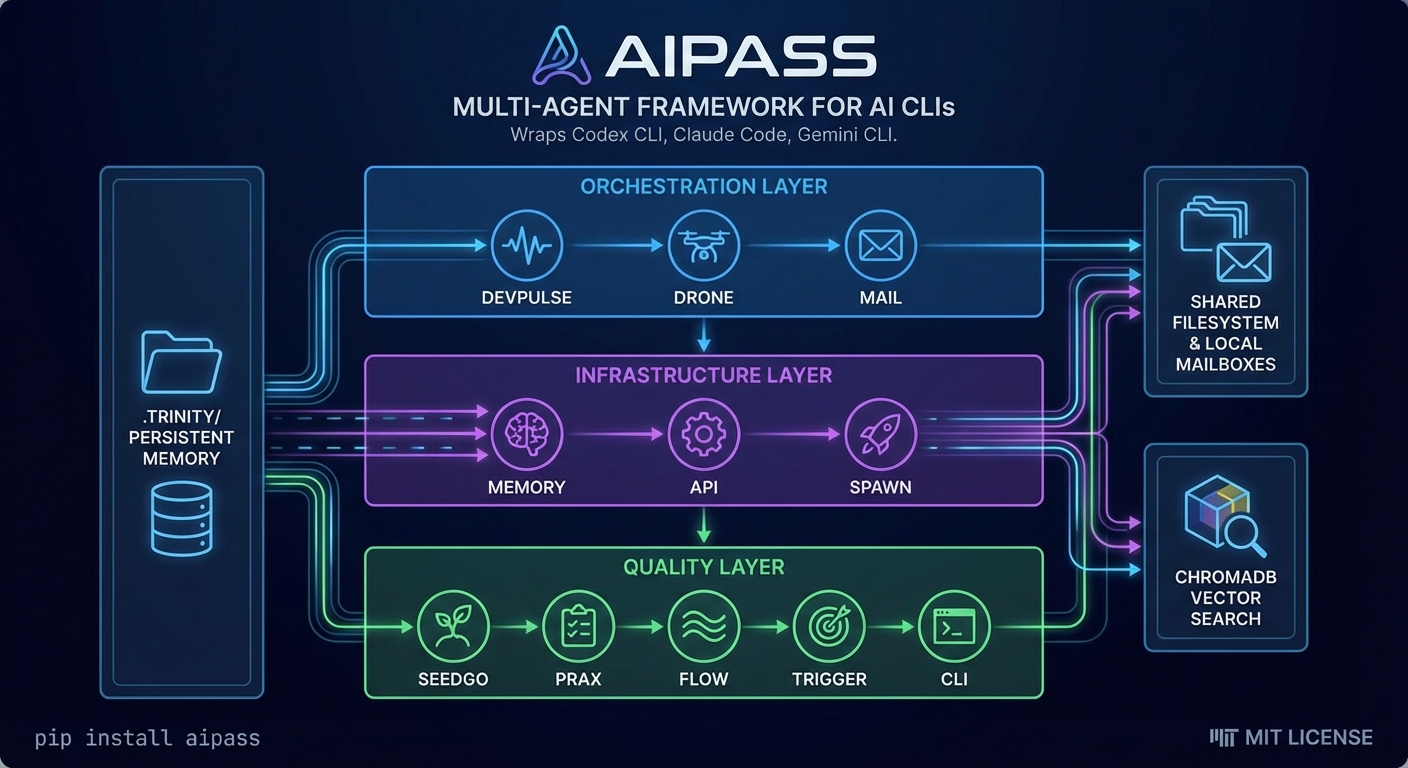
AIPass1 is a local-first CLI framework that addresses this by wrapping existing AI coding CLIs — Codex CLI, Claude Code, and Gemini CLI — and adding three capabilities none of them have natively: persistent memory across sessions, inter-agent communication, and a shared workspace where multiple specialised agents collaborate on the same codebase.
The framework runs each CLI as a subprocess. It does not proxy API calls, extract tokens, or intercept credentials. Your existing subscription (Claude Pro/Max, Codex API key, Gemini) handles authentication directly with the provider. AIPass adds the orchestration layer on top.
Architecture: The .trinity/ Directory
The core mechanism is a .trinity/ directory that lives inside each agent’s workspace. It stores identity, learned context, and accumulated knowledge as JSON files. When an agent starts a new session, it reads .trinity/ to pick up where it left off. Before the session ends, it writes back what it learned.
src/aipass/<agent>/
├── .trinity/           # Persistent identity + memory (JSON files)
├── .ai_mail.local/     # Local mailbox for task dispatch
├── apps/               # Entry point → modules → handlers
└── README.md           # Domain knowledge loaded at startup
When .trinity/ files approach capacity limits, a dedicated memory agent archives older entries into ChromaDB for semantic search. Active working memory stays fast and focused; historical context remains accessible through vector retrieval.
Eleven Agents, Three Layers
AIPass ships with eleven specialised agents organised across three layers:
Orchestration:
- devpulse — primary interface; coordinates all other agents
- drone — command routing; resolves
@agentreferences - ai_mail — inter-agent messaging and task dispatch
Infrastructure:
- memory — automatic archival and ChromaDB vector search
- api — multi-provider LLM access via OpenRouter
- spawn — creates new agents from templates
Quality and operations:
- seedgo — 33 automated quality standards across all agents
- prax — real-time monitoring, logs, dashboards
- flow — plan lifecycle management with six template types
- trigger — event-driven automation and self-healing
- cli — terminal formatting and rich output
The separation matters. In most multi-agent setups, agents are isolated in sandboxes and communicate through a central controller. AIPass agents share the filesystem, communicate through local mailboxes, and build on each other’s work. The project describes this as “a persistent society with operational rules” rather than a traditional orchestration pipeline.
CLI Integration
AIPass supports all three major AI coding CLIs, though Claude Code is the primary and fully-tested integration:
| CLI | Autonomous Command | Status |
|---|---|---|
| Claude Code | claude -p "prompt" --permission-mode bypassPermissions |
Fully tested |
| Codex CLI | codex exec "prompt" --dangerously-bypass-approvals-and-sandbox |
Integrated |
| Gemini CLI | gemini -p "prompt" --approval-mode=yolo |
Integrated |
Each CLI runs as a subprocess — the same binary you would invoke manually. This means AIPass inherits whatever speed, model, and capability improvements each CLI ships, without needing to update its own code.
Getting Started
pip install aipass
mkdir my-project && cd my-project
aipass init
aipass init agent my-agent
From there, you can work in team mode (interact with devpulse, which dispatches work across agents in parallel) or direct mode (cd src/aipass/<agent> && claude for focused one-on-one work with a specialist).
The drone command handles routing:
drone @seedgo audit aipass          # Run 33 quality checks
drone @flow create . "Description"  # Create a work plan
drone @ai_mail dispatch @memory "Task" "Details"
drone systems                       # List all agents and roles
What This Means for Codex CLI Users
The persistent memory problem is real. Codex CLI’s codex.toml and instructions files help with project-level configuration, but they do not carry forward what the agent learned during a session — which files it explored, which approaches failed, what architectural decisions it made and why.
AIPass offers one approach to solving this. The .trinity/ model is straightforward: JSON files that the agent reads on startup and writes on shutdown. It does not require any changes to Codex CLI itself, and it works with the existing sandbox model.
The multi-agent coordination is the more ambitious claim. Having eleven agents collaborate on a shared codebase through local mailboxes and a shared filesystem is architecturally different from the subagent model Codex CLI uses internally (where subagents are spawned for parallel tasks but do not persist). Whether this scales to production codebases — and whether the coordination overhead justifies the benefit — remains to be proven.
The project is in beta. It reports 3,500+ tests, 33 automated quality checks, and 185+ merged PRs (agent-created, human-reviewed). The MIT license means the code is available for inspection and modification.
Citations
-
GitHub, AIOSAI/AIPass. MIT license, Python 3.10+, beta status. All technical details in this article are drawn from the project’s README and repository structure as of April 12, 2026. ↩