Gemma 4 on Codex CLI vs Claude Code: Same Model, Different Results
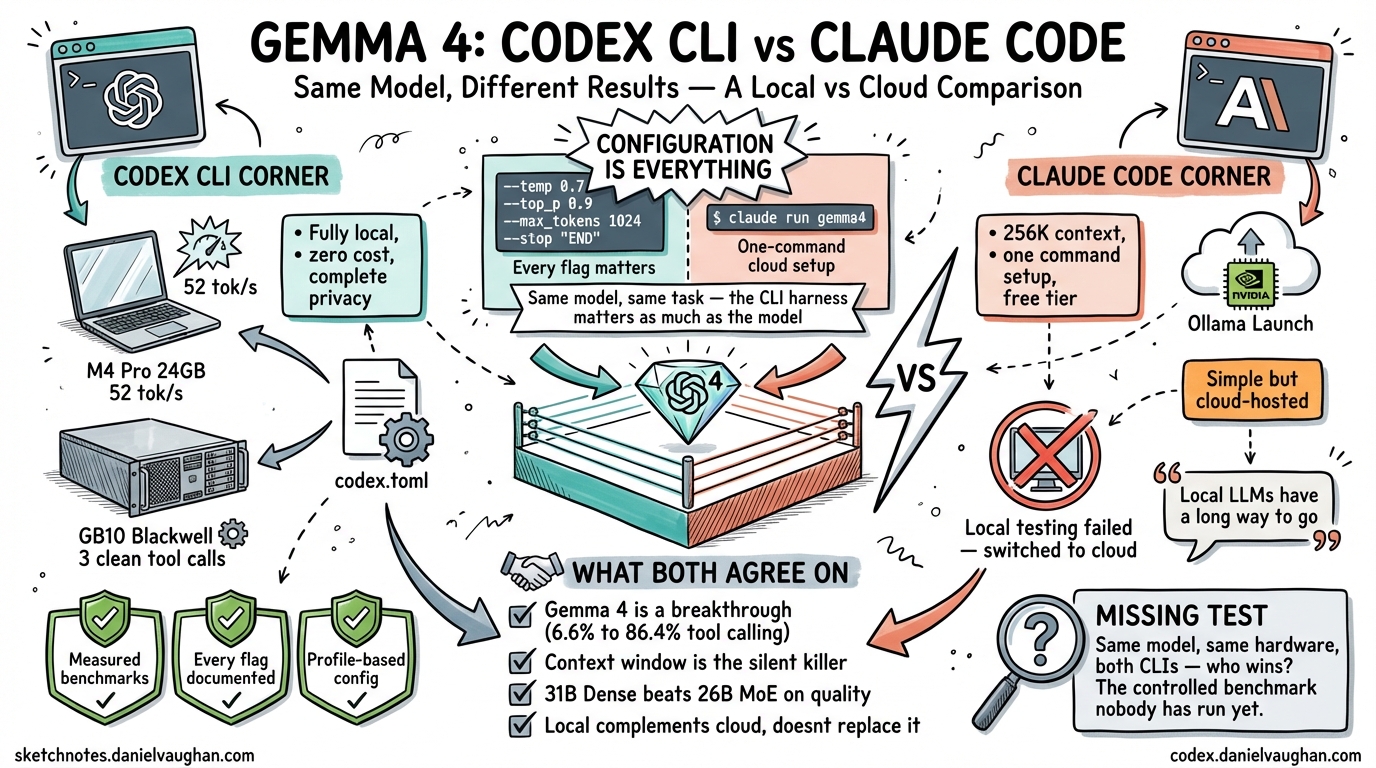
Joe Njenga recently documented his experience running Gemma 4 with Claude Code1. I spent the same week running Gemma 4 with Codex CLI on two machines — a 24 GB M4 Pro MacBook Pro and a Dell Pro Max GB10 with 128 GB on NVIDIA Blackwell2. We tested the same model family. We reached very different conclusions. The comparison reveals something important about the state of local AI coding in April 2026: the CLI harness matters as much as the model.
Two Approaches to the Same Problem
Njenga and I started from the same place — Gemma 4’s breakthrough function-calling scores (86.4% on tau2-bench, up from 6.6% for Gemma 3)3 — and asked the same question: can this model drive an agentic coding CLI end to end?
We took opposite paths to answer it.
| Codex CLI (this guide) | Claude Code (Njenga) | |
|---|---|---|
| Model | 26B MoE Q4_K_M (Mac), 31B Dense (GB10) | 31B Dense |
| Inference | Fully local (llama.cpp / Ollama) | Ollama Launch (cloud, NVIDIA Blackwell) |
| Hardware | M4 Pro 24 GB + Dell GB10 128 GB | Local attempts failed; switched to cloud |
| Cost | Zero (after hardware) | Free tier (Ollama Cloud) |
| Privacy | Complete — no data leaves the machine | Cloud-hosted — tokens sent to NVIDIA |
| Context window | 32K (Mac), higher on GB10 | 256K (cloud) |
| Tool calling | Native via Gemma 4 special tokens | Native via Claude Code’s function-calling |
| Outcome | Both setups working, measured benchmarks | Cloud works; local “has a long way to go” |
The most striking difference is not technical — it is philosophical. Njenga concluded that local models are not ready and recommended the cloud-hosted version. I concluded that local models work, but only if you get the configuration exactly right.
We are both correct. The difference is what “exactly right” requires.
Why Njenga’s Local Setup Failed
Njenga reported that running Gemma 4 locally with Claude Code hit multiple problems:
- Errors during code execution that the local model could not fix through iteration1
- Claude Code breaking several times — providing summaries instead of making actual code changes
- Default Ollama context window (4K tokens) silently truncating Claude Code’s system prompt, causing mid-task failures
These are real problems. But they are solvable — and the solutions reveal how much the CLI harness affects local model viability.
The Context Window Trap
Njenga identified the most common local model failure: Ollama’s default 4K context window silently destroys agentic coding. Claude Code’s system prompt plus tool definitions plus file contents easily exceeds 4K tokens. When the context is silently truncated, the model appears to work but produces incoherent tool calls or abandons tasks partway through.
Codex CLI has the same problem. The system prompt plus tools consumes approximately 27K tokens. That is why the Mac setup requires -c 32768 on llama-server and model_context_window = 32768 in config.toml2. Without both settings matching, tool calling breaks in identical ways to what Njenga described.
The fix is not obvious. Neither CLI warns you when the context window is too small. The model just silently degrades.
The Flag Problem
On the Mac, every flag in the llama-server command is load-bearing2:
| Flag | What happens if you skip it |
|---|---|
-m (not -hf) |
Auto-downloads a 1.1 GB vision projector, causing OOM |
-np 1 |
Multiple KV cache slots exhaust 24 GB memory |
-ctk q8_0 -ctv q8_0 |
f16 KV cache exceeds Metal working set |
--jinja |
Tool calling templates do not render |
web_search = "disabled" |
llama.cpp rejects non-function tool types |
Njenga would have hit some of these same issues. Claude Code’s local model integration likely has its own set of required flags and workarounds. The difference is that Codex CLI’s config.toml provides a single file where every parameter can be locked down, and the --profile flag lets you switch between local and cloud configurations without reconfiguring anything.
Where Claude Code Has an Advantage
Credit where it is due. Claude Code has genuine advantages for local model usage that Codex CLI currently lacks:
Larger default context window support. Njenga’s cloud setup used a 256K context window1. My Mac setup is constrained to 32K by memory. For large codebase exploration, 256K is a significant advantage — though it requires cloud inference to achieve it with the 31B model.
Simpler initial setup. Njenga’s cloud path was one command: ollama launch claude --model gemma4:31b-cloud1. My Mac setup required downloading the specific GGUF, finding the snapshot path, setting six flags, creating a config.toml profile, and disabling web search. The learning curve is steep.
Native Claude integration. Claude Code is built by Anthropic. Its agentic harness is designed around Claude’s capabilities. When you swap in Gemma 4, you inherit Claude Code’s mature tool-calling pipeline. Codex CLI’s wire_api = "responses" is newer and has more edge cases with non-OpenAI models.
Where Codex CLI Has an Advantage
Measured, reproducible results. Every claim in the Codex CLI guide is backed by measured benchmarks — llama-bench numbers, timed sessions, counted tool calls, test pass rates2. Njenga’s article reports that things “work” or “don’t work” without quantifying the difference.
Two verified local setups. Codex CLI has two confirmed working paths — llama.cpp on Mac and Ollama on GB10 — each with exact commands, flags, and config files. If you follow the guide, you will get the same results.
Profile-based configuration. config.toml profiles let you switch between local and cloud models with --profile local or --profile cloud. No reconfiguration, no restarting servers, no changing environment variables.
[profiles.local]
model = "ggml-org/gemma-4-26B-A4B-it-GGUF:Q4_K_M"
model_provider = "mac_local"
web_search = "disabled"

[profiles.cloud]
model = "gpt-5.4"
True local privacy. Both Codex CLI setups run entirely on local hardware. No tokens leave the machine. Njenga’s recommended setup (Ollama Cloud on NVIDIA) sends your code to cloud GPUs. For proprietary codebases, this distinction matters.
The quality > speed finding. The most important result from the Codex CLI testing was not about the CLI at all — it was about model behaviour. The GB10’s 31B Dense completed a benchmark task in 3 clean tool calls. The Mac’s 26B MoE needed 10 tool calls with 5 failed rewrites2. For agentic coding, first-attempt success matters more than raw token generation speed. This finding is absent from Njenga’s analysis.
The Real Comparison: Benchmarks
Here is what the Codex CLI testing measured that Njenga’s article does not provide:
| Metric | Codex CLI + Mac (26B MoE) | Codex CLI + GB10 (31B Dense) | Cloud (GPT-5.4) |
|---|---|---|---|
| Generation speed | 52 tok/s | 10 tok/s | N/A (API) |
| Benchmark time | 4m 42s | 6m 59s | 1m 05s |
| Tool calls | ~10 (messy) | 3 (clean) | ~5 (clean) |
| Tests passed | 4/4 after 5 retries | 5/5 first try | 5/5 first try |
| Code quality | 3/5 (dead code) | 4/5 (clean) | 5/5 |
Claude Code’s testing did not produce comparable data. Without benchmarks, it is impossible to know whether Claude Code’s tool-calling pipeline extracts better or worse agentic performance from the same Gemma 4 model. This is the comparison I would like to see someone run.
What Both Experiences Confirm
Despite the different approaches, Njenga and I agree on several things:
Gemma 4 is a genuine breakthrough for local tool calling. The jump from 6.6% to 86.4% on tau2-bench makes this the first open-weights model family where local agentic coding is viable3.
Context window configuration is the silent killer. Both CLIs fail in confusing ways when the context window is too small. Neither provides adequate warnings. This is the single most common failure mode for local model users.
The 31B Dense is the better model. When hardware allows it, the 31B Dense outperforms the 26B MoE on code quality. Njenga’s cloud setup and my GB10 setup both use the 31B Dense for this reason.
Ollama on Apple Silicon has problems. Njenga’s local testing hit errors; my testing found Flash Attention freezes and a streaming bug that routes tool calls to the wrong field4. Neither of us got Ollama + Gemma 4 + Apple Silicon working for tool calling. llama.cpp is the only working path on Mac.
Local is not a replacement for cloud. Both articles conclude that local models complement cloud models rather than replacing them. Local is for fast, private, zero-cost iteration. Cloud is for complex refactors and production-critical work.
The Missing Test
The comparison I would like to see — and that neither article provides — is a controlled benchmark running the same Gemma 4 31B Dense model, with the same prompt, on the same hardware, through both Codex CLI and Claude Code. That would isolate the harness effect: how much does the CLI’s tool-calling pipeline affect agentic performance, independent of the model?
The hypothesis based on architecture differences:
- Codex CLI uses a fixed, minimal tool set (
apply_patch,Bash,Read,Write,Glob,Grep,WebFetch) withwire_api = "responses". The harness is explicit and predictable. - Claude Code uses a richer tool set designed for Claude’s capabilities. When a non-Claude model is swapped in, there may be impedance mismatches that cause the failures Njenga observed.
If someone runs this test, I would be glad to publish the results.
Practical Recommendation
If you want to run Gemma 4 locally with an AI coding CLI today:
On a Mac with 24 GB: Use Codex CLI + llama.cpp + 26B MoE Q4_K_M. Follow the exact setup guide. Every flag matters. Expect 52 tok/s generation but lower code quality than the 31B Dense.
On a GB10 or high-memory NVIDIA system: Use Codex CLI + Ollama + 31B Dense. Three clean tool calls. First-attempt success. 10 tok/s but higher quality.
If you want zero setup: Use Claude Code + Ollama Cloud. One command. 256K context. But your code goes to NVIDIA’s cloud, and you depend on free-tier availability.
If you want the best results: Use a cloud model (GPT-5.4 or Claude Sonnet) for complex tasks, and local Gemma 4 for fast private iteration. Both CLIs support this hybrid approach.
The tools are different. The model is the same. The configuration is everything.
Citations
-
Joe Njenga, I Tried Gemma 4 On Claude Code (And Found New FREE Google Coding Beast), Medium, April 2026. Cloud-hosted Gemma 4 31B via Ollama Launch on NVIDIA Blackwell. Local testing hit errors; recommended cloud path. ↩ ↩2 ↩3 ↩4
-
Daniel Vaughan, Running Gemma 4 Locally with the Codex CLI: What Actually Works, April 2026. Two verified local setups: llama.cpp on M4 Pro 24 GB (52 tok/s) and Ollama on Dell GB10 (31B Dense, 3 clean tool calls). Quality > speed finding. ↩ ↩2 ↩3 ↩4 ↩5
-
Gemma 4 Benchmarks, gemma4all.com. tau2-bench: Gemma 3 27B 6.6%, Gemma 4 31B 86.4%. LiveCodeBench v6: 80.0%. ↩ ↩2
-
Ollama Issue #15315, Tool calling fix. Streaming bug routes tool calls to reasoning field instead of tool_calls field on Apple Silicon. ↩