Dynamic Session Control in Codex CLI: Mid-Session Switching of Models, Permissions, and Workflow Modes
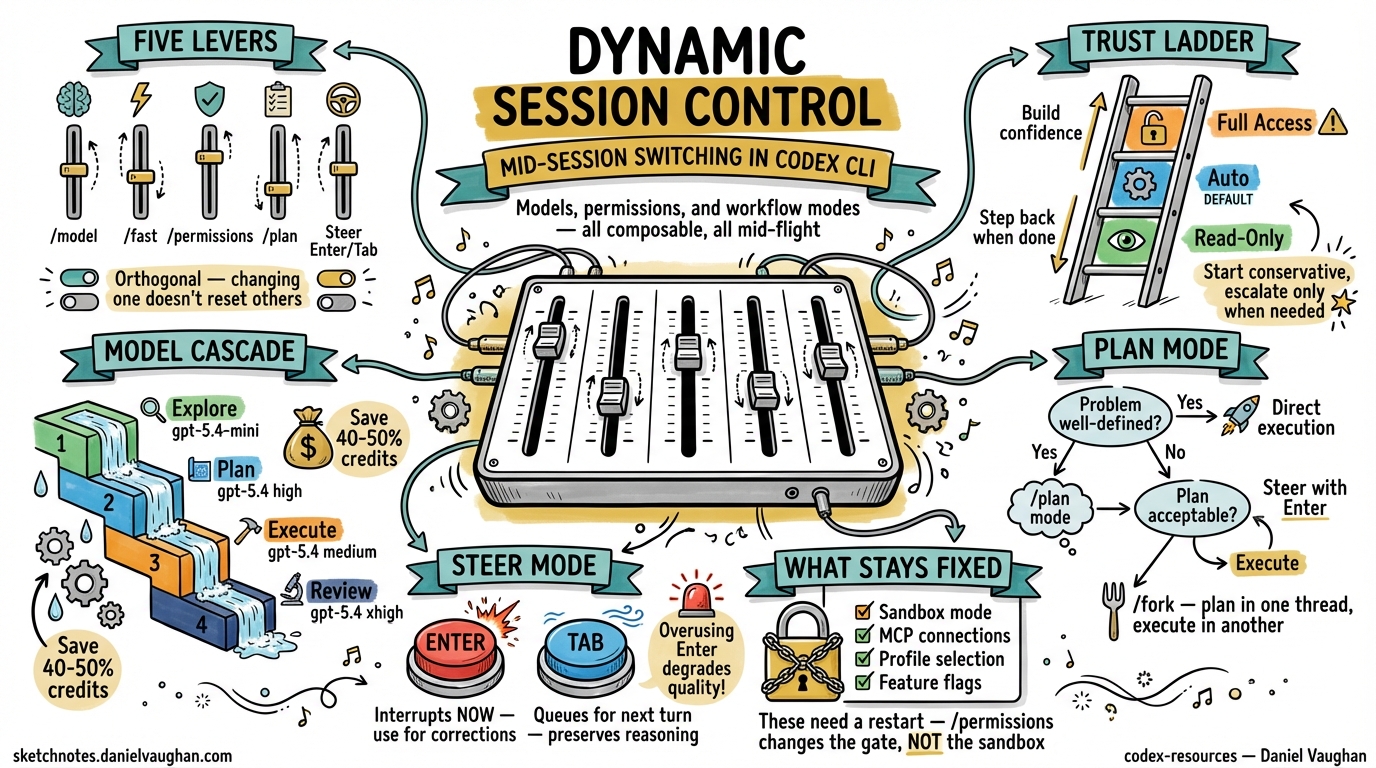
Dynamic Session Control in Codex CLI: Mid-Session Switching of Models, Permissions, and Workflow Modes
A Codex CLI session is not a static environment. Every slash command that adjusts the model, the approval policy, the reasoning effort, or the workflow mode reshapes what the agent can do — without losing the conversational context you have built up. This article treats the full suite of mid-session levers as a single, composable system and shows how senior developers use them to move fluidly between exploration, planning, and high-trust execution within a single terminal session.
The Five Session Control Levers
Codex CLI exposes five orthogonal axes of control that can be changed at any point during an interactive session 1:
| Lever | Slash command | What it changes |
|---|---|---|
| Model | /model |
Which LLM processes the next turn |
| Speed / cost | /fast |
Toggles GPT-5.4 fast mode (1.5× speed, 2× credits) 2 |
| Approval policy | /permissions |
How much autonomy the agent has before asking |
| Workflow mode | /plan or Shift+Tab |
Whether the agent plans or executes |
| Steering | Enter (immediate) / Tab (queued) |
Redirects or queues instructions mid-turn |
Each lever operates independently: switching the model does not reset your approval policy; entering plan mode does not change your sandbox. This orthogonality is what makes mid-session control genuinely useful rather than a gimmick.
The /permissions Command: A Progressive Trust Ladder
The /permissions command exposes three approval presets that can be swapped at any point in a session 3:
/permissions
graph LR
    A["Read-Only"] -->|"Build confidence"| B["Auto (default)"]
    B -->|"Trusted repo + task"| C["Full Access"]
    C -->|"Task complete"| B
    B -->|"Sensitive review"| A
- Read-Only — Codex can browse files but will not make changes or run commands without explicit approval. Ideal for code review, architecture exploration, and onboarding to an unfamiliar codebase 3.
- Auto (default) — Codex reads, edits, and runs commands within the working directory. It still asks before touching anything outside scope or accessing the network 3.
- Full Access — unrestricted machine-wide access including network. Use sparingly and only when you trust both the repository and the task 3.
The official best practices recommend starting conservatively: “Keep approval and sandboxing tight by default, then loosen permissions only for trusted repos or specific workflows once the need is clear” 4. In practice, this means a typical session begins in Auto, temporarily escalates to Full Access for a network-dependent task (e.g. running integration tests against a staging API), then steps back down.
Granular Approval Policy in config.toml
For teams that need finer control than the three presets, config.toml supports a granular approval policy object 5:
[approval_policy]
granular.sandbox_approval = true
granular.rules = true
granular.mcp_elicitations = false
granular.request_permissions = true
granular.skill_approval = true
This lets you, for example, auto-approve sandbox escalations but block MCP elicitations — useful when running trusted local tools alongside untrusted third-party MCP servers.
The /model Command: Switching Models Without Losing Context
Type /model and select from the available models. Codex clears the visible transcript and starts a fresh chat in the same CLI session, preserving your working directory and configuration 1:
/model
→ Select: gpt-5.4
→ Codex confirms the new model in the transcript
This is not just a convenience — it is a cost and quality lever. Common mid-session model switches include:
| Scenario | Switch to | Why |
|---|---|---|
| Exploratory chat → implementation | gpt-5.4 |
Full reasoning for complex code generation |
| Quick formatting / boilerplate | gpt-5.4-mini |
30% of the credit consumption 6 |
| Rapid multi-draft iteration | gpt-5.3-codex-spark |
1,000+ tok/s on Cerebras WSE-3 (Pro only) 7 |
| Deep architectural analysis | gpt-5.4 with xhigh reasoning |
Maximum reasoning depth |
Combining /model with /fast
The /fast toggle is exclusive to GPT-5.4 and doubles credit consumption in exchange for approximately 1.5× speed 2. It maps to the service_tier = "fast" config key 5. For cost-conscious workflows, the opposite — service_tier = "flex" — saves approximately 50% but may increase latency during peak hours.
# Profile for rapid iteration
[profiles.sprint]
model = "gpt-5.4"
service_tier = "fast"
model_reasoning_effort = "medium"

# Profile for deep review
[profiles.deep-review]
model = "gpt-5.4"
service_tier = "flex"
model_reasoning_effort = "xhigh"
plan_mode_reasoning_effort = "xhigh"
Plan Mode: The /plan Toggle
Plan mode (/plan or Shift+Tab) instructs Codex to gather context, ask clarifying questions, and build a plan before writing any code 4. This is not merely a prompt change — plan mode uses a separate reasoning effort level (plan_mode_reasoning_effort) that can exceed the execution-phase effort 5:
model_reasoning_effort = "medium"
plan_mode_reasoning_effort = "high"
The decision framework is straightforward:
flowchart TD
    A["New task"] --> B{"Is the problem<br/>well-defined?"}
    B -->|Yes| C["Direct execution"]
    B -->|No| D["/plan mode"]
    D --> E{"Plan acceptable?"}
    E -->|Yes| F["Exit plan mode<br/>→ execute"]
    E -->|No| G["Refine with<br/>steer (Enter)"]
    G --> D
Plan mode is particularly valuable when combined with /fork: plan in one thread, fork to execute, and preserve the planning context as a reference 1.
Mid-Turn Steering: Enter vs Tab
Steer mode (default since v0.98.0) lets you redirect the agent while it is actively working 8:
- Enter — sends input immediately. Codex reads your message mid-turn and adjusts its approach without losing context 1. Use this for urgent corrections: “Stop — don’t modify the database migration, only the application code.”
- Tab — queues a follow-up for the next turn 1. Use this for additions: “After you finish, also run the linter.”
The critical distinction: Enter interrupts the current reasoning chain; Tab preserves it. Overusing Enter degrades output quality because the model must reconcile its partially completed work with new instructions.
Composing the Levers: Session Progression Patterns
Pattern 1: The Trust Escalation
A session that starts cautiously and opens up as confidence grows:
sequenceDiagram
    participant D as Developer
    participant C as Codex CLI

    D->>C: Start session (Auto permissions)
    D->>C: /plan — "Explain this service's auth flow"
    C-->>D: Plan with architecture diagram
    D->>C: /permissions → Read-Only
    D->>C: "Walk me through the rate limiter"
    C-->>D: Explanation with file references
    D->>C: /permissions → Auto
    D->>C: "Refactor rate limiter to use sliding window"
    C-->>D: Implementation + tests
    D->>C: /permissions → Full Access
    D->>C: "Run integration tests against staging"
    C-->>D: Test results
    D->>C: /permissions → Auto
Pattern 2: The Model Cascade
Progressively upgrade the model as the task demands more reasoning:
- Explore with
gpt-5.4-mini(cheap, fast) — understand the codebase - Plan with
gpt-5.4athighreasoning — design the approach - Execute with
gpt-5.4atmediumreasoning — implement the plan - Review with
gpt-5.4atxhighreasoning — deep code review of your own changes
This cascade can save 40–50% of credits compared to running gpt-5.4 at xhigh for the entire session 9.
Pattern 3: The Fork-and-Compare
Use /fork combined with /model to generate competing implementations:
- Plan the approach in the main thread
/fork→ switch togpt-5.4→ implement option A- Return to the original thread →
/fork→ implement option B - Compare diffs and merge the better approach
Pattern 4: The CI Profile Switch
For developers who run codex exec in CI but also use interactive sessions locally, profiles eliminate the need to remember different flag combinations 5:
[profiles.ci]
model = "gpt-5.4-mini"
model_reasoning_effort = "medium"
approval_policy = "on-request"
sandbox_mode = "workspace-write"
personality = "none"

[profiles.interactive]
model = "gpt-5.4"
model_reasoning_effort = "high"
approval_policy = "on-request"
sandbox_mode = "workspace-write"
personality = "friendly"
Launch with codex --profile ci or codex --profile interactive.
The /compact Command as a Session Reset Point
Long sessions accumulate context that degrades output quality. The /compact command summarises the conversation history to free tokens 1 10. It is also a natural inflection point for switching modes: after compacting, the agent has a fresh context window and is better positioned to handle a model or permission change.
A practical pattern:
- Complete a major task
/compact— summarise what was accomplished/model— switch to a cheaper model for the next phase/permissions— adjust trust level for the new task
What Cannot Be Changed Mid-Session
Not everything is dynamic. The following require restarting Codex:
- Sandbox mode (
read-only/workspace-write/danger-full-access) — set at launch via--sandboxor config.toml 11 - MCP server connections — configured at startup via
config.toml12 - Profile selection — the
--profileflag is a launch-time argument 5 - Feature flags — toggled via
codex features enable/disablebut take effect on next session 13
The /permissions command changes the approval policy within the current sandbox mode. It does not escalate the sandbox itself. If you started with workspace-write, switching to Full Access via /permissions does not grant danger-full-access filesystem permissions — it only suppresses approval prompts within the existing sandbox boundaries 3.
This is an important distinction that catches many developers. The sandbox is a kernel-level enforcement mechanism (Seatbelt on macOS, Landlock on Linux, restricted tokens on Windows) 11. The approval policy is a software-level gate. /permissions controls the gate; the sandbox remains fixed.
Recommendations
- Default to Auto permissions — escalate only when needed, step back when done
- Use profiles for repeatable configurations rather than manually switching levers each session
- Pair
/planwith/fork— plan in one thread, execute in a fork, keep the plan as a reference - Use
/compactas a mode-switch checkpoint — it gives the agent a clean slate for the next phase - Avoid
/fastfor reasoning-heavy tasks — the speed gain is not worth the quality trade-off on complex architectural decisions - Steer with Tab by default, Enter only for corrections — Tab preserves the reasoning chain; Enter disrupts it