Error Recovery and Rollback Patterns for Codex CLI: Git Safety Nets for Agentic Workflows
Error Recovery and Rollback Patterns for Codex CLI: Git Safety Nets for Agentic Workflows
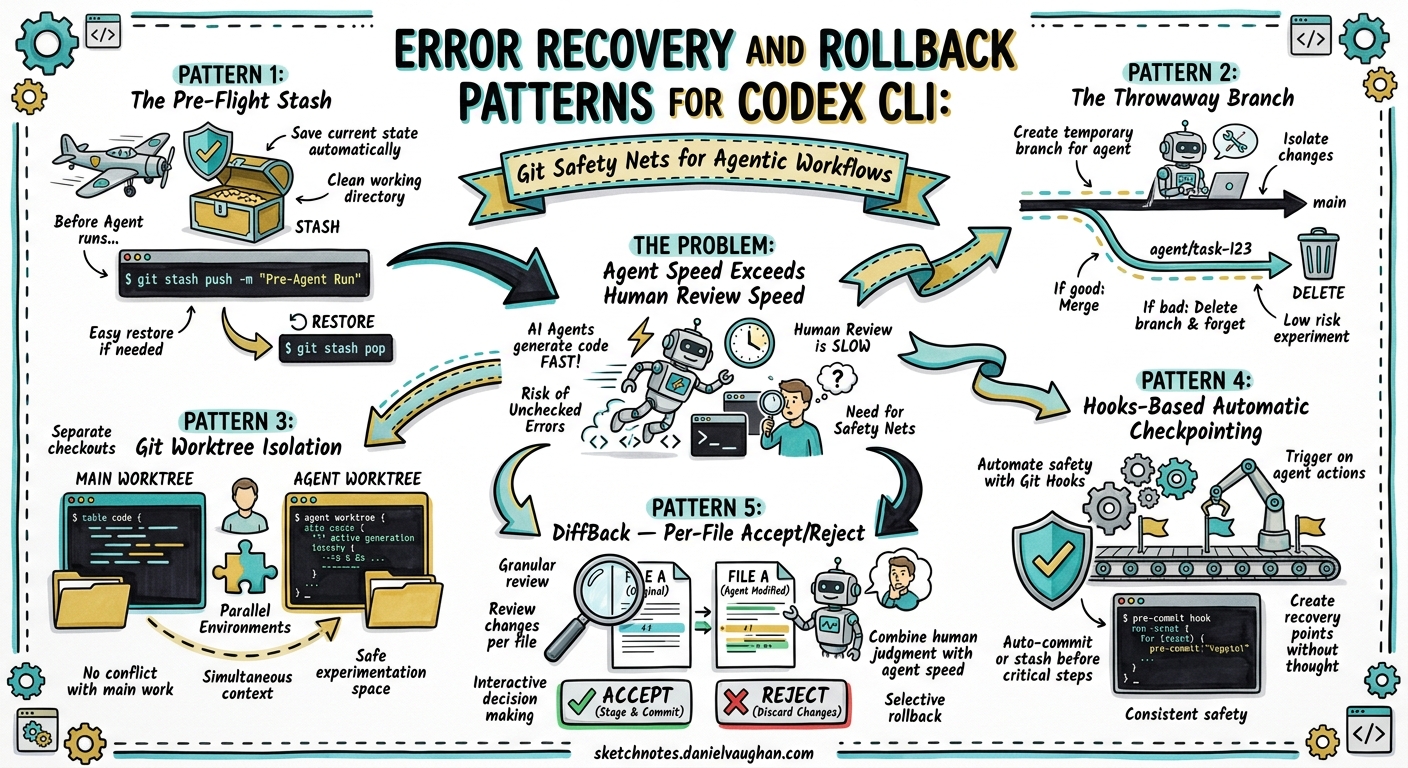
Coding agents move fast. A single Codex CLI session can touch thirty files in under a minute, and when something goes wrong — a broken refactor, a hallucinated import, a test suite that now fails in ways you did not expect — you need a recovery strategy that is faster than the agent that created the mess.
As of v0.125, Codex CLI does not ship a production-ready built-in undo mechanism1. An experimental /undo command existed briefly but was removed after causing more problems than it solved2. The /rewind checkpoint proposal (Issue #11626) remains open with 92 upvotes, requesting synchronised rollback of both conversation context and file changes3. Until that ships, Git is your undo button — but only if you use it deliberately.
This article codifies the recovery patterns that experienced Codex CLI users rely on daily, from lightweight pre-flight stashes to full worktree isolation and third-party snapshot tools.
The Problem: Agent Speed Exceeds Human Review Speed
In a traditional coding workflow, mistakes accumulate one file at a time. You notice the error, hit undo, and carry on. Agentic workflows break this model in three ways:
- Blast radius — a single agent turn can modify, create, and delete files across the entire repository
- Interleaved changes — useful modifications and harmful ones coexist in the same turn
- Context coupling — reverting file changes without also resetting the conversation leaves the agent confused about repository state
GitButler’s engineering team formalised this as seven properties of “agent-safe Git”: task isolation, clear branch boundaries, explicit commit selection, easy review, recoverable mistakes, cross-branch safety, and traceability4. Every pattern below addresses one or more of these properties.
Pattern 1: The Pre-Flight Stash
The simplest safety net. Before handing control to Codex, snapshot your uncommitted work:
# Stash everything, including untracked files
git stash push --include-untracked -m "pre-codex-$(date +%Y%m%dT%H%M%S)"

# Run Codex
codex "refactor the auth module to use JWT middleware"

# If the result is bad, hard-reset and restore
git checkout -- .
git clean -fd
git stash pop
This works for interactive sessions where you want a quick escape hatch. The timestamp in the stash message makes it easy to find later via git stash list5.
Limitation: The stash only captures your pre-existing uncommitted changes. If Codex creates new files that you want to remove, you need git clean -fd as well. And if Codex made some good changes mixed with bad ones, you lose everything — there is no per-file granularity.
Pattern 2: The Throwaway Branch
For higher-stakes work, isolate the agent’s changes on a dedicated branch:
# Create and switch to a throwaway branch
git checkout -b codex/refactor-auth-$(date +%s)

# Run Codex — all changes land on this branch
codex "refactor the auth module to use JWT middleware"

# Review the diff against main
git diff main...HEAD

# If good, merge back
git checkout main
git merge codex/refactor-auth-*

# If bad, simply delete the branch
git checkout main
git branch -D codex/refactor-auth-*
This pattern provides complete isolation with zero risk to your main branch6. Simon Willison recommends treating AI-assisted coding identically to manual coding: branch, commit selectively, and use git revert when needed7.
Pattern 3: Git Worktree Isolation
For parallel agent sessions or when you want to keep working while Codex runs:
# Create an isolated worktree
git worktree add ../codex-workspace codex/task-42

# Run Codex in the isolated worktree
cd ../codex-workspace
codex "implement the caching layer for the user service"

# Review from your main worktree — no context switch needed
cd ../main-repo
git diff main...codex/task-42

# Clean up if the work is rejected
git worktree remove ../codex-workspace
git branch -D codex/task-42
The Codex App uses worktrees natively — each agent thread gets its own Git worktree, created automatically when a task starts8. The CLI does not create worktrees automatically, but the manual approach above achieves the same isolation9.
flowchart LR
    A[Main Worktree] -->|git worktree add| B[Agent Worktree]
    B -->|codex runs here| C{Review Diff}
    C -->|Accept| D[Merge to main]
    C -->|Reject| E[Remove worktree + branch]
    A -->|Continue working| A
Pattern 4: Hooks-Based Automatic Checkpointing
With Codex CLI v0.124+ hooks now stable10, you can automate checkpointing before every tool execution:
# ~/.codex/config.toml
[hooks.pre_tool_use.git_checkpoint]
command = "bash"
args = ["-c", """
  if [ "$CODEX_TOOL_NAME" = "apply_patch" ] || [ "$CODEX_TOOL_NAME" = "shell" ]; then
    git stash push --include-untracked -m "codex-checkpoint-$(date +%s)" 2>/dev/null
    git stash pop --quiet 2>/dev/null
    git add -A && git commit --allow-empty -m "codex-auto-checkpoint" --no-verify 2>/dev/null || true
  fi
"""]
This creates a commit before each file-modifying operation, giving you a fine-grained git log to bisect through if something goes wrong. The --no-verify flag skips pre-commit hooks to avoid interfering with the agent’s flow.
Warning: This generates many small commits. Squash them before merging:
# Squash all codex checkpoints into one commit
git rebase -i $(git log --oneline | grep -v "codex-auto-checkpoint" | head -1 | awk '{print $1}')
Pattern 5: DiffBack — Per-File Accept/Reject
DiffBack is a community tool that wraps any agent command, snapshots files before execution, and presents an interactive per-file review interface11:
npm install -g diffback

# Wrap your Codex session
diffback run "codex 'migrate all API routes from Express to Fastify'"

# After Codex finishes, review each changed file
diffback review

# Selectively revert specific files
diffback revert <session-id> --file src/routes/broken-route.ts
DiffBack stores original file snapshots in ~/.diffback/snapshots/ and session metadata as JSON11. This solves the interleaved-changes problem: you keep the good refactoring in src/middleware/ while reverting the broken changes in src/routes/.
sequenceDiagram
    participant Dev as Developer
    participant DB as DiffBack
    participant CX as Codex CLI
    participant FS as Filesystem

    Dev->>DB: diffback run "codex ..."
    DB->>FS: Snapshot all files
    DB->>CX: Execute codex command
    CX->>FS: Modify 30 files
    CX-->>DB: Exit
    DB->>FS: Diff against snapshots
    Dev->>DB: diffback review
    DB->>Dev: File-by-file accept/reject
    Dev->>DB: Accept 28, reject 2
    DB->>FS: Restore 2 rejected files
Pattern 6: Entire CLI — Session-Aware Checkpointing
Entire CLI hooks into your Git workflow to capture AI agent sessions alongside commits12. It creates checkpoints on a separate entire/checkpoints/v1 branch, keeping your working branch clean:
# Install
npm install -g @entireio/cli

# Sessions are automatically captured when you commit
# Each session links to its associated commits
entire sessions list
entire sessions inspect <session-id>
This approach pairs well with Codex CLI because it provides traceability — you can see which agent session produced which commits and roll back at the session level rather than the commit level12.
Pattern 7: The Safe-Execute Wrapper Script
For CI/CD pipelines and codex exec workflows, wrap the agent in a checkpoint-and-validate script:
#!/usr/bin/env bash
set -euo pipefail

TASK="$1"
BRANCH="codex/exec-$(date +%s)"
STASH_NAME="pre-codex-exec-$(date +%Y%m%dT%H%M%S)"

# Checkpoint
git stash push --include-untracked -m "$STASH_NAME"
git checkout -b "$BRANCH"
git stash pop || true

# Execute
codex exec "$TASK" \
  --approval-mode full-auto \
  -m o4-mini

# Validate
if ! npm test 2>/dev/null; then
  echo "::error::Tests failed after codex exec — rolling back"
  git checkout main
  git branch -D "$BRANCH"
  git stash pop 2>/dev/null || true
  exit 1
fi

# Success — merge
git checkout main
git merge --no-ff "$BRANCH" -m "codex: $TASK"
git branch -d "$BRANCH"
This pattern is used in GitHub Actions workflows with codex-action@v1, where the action creates a branch, runs the agent, validates tests, and only merges if validation passes13.
Decision Framework: Which Pattern When?
flowchart TD
    A[Need to recover from agent changes?] --> B{How many files changed?}
    B -->|1-3 files| C[git checkout -- file1 file2]
    B -->|Many files, mixed good/bad| D{Need per-file control?}
    B -->|Everything is bad| E[git reset --hard HEAD]
    D -->|Yes| F[DiffBack per-file review]
    D -->|No| G{Was work on a branch?}
    G -->|Yes| H[Delete the branch]
    G -->|No| I[git stash / git reset]

    style F fill:#e1f5fe
    style H fill:#e8f5e9
    style E fill:#ffebee
| Pattern | Granularity | Overhead | Best For |
|---|---|---|---|
| Pre-flight stash | All-or-nothing | Minimal | Quick interactive sessions |
| Throwaway branch | All-or-nothing | Low | Medium-risk refactors |
| Git worktree | Full isolation | Medium | Parallel agent sessions |
| Hooks checkpoint | Per-operation | Medium | Debugging which turn broke things |
| DiffBack | Per-file | Low | Mixed good/bad changes |
| Entire CLI | Per-session | Low | Audit and traceability |
| Safe-execute wrapper | Branch + validate | Medium | CI/CD pipelines |
What Is Coming: The /rewind Proposal
The community’s most-requested recovery feature is /rewind (Issue #11626)3, which would:
- Display recent checkpoints with timestamps, prompt snippets, and affected files
- Revert Codex-generated edits after the chosen checkpoint
- Preview file changes before applying the rewind
- Allow editing the restored prompt before resubmitting
- Only revert AI-generated edits, preserving unrelated local changes
A related issue (#12558) for “Claude Code-style /rewind with checkpoint restore + context summarise modes” was marked as completed3, suggesting OpenAI is actively working on this capability. Until it ships in a stable release, the Git-based patterns above remain the reliable path.
Practical Recommendations
-
Always work on a branch when running Codex in
full-autoorauto-editmode. The two seconds it takes togit checkout -bsaves hours of manual untangling. -
Commit before and after each agent session. Even a quick
git commit -am "checkpoint"gives you a clean reset point. -
Use
suggestmode for exploratory work. You review every change before it lands, eliminating the need for after-the-fact rollback entirely14. -
Install DiffBack for mixed-quality outputs. When the agent gets 90% right and 10% wrong, per-file rollback is dramatically faster than re-running the entire session.
-
Add the safe-execute wrapper to CI. Never let
codex execmerge directly to main without validation. -
Review
git diffbefore approving. Codex streams progress to stderr during execution — pair this with agit diff --statafter each turn to catch problems early15.
Citations
-
Codex CLI Features — OpenAI Developers — no built-in undo in feature list as of v0.125 ↩
-
Feature request: bring back Undo / Redo for Codex-applied file changes — GitHub Issue #16784 ↩
-
CLI: Add /rewind checkpoint restore — GitHub Issue #11626 — 92 upvotes, open as of April 2026 ↩ ↩2 ↩3
-
Agent-safe Git with GitButler — Butler’s Log — seven properties of agent-safe Git ↩
-
Git Is Your Undo Button for AI Mistakes — 31 Days of Vibe Coding ↩
-
Using Git with coding agents — Simon Willison’s Agentic Engineering Patterns ↩
-
Ask HN: How Do you undo or checkout changes from Codex CLI and others? — Hacker News ↩
-
Codex CLI v0.124.0 Changelog — OpenAI Developers — hooks graduated to stable ↩
-
DiffBack — GitHub — per-file accept/reject for AI agent changes ↩ ↩2
-
Entire CLI — GitHub — session-aware Git checkpointing ↩ ↩2
-
Non-interactive mode — Codex — OpenAI Developers — codex exec streams to stderr ↩