Codex CLI Sandbox Internals: How Seatbelt, Bubblewrap, Landlock and Windows DACL Keep Agent Commands in Check
Codex CLI Sandbox Internals: How Seatbelt, Bubblewrap, Landlock and Windows DACL Keep Agent Commands in Check
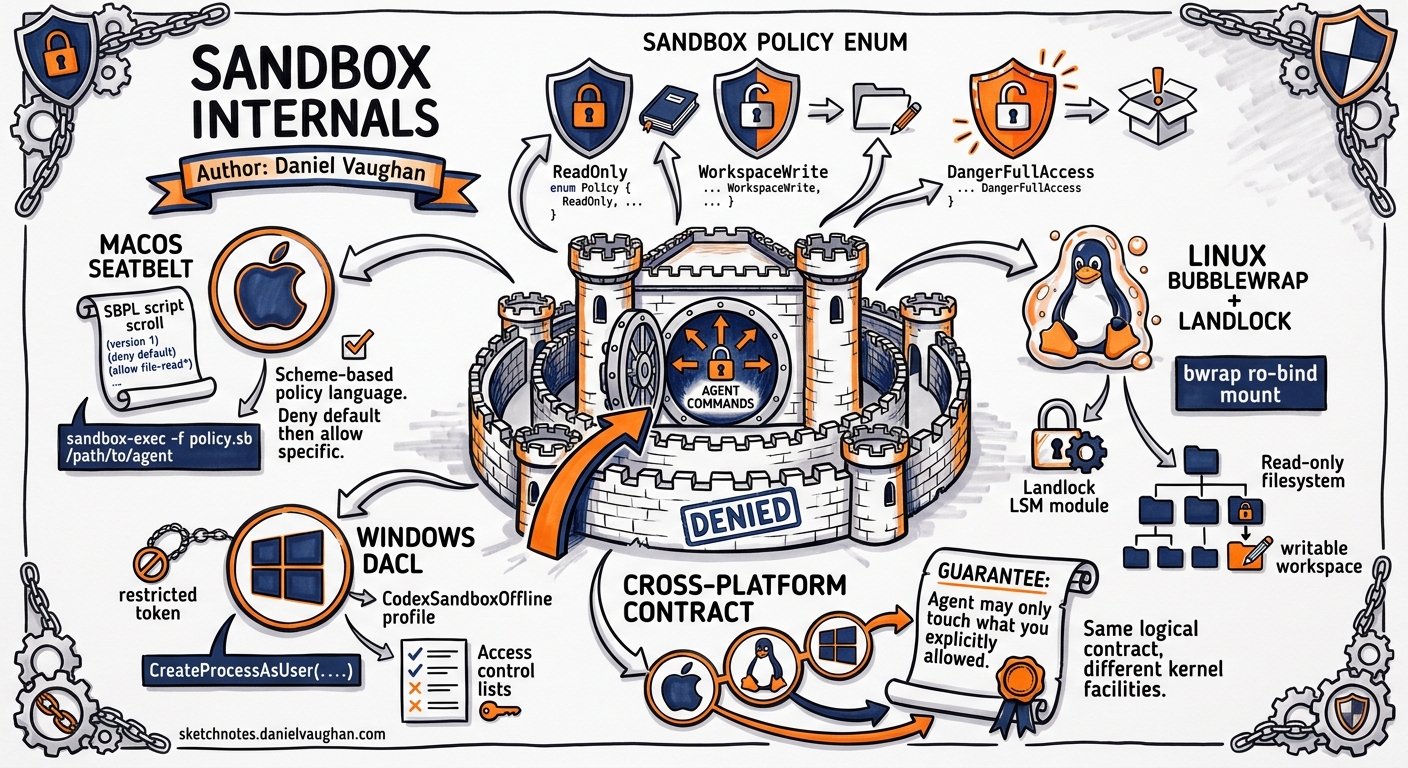
When Codex CLI runs a shell command on your behalf, it does not simply call exec and hope for the best. Every command executes inside a platform-native sandbox whose job is to enforce one deceptively simple guarantee: the agent may only touch what you have explicitly allowed. This article traces the full path from the high-level SandboxPolicy enum in codex-rs down to the OS primitives that actually confine the process on macOS, Linux and Windows.
The Policy Layer
All sandboxing starts with a single Rust enum 1:
pub enum SandboxPolicy {
    ReadOnly,          // read the workspace, write nothing
    WorkspaceWrite,    // read everything, write only inside the project root
    DangerFullAccess,  // no sandbox at all
}
The user selects a policy through the --sandbox flag or the sandbox_policy key in codex.toml. Once chosen, the policy is handed to a platform-specific driver that translates it into OS-level restrictions. The diagram below shows the translation pipeline:
flowchart TD
    A["codex --sandbox workspace-write"] --> B["SandboxPolicy::WorkspaceWrite"]
    B --> C{Platform?}
    C -->|macOS| D["Seatbelt SBPL Generator"]
    C -->|Linux| E["Bubblewrap / Landlock Driver"]
    C -->|Windows| F["Restricted Token + DACL Builder"]
    D --> G["sandbox-exec -p '(version 1)…'"]
    E --> H["bwrap --ro-bind / / --bind $CWD $CWD …"]
    F --> I["CreateProcessAsUser with CodexSandboxOffline"]
Each driver enforces the same logical contract — read-only mounts, writable workspace roots, network allow/deny — but does so with entirely different kernel facilities. 2
macOS: Seatbelt and SBPL Scripts
On macOS, Codex CLI delegates to /usr/bin/sandbox-exec, the user-space entry point for Apple’s Seatbelt mandatory access control framework. At runtime the Seatbelt driver builds an SBPL (Scheme-based Policy Language) script in memory and passes it via the -p flag. 3
A simplified version of the generated policy for WorkspaceWrite looks like this:
(version 1)
(deny default)
(allow file-read*)
(allow file-write*
  (subpath "/Users/you/project"))
(deny file-write*
  (subpath "/Users/you/project/.git")
  (subpath "/Users/you/project/.codex"))
(deny network*)
Key design choices:
- Default-deny posture. Everything not explicitly allowed is blocked at the kernel level.
.gitand.codexare forced read-only regardless of the chosen policy, preventing the agent from rewriting history or tampering with its own configuration. 4- Network is binary. Seatbelt offers no domain-level filtering, so network access is either fully allowed or fully denied. A
network_access = truesetting in the config currently results in the(deny network*)rule being silently omitted rather than applying granular controls — a known limitation tracked in GitHub issue #10390. 5
Environment variables are scrubbed before the child process launches: HOME, PATH and a curated allowlist are rebuilt from scratch so that leaked credentials in the parent shell cannot reach agent-generated commands. 3
Linux: Bubblewrap, Landlock and seccomp
The Linux driver has three layers of defence that stack on top of one another.
Bubblewrap (bwrap)
Bubblewrap is the primary containment tool. It creates a new mount namespace, PID namespace and (optionally) network namespace around the child process. The generated invocation for WorkspaceWrite resembles:
bwrap \
  --ro-bind / / \
  --bind "$PROJECT_ROOT" "$PROJECT_ROOT" \
  --ro-bind "$PROJECT_ROOT/.git" "$PROJECT_ROOT/.git" \
  --dev /dev \
  --proc /proc \
  --unshare-pid \
  --die-with-parent \
  -- /bin/bash -c "$CMD"
The entire root filesystem is mounted read-only (--ro-bind / /), then selective read-write bind mounts punch holes for the workspace directories. The --die-with-parent flag ensures orphaned sandbox processes are killed if the Codex CLI parent exits unexpectedly. 2
Network Isolation
Network policy is implemented via BwrapNetworkMode, an enum with three variants:
| Mode | Mechanism | Effect |
|---|---|---|
Isolated |
--unshare-net |
Fully disconnected — no loopback, no DNS |
ProxyOnly |
seccomp filter on SYS_connect, SYS_bind, SYS_sendto |
Blocks raw socket calls; traffic must flow through a supervised proxy |
FullAccess |
No network namespace | Unrestricted |
In ProxyOnly mode, a seccomp BPF programme is loaded via PR_SET_NO_NEW_PRIVS and seccomp(SECCOMP_SET_MODE_FILTER) to intercept networking syscalls at the kernel boundary. 6
Landlock Fallback
On older kernels (pre-5.13) or systems where Bubblewrap is unavailable, the driver falls back to Landlock LSM. The features.use_legacy_landlock = true flag in codex.toml forces this path. Landlock applies filesystem access rules directly to the calling thread without requiring new namespaces, making it a lighter but less comprehensive alternative. 2
flowchart LR
    subgraph "Linux Sandbox Stack"
        direction TB
        L1["Bubblewrap — mount/PID/net namespaces"]
        L2["seccomp BPF — syscall filtering"]
        L3["Landlock LSM — filesystem access rules"]
        L1 --> L2
        L2 --> L3
    end
    P["SandboxPolicy"] --> L1
    style L1 fill:#e0f0ff,stroke:#336
    style L2 fill:#fff3e0,stroke:#963
    style L3 fill:#e8f5e9,stroke:#363
A notable platform quirk: Ubuntu 24.04’s default AppArmor profile can conflict with Bubblewrap’s namespace creation. The recommended workaround is to add an AppArmor exception for the codex binary or switch to Landlock mode. 5
Windows: Restricted Tokens and DACLs
Windows support, introduced in the codex-rs rewrite, takes a fundamentally different approach. Rather than namespaces, it uses the NT security model directly. 7
-
Dedicated local users. During installation, Codex creates two local accounts:
CodexSandboxOffline(no network rights) andCodexSandboxOnline(standard network access). The choice between them maps directly to the network policy. -
Restricted tokens. The driver calls
CreateProcessAsUserwith a restricted token derived from the chosen sandbox account. The token strips most privileges (SeShutdownPrivilege,SeRemoteShutdownPrivilege, etc.) and applies a deny-only SID list to prevent privilege escalation. -
DACL grants. Workspace directories receive explicit ACL entries granting the sandbox user read/write access, while the rest of the filesystem inherits the default deny.
.gitand.codexdirectories are granted read-only ACEs, mirroring the macOS and Linux behaviour.
# codex.toml — Windows-specific overrides
[sandbox]
policy = "workspace-write"

[sandbox.windows]
offline_user = "CodexSandboxOffline"
online_user  = "CodexSandboxOnline"
The result is a process that runs under a separate user identity with a surgically reduced token — a pattern well-established in Windows service hardening but novel in the context of AI agent tooling. 7
Cross-Platform Invariants
Despite the divergent mechanisms, several invariants hold on every platform:
.gitis always read-only. No sandbox policy, includingDangerFullAccessat the application layer, grants write access to.gitunless the user explicitly overrides this withallow_git_write = true.- Environment scrubbing.
AWS_SECRET_ACCESS_KEY,GITHUB_TOKENand dozens of other sensitive variables are removed from the child environment before launch. - Parent-death cleanup. On Linux,
PR_SET_PDEATHSIG(SIGKILL)ensures orphan reaping. On macOS,kqueueEVFILT_PROC watches serve the same purpose. On Windows, Job Objects withJOB_OBJECT_LIMIT_KILL_ON_JOB_CLOSEhandle the case. - Symlink traversal guards. All three drivers resolve symlinks before applying policy to prevent a symlink inside the workspace from granting access to files outside it — a fix introduced after a bug report demonstrated the escape vector. 5
Practical Implications
For day-to-day use, the sandbox is invisible. But understanding its internals pays off when things go wrong:
- Build failures inside the sandbox usually mean a tool writes to a path outside the workspace root. The fix is to redirect output (e.g.
GOPATH,CARGO_TARGET_DIR) into the project tree. - Network timeouts in
ProxyOnlymode indicate that a dependency manager is opening raw sockets rather than using HTTP. Switching toFullAccessnetwork mode or configuring a proxy address resolves the issue. - Permission denied on
.gitis by design. If your workflow requires writing to.git(e.g. custom merge drivers), setallow_git_write = trueincodex.tomland accept the risk.
Conclusion
Codex CLI’s sandbox architecture is a case study in defence-in-depth applied to AI agent tooling. By mapping a single policy enum onto three radically different OS security primitives — Seatbelt on macOS, Bubblewrap/Landlock/seccomp on Linux, restricted tokens and DACLs on Windows — the project achieves a consistent security posture without compromising on platform-native performance or idiom. As agent capabilities grow, this isolation layer will only become more critical.
References
-
OpenAI, “Codex CLI — codex-rs sandbox module,” GitHub, 2026. https://github.com/openai/codex/tree/main/codex-rs/core/src/sandbox ↩
-
DeepWiki, “OpenAI Codex — Sandboxing and Security,” DeepWiki, 2026. https://deepwiki.com/openai/codex/4-sandboxing-and-security ↩ ↩2 ↩3
-
Pierce Freeman, “Agent Sandboxes,” piercefreeman.com, 2025. https://www.piercefreeman.com/blog/agent-sandboxes ↩ ↩2
-
OpenAI, “Codex CLI Documentation — Sandboxing,” OpenAI, 2026. https://openai.com/codex/docs/sandboxing ↩
-
OpenAI, “Codex CLI — GitHub Issues,” GitHub, 2026. https://github.com/openai/codex/issues ↩ ↩2 ↩3
-
Linux Kernel Documentation, “Seccomp BPF,” kernel.org, 2024. https://www.kernel.org/doc/html/latest/userspace-api/seccomp_filter.html ↩
-
Microsoft, “Restricted Tokens,” Microsoft Learn, 2024. https://learn.microsoft.com/en-us/windows/win32/secauthz/restricted-tokens ↩ ↩2