ProgramBench and the Zero-Percent Problem: What a Cleanroom Benchmark Reveals About Architectural Reasoning in Codex CLI
ProgramBench and the Zero-Percent Problem: What a Cleanroom Benchmark Reveals About Architectural Reasoning in Codex CLI
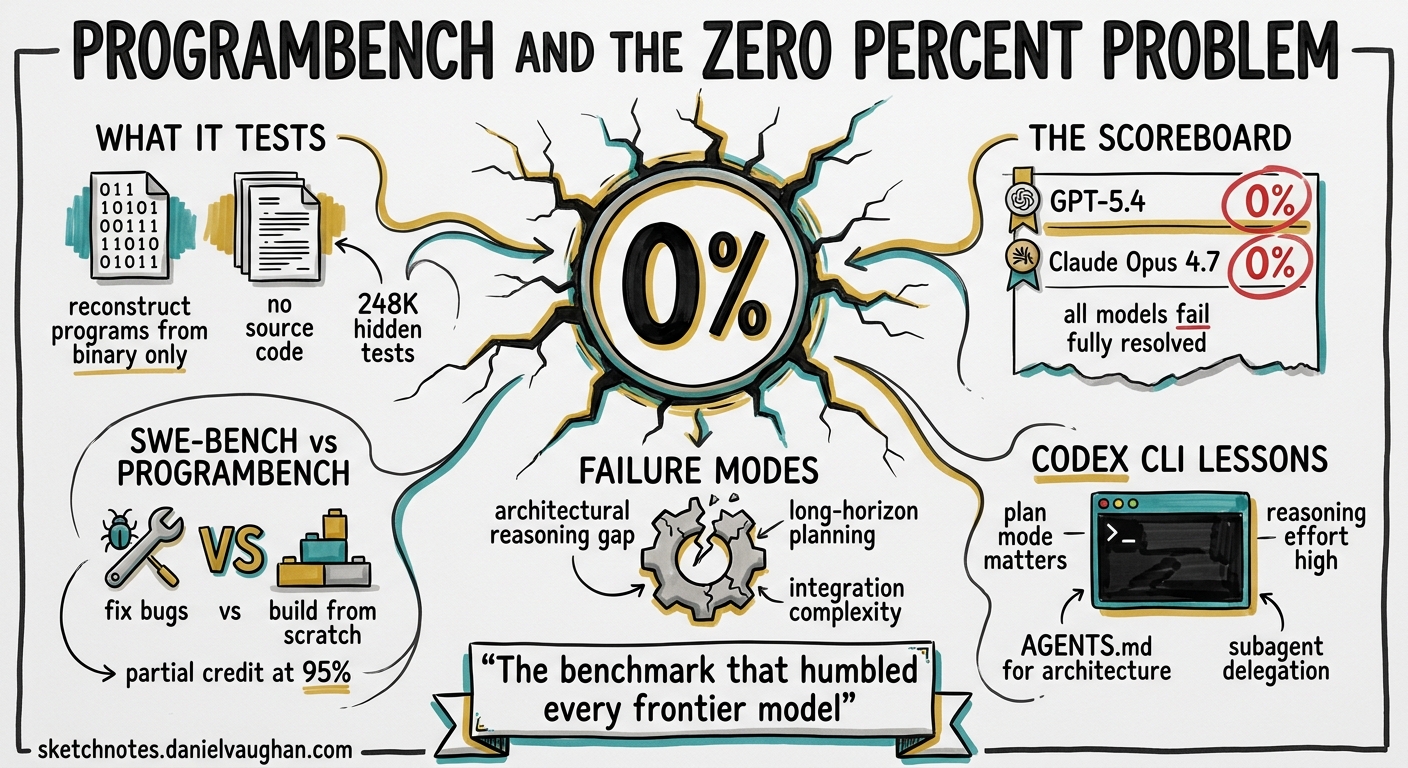
On 5 May 2026, researchers from Meta Superintelligence Labs, Stanford, and Harvard published ProgramBench — a benchmark that asks AI coding agents to reconstruct entire programs from nothing but a compiled binary and its documentation1. The headline result: every frontier model, including GPT-5.4 and Claude Opus 4.7, scored 0% fully resolved across all 200 tasks2. That number deserves unpacking, because the failure modes it exposes map directly to configuration choices Codex CLI practitioners make every day.
What ProgramBench Actually Tests
SWE-bench asks agents to fix bugs in existing codebases. ProgramBench inverts the problem entirely. The agent receives an executable binary and its usage documentation — nothing else. No source code, no decompiler, no internet access1. It must:
- Probe the binary’s behaviour through input/output experimentation
- Infer the internal architecture from observed behaviour and documentation
- Implement a complete, buildable codebase that passes 248,853 hidden behavioural tests3
Tasks range from small CLI utilities to projects the scale of FFmpeg, SQLite, and the PHP interpreter1.
flowchart LR
    A[Binary + Docs] --> B[Agent Probes Behaviour]
    B --> C[Infers Architecture]
    C --> D[Implements Codebase]
    D --> E[248k Hidden Tests]
    E -->|Pass all| F[Fully Resolved]
    E -->|Pass 95%+| G[Almost Resolved]
    E -->|Below 95%| H[Failed]
The two-tier scoring matters. Fully resolved requires a perfect behavioural match. Almost resolved means the submission passes at least 95% of tests — a partial-credit tier that currently provides the only separation between models2.
The Scoreboard: May 2026
| Model | Fully Resolved | Almost Resolved |
|---|---|---|
| Claude Opus 4.7 | 0.0% | 3.0% |
| Claude Opus 4.6 | 0.0% | 2.5% |
| Claude Sonnet 4.6 | 0.0% | 1.0% |
| GPT-5.4 | 0.0% | 0.0% |
| Gemini 3.1 Pro | 0.0% | 0.0% |
Source: ProgramBench public leaderboard, May 202624
Every model submitted final answers in 98% of evaluation runs3 — they did not time out or refuse. They confidently produced implementations that were architecturally wrong.
Seven Failure Modes and What They Mean for Practitioners
The ProgramBench authors and independent reviewers identified seven recurring failure patterns35. Each maps to a concrete Codex CLI configuration decision.
1. Shallow Probing
Models ran obvious inputs and moved on, missing edge cases. In Codex CLI terms, this is the agent that reads one file and starts coding. The mitigation: force exploration before implementation.
2. Premature Implementation
Agents began writing code before discovering requirements. The paper notes they “favor monolithic, single-file implementations that diverge sharply from human-written code”1.
3. Missing Negative Cases
Error handling, invalid flags, and non-zero exit codes were routinely ignored. Agents handled the happy path and stopped.
4. Weak Architecture
Implementations were structurally brittle — designed around demo scenarios rather than the full specification.
5. Poor Self-Testing
Models rarely built automated comparisons between their output and the original binary, despite having the binary available for comparison.
6. Overconfidence
Agents submitted incomplete work prematurely. Most failures were not caused by timeouts — the agents chose to stop3.
7. Tool-Loop Fragility
The agent harness itself sometimes failed, preventing fair evaluation of the underlying model5.
Configuring Codex CLI to Counter These Patterns
ProgramBench tests a scenario most practitioners never face: reconstructing unknown software from a binary. But the failure modes it surfaces — shallow exploration, premature implementation, weak architecture — appear in everyday development too. Here is how to configure Codex CLI to resist them.
Force Plan-Before-Code with Plan Mode
The single most effective countermeasure to premature implementation is plan mode. When Codex operates in plan mode, it gathers context, asks clarifying questions, and builds a structured plan before touching any code6.
# ~/.codex/config.toml
[model]
plan_mode_reasoning_effort = "high"
model_reasoning_effort = "low"
This dual-effort pattern gives the model time to think during planning whilst keeping execution fast7. For architecturally complex tasks, bump to "xhigh" — the model explores more of the codebase, raises more edge cases, and produces more precise acceptance criteria7.
Write Architectural Constraints into AGENTS.md
The ProgramBench failure of monolithic single-file implementations is directly addressable through AGENTS.md. When you specify structural expectations, the agent follows them8.
<!-- .codex/AGENTS.md -->
## Architecture Rules

- Never place more than 300 lines in a single file.
- Every new module must include a README explaining its responsibility.
- Use the existing directory structure; do not flatten into root.
- Before implementing, list every file you will create or modify and explain why.
Require Self-Testing via Hooks
ProgramBench agents rarely compared their output against the original. In production, the equivalent is writing code without running the test suite. A PostToolUse hook can enforce verification after every code change9:
[[hooks.PostToolUse]]
matcher = "^(Bash|apply_patch)$"

[[hooks.PostToolUse.hooks]]
type = "command"
command = '/bin/sh -c "cd $(git rev-parse --show-toplevel) && make test 2>&1 | tail -20"'
timeout = 60
statusMessage = "Running test suite"
Use Goal Mode for Long-Horizon Architectural Tasks
ProgramBench tasks demand sustained, multi-step reasoning across an entire codebase. The /goal command in Codex CLI v0.129 provides exactly this — a persistent objective that survives context compaction and guides the agent across extended sessions10.
/goal "Reconstruct the behaviour of the target binary. Phase 1: probe all documented flags and record input-output pairs. Phase 2: design a modular architecture. Phase 3: implement module by module with tests after each."
Raise Reasoning Effort for Discovery Phases
The shallow-probing failure is a direct consequence of low reasoning effort. For tasks that require exploratory investigation, override the default:
codex --reasoning-effort xhigh "Analyse the behaviour of ./target-binary across all documented flags, edge cases, and error conditions. Record findings in ANALYSIS.md before writing any implementation code."
Where ProgramBench Sits in the Benchmark Landscape
graph TD
    subgraph "Bounded Tasks"
        A["SWE-bench Verified<br/>Bug fixes in existing code<br/>Best: 79.2%"]
        B["LiveCodeBench<br/>Competitive programming<br/>Best: ~85%"]
    end
    subgraph "Open-Ended Engineering"
        C["SWE-bench Pro<br/>Complex multi-file issues<br/>1,865 tasks"]
        D["ProgramBench<br/>Full program reconstruction<br/>Best: 0% fully resolved"]
    end
    A --> C
    C --> D
    style D fill:#f96,stroke:#333,stroke-width:2px
SWE-bench Verified scores now exceed 79%11. ProgramBench scores 0%. The gap is not a contradiction — it measures fundamentally different capabilities. SWE-bench tests “local surgery”: find a bug, understand its context, apply a fix. ProgramBench tests architectural reasoning: given a specification, design and build an entire system1.
This distinction matters for how you assign work to Codex CLI. The evidence says:
- High confidence: Bug fixes, feature additions within existing architecture, test generation, refactoring bounded modules
- Moderate confidence: Multi-file changes following established patterns, API integrations with clear specifications
- Low confidence: Greenfield architecture, system-level design, reconstructing undocumented behaviour
The Monolithic-File Anti-Pattern
One of ProgramBench’s sharpest findings is that models “favor monolithic, single-file implementations that diverge sharply from human-written code”1. This is not an abstract benchmark curiosity — it happens in production. When Codex CLI tackles a large task without structural guidance, it gravitates toward fewer, larger files.
The defence is explicit. In your AGENTS.md, specify:
## File Structure Policy

When creating new functionality:
1. Follow the existing module boundary conventions in this repository.
2. Each file should have a single, clear responsibility.
3. If a new file exceeds 200 lines, decompose it before proceeding.
4. Mirror the test directory structure against the source directory structure.
This is not hand-holding — it is context engineering. The model cannot infer your team’s architectural preferences from the task description alone8.
Practical Takeaways
-
ProgramBench is a frontier stress test, not a deployment benchmark. No team is asking Codex CLI to rebuild FFmpeg from a binary. But the failure modes it reveals — shallow exploration, premature coding, monolithic output — appear in everyday sessions at lower intensity.
-
Plan mode is your primary architectural guardrail. Force it for any task involving structural decisions. Set
plan_mode_reasoning_effortto"high"or"xhigh"7. -
AGENTS.md is your architectural specification. Without explicit structural guidance, models default to monolithic implementations. Write your team’s conventions into the instruction stack8.
-
Self-testing hooks close the verification gap. ProgramBench agents rarely validated their own output. A
PostToolUsehook running the test suite after every change prevents the same mistake in production9. -
Right-size the task. The benchmark confirms what practitioners already know: AI coding agents excel at bounded modifications within existing code and struggle with open-ended architectural work. Decompose accordingly6.
-
Watch this benchmark. When ProgramBench fully-resolved scores climb above zero, it signals a genuine step change in architectural reasoning — and a meaningful expansion of what you can safely delegate to Codex CLI.
Citations
-
Yang, J., Lieret, K., Ma, J., Thakkar, P., Pedchenko, D., Sootla, S., McMilin, E., Yin, P., Hou, R., Synnaeve, G., Yang, D., & Press, O. (2026). “ProgramBench: Can Language Models Rebuild Programs From Scratch?” arXiv:2605.03546. https://arxiv.org/abs/2605.03546 ↩ ↩2 ↩3 ↩4 ↩5 ↩6
-
ProgramBench Public Leaderboard, May 2026. https://programbench.com/ ↩ ↩2 ↩3
-
BenchLM.ai. “ProgramBench Benchmark Explained: Can LLMs Rebuild Programs From Binaries?” https://benchlm.ai/blog/posts/programbench-cleanroom-coding-benchmark ↩ ↩2 ↩3 ↩4
-
BenchLM.ai. “ProgramBench Benchmark 2026: 9 model averages.” https://benchlm.ai/benchmarks/programBench ↩
-
AI Feed Today. “ProgramBench Benchmark Review: Why Top AI Models Score 0%.” https://aifeedtoday.com/programbench-benchmark-review/ ↩ ↩2
-
OpenAI. “Best practices — Codex.” https://developers.openai.com/codex/learn/best-practices ↩ ↩2
-
SmartScope. “Complete Guide to Codex Plan Mode (2026): Stop AI Drift with Plan-Execute.” https://smartscope.blog/en/generative-ai/chatgpt/codex-plan-mode-complete-guide/ ↩ ↩2 ↩3
-
OpenAI. “Custom instructions with AGENTS.md — Codex.” https://developers.openai.com/codex/guides/agents-md ↩ ↩2 ↩3
-
OpenAI. “Hooks — Codex.” https://developers.openai.com/codex/hooks ↩ ↩2
-
OpenAI. “Features — Codex CLI.” https://developers.openai.com/codex/cli/features ↩
-
SWE-bench Leaderboards, May 2026. https://www.swebench.com/ ↩