Eval-Driven Development with Codex CLI: Building Promptfoo Test Suites for AI Applications
Eval-Driven Development with Codex CLI: Building Promptfoo Test Suites for AI Applications
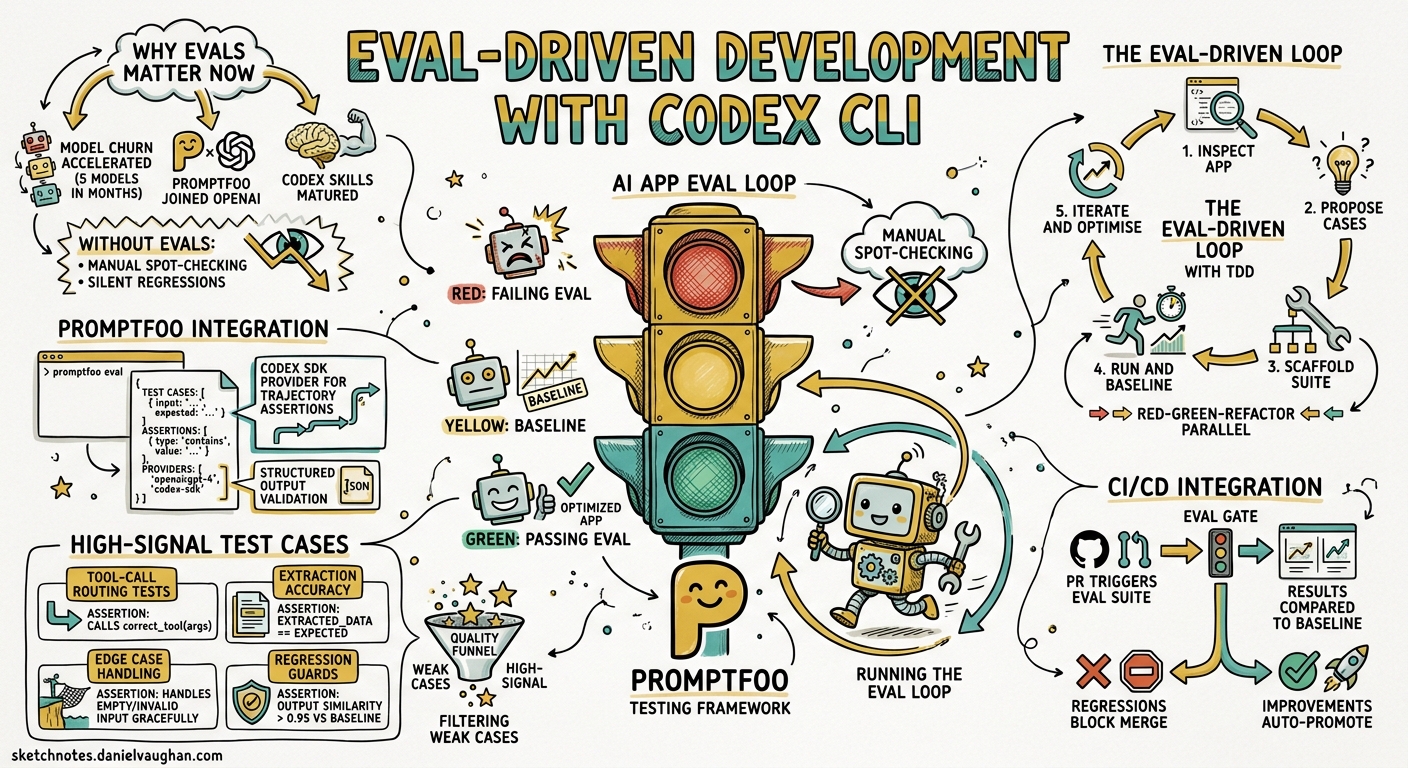
Most teams building AI applications still rely on manual spot-checking to validate prompt changes. A developer tweaks a system prompt, eyeballs a few outputs, and ships. This works until it doesn’t — until a model migration silently degrades extraction accuracy, or a prompt refactor breaks tool-call routing in edge cases nobody thought to test.
Eval-driven development treats AI application quality the same way test-driven development treats code quality: you write the assertions first, then iterate until they pass. OpenAI’s official “Add evals to your AI application” use case1 pairs Codex CLI with Promptfoo — the open-source eval framework OpenAI acquired and continues to maintain under an MIT licence2 — to automate the creation, execution, and maintenance of eval suites directly from your terminal.
Why Eval-Driven Development Matters Now
Three developments in early 2026 made this approach practical for everyday teams:
-
Model churn accelerated. GPT-5.5, GPT-5.4, GPT-5.3-Codex, and their mini variants shipped within months of each other3. Each model change is a potential regression vector for prompt-dependent applications.
-
Promptfoo joined OpenAI. The acquisition brought first-class Codex SDK provider support, including trajectory assertions and structured-output validation2.
-
Codex CLI skills matured. The
$promptfoo-evalsskill can inspect an application, propose high-signal test cases, scaffold the eval configuration, and run the suite — all within a single interactive session1.
The Eval-Driven Loop
The workflow follows a five-phase cycle that mirrors red-green-refactor from TDD:
graph LR
    A[Inspect App] --> B[Propose Cases]
    B --> C[Scaffold Suite]
    C --> D[Run & Baseline]
    D --> E[Iterate & Optimise]
    E --> B
Phase 1: Inspect the Application
Codex reads your project structure, identifies prompt files, model calls, tool definitions, and retrieval pipelines. It maps the paths users actually traverse — not just the happy path.
codex "Inspect this project. Identify all LLM calls, prompts, tools, and \
retrieval steps. List the user-visible behaviours that should be eval'd."
Phase 2: Propose High-Signal Cases
Rather than exhaustive coverage, Codex targets the behaviours most likely to break under model or prompt changes1:
- Classification and routing — does the agent pick the right tool?
- Extraction accuracy — are structured fields populated correctly?
- Grounding and citation — does the response stay faithful to retrieved context?
- Business-rule compliance — JSON schemas, field constraints, rate limits
- Migration confidence — does the new model match the old one’s output distribution?
Phase 3: Scaffold the Suite
Codex creates the standard Promptfoo project structure:
evals/
  promptfooconfig.yaml
  tests/
    cases.yaml
  providers/
    adapter.js
The configuration file follows Promptfoo’s declarative YAML format4:
providers:
  - id: openai:codex-sdk
    config:
      model: gpt-5.5
      working_dir: ./src
      sandbox_mode: read-only
      output_schema:
        type: object
        properties:
          category:
            type: string
          confidence:
            type: number
        required: [category, confidence]

tests: file://tests/cases.yaml

defaultTest:
  options:
    threshold: 0.8
Test cases live in a separate YAML file for clean version control:
- vars:
    input: "Refund my order #4821, the item arrived damaged"
  assert:
    - type: is-json
    - type: javascript
      value: "output.category === 'refund_request'"
    - type: cost
      threshold: 0.05

- vars:
    input: "What are your opening hours?"
  assert:
    - type: javascript
      value: "output.category === 'faq'"
    - type: latency
      threshold: 10000
Phase 4: Run and Establish a Baseline
codex exec "Run the Promptfoo eval suite in evals/ and report the results. \
If any cases fail, explain why but do not change the application code."
Or run Promptfoo directly:
cd evals && npx promptfoo eval
The first run establishes a baseline. Subsequent runs compare against it, surfacing regressions before they reach production4.
Phase 5: Iterate and Optimise
This is where eval-driven development diverges from traditional testing. You hand Codex both the failing eval cases and the prompt files, then ask it to optimise:
codex "The eval suite in evals/ has 3 failing cases for the refund classifier. \
Optimise the prompt in src/prompts/classifier.txt until all cases pass. \
After each change, run npx promptfoo eval, inspect failures, and keep edits minimal."
The OpenAI Cookbook’s “Agent Improvement Loop” pattern5 formalises this further: traces from the Agents SDK feed into HALO analysis, which ranks optimisation recommendations, which Codex implements via a structured handoff file.
Configuring the Codex SDK Provider
Promptfoo’s openai:codex-sdk provider6 exposes Codex-specific evaluation capabilities beyond simple text comparison:
| Metric | Configuration | Use Case |
|---|---|---|
| Final response text | Default response.output |
Content assertions |
| Token usage | tokenUsage field |
Cost regression gates |
| Session/thread IDs | sessionId metadata |
Session continuity checks |
| Tool trajectories | enable_streaming: true |
Verifying tool-call sequences |
| Skill invocations | metadata.skillCalls |
Confirming skill usage |
| Structured output | output_schema object |
JSON shape validation |
Trajectory Assertions
When you need to verify that the agent actually ran tests or checked documentation rather than just claiming it did, enable tracing6:
providers:
  - id: openai:codex-sdk:gpt-5.3-codex
    config:
      enable_streaming: true
      deep_tracing: true

defaultTest:
  assert:
    - type: trajectory:step-count
      value: ">= 3"
This catches a common failure mode: agents that produce plausible output without executing the verification steps you expected.
Integrating Evals into CI/CD
Promptfoo ships with CI/CD integration7 that slots into existing pipelines:
# .github/workflows/eval.yml
name: Eval Gate
on:
  pull_request:
    paths:
      - 'src/prompts/**'
      - 'evals/**'

jobs:
  eval:
    runs-on: ubuntu-latest
    steps:
      - uses: actions/checkout@v4
      - uses: actions/setup-node@v4
        with:
          node-version: '22'
      - run: npm ci
      - run: npx promptfoo eval --ci --output results.json
        env:
          OPENAI_API_KEY: ${{ secrets.OPENAI_API_KEY }}
      - run: npx promptfoo eval:assert --results results.json --threshold 0.9
The --ci flag suppresses interactive output and returns a non-zero exit code on failure, making it a natural gate for prompt changes7.
Cost-Aware Evaluation
Agent evals can be expensive — Promptfoo’s documentation notes typical costs of $0.10–0.30 per security audit case8. Two strategies keep costs manageable:
-
Cache aggressively during development. Promptfoo caches responses by default based on prompt template, model, and sandbox settings. Disable only when testing for stability (
PROMPTFOO_CACHE_ENABLED=false)6. -
Use cheaper models for regression gates. Run the full suite against
gpt-5.1-codex-miniin CI, reservinggpt-5.5evals for pre-release validation6.
The Improvement Loop in Practice
The OpenAI Cookbook’s agent improvement loop5 connects traces, feedback, evals, and optimisation into a continuous flywheel:
graph TD
    A[Agent Execution] -->|OTLP traces| B[Trace Export]
    B -->|JSONL spans| C[HALO Analysis]
    C -->|Ranked recommendations| D[Codex Handoff]
    D -->|Prompt/harness changes| E[Promptfoo Eval]
    E -->|Pass/fail results| F{Threshold Met?}
    F -->|Yes| G[Promote Harness]
    F -->|No| D
The harness — system prompt, tool policy, model settings, and validation rules — is treated as an explicit, versioned contract5:
@dataclass(frozen=True)
class AgentConfig:
    version: str
    system_prompt: str
    model_settings: ModelSettings
    tool_policy: dict[str, Any]
    eval_metadata: dict[str, Any]
Each iteration produces a codex_handoff.md file containing the HALO diagnosis, ranked recommendations, and implementation guidance. Codex reads this file and applies the changes, then reruns the eval suite to verify improvement5.
What Makes a Good First Eval Target
Not every AI behaviour warrants an eval suite. The official use case documentation1 recommends starting with behaviours that are:
- Concrete and verifiable — classification labels, extracted fields, tool-call names
- User-visible — failures that customers notice, not internal plumbing
- Regression-prone — behaviours that broke during the last model migration
- Automatable — assertions you can express in YAML without human judgement
Poor first targets include subjective tone assessments, creative writing quality, and conversational flow — these benefit more from LLM-as-judge rubrics added later8.
Limitations and Caveats
- The Codex SDK provider does not support embeddings, moderation, image generation, or the Realtime API6. If your application uses these, you’ll need separate evaluation tooling.
- Trajectory assertions require
enable_streaming, which increases token consumption and evaluation time6. - Promptfoo’s Codex integration requires Node.js
^20.20.0or>=22.22.06. Older Node versions will fail silently. - Custom prompts in Codex CLI are deprecated9. Use skills (
$promptfoo-evals) rather than custom slash commands for eval workflows. - Cost estimation requires known model names. Custom or fine-tuned model identifiers may not produce accurate cost tracking6.
Getting Started
The fastest path from zero to a working eval suite:
# Install Promptfoo alongside your project
npm install --save-dev promptfoo @openai/codex-sdk

# Ask Codex to scaffold the suite
codex "Use \$promptfoo-evals to add an eval suite for the support classifier \
in src/classifier.ts. Target classification accuracy and tool-call correctness. \
Run the suite and show me the baseline."
From there, commit the evals/ directory, add the CI gate, and treat eval failures the same way you treat test failures: as blockers, not suggestions.
Citations
-
OpenAI, “Add evals to your AI application — Codex use cases,” https://developers.openai.com/codex/use-cases/ai-app-evals ↩ ↩2 ↩3 ↩4
-
Promptfoo, “GitHub — promptfoo/promptfoo: Test your prompts, agents, and RAGs,” MIT licence, https://github.com/promptfoo/promptfoo ↩ ↩2
-
OpenAI, “Models — Codex,” https://developers.openai.com/codex/models ↩
-
Promptfoo, “Intro — Getting started with Promptfoo,” https://www.promptfoo.dev/docs/intro/ ↩ ↩2
-
OpenAI Cookbook, “Build an Agent Improvement Loop with Traces, Evals, and Codex,” May 2026, https://developers.openai.com/cookbook/examples/agents_sdk/agent_improvement_loop ↩ ↩2 ↩3 ↩4
-
Promptfoo, “OpenAI Codex SDK Provider,” https://www.promptfoo.dev/docs/providers/openai-codex-sdk/ ↩ ↩2 ↩3 ↩4 ↩5 ↩6 ↩7 ↩8
-
Promptfoo, “CI/CD Integration for LLM Eval and Security,” https://www.promptfoo.dev/docs/integrations/ci-cd/ ↩ ↩2
-
Promptfoo, “Evaluate Coding Agents,” https://www.promptfoo.dev/docs/guides/evaluate-coding-agents/ ↩ ↩2
-
OpenAI, “Custom Prompts — Codex,” https://developers.openai.com/codex/custom-prompts ↩