Codex CLI for CI/CD: codex exec, Non-Interactive Mode and Pipeline Integration
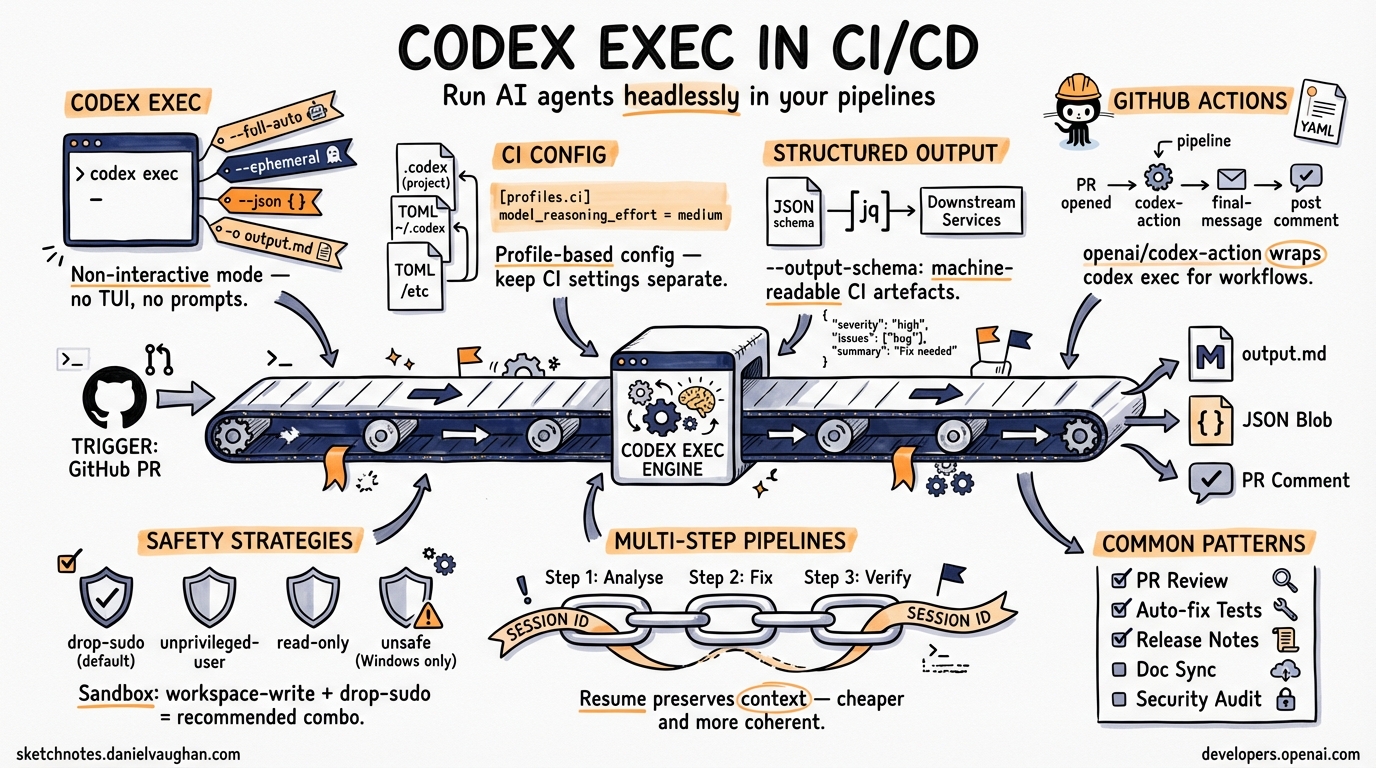
Codex CLI for CI/CD: codex exec, Non-Interactive Mode and Pipeline Integration
Published 2026-03-26. Based on official Codex CLI docs and openai/codex-action README.
The Core Command: codex exec
codex exec is Codex’s non-interactive execution mode — no TUI, no prompts, just autonomous task completion.1 It’s the entry point for every CI/CD integration.
# Basic usage
codex exec "fix all failing tests"

# Stream output to file
codex exec "generate release notes" | tee release-notes.md

# Write final response to file
codex exec -o summary.md "summarise changes in this PR"

# Resume previous session
codex exec resume --last "continue with the next step"
codex exec resume <SESSION_ID>
Key Flags
| Flag | Purpose | CI Recommendation |
|---|---|---|
--full-auto |
Allow Codex to edit files without confirmation2 | Use with a scoped sandbox |
--ephemeral |
Don’t write session files to disk2 | Good for stateless runners |
--json |
Emit JSON Lines (structured event stream)2 | Required for parsing in scripts |
-o <path> / --output-last-message <path> |
Write final message to a file2 | Use to capture Codex output |
--output-schema <path> |
Constrain final response to a JSON schema2 | Structured output for automation |
--skip-git-repo-check |
Override the Git repo requirement2 | Useful in container builds |
--sandbox danger-full-access |
Broader filesystem + network access2 | Only in trusted, isolated environments |
Environment Variables
# Set your API key as a secret (codex exec only, not interactive mode)
export CODEX_API_KEY=$OPENAI_API_KEY

# Or inline
CODEX_API_KEY=$OPENAI_API_KEY codex exec --json "task"
Use CODEX_API_KEY (not OPENAI_API_KEY) in CI — it’s the canonical variable name for codex exec pipelines. ⚠️ [unverified]
Profile-Based CI Configuration
Define a ci profile in your project’s .codex/config.toml2 to keep CI settings separate from interactive settings:
# .codex/config.toml (commit this to your repo)
[profiles.ci]
sandbox_mode = "workspace-write"
approval_policy = "never"
model_reasoning_effort = "medium"

[profiles.ci-fast]
sandbox_mode = "workspace-write"
approval_policy = "never"
model = "gpt-5.4-mini"
model_reasoning_effort = "low"
Activate with:
codex --profile ci exec "run the test suite and fix any type errors"
Tip: model_reasoning_effort = "medium" is the CI sweet spot — cheaper than high, more reliable than low for multi-step tasks. ⚠️ [unverified]
Structured Output with --output-schema
For automation pipelines that need to consume Codex output as data, use --output-schema2 to enforce a JSON schema on the final response:
// .codex/schemas/pr-review.json
{
  "type": "object",
  "properties": {
    "severity": { "type": "string", "enum": ["low", "medium", "high", "critical"] },
    "issues": {
      "type": "array",
      "items": {
        "type": "object",
        "properties": {
          "file": { "type": "string" },
          "line": { "type": "number" },
          "message": { "type": "string" }
        }
      }
    },
    "summary": { "type": "string" }
  }
}
codex exec --output-schema .codex/schemas/pr-review.json \
  "review this PR for security issues and code quality"
The output will be valid JSON matching the schema — ready for jq, downstream services, or GitHub PR comments.
JSON Lines Output Mode
--json emits structured event stream output:2
codex exec --json "task" | jq 'select(.type == "turn.completed")'
Event types to know:
thread.started— session initialisedturn.started/turn.completed— agent turn lifecycleitem.started/item.completed— individual tool calls or messages- Includes token usage in
turn.completed
Useful for: logging to observability platforms, parsing progress in shell scripts, filtering for specific outputs.
GitHub Actions Integration: openai/codex-action
The official action (openai/codex-action)3 wraps codex exec for GitHub workflows:
# .github/workflows/codex-pr-review.yml
name: Codex PR Review

on:
  pull_request:
    types: [opened, synchronize]

jobs:
  review:
    runs-on: ubuntu-latest
    permissions:
      contents: read
      pull-requests: write
    steps:
      - uses: actions/checkout@v4
        with:
          fetch-depth: 0

      - name: Run Codex review
        id: codex
        uses: openai/codex-action@v1
        with:
          openai-api-key: $
          prompt: |
            Review the changes in this pull request.
            Focus on: security issues, error handling, test coverage.
            Be concise. Format as bullet points per file.
          sandbox: workspace-write
          safety-strategy: drop-sudo
          model: gpt-5.4

      - name: Post review comment
        uses: actions/github-script@v7
        with:
          script: |
            github.rest.issues.createComment({
              issue_number: context.issue.number,
              owner: context.repo.owner,
              repo: context.repo.repo,
              body: `## Codex Review\n\n$`
            })
Action Inputs Reference
| Input | Required | Default | Notes |
|---|---|---|---|
openai-api-key |
✅ | — | Store as repo secret3 |
prompt |
✅* | — | *or use prompt-file3 |
prompt-file |
✅* | — | *path to a .md prompt file3 |
sandbox |
— | workspace-write |
Scope: workspace-write, read-only, danger-full-access3 |
safety-strategy |
— | drop-sudo |
See below3 |
model |
— | auto | e.g. gpt-5.4, gpt-5.4-mini3 |
effort |
— | auto | low, medium, high3 |
output-file |
— | — | Path to write final message3 |
codex-args |
— | — | Pass-through to codex exec3 |
MCP servers: Servers configured in .codex/config.toml are automatically available to the action — no extra setup needed. ⚠️ [unverified]
Safety Strategies
| Strategy | How it works | When to use |
|---|---|---|
drop-sudo (default) |
Removes sudo for the rest of the job4 | Standard Linux/macOS GitHub runners4 |
unprivileged-user |
Runs Codex as a non-root user4 | Self-hosted runners with pre-configured accounts4 |
read-only |
Filesystem read-only; no network writes3 | Audit-only tasks (e.g., security scanning) |
unsafe |
No privilege reduction4 | Windows only (no sandbox available)4 |
Note: drop-sudo is permanent for the job step — subsequent steps in the same job cannot use sudo.4
Sandbox Modes Explained
| Mode | Filesystem | Network | Best for |
|---|---|---|---|
workspace-write |
Write within workspace dir | Restricted | Standard CI tasks3 |
read-only |
Read only | None | Audit/review tasks3 |
danger-full-access |
Full access | Full | Trusted isolated environments only3 |
For most CI workflows: sandbox: workspace-write + safety-strategy: drop-sudo is the recommended combination.4
Common CI/CD Patterns
1. Automated PR Review
# In GitHub Actions step
codex exec \
  --profile ci \
  -o /tmp/review.md \
  "Review this PR diff for bugs, missing tests, and style issues: $(git diff origin/main...HEAD)"
2. Auto-Fix Failing Tests
codex exec --full-auto \
  "Run the test suite. Fix any failing tests. Don't change test assertions — only fix the implementation."
3. Release Notes Generation
codex exec \
  -o RELEASE_NOTES.md \
  "Write release notes for the changes since the last git tag. Format: markdown, user-focused, no internal jargon."
4. Nightly Documentation Sync
codex exec --profile ci --ephemeral \
  "Check that all public functions in src/ have JSDoc comments. Add any missing ones."
5. Structured Security Audit
codex exec \
  --output-schema .codex/schemas/security-audit.json \
  --profile ci \
  "Scan this codebase for OWASP Top 10 vulnerabilities. Return structured JSON."
Multi-Step Pipelines with Session Resume
Chain tasks across pipeline steps using resume:2
# Step 1: Analyse
SESSION=$(codex exec --json "analyse the failing CI build" | jq -r 'select(.type=="thread.started") | .id')

# Step 2: Fix (resuming the same context)
codex exec resume $SESSION "now implement the fixes you identified"

# Step 3: Verify
codex exec resume $SESSION "run the tests and confirm everything passes"
This preserves context across steps without re-loading all files — cheaper and more coherent than three independent codex exec calls.
Things to Watch
PostToolUsehook — expected in v0.117.0 (currently alpha).5 Will fire after every tool call, enabling auto-test-on-write patterns inside CI hooks.- Python SDK — shipped in v0.115.0.6 Enables embedding Codex in Python CI scripts with full async/sync support.
codex-actionstructured output — pairoutput-schemawith the action to produce machine-readable CI artefacts.
See Also
- AGENTS.md Guide — control Codex behaviour via project config
- Codex CLI Hooks Deep Dive — hooks for CI automation events
- Approval Modes & Sandbox Security
- openai/codex-action — official GitHub Action
Citations
-
https://developers.openai.com/codex/cli/reference — Codex CLI command line reference; documents
codex execas the non-interactive execution subcommand ↩ -
https://developers.openai.com/codex/cli/reference — Codex CLI command line reference; documents
--full-auto,--ephemeral,--json,--output-last-message(-o),--output-schema,--skip-git-repo-check,--sandbox,--profile, sessionresumesubcommand with--lastflag ↩ ↩2 ↩3 ↩4 ↩5 ↩6 ↩7 ↩8 ↩9 ↩10 ↩11 -
https://github.com/openai/codex-action — openai/codex-action repository; documents action inputs (
openai-api-key,prompt,prompt-file,sandbox,safety-strategy,model,effort,output-file,codex-args), output (final-message), and sandbox modes (workspace-write,read-only,danger-full-access) ↩ ↩2 ↩3 ↩4 ↩5 ↩6 ↩7 ↩8 ↩9 ↩10 ↩11 ↩12 ↩13 ↩14 -
https://developers.openai.com/codex/github-action — OpenAI Developers: GitHub Action guide; documents safety strategies (
drop-sudo,unprivileged-user,unsafe), Windows-only restriction onunsafe, and the permanent nature ofdrop-sudowithin a job ↩ ↩2 ↩3 ↩4 ↩5 ↩6 ↩7 ↩8 -
https://github.com/openai/codex/releases — openai/codex releases page; v0.117.0 is in alpha as of 2026-03-26;
PostToolUsehook not yet confirmed in a stable release ↩ -
https://developers.openai.com/codex/changelog — Codex changelog; v0.115.0 (2026-03-16) introduced the Python SDK for API integration via app-server filesystem RPCs ↩