Codex CLI Performance Optimisation: Token Overhead, Hidden Costs and Tuning Tactics
Codex CLI Performance Optimisation: Token Overhead, Hidden Costs and Tuning Tactics
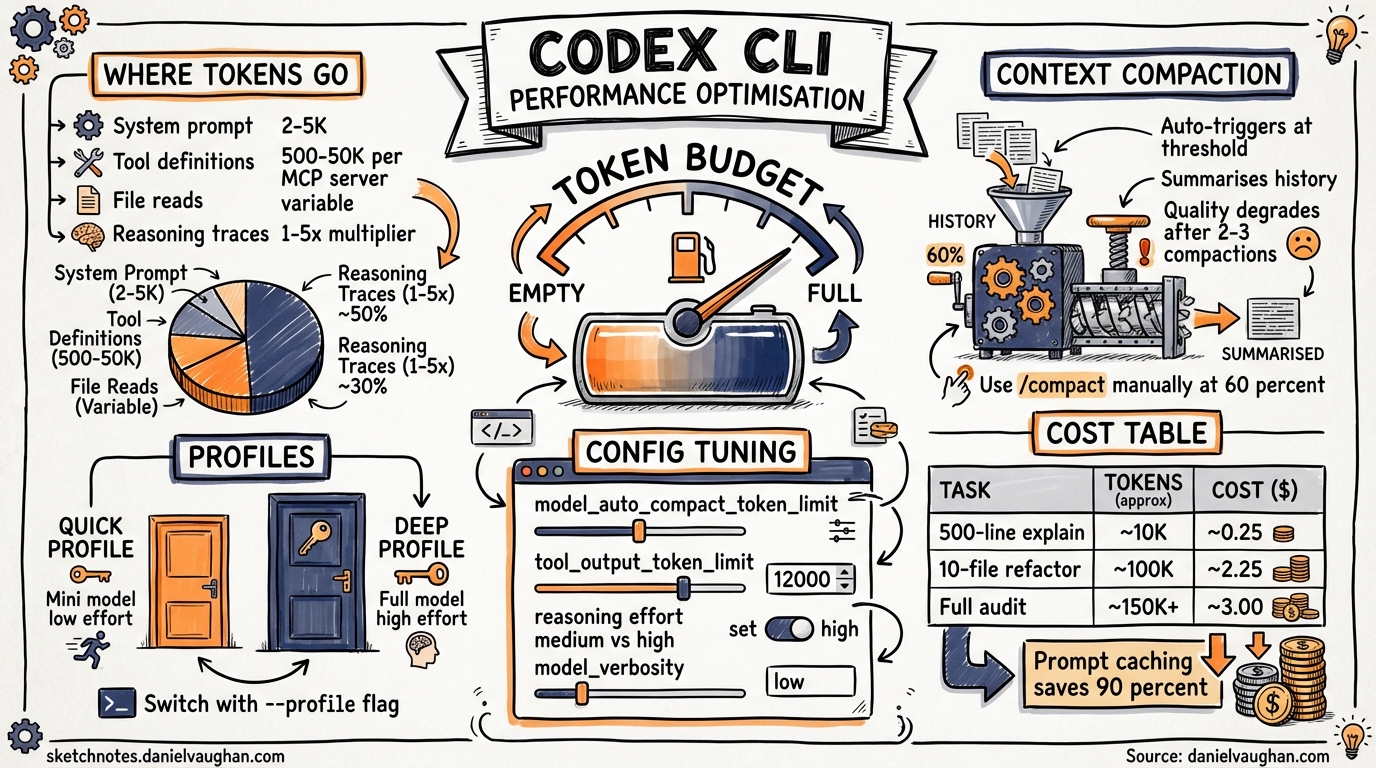
A GitHub MCP server with 93 tools consumes roughly 55,000 tokens per turn1. That is before you type a single character. System prompts, tool definitions, MCP server schemas, reasoning traces and context compaction all burn tokens invisibly, and most developers underestimate the overhead by an order of magnitude. This article dissects where your tokens go and provides concrete tactics for cutting waste without sacrificing output quality. Updated May 2026 with the GPT-5.5 model, v0.135.0 changes and current profile syntax.
Understanding the token budget
Each model exposes a different context window. Understanding the effective capacity, after overhead, is the first step to optimisation.
| Model | Input window | Total context | Typical use case |
|---|---|---|---|
| GPT-5.5 | 1M | 1M | Newest frontier; state-of-the-art reasoning2 |
| GPT-5.4 | 1M | 1M | Flagship; recommended default2 |
| GPT-5.4-mini | 400K | 400K | Subagent work; 30 per cent of GPT-5.4 quota2 |
| GPT-5.3-Codex | 272K | 400K | Coding specialist2 |
| GPT-5.3-Codex-Spark | 128K | 128K | Near-instant iteration; 1,000+ tok/s3 |
| GPT-5.2 | 272K | 400K | Previous generation2 |
The input window is what you can send; total context includes the model’s reasoning and output tokens. Your usable capacity is the input window minus all overhead.
Where your tokens go
System prompt and AGENTS.md
Every API call includes a system prompt composed from Codex’s built-in instructions plus any AGENTS.md tiers you have defined. This typically costs 2,000 to 5,000 tokens per turn4. OpenAI’s prompt caching means this payload loads once and is cached afterwards, so subsequent turns in the same session pay a fraction of the original cost4.
Tool definitions
Each registered tool, whether built-in or from an MCP server, adds its JSON schema to every request. Built-in tools are relatively lean, but the cost compounds quickly:
- About 500 tokens per registered built-in Codex tool4
- About 200 to 500 tokens per connected MCP server for server-level overhead4
- About 550 to 1,400 tokens per individual MCP tool definition1
A typical four-server MCP setup adds roughly 7,000 tokens of overhead per turn5. Heavy configurations with five or more servers can burn more than 50,000 tokens before you type your first prompt1.
File reads and attachments
When Codex reads a file via @file references or tool calls, the full content enters the context window. A 500-line module might cost 15,000 tokens of input4. There is no automatic truncation; if you point Codex at a large file, every byte counts.
Reasoning traces
Reasoning effort has a dramatic impact on token consumption. At xhigh, Codex uses three to five times more tokens than medium for the same prompt4. The reasoning tokens are consumed server-side (they do not appear in your visible output), but they count against your quota and billing.
graph LR
    A[Your Prompt] --> B[System Prompt\n2-5K tokens]
    B --> C[Tool Definitions\n500-50K tokens]
    C --> D[File Reads\nvariable]
    D --> E[Conversation History\ngrowing]
    E --> F[Reasoning Trace\n1-5x multiplier]
    F --> G[Model Output]

    style B fill:#f9d71c,stroke:#333
    style C fill:#ff6b6b,stroke:#333
    style F fill:#ff6b6b,stroke:#333
Background retries and compaction triggers
When a request fails (rate limit, transient error), Codex retries with exponential backoff6. Each retry re-sends the full context. If you are near the compaction threshold, a failed request followed by a retry can trigger compaction mid-conversation, consuming additional tokens for the summarisation call itself.
Monitoring: know what you are spending
The /status command
The /status slash command displays your current model, token usage, Git branch and sandbox mode4. The token count includes all overhead, not just your visible messages5. If costs surprise you, /status is your first diagnostic.
The status bar
Codex CLI’s TUI shows a persistent status line with context usage percentage. Watch this during long sessions. When it climbs past 80 per cent, you are approaching compaction territory.
Token usage breakdown (requested feature)
As of May 2026, there is no built-in breakdown showing tokens by source (system prompt versus tools versus history versus reasoning). This has been requested as a feature in GitHub issue #132227. Until it ships, you will need to estimate overhead from your configuration.
Context compaction: how it works
When token usage exceeds model_auto_compact_token_limit, Codex triggers automatic history compaction6:
- The entire conversation history is sent with a dedicated summarisation prompt
- The model produces a compressed summary
- A new history is constructed: initial context + recent user messages (up to roughly 20,000 tokens) + summary
- The old history is replaced
flowchart TD
    A[Token usage exceeds threshold] --> B[Send history + compaction prompt to model]
    B --> C[Model generates summary]
    C --> D[Construct new history]
    D --> E[Initial context + Recent messages ~20K + Summary]
    E --> F[Replace session history]
    F --> G[Continue conversation with freed capacity]

    style A fill:#ff6b6b,stroke:#333
    style G fill:#4ecdc4,stroke:#333
The quality trade-off
Multiple compactions cause cumulative information loss6. Each round discards detail from earlier exchanges. After two or three compactions, the model may lose track of decisions made early in the session. The official documentation warns explicitly that ‘long conversations and multiple compactions can cause the model to be less accurate’6.
Manual compaction with /compact
You can trigger compaction manually at any time with /compact. This is useful when you have finished a phase of work (investigation, say) and want to free tokens before starting implementation. Manual compaction at roughly 60 per cent context usage gives better results than waiting for the automatic 95 per cent trigger8.
Configuration for token control
All settings live in ~/.codex/config.toml (user-level) or .codex/config.toml (project-level).
Essential token management keys
# Override model context window (tokens)
model_context_window = 272000

# Trigger auto-compaction at this token count
model_auto_compact_token_limit = 64000

# Budget per tool output (prevents runaway file reads)
tool_output_token_limit = 12000

# Custom compaction prompt for domain-specific summarisation
compact_prompt = "Summarise focusing on architectural decisions and file paths modified"

# Or load from file (experimental)
experimental_compact_prompt_file = "/path/to/compact_prompt.txt"

# Cap history file size
[history]
max_bytes = 5242880
Setting model_auto_compact_token_limit lower than the default forces earlier compaction. This trades a small summarisation cost for consistently lower context pressure9.
Reasoning effort tuning
Match reasoning depth to task complexity rather than using a uniform setting:
# Default: medium for routine tasks
model_reasoning_effort = "medium"

# Higher effort only in plan mode where it matters
plan_mode_reasoning_effort = "high"

# Suppress reasoning summaries when you do not need explanations
model_reasoning_summary = "none"
The minimal reasoning level is available only for GPT-5 models4. Reserve xhigh for genuinely hard problems, such as architectural decisions, complex refactors and security audits, where the extra thinking demonstrably improves output.
Verbosity control
# Reduce output verbosity (GPT-5 Responses API)
model_verbosity = "low"
Lower verbosity produces terser responses, saving output tokens without affecting the quality of code generation9.
Practical tuning tactics
1. Audit your MCP servers
Every connected MCP server injects its full tool catalogue into every request. Run /status and count your active servers. If you use some infrequently, disable them in your configuration and enable them only when needed5.
For context: a GitHub MCP server with 93 tools consumes roughly 55,000 tokens per turn1. If you need only basic Git operations, the built-in tools or a shell command cost a fraction of that.
2. Use profiles for different tasks
Create separate profiles that match task complexity to model and reasoning settings:
# Named permission profiles (v0.134.0+ syntax)
[permission_profiles.quick]
model = "gpt-5.4-mini"
model_reasoning_effort = "low"
model_verbosity = "low"

[permission_profiles.deep]
model = "gpt-5.5"
model_reasoning_effort = "high"
plan_mode_reasoning_effort = "xhigh"
Switch profiles with codex --profile quick for routine tasks and codex --profile deep for complex work9.
Note: Since v0.134.0,
--profileis the sole activation path. The legacy[profile.*]syntax is rejected. Use[permission_profiles.*]instead. Run/permissionsin the TUI to inspect your active profile at any time.
3. Start fresh threads between phases
Do not drag investigation context into implementation. After finishing research or debugging, start a new session or use /clear to reset. This prevents stale context from consuming tokens during the productive phase8.
4. Prefer codex exec for automation
The codex exec command skips the TUI entirely, reducing overhead in CI/CD pipelines and scripted workflows. Combined with --model gpt-5.4-mini, this is the most token-efficient way to run batch operations4.
5. Use prompt caching
Prompt caching provides substantial savings on repeated requests. Cached input tokens are billed at roughly 10 per cent of the uncached rate (for example, 6.25 credits/1M versus 62.50 credits/1M for GPT-5.4)10. To maximise cache hits:
- Keep your system prompt and
AGENTS.mdstable across sessions - Avoid unnecessary changes to tool configurations mid-session
- Use
--resumeto continue sessions rather than starting fresh for related work5
6. Set tool_output_token_limit
Large file reads can exhaust your context window in a single turn. Setting tool_output_token_limit = 12000 caps the tokens stored per tool output9, forcing Codex to work with summaries rather than entire files. This is particularly valuable when the model reads log files or large generated outputs.
Cost estimation reference
For API key users on token-based billing, representative costs per task at GPT-5.4 rates4:
| Task | Input tokens | Output tokens | Approximate cost |
|---|---|---|---|
| Explain a 500-line module | ~15K | ~2K | ~$0.25 |
| Refactor auth module (10 files) | ~120K | ~30K | ~$2.25 |
| Full repository audit | ~200K | ~20K | ~$3.00 |
These figures include overhead. Subscription users (Plus at $20/month, Pro at $200/month) pay through message limits rather than per-token, but the same optimisation tactics extend your effective messages per five-hour window10.
The optimisation checklist
Before your next long Codex CLI session, run through this:
- Check MCP server count, disable any you will not use
- Set
model_reasoning_effortappropriate to the task - Configure
model_auto_compact_token_limitfor early compaction - Set
tool_output_token_limitto prevent runaway file reads - Use
/statusperiodically to monitor context usage - Start fresh threads between distinct work phases
- Use
codex execfor scripted/batch operations
Token optimisation in Codex CLI is not about penny-pinching. It is about maintaining model accuracy by keeping context clean and relevant. A session running at 95 per cent context capacity with three compactions behind it produces measurably worse output than a fresh session with focused context. Treat your token budget as a quality indicator, not just a cost metric.
Citations
-
MCP Token Trap: Why Your AI Agent Burns 35x More Tokens Than a CLI — OnlyCLI ↩ ↩2 ↩3 ↩4
-
Codex CLI: The Definitive Technical Reference — Blake Crosley ↩ ↩2 ↩3 ↩4 ↩5 ↩6 ↩7 ↩8 ↩9 ↩10
-
How to Reduce Codex CLI Token Usage: 7 Proven Optimisation Strategies — BSWEN ↩ ↩2 ↩3 ↩4
-
Context Compaction Research: Claude Code, Codex CLI, OpenCode, Amp — GitHub Gist (badlogic) ↩ ↩2 ↩3 ↩4
-
Why Is My Codex CLI Token Usage Suddenly So High? — BSWEN ↩ ↩2
-
Configuration Reference — Codex CLI — OpenAI Developers ↩ ↩2 ↩3 ↩4