Codex CLI Security Model: The Two-Axis Approval and Sandbox Framework
Codex CLI Security Model: The Two-Axis Approval and Sandbox Framework
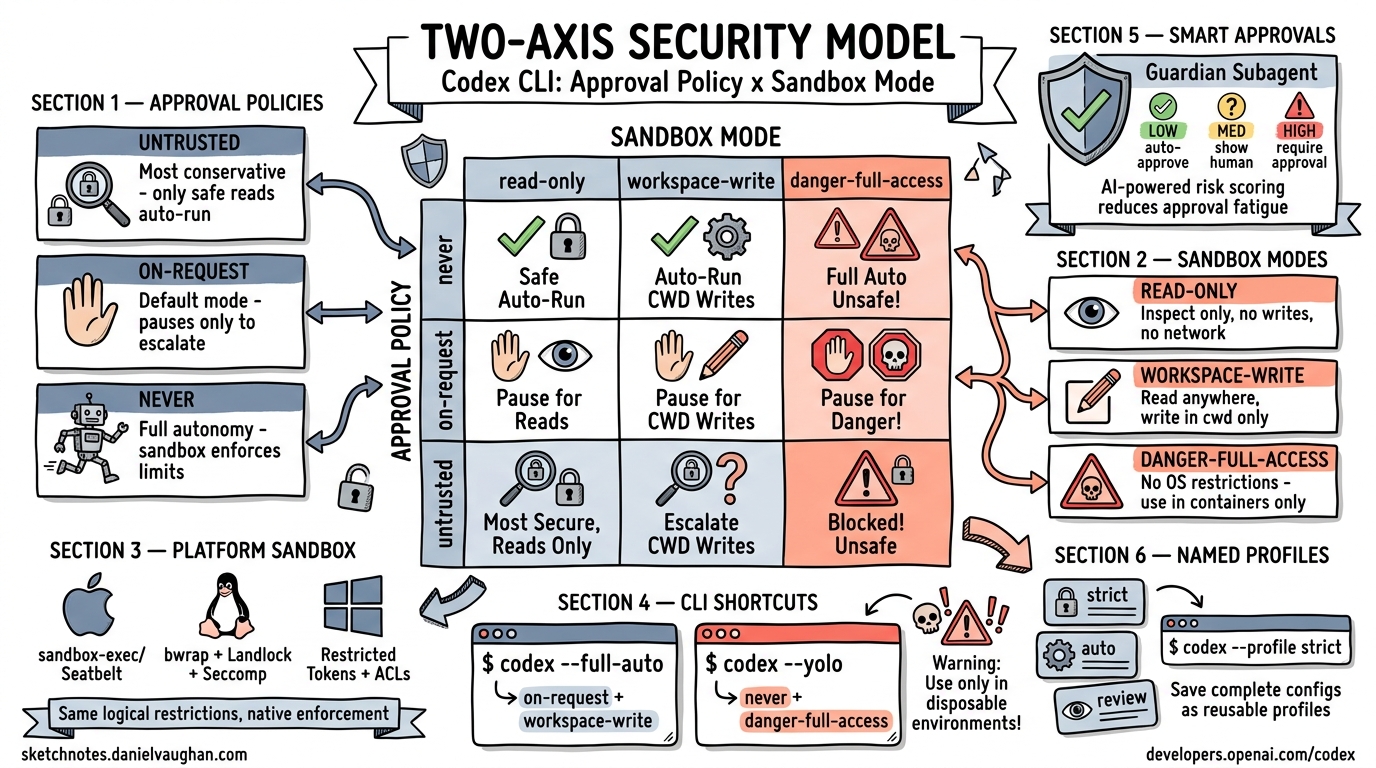
Two independent axes: what Codex ASKS vs what the OS ALLOWS.
Codex CLI’s security model is built on two orthogonal dimensions – the approval policy (when the agent must pause for human confirmation) and the sandbox mode (what the operating system physically permits). Understanding their independence is key to configuring a safe, productive agent.
The Two-Axis Model
The two axes are fully orthogonal. You can combine any approval policy with any sandbox mode:
                    Sandbox Mode
                    read-only | workspace-write | danger-full-access
                   ──────────┼─────────────────┼────────────────────
Approval   never  │          │                 │
Policy  on-request│          │                 │
        untrusted │          │                 │
- Approval policy controls when the agent must ask the human for permission.
- Sandbox mode controls what the OS allows the agent to do, regardless of approval.
This separation means that even in never approval mode (no prompts), the sandbox still enforces OS-level limits. And in untrusted approval mode, the sandbox provides defense-in-depth beyond the approval gate.
Approval Policies
untrusted
The most conservative interactive mode. Only safe reads auto-run. Everything else requires explicit human approval.
- File reads in the working directory: auto-approved
- File writes, command execution, network access: all require approval
- Best for: exploring unfamiliar codebases, running untrusted prompts
on-request
The default mode (also the mode behind --full-auto). The agent pauses only to escalate – it runs within its current permission level and asks only when it needs to do something beyond that level.
- Reads and writes within the workspace: auto-approved
- Commands matching approved patterns: auto-approved
- New command patterns or escalations: require approval
- Best for: daily development workflows
never
No prompts at all. The agent runs autonomously. The sandbox still enforces OS-level limits.
- No human interaction during execution
- All actions within sandbox limits proceed automatically
- Best for: CI/CD pipelines, batch processing, automated workflows
- Must be paired with an appropriate sandbox mode
on-failure (Deprecated)
Previously paused only when the agent encountered errors. This mode has been deprecated in favor of the clearer on-request / untrusted / never taxonomy.
Sandbox Modes
read-only
Inspect only. No writes permitted at the OS level, regardless of approval policy.
- File system: read-only access
- Network: blocked
- Best for: code review, analysis, auditing
workspace-write
Read and write within the current working directory. Network is off by default.
- File system: read anywhere, write only in cwd and below
- Network: disabled unless explicitly allowed
- This is the sandbox value behind
--full-auto(combined withon-requestapproval) - Best for: standard development with guardrails
danger-full-access
No OS-level restrictions. The agent has full access to the filesystem, network, and system resources.
- No sandbox enforcement
- Use only in hardened containers (Docker, VMs, CI runners)
- Best for: infrastructure tasks that genuinely need full system access, always in disposable environments
Platform-Specific Sandbox Implementation
The sandbox mode translates to different OS-level enforcement mechanisms on each platform:
| Platform | Technology | Details |
|---|---|---|
| macOS | sandbox-exec / Seatbelt (SBPL) |
Apple’s native sandboxing; profile-based filesystem and network restrictions |
| Linux | bwrap + Landlock + Seccomp |
Bubblewrap for mount namespace isolation, Landlock for filesystem access control, Seccomp for syscall filtering |
| Windows | Restricted Tokens + ACLs + Firewall | Windows restricted process tokens, filesystem ACLs, and Windows Firewall rules |
The same sandbox_mode value produces the same logical restrictions across platforms, but each platform uses its native enforcement mechanisms.
CLI Shortcuts
--full-auto
A convenience shortcut that sets:
- Approval policy:
on-request - Sandbox mode:
workspace-write
codex --full-auto "refactor the auth module"
--yolo
Bypasses both axes. Equivalent to never approval + danger-full-access sandbox.
codex --yolo "set up the entire dev environment"
Warning:
--yoloremoves all safety guardrails. Use only in disposable environments.
Distinct Approval IDs
Since v0.104.0, each command the agent proposes receives its own unique approval ID. This has important implications:
- Approving
npm install(ID #3274) does not auto-approverm -rf(ID #5378) - Each approval decision is scoped to the specific command
- You can reject with feedback – telling the agent “Too risky!” and suggesting an alternative
- The approval history is tracked per-command, not per-category
This granularity prevents the “approve one, approve all” problem that plagued earlier versions.
Smart Approvals (Experimental)
An experimental feature that introduces a Guardian subagent to reduce approval fatigue:
# In config.toml
[features]
smart_approvals = true
When enabled:
- The Guardian subagent reviews the session context before each approval prompt
- It assigns a risk score (low / med / high) to each proposed action
- Low-risk actions that match established patterns can be auto-approved
- The Guardian provides an intelligent middle ground between full human approval and full autonomy
Risk Level    Behavior
──────────    ────────
LOW           Auto-approve (Guardian confident it's safe)
MED           Show to human with Guardian's assessment
HIGH          Always require human approval
Named Profiles
Save complete configuration sets (approval policy + sandbox mode + model + other settings) as named profiles:
# ~/.config/codex/profiles/strict.toml
[approval]
policy = "untrusted"

[sandbox]
mode = "read-only"
# ~/.config/codex/profiles/auto.toml
[approval]
policy = "on-request"

[sandbox]
mode = "workspace-write"
# ~/.config/codex/profiles/review.toml
[approval]
policy = "untrusted"

[sandbox]
mode = "read-only"
Switch at invocation:
codex --profile strict    # Conservative audit mode
codex --profile auto      # Standard development
codex --profile review    # Code review mode
Precedence Order
When multiple configuration sources exist, they resolve in this order (highest precedence first):
- CLI flags
--profile- Project-level config (
.codex/config.tomlin the repo) - User-level config (
~/.config/codex/config.toml) - System defaults
Permission Profiles
A more granular alternative to the blunt 3-tier sandbox. Permission profiles allow declarative per-resource policies:
# Filesystem: allow specific read/write paths
[[filesystem]]
path = "/data/only"
access = "read"

# Network: allow/deny per domain
[[network]]
domain = "api.example.com"
allow = true
Permission profiles replace the blunt sandbox tiers with fine-grained, resource-specific rules. They are particularly useful in enterprise environments where teams need different access patterns for different services.
Admin Enforcement
For enterprise and team deployments, administrators can lock security settings:
- Lock minimum sandbox level – prevent developers from using
danger-full-access - Disallow specific policies – e.g., forbid
neverapproval mode prefix_rules– define allowed/forbidden command prefixes and prompt patterns- Audit logging – all approval decisions and sandbox violations are logged
# Admin-enforced config (managed by IT)
[admin]
min_sandbox = "workspace-write"
disallow_policies = ["never"]

[[prefix_rules]]
pattern = "rm -rf /"
action = "forbidden"
Putting It All Together
A typical team configuration might look like:
| Role | Approval Policy | Sandbox Mode | Use Case |
|---|---|---|---|
| Junior developer | untrusted |
read-only |
Learning, exploring code |
| Senior developer | on-request |
workspace-write |
Daily development |
| CI pipeline | never |
workspace-write |
Automated tasks |
| Infrastructure | on-request |
danger-full-access |
System setup (in containers) |
| Security audit | untrusted |
read-only |
Code review and analysis |
The two-axis model ensures that security is always enforced at the OS level (sandbox), while the approval policy controls the developer experience. Neither axis alone is sufficient – together they provide defense-in-depth for agentic coding workflows.
Sources: developers.openai.com/codex, sketchnotes.danielvaughan.com, danielvaughan.com/articles