Codex CLI TUI Shortcuts and Slash Commands: The Complete Reference
Codex CLI TUI Shortcuts and Slash Commands: The Complete Reference
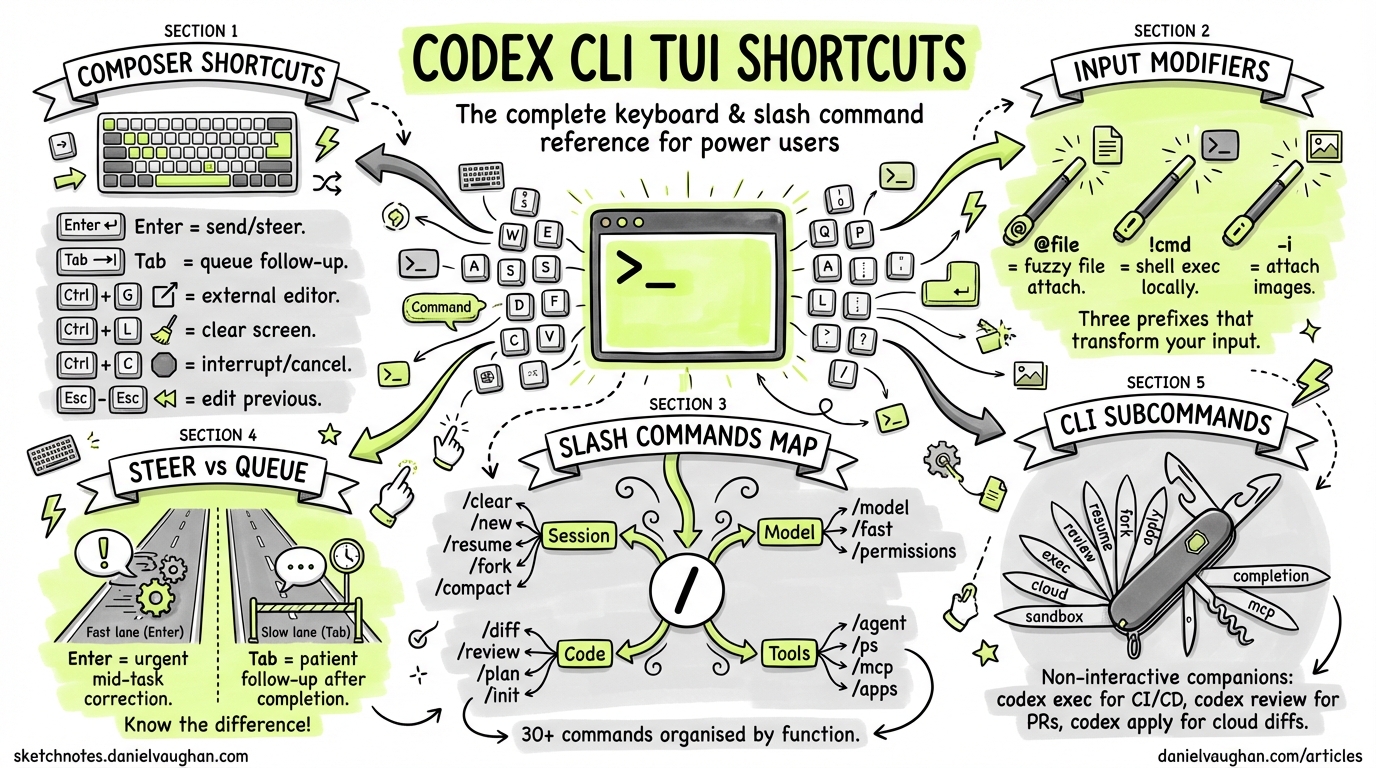
Codex CLI’s full-screen terminal UI (TUI) is where most interactive work happens. Beneath the chat-style composer sits a dense set of keyboard shortcuts, input modifiers and slash commands that let you control models, review diffs, manage sessions and configure the agent without leaving the terminal1. This reference catalogues every shortcut and slash command available as of May 2026 (v0.135.0), organised by function. Updated with /plugins, codex doctor, Vim mode and the current model names.
The composer: input shortcuts and modifiers
The composer is the text-entry area at the bottom of the TUI. Beyond plain text, it supports several input modifiers and keyboard shortcuts that speed up interaction.
Keyboard shortcuts
| Shortcut | Action |
|---|---|
| Enter | Send the current prompt. During agent execution, injects new instructions into the running turn (steer mode)2 |
| Tab | During agent execution, queues a follow-up prompt for the next turn rather than interrupting the current one2 |
| Ctrl+G | Opens the current prompt in your external editor, as defined by VISUAL (falls back to EDITOR)3 |
| Ctrl+L | Clears the terminal screen without resetting the conversation context3 |
| Ctrl+C | Cancels the current operation; press twice to quit the session4 |
| Ctrl+D | Exits Codex CLI; press twice to force quit4 |
| Esc, Esc | When the composer is empty, double-pressing Escape edits your previous message. Continue pressing to walk back through the transcript3 |
| Up / Down | Navigate through draft history in the composer. Codex restores prior draft text and image placeholders3 |
Since v0.135.0, the TUI also supports Vim-style text-object editing when Vim mode is enabled, including word, line-end behaviour and a configurable interrupt-turn binding.
Input modifiers
Three prefix characters transform composer input before it reaches the model:
| Prefix | Purpose | Example |
|---|---|---|
| @ | Fuzzy file search over the workspace root. Press Tab or Enter to accept a match and attach the file to the conversation3 | @src/main.rs |
| ! | Executes a local shell command outside Codex’s sandbox. Output is displayed but not sent to the model3 | !git log --oneline -5 |
| -i / –image | Attach images via CLI flags at launch, or paste screenshots directly into the composer during a session5 | codex -i mockup.png "Implement this design" |
flowchart LR
    A[User types in composer] --> B{First character?}
    B -->|@| C[Fuzzy file search]
    B -->|!| D[Local shell exec]
    B -->|/ | E[Slash command popup]
    B -->|text| F[Send to model]
    C -->|Tab/Enter| G[Attach file to context]
    D --> H[Display output locally]
    E --> I[Execute command]
    F -->|Enter| J[Model processes prompt]
Slash commands: complete reference
Type / in the composer to open the slash-command popup. Commands are grouped below by function1.
Session management
| Command | Description |
|---|---|
/clear |
Clears the terminal, resets the visible transcript and starts a fresh chat within the same CLI session1 |
/new |
Starts a new conversation inside the same session without leaving the terminal1 |
/resume |
Resumes a saved conversation from your session list1 |
/fork |
Forks the current conversation into a new thread, preserving the original1 |
/compact |
Summarises the visible conversation to free tokens while retaining key context1 |
/copy |
Copies the latest completed Codex output to the system clipboard1 |
/exit |
Exits the CLI session1 |
/quit |
Alias for /exit1 |
Model and configuration
| Command | Description |
|---|---|
/model |
Opens a picker to choose the active model (e.g. gpt-5.5, gpt-5.4, gpt-5.4-mini, gpt-5.3-codex, gpt-5.3-codex-spark) and adjust reasoning effort16 |
/fast |
Toggles fast mode for GPT-5.4. Accepts /fast on, /fast off or /fast status1 |
/permissions |
Opens an approval-preset picker: choose between named permission profiles mid-session. Since v0.135.0, displays configured custom profiles1 |
/personality |
Changes how Codex communicates (tone, verbosity) without altering system instructions1 |
/statusline |
Configures which fields appear in the TUI footer status bar and their order1 |
/theme |
Previews and saves syntax-highlighting colour schemes for code blocks in the TUI3 |
/experimental |
Toggles experimental features such as subagents on or off1 |
/debug-config |
Prints configuration layer order and policy sources for debugging precedence issues1 |
Code and project tools
| Command | Description |
|---|---|
/diff |
Shows the Git diff of the current working tree, including untracked files1 |
/review |
Launches a code review of your working tree changes. Supports presets: against a base branch, uncommitted changes or specific commits13 |
/plan |
Switches to plan mode, optionally with a prompt. The agent produces an execution plan without making changes1 |
/init |
Generates an AGENTS.md scaffold in the current directory, capturing persistent repository instructions1 |
/mention |
Attaches a file to the conversation for the model to inspect1 |
Agent and tool management
| Command | Description |
|---|---|
/agent |
Switches the active agent thread when working with spawned subagents1 |
/ps |
Shows experimental background terminals and their recent output1 |
/mcp |
Lists all configured Model Context Protocol tools available in the session1 |
/apps |
Browses available apps (connectors) and inserts them into your prompt1 |
/plugins |
Opens the plugin browser to search, install and manage marketplace plugins1 |
/reload-plugins |
Reloads all installed plugins without restarting the session1 |
Platform and diagnostics
| Command | Description |
|---|---|
/status |
Displays the active model, approval policy, writable roots and current token usage1 |
/feedback |
Sends session logs to the Codex maintainers for diagnostics and bug reports1 |
/logout |
Signs out and clears stored credentials, useful on shared machines1 |
/sandbox-add-read-dir |
Grants the sandbox read access to additional directories (Windows-specific)1 |
Steer mode versus plan mode: Enter and Tab mechanics
Understanding the difference between Enter and Tab during agent execution is essential for effective steering2:
sequenceDiagram
    participant U as User
    participant A as Agent (running)

    Note over A: Agent is executing a task...
    U->>A: Press Enter + type correction
    Note over A: Injects immediately into current turn
    A->>A: Adjusts behaviour mid-execution

    Note over A: Agent continues working...
    U->>A: Press Tab + type follow-up
    Note over A: Queued for next turn
    A->>A: Finishes current task
    A->>U: Reads queued prompt
    A->>A: Begins follow-up work
- Enter (steer mode): sends your message immediately, interrupting the agent’s current work. Use this for urgent corrections, ‘stop, don’t delete that file’ or ‘use the staging database instead’2.
- Tab (queue mode): holds your prompt until the agent finishes its current turn. Use this for follow-up tasks, ‘after that, run the test suite’ or ‘then update the changelog’2.
CLI subcommands for non-interactive use
These subcommands complement the interactive session and share the same global flags7:
| Subcommand | Purpose |
|---|---|
codex exec / codex e |
Runs Codex non-interactively with a prompt; ideal for CI/CD pipelines7 |
codex review |
Non-interactive code review against the working tree7 |
codex resume |
Resumes a previous interactive session from the command line7 |
codex fork |
Forks a previous session into a new one7 |
codex apply / codex a |
Applies the latest diff from a Cloud task as git apply7 |
codex cloud |
Browses and manages Cloud tasks from the terminal (experimental)7 |
codex mcp |
Manages MCP server configurations7 |
codex doctor |
Runs environment, Git, terminal, app-server and thread diagnostics for troubleshooting (enhanced in v0.135.0)7 |
codex remote-control |
Starts or manages the remote control daemon for headless/remote sessions7 |
codex completion bash\|zsh\|fish |
Generates shell completion scripts7 |
codex sandbox |
Runs arbitrary commands under the sandbox policy for testing7 |
Global flags worth knowing
These flags apply to the base codex command and propagate to subcommands7:
# Override model for this session
codex -m gpt-5.5 "Refactor the auth module"

# Inline config overrides
codex -c model_provider="oss" -c sandbox="workspace-write"

# Attach images at launch
codex -i screenshot.png -i wireframe.png "Implement this UI"

# Load a named profile
codex -p fast-review

# Set approval policy
codex -a never "Run the full test suite"

# Grant additional directory access
codex --add-dir /var/log "Search recent error logs"
Platform differences
| Feature | macOS | Linux | Windows (WSL) |
|---|---|---|---|
| Sandbox engine | Seatbelt8 | Landlock + seccomp8 | Restricted tokens + ACLs8 |
/sandbox-add-read-dir |
Not needed | Not needed | Available1 |
codex app subcommand |
Available | Not available | Not available7 |
| Ctrl+G editor | Respects VISUAL / EDITOR |
Respects VISUAL / EDITOR |
Respects VISUAL / EDITOR3 |
| Shell completions | bash, zsh, fish | bash, zsh, fish | bash, zsh (via WSL)7 |
Quick-reference card
The shortcuts worth committing to muscle memory:
| Action | Shortcut |
|---|---|
| Attach a file | @filename + Tab |
| Run a shell command | !command |
| Review changes before committing | /diff then /review |
| Switch model mid-session | /model |
| Free up context window | /compact |
| Copy last response | /copy |
| Open long prompt in editor | Ctrl+G |
| Correct agent mid-task | Enter + message |
| Queue follow-up work | Tab + message |
| Check token usage | /status |
Citations
-
Slash commands in Codex CLI — OpenAI Developers ↩ ↩2 ↩3 ↩4 ↩5 ↩6 ↩7 ↩8 ↩9 ↩10 ↩11 ↩12 ↩13 ↩14 ↩15 ↩16 ↩17 ↩18 ↩19 ↩20 ↩21 ↩22 ↩23 ↩24 ↩25 ↩26 ↩27 ↩28 ↩29 ↩30 ↩31 ↩32 ↩33
-
OpenAI Codex CLI Cheat Sheet — Shortcuts and Commands — ComputingForGeeks ↩ ↩2 ↩3 ↩4 ↩5 ↩6 ↩7 ↩8 ↩9
-
Codex CLI Cheat Sheet 2026 — Commands and Options — Toolsbase ↩ ↩2
-
Command line options — Codex CLI — OpenAI Developers ↩ ↩2 ↩3 ↩4 ↩5 ↩6 ↩7 ↩8 ↩9 ↩10 ↩11 ↩12 ↩13 ↩14 ↩15
-
GitHub — openai/codex: Lightweight coding agent that runs in your terminal ↩ ↩2 ↩3