Gemma 4 Local Model + Codex CLI: Complete Setup Guide
Gemma 4 Local Model + Codex CLI: Complete Setup Guide
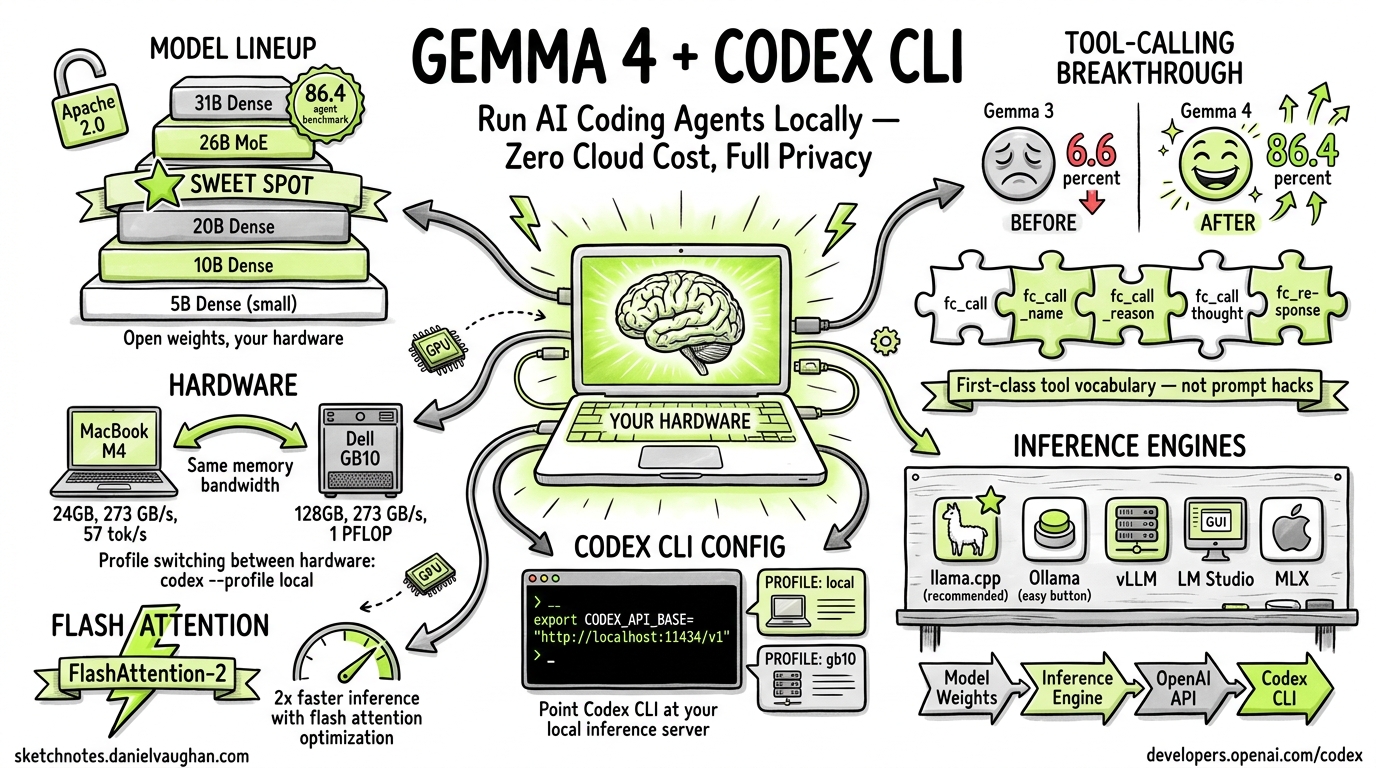
Run AI coding agents on YOUR hardware – zero cloud cost, full privacy.
Google’s Gemma 4 is an open-weight model family released under the Apache 2.0 license. Its breakthrough in tool-calling reliability makes it the first local model genuinely usable for agentic coding with Codex CLI. This guide covers the full model lineup, hardware requirements, installation, configuration, flash attention optimization, tool-calling architecture, and known limitations.
Model Lineup
Gemma 4 ships in four parameter sizes, each with distinct tradeoffs:
| Variant | Parameters | Architecture | Notes |
|---|---|---|---|
| 5B | 5 billion | Dense | Lightweight; fits on modest hardware |
| 10B | 10 billion | Dense | Good balance of quality and resource use |
| 20B | 20 billion | Dense | Strong general performance |
| 26B | 26 billion | MoE (Mixture of Experts) | Sweet spot: 97% of 31B quality, fits on a single GPU |
| 31B | 31 billion | Dense | Flagship; scores 86.4% on agent benchmarks |
All variants are released under the Apache 2.0 license with fully open weights.
The 26B MoE Sweet Spot
The 26B MoE variant deserves special attention. It delivers approximately 97% of the 31B Dense model’s quality while fitting comfortably on a single consumer GPU. For most local Codex CLI workflows, this is the recommended starting point.
Tool-Calling Breakthrough
Gemma 4’s tool-calling capabilities represent a generational leap over its predecessor:
| Metric | Gemma 3 | Gemma 4 (31B) |
|---|---|---|
| Agent benchmark score | 6.6% | 86.4% |
Why the jump matters
Previous open-weight models (including Gemma 3) relied on prompt hacks to simulate tool use. The results were unreliable – the model would frequently fail to emit properly structured tool calls, hallucinate function names, or drop required parameters.
Gemma 4 introduces first-class vocabulary tokens for tool calling. The model natively understands tool-call structure through dedicated tokens rather than prompt engineering:
fc_call– initiates a function callfc_call_name– specifies the function namefc_call_reason– provides the model’s reasoning for invoking the toolfc_call_thought– captures chain-of-thought before the callfc_response– marks the tool’s response boundary
This native token vocabulary means tool calls are structurally reliable, not probabilistically hoped-for.
Hardware Requirements
M4 MacBook vs GB10
Two reference hardware configurations have been tested:
| Spec | M4 MacBook Pro 24GB | Dell Pro Max GB10 128GB |
|---|---|---|
| Memory bandwidth | 273 GB/s, ~57 tok/s, E4B Q8_0 | 273 GB/s, 1 PFLOP/s, 31B Dense FP16 |
Key finding: Both platforms deliver the same memory bandwidth. The GB10 wins on raw compute and capacity (128GB unified memory allows running the full 31B Dense at FP16), while the M4 is limited to smaller quantized variants.
Profile switching makes it easy to move between hardware:
codex --profile local    # M4 MacBook local inference
codex --profile gb10     # GB10 workstation
Inference Engines
Several inference backends can serve Gemma 4 locally:
| Engine | Type | Notes |
|---|---|---|
| llama.cpp | CLI / library | Recommended; best quantization support, widest hardware compatibility |
| Ollama | Service wrapper | Easiest setup; wraps llama.cpp with a REST API |
| vLLM | Production server | High-throughput; best for shared/team deployments |
| LM Studio | GUI application | Visual interface; good for experimentation |
| MLX | Apple Silicon native | Optimized for M-series Macs |
The general pipeline is:
Model weights --> Inference Engine --> OpenAI-compatible API --> Codex CLI
Download and Run with Ollama (Recommended Quick Start)
# Pull the model
ollama pull gemma4:26b

# Start serving (exposes OpenAI-compatible API on localhost:11434)
ollama serve
Using llama.cpp Directly
# Download GGUF weights
wget https://huggingface.co/google/gemma-4-31b-it-gguf/resolve/main/gemma-4-31b-it-Q4_K_M.gguf

# Start the server
./llama-server -m gemma-4-31b-it-Q4_K_M.gguf \
  --port 8080 \
  --n-gpu-layers 99 \
  --ctx-size 65536
Codex CLI Integration: Custom Model Provider Configuration
Gemma 4 integrates with Codex CLI through the custom model providers system. The critical configuration requirement: you must use the Responses API wire format.
Config File (codex.toml)
[model_provider]
wire_api = "responses"          # MANDATORY -- Chat Completions removed
stream_idle_timeout_ms = 10000000
model_context_window = 65536
Important: Chat Completions support has been removed. Only the Responses API wire format works with Codex CLI’s tool-calling pipeline.
Environment Setup
export OPENAI_API_KEY="not-needed"            # Placeholder; local inference doesn't need a real key
export OPENAI_BASE_URL="http://localhost:11434/v1"  # Point to your local engine
export CODEX_MODEL="gemma4:26b"               # Or gemma4:31b, etc.
Profile-Based Configuration
For switching between local and cloud models, use named profiles:
# ~/.config/codex/profiles/local.toml
[model_provider]
wire_api = "responses"
model_context_window = 65536

[model]
name = "gemma4:26b"
base_url = "http://localhost:11434/v1"
Switch with:
codex --profile local
Flash Attention Optimization
The Freeze Problem
When running Gemma 4 locally, users frequently encounter a critical failure mode: the flash attention kernel freeze. Symptoms include:
- GPU usage drops to 0%
- The model appears to hang mid-generation
- System monitor shows the process is alive but idle
- Error message:
ERROR: Flash Attention kernel failed. Gemma-4 model suspended.
Root Cause
The flash attention implementation in several inference backends has compatibility issues with Gemma 4’s attention architecture, particularly:
- Context length triggers: Freezes occur more frequently as context approaches the model’s window limit
- Quantization interactions: Certain quantization levels (especially Q8_0 at high context) can trigger kernel failures
- Driver version mismatches: CUDA driver versions below 12.4 show higher freeze rates
Fixes and Workarounds
Option 1: Disable flash attention
# llama.cpp
./llama-server -m gemma-4-31b-it-Q4_K_M.gguf --no-flash-attn

# Ollama (environment variable)
OLLAMA_FLASH_ATTENTION=0 ollama serve
Option 2: Limit context window
# Reduce context to avoid the problematic range
./llama-server -m gemma-4-31b-it-Q4_K_M.gguf --ctx-size 32768
Option 3: Update CUDA drivers
# Ensure CUDA >= 12.4
nvidia-smi  # Check current version
# Update via your package manager or NVIDIA's installer
Option 4: Use MLX on Apple Silicon MLX’s attention implementation avoids the flash attention kernel entirely, sidestepping the freeze on M-series Macs.
Tool-Calling Architecture
How Codex CLI Processes Gemma 4 Tool Calls
When Codex CLI sends a prompt to Gemma 4, the model responds using its native tool-call tokens:
<fc_call>
<fc_call_thought>I need to read the file to understand the current implementation</fc_call_thought>
<fc_call_reason>Reading source file to analyze the bug</fc_call_reason>
<fc_call_name>read_file</fc_call_name>
{"path": "main.py"}
</fc_call>
Codex CLI’s Responses API handler parses these tokens, executes the tool, and returns the result:
<fc_response>
# Contents of main.py
def hello():
    print("world")
</fc_response>
This loop continues until the model produces a final text response without tool calls.
What Works
- Code generation
- File reading
- Bash commands
- Web search
What Breaks (Known Limitations)
apply_patch– fragile; the model frequently generates malformed patches- Long multi-file refactors – the model loses coherence across many files
- Complex reasoning – particularly when using cloud-scale planning patterns
- Cloud-level flow planning – the model cannot match cloud models (GPT-5, Claude) on multi-step orchestration
The Context Window Factor
Local models excel at focused iteration – short, targeted tasks within a single file or small scope. They struggle with tasks requiring the kind of broad context and long-horizon planning that cloud models handle well. The practical context window is often smaller than the theoretical maximum due to quality degradation at high token counts.
Summary
Gemma 4 represents a genuine inflection point for local AI-assisted coding. The jump from 6.6% to 86.4% on agent benchmarks makes it the first open-weight model that can reliably drive Codex CLI’s agentic loop. The 26B MoE variant hits the sweet spot for single-GPU deployment, and the Apache 2.0 license removes all usage restrictions.
Choose local when: you need full privacy, zero cost, focused single-file tasks, or air-gapped environments.
Choose cloud when: you need complex multi-file refactors, long-horizon planning, or maximum quality on difficult reasoning tasks.
The two approaches are complementary. Profile switching (codex --profile local / codex --profile cloud) makes it trivial to choose the right tool for each task.
Sources: codex.danielvaughan.com, sketchnotes.danielvaughan.com (Article #230), developers.openai.com/codex