Codex CLI Offline Mode: Local Models, Air-Gapped Setups, and What Works Without Internet
Codex CLI Offline Mode: Local Models, Air-Gapped Setups, and What Works Without Internet
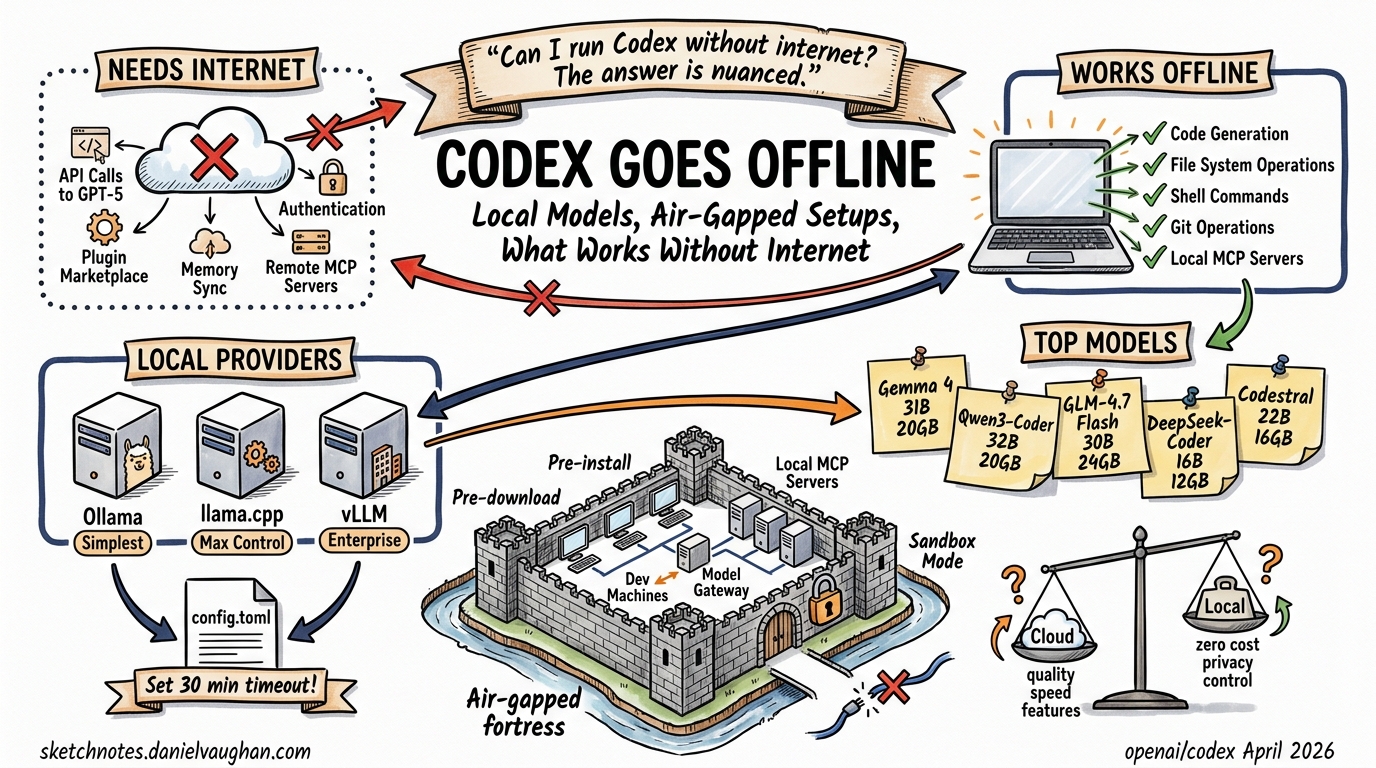
“Can I run Codex CLI without internet?” is one of the most common search queries that leads nowhere. The answer is nuanced: Codex CLI can work with local models, but true offline mode has gaps. This article maps exactly what works, what doesn’t, and how to configure local providers for restricted environments.
What Requires Internet
By default, Codex CLI needs connectivity for:
- Model API calls — GPT-5.4, GPT-5.3-codex, and all OpenAI-hosted models
- Authentication — device-code login and token refresh against OpenAI’s auth servers
- Plugin/marketplace operations — installing, browsing, and updating plugins from Git-hosted marketplaces
- Memory sync — cross-session memory persistence (if using cloud-backed memory)
- MCP server connections — remote MCP servers accessed over HTTP/WebSocket
What Works Offline (With Local Models)
When pointed at a local model server, Codex CLI can operate without internet for:
- Code generation, editing, and review — core agent loop works against any OpenAI-compatible API
- File system operations — reading, writing, and navigating your codebase
- Shell command execution — sandbox and full-access modes work locally
- Git operations — commits, diffs, and local repo management
- Local MCP servers — STDIO-based MCP servers launched as child processes
Setting Up Local Model Providers
Option 1: Ollama (Simplest)
# Install Ollama
curl -fsSL https://ollama.com/install.sh | sh

# Pull a coding model
ollama pull gemma4:31b
# or
ollama pull qwen3-coder

# Run Codex with local model
codex --oss -m gemma4:31b
The --oss flag configures Codex to use the default Ollama endpoint at http://localhost:11434/v1.
Option 2: llama.cpp (Maximum Control)
# Build with GPU support
git clone https://github.com/ggml-org/llama.cpp
cmake llama.cpp -B llama.cpp/build -DGGML_CUDA=ON  # or -DGGML_METAL=ON for Mac
cmake --build llama.cpp/build --config Release -j --target llama-server

# Download a quantized model (e.g., GLM-4.7-Flash 30B MoE)
# Launch server
./llama.cpp/build/bin/llama-server \
  -m model.gguf \
  --port 8001 \
  --temp 1.0 --top-p 0.95 \
  -c 131072
Option 3: vLLM / TGI (Enterprise)
For production air-gapped deployments, vLLM or Hugging Face Text Generation Inference behind an OpenAI-compatible API gateway.
Configuration
Edit ~/.codex/config.toml:
[providers.local]
base_url = "http://localhost:8001/v1"
api_key = "not-needed"  # local servers typically don't require auth
stream_idle_timeout_ms = 1800000  # 30 min — critical for slow local models
Then run:
codex -m local/your-model-name
Key tip: Set stream_idle_timeout_ms to at least 1,800,000 (30 minutes). Local models on consumer hardware can be orders of magnitude slower than cloud APIs, and the default timeout will kill long-running generations.
Recommended Local Models for Codex (April 2026)
| Model | Size | VRAM Required | Strengths |
|---|---|---|---|
| Gemma 4 31B | 31B MoE | ~20 GB | Good all-round coding, Google-backed |
| Qwen3-Coder | 32B | ~20 GB | Strong code generation, tool-use aware |
| GLM-4.7-Flash | 30B MoE | ~24 GB | Agentic/coding focus, fast inference |
| DeepSeek-Coder-V3 | 16B | ~12 GB | Efficient, good for smaller GPUs |
| Codestral 25.01 | 22B | ~16 GB | Mistral’s dedicated coding model |
What Breaks in Air-Gapped Environments
- Authentication — Codex expects to validate against OpenAI’s auth servers. Workaround: use
api_keyin config pointing to your local server’s auth (or a dummy key if auth not required) - Plugin marketplace — won’t load. Pre-install any needed plugins before going offline, or use local directory-based plugin installation (
codex plugin add /path/to/plugin) - Memory features — cloud-synced memory won’t work. Local session histories are preserved
- Auto-update checks — will fail silently, which is fine
codex execin CI — works if pointed at a local model endpoint accessible from the CI runner- MCP Apps — remote MCP servers won’t connect; local STDIO servers work fine
Enterprise Air-Gapped Architecture
flowchart TB
    subgraph airgap["Air-Gapped Network"]
        dev["Dev Machines + Codex CLI"]
        gateway["vLLM / TGI Gateway<br/>(OpenAI-compat API + approved models)"]
        mcp["Local MCP Servers<br/>(STDIO, no network)"]
    end
    dev --> gateway
    dev --> mcp
Key considerations:
- Pre-install Codex CLI binary — download the release asset (
.tar.gzor.dmg) and transfer via approved media - Pre-download models — transfer GGUF or safetensor files via approved channels
- Network sandbox — use
sandbox = "read-only"orworkspace-writeto prevent accidental outbound connection attempts - Deny-read policies — use glob deny-read patterns (
deny_read = ["~/.ssh/*", "~/.aws/*"]) to prevent the agent from reading sensitive credential files - Audit trail — local session logs provide full traceability without cloud telemetry
Feature Comparison: Cloud vs Local
| Feature | Cloud (GPT-5.4) | Local (Gemma 4 / Qwen3) |
|---|---|---|
| Code quality | Excellent | Good (model-dependent) |
| Speed | Fast | Slower (hardware-dependent) |
| Subagents | Full support | Works but slower |
| MCP servers | Remote + local | Local only |
| Plugins | Full marketplace | Pre-installed only |
| Memory | Cloud-synced | Session-local only |
| Cost | Per-token API | Zero marginal cost |
| Data privacy | Sent to OpenAI | Stays on-premises |
| Compliance | Shared responsibility | Full control |
Current Limitations and Outlook
As of April 2026, there is no official --offline flag or dedicated air-gapped mode (GitHub issue #3642 tracks this). The community workaround is configuring local providers and accepting reduced functionality for plugins and memory.
The device-key v2 infrastructure (6 PRs shipped in v0.122-alpha using Secure Enclave / TPM hardware-backed keys) suggests OpenAI is investing in enterprise authentication — which could eventually support certificate-based auth suitable for air-gapped environments without internet-dependent device-code flows.
See also: Custom Model Providers, Security Hardening, Enterprise Admin Guide