gh skill: Supply-Chain-Secure Agent Skills from GitHub CLI to Codex CLI
gh skill: Supply-Chain-Secure Agent Skills from GitHub CLI to Codex CLI
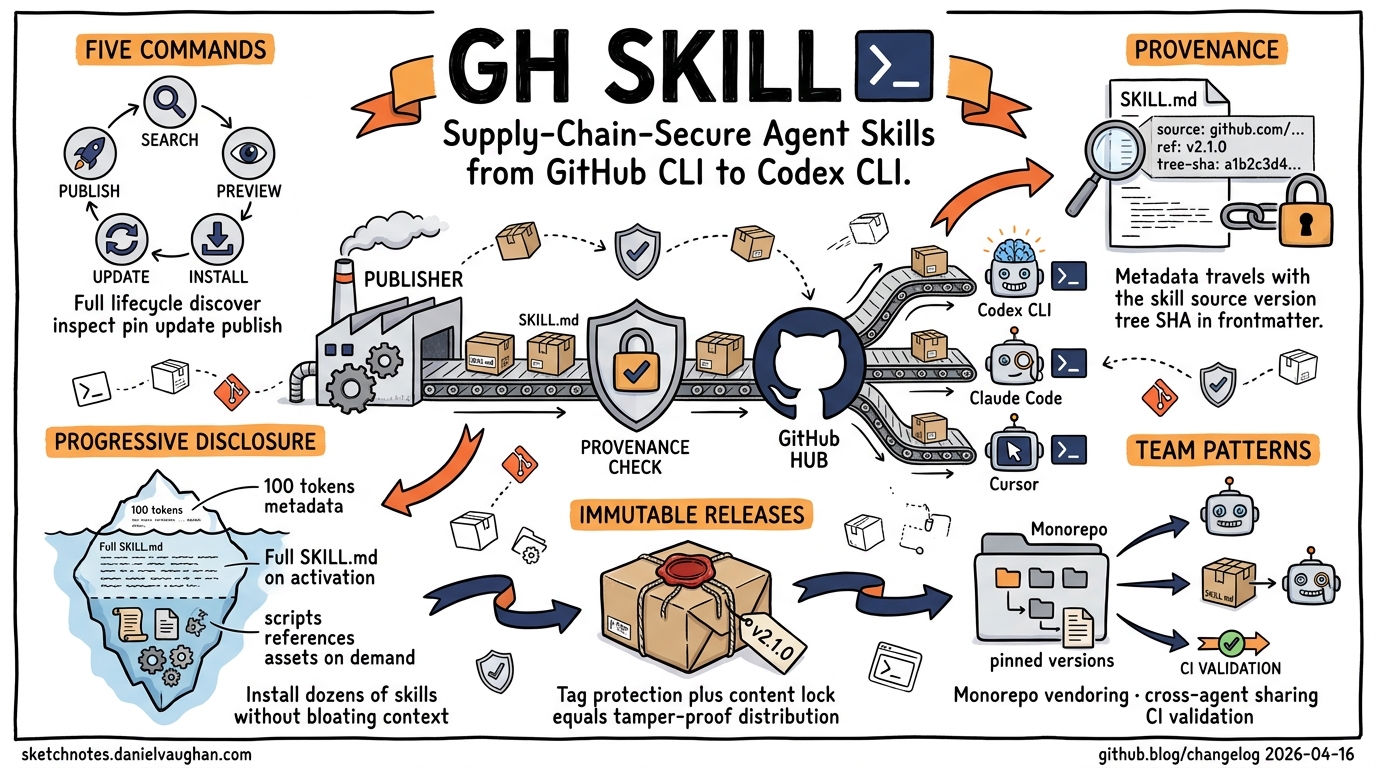
On 16 April 2026, GitHub shipped gh skill in CLI v2.90.0 — a first-class subcommand for discovering, installing, pinning, updating, and publishing agent skills directly from the terminal12. The timing matters: the agent-skills ecosystem has grown rapidly across Codex CLI, Claude Code, Cursor, Gemini CLI, and others, but until now there was no unified package-manager-style toolchain with provenance guarantees. This article unpacks how gh skill works, how it interacts with Codex CLI’s skill-loading pipeline, and what it means for teams managing skills at scale.
What Problem Does gh skill Solve?
Agent skills — portable directories of instructions, scripts, and resources that teach coding agents how to perform specific tasks — follow the open Agent Skills specification hosted at agentskills.io3. The specification standardises the SKILL.md format, directory layout, and progressive-disclosure loading model. But the specification deliberately says nothing about distribution.
Before gh skill, installing a skill meant cloning a repository and manually copying directories into the right location. Updating meant remembering where you got it. Verifying integrity meant trusting the author. For a single developer running a handful of personal skills, that works. For a team deploying twenty skills across four agent hosts, it does not.
gh skill fills this gap by providing:
- Discovery via
gh skill search - Inspection before installation via
gh skill preview - Version-pinned installation with
--pin - Cross-agent-host targeting with
--agent - Provenance tracking baked into the installed skill itself
- Supply-chain hardening through immutable releases and content-addressed change detection
The Five Core Subcommands
flowchart LR
    A[gh skill search] --> B[gh skill preview]
    B --> C[gh skill install]
    C --> D[gh skill update]
    E[gh skill publish] --> A
    style A fill:#4a90d9,color:#fff
    style B fill:#7b68ee,color:#fff
    style C fill:#2ecc71,color:#fff
    style D fill:#e67e22,color:#fff
    style E fill:#e74c3c,color:#fff
search
Browse available skills from any repository that publishes them:
gh skill search mcp-apps
gh skill search --topic codex --topic infrastructure
preview
Inspect a skill’s SKILL.md, scripts, and references before committing to installation:
gh skill preview openai/skills terraform-drift
install
Install a skill into the correct directory for your chosen agent host:
# Install interactively from a skill repository
gh skill install openai/skills

# Install a specific skill at a specific version for Codex CLI
gh skill install openai/skills terraform-drift@v2.1.0 --agent codex --scope user

# Pin to a commit SHA for maximum reproducibility
gh skill install github/awesome-copilot documentation-writer --pin abc123def
The --agent flag accepts codex, claude-code, cursor, gemini, and antigravity1. When targeting Codex CLI, gh skill writes to the appropriate directory in the Codex skill hierarchy.
update
Scan installed skills, read provenance metadata, and check upstream for changes:
# Interactive update check
gh skill update

# Update a single skill
gh skill update terraform-drift

# Update everything non-interactively
gh skill update --all
publish
Validate skills against the Agent Skills specification and optionally enable immutable releases:
# Dry-run validation
gh skill publish --dry-run

# Publish with auto-fix for metadata issues
gh skill publish --fix
The publish step checks remote settings including tag protection, secret scanning, and code scanning configuration2.
How Codex CLI Loads Skills
Understanding how gh skill install --agent codex maps to Codex CLI’s runtime requires knowing the skill-loading hierarchy. Codex CLI scans four tiers in order4:
graph TD
    A["Repository-level<br/>.agents/skills"] --> E[Merged skill set]
    B["User-level<br/>~/.agents/skills"] --> E
    C["Admin-level<br/>/etc/codex/skills"] --> E
    D["Built-in skills<br/>bundled with Codex"] --> E
    E --> F{Progressive disclosure}
    F --> G["Metadata only<br/>~100 tokens per skill"]
    G --> H["Full SKILL.md<br/>on activation"]
    H --> I["scripts/ references/ assets/<br/>on demand"]
    style A fill:#3498db,color:#fff
    style B fill:#2ecc71,color:#fff
    style C fill:#e67e22,color:#fff
    style D fill:#9b59b6,color:#fff
When gh skill install targets --agent codex --scope user, the skill directory lands in ~/.agents/skills/<skill-name>/. At startup, Codex reads only the name and description fields from each SKILL.md frontmatter — roughly 100 tokens per skill3. The full body loads only when the skill activates, and referenced files (scripts/, references/, assets/) load only on demand. This progressive-disclosure model means you can install dozens of skills without bloating your context window.
Skills can be disabled without removal via ~/.codex/config.toml:
[[skills.config]]
path = "/home/dev/.agents/skills/terraform-drift/SKILL.md"
enabled = false
Provenance: Supply-Chain Security That Travels with the Skill
The standout feature of gh skill is portable provenance. When it installs a skill, it writes tracking metadata directly into the SKILL.md frontmatter1:
---
name: terraform-drift
description: Detect and remediate Terraform state drift using plan output analysis.
metadata:
  gh-skill-source: openai/skills
  gh-skill-ref: v2.1.0
  gh-skill-tree-sha: a1b2c3d4e5f6
---
Because provenance data lives inside the skill file, it travels with the skill regardless of how it is subsequently copied, committed to a monorepo, or synced across machines. gh skill update reads this metadata to determine whether a newer version is available upstream, using content-addressed change detection based on the git tree SHA2.
Immutable Releases
When publishing with gh skill publish, you can enable immutable releases. This prevents post-publication alteration of release content, even by repository admins1. Combined with tag pinning at install time, this gives teams a guarantee chain:
sequenceDiagram
    participant Author
    participant GitHub
    participant gh skill
    participant Codex CLI

    Author->>GitHub: gh skill publish (immutable release v2.1.0)
    GitHub-->>GitHub: Tag protection + content lock
    gh skill->>GitHub: gh skill install skill@v2.1.0 --pin v2.1.0
    GitHub-->>gh skill: Download + verify tree SHA
    gh skill->>Codex CLI: Write to ~/.agents/skills/ with provenance
    Note over Codex CLI: SKILL.md contains source, ref, tree SHA
    gh skill->>GitHub: gh skill update (periodic)
    GitHub-->>gh skill: Compare tree SHA, report changes
Practical Patterns for Teams
Pattern 1: Monorepo Skill Distribution
For teams that vendor skills into their repository:
# Install project-level skills pinned to a release
gh skill install myorg/agent-skills api-reviewer@v3.0.0 --agent codex --scope project
gh skill install myorg/agent-skills db-migration@v3.0.0 --agent codex --scope project

# Skills land in .agents/skills/ and can be committed
git add .agents/skills/
git commit -m "chore: pin agent skills to v3.0.0"
Every developer cloning the repository gets the same skills at the same version. The provenance metadata in each SKILL.md enables automated freshness checks in CI.
Pattern 2: Cross-Agent Skill Sharing
A skill authored for one agent often works across others. Install the same skill for multiple hosts:
gh skill install myorg/skills code-reviewer --agent codex
gh skill install myorg/skills code-reviewer --agent claude-code
The Agent Skills specification ensures SKILL.md is portable3. Agent-specific behaviour goes in the compatibility field:
---
name: code-reviewer
description: Reviews pull request diffs for security, performance, and style issues.
compatibility: Requires git and access to the internet.
---
Pattern 3: CI Skill Validation
Add skill validation to your publishing pipeline:
# In CI: validate all skills before release
gh skill publish --dry-run

# Check that all installed skills are up to date
gh skill update --all --dry-run 2>&1 | grep -c "outdated"
The SKILL.md Specification
For teams authoring skills to distribute via gh skill, the specification defines clear constraints3:
| Field | Required | Notes |
|---|---|---|
name |
Yes | 1–64 chars, lowercase alphanumeric + hyphens, must match directory name |
description |
Yes | 1–1024 chars, should describe what and when |
license |
No | License name or reference to bundled file |
compatibility |
No | 1–500 chars, environment requirements |
metadata |
No | Arbitrary key-value pairs (used by gh skill for provenance) |
allowed-tools |
No | Space-separated pre-approved tools (experimental) |
The allowed-tools field is particularly interesting for Codex CLI’s sandbox model. A skill can declare upfront which tools it needs:
allowed-tools: Bash(git:*) Bash(terraform:*) Read
This reduces approval friction in stricter sandbox configurations, though support varies across agent implementations3.
Security Considerations
gh skill brings package-manager ergonomics but inherits package-manager risks. GitHub’s own documentation warns: “Skills are installed at your own discretion. They are not verified by GitHub and may contain prompt injections, hidden instructions, or malicious scripts”1.
For enterprise deployments, consider:
- Always pin to tags or SHAs — never install from
HEAD - Enable immutable releases on skill repositories you publish
- Review skills with
gh skill previewbefore installation - Use
/etc/codex/skillsfor admin-managed, audited skills that override user-level installations - Validate provenance metadata in CI — if the
gh-skill-tree-shachanges unexpectedly, investigate
⚠️ The allowed-tools field is experimental and its enforcement behaviour may differ between agent hosts. Do not rely on it as a sole security boundary.
What This Means for the Ecosystem
gh skill represents GitHub treating agent skills as a first-class supply-chain artefact alongside packages, containers, and actions. The parallels to gh extension are deliberate — both use the same install-update-publish lifecycle, and gh extension install gained unauthenticated public release support in the same v2.90.0 release2.
For Codex CLI users specifically, gh skill solves the “works on my machine” problem for skills. A team can now declare their skill dependencies in version control, pin them to immutable releases, and verify provenance automatically. Combined with Codex CLI’s progressive-disclosure loading and the codex marketplace add command for plugin-level distribution5, the toolchain for managing agent customisation at scale is maturing rapidly.