Contract-Driven API Development with Codex CLI: Using Specmatic MCP for Spec-First Full-Stack Builds
Contract-Driven API Development with Codex CLI: Using Specmatic MCP for Spec-First Full-Stack Builds
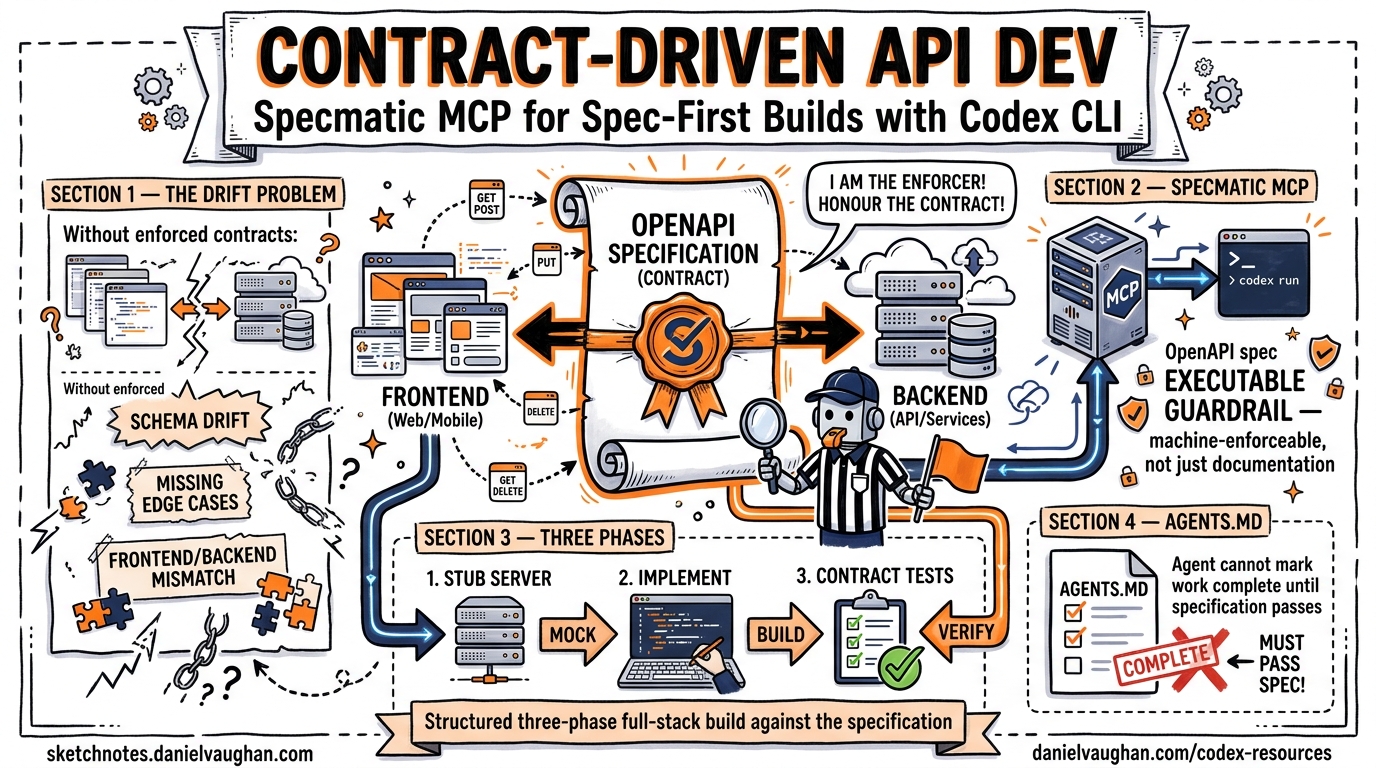
Most agentic coding workflows suffer from the same failure mode: the agent generates code that compiles, passes its own tests, and drifts silently from the API contract you actually need. Contract-driven development (CDD) eliminates that drift by turning your OpenAPI specification into an executable, machine-enforceable guardrail — and the Specmatic MCP server makes those guardrails available to Codex CLI as first-class tools.1
This article walks through the complete pipeline: configuring Specmatic MCP in Codex CLI, structuring a three-phase full-stack build, and wiring contract tests into your AGENTS.md so the agent cannot mark work as complete until the specification passes.
Why Contracts Matter More with Agents
When a human developer builds an API endpoint, they typically have the specification open in a browser tab and cross-reference manually. When Codex builds that same endpoint, it relies on whatever context is in the conversation window. Without an enforced contract, three things go wrong predictably:
- Schema drift — the agent invents response fields that look plausible but diverge from the spec2
- Missing edge cases — boundary conditions (empty arrays, null fields, invalid enums) go untested until integration3
- Frontend/backend mismatch — parallel development produces two implementations of different contracts
Contract-driven development resolves all three by making the OpenAPI specification the single source of truth and executing it as a test suite continuously during development.4
The Specmatic MCP Server
Specmatic is an open-source contract testing tool that converts OpenAPI, AsyncAPI, gRPC, and GraphQL specifications into executable tests and mock servers.5 The Specmatic MCP server exposes these capabilities as Model Context Protocol tools that Codex CLI can call during its agent loop.1
Available Tools
| MCP Tool | Purpose |
|---|---|
run_contract_test |
Validates a running API against the OpenAPI spec |
run_resiliency_test |
Sends boundary-condition and malformed payloads |
manage_mock_server |
Starts, stops, and lists mock servers from the spec |
backward_compatibility_check |
Detects breaking changes via git diff (npm only) |
The critical insight: these tools run outside the agent’s sandbox. Specmatic validates independently, so the agent cannot game its own tests.1
Setting Up Specmatic MCP in Codex CLI
Prerequisites
You need Node.js (stable), a Java Runtime Environment, and Git installed on the machine running Codex CLI.6
Adding the Server
The quickest path uses the Codex MCP CLI:
codex mcp add specmatic -- npx specmatic-mcp
This registers a STDIO-based MCP server in your global ~/.codex/config.toml.7 For project-scoped configuration, create .codex/config.toml in your repository root:
[mcp_servers.specmatic]
command = "npx"
args = ["specmatic-mcp"]
startup_timeout_sec = 30
tool_timeout_sec = 120
required = true
Setting required = true means Codex CLI will refuse to start a session if Specmatic fails to initialise — a deliberate safety net for contract-first workflows.7
Docker Alternative
For teams that prefer containerised tooling or lack a local JRE:
[mcp_servers.specmatic]
command = "docker"
args = [
  "run", "--rm", "--network=host",
  "-v", "./:/app",
  "-w", "/app",
  "specmatic/specmatic-mcp"
]
startup_timeout_sec = 45
required = true
The --network=host flag is mandatory — without it, the mock server and contract tests cannot reach localhost services started by the agent.6
The Three-Phase Build
The Specmatic team’s reference architecture splits full-stack development into three phases, each with different guardrails.1 This maps cleanly onto Codex CLI’s agent loop.
flowchart LR
    subgraph Phase1["Phase 1: Backend"]
        A[OpenAPI Spec] --> B[Implement Endpoints]
        B --> C[Contract Tests]
        C -->|Fail| B
        C -->|Pass| D[Resiliency Tests]
        D -->|Fail| B
        D -->|Pass| E[Backend Complete]
    end

    subgraph Phase2["Phase 2: Frontend"]
        F[Start Mock Server] --> G[Build UI Components]
        G --> H[Playwright Tests vs Mock]
        H -->|Fail| G
        H -->|Pass| I[Frontend Complete]
    end

    subgraph Phase3["Phase 3: Integration"]
        J[Stop Mock Server] --> K[Connect to Real Backend]
        K --> L[E2E Tests]
        L -->|Fail| M[Fix Issues]
        M --> L
        L -->|Pass| N[Ship It]
    end

    E --> F
    I --> J
Phase 1: Backend Implementation
The agent implements API endpoints while continuously running contract and resiliency tests via MCP tools. The acceptance criterion is explicit: both run_contract_test and run_resiliency_test must pass before the agent moves on.1
A well-structured prompt:
Implement the backend API in backend/ according to products_api.yaml.
After each endpoint, call the Specmatic MCP run_contract_test tool.
When all contract tests pass, run run_resiliency_test.
Do NOT mark the backend as complete until both test suites pass with zero failures.
Phase 2: Frontend Development
The agent starts a Specmatic mock server from the same OpenAPI spec, then builds the frontend against it. The mock server returns schema-compliant responses using the examples defined in the specification, giving the agent deterministic data to develop and test against.1
Start the Specmatic mock server for products_api.yaml using manage_mock_server.
Build the React frontend in frontend/ consuming the mock at http://localhost:9001.
Use Playwright to verify each UI component renders correctly against mock data.
Do NOT stop the mock server until all Playwright tests pass.
Phase 3: Integration
The mock server stops, the frontend reconfigures to target the real backend, and end-to-end tests execute. This phase catches any remaining mismatches that survived the contract-enforced development phases.1
AGENTS.md for Contract-First Workflows
Your AGENTS.md bridges the gap between the OpenAPI specification and the agent’s execution policy. Here is a template for a contract-driven project:
# Project Instructions

## API Contract

The single source of truth is `products_api.yaml` at the repository root.
All API implementations MUST pass Specmatic contract and resiliency tests.
Do NOT modify the OpenAPI spec without explicit approval.

## Backend Rules

- Framework: Express.js with TypeScript
- Run `run_contract_test` after implementing each endpoint group
- Run `run_resiliency_test` after all endpoints pass contract tests
- Handle all error codes defined in the OpenAPI spec
- Return exactly the response schemas specified — no extra fields

## Frontend Rules

- Framework: React with TypeScript
- Always develop against the Specmatic mock server, not the real backend
- Use `manage_mock_server` to start/stop mocks
- All API calls go through a single `apiClient.ts` module

## Completion Criteria

A feature is complete when:
1. All Specmatic contract tests pass
2. All Specmatic resiliency tests pass
3. All Playwright E2E tests pass against the real backend
4. No TypeScript compilation errors
This structure means the agent has unambiguous acceptance criteria at every phase. Combined with Codex CLI’s suggest approval mode, you review the diffs while the contract tests enforce correctness.8
Practical Patterns
Pattern 1: Backward Compatibility Guard
When evolving an existing API, use the backward_compatibility_check tool before committing spec changes:
codex exec "Review the changes to products_api.yaml and run \
backward_compatibility_check to verify no breaking changes. \
Report any violations." \
--full-auto -o compatibility-report.txt
This catches field removals, type changes, and dropped required properties before they reach CI.6
Pattern 2: Parallel Subagent Architecture
For larger APIs, split the work across subagents using Codex CLI’s worktree support:
flowchart TB
    O[Orchestrator Agent] --> |"Phase 1"| S1[Backend Subagent<br/>Worktree A]
    O --> |"Phase 2"| S2[Frontend Subagent<br/>Worktree B]
    S1 --> |Contract tests pass| O
    S2 --> |Mock tests pass| O
    O --> |"Phase 3"| I[Integration Agent<br/>Main Branch]

    SP[Specmatic MCP] -.->|contract_test| S1
    SP -.->|mock_server| S2
    SP -.->|contract_test| I
Each subagent has its own Specmatic MCP instance scoped to its worktree. The orchestrator merges only when both subagents report passing contracts.9
Pattern 3: CI Pipeline with Structured Output
Use codex exec with --output-schema to produce machine-readable compliance reports:
codex exec "Run all Specmatic contract and resiliency tests against \
the staging deployment. Summarise results." \
--output-schema ./schemas/compliance-report.json \
--full-auto -o report.json
Where compliance-report.json defines:
{
  "type": "object",
  "properties": {
    "contract_tests_passed": { "type": "boolean" },
    "resiliency_tests_passed": { "type": "boolean" },
    "failures": {
      "type": "array",
      "items": {
        "type": "object",
        "properties": {
          "endpoint": { "type": "string" },
          "method": { "type": "string" },
          "error": { "type": "string" }
        }
      }
    },
    "summary": { "type": "string" }
  },
  "required": ["contract_tests_passed", "resiliency_tests_passed", "failures", "summary"]
}
Downstream pipeline steps parse report.json to gate deployments.10
Pattern 4: Spec Evolution with Spec-Kit
For teams where the OpenAPI specification evolves alongside features rather than being fully designed upfront, Specmatic provides a spec-kit approach. Each feature analyses existing contracts for reuse before extending the API, ensuring backward compatibility throughout.11
This maps naturally to a Codex CLI workflow where each feature branch starts with:
Analyse the existing OpenAPI spec for endpoints that could serve
this feature's requirements. Only add new endpoints or fields
if no existing contract covers the need. Run backward_compatibility_check
after any spec modifications.
What Contract Testing Does Not Catch
Contract tests verify structural compliance: correct status codes, valid response schemas, proper error formats. They do not verify:
- Business logic correctness — an endpoint that returns
200with the wrong calculation still passes the contract3 - Performance characteristics — response time, throughput, and resource consumption require separate tooling
- Security vulnerabilities — authentication bypass, injection attacks, and authorisation failures need dedicated security testing
⚠️ Contract testing is a necessary but not sufficient layer. Pair it with unit tests for business logic, load tests for performance, and security scanning for vulnerabilities.
Supported Specification Formats
While this article focuses on OpenAPI, Specmatic’s MCP server supports multiple specification formats:5
| Format | Contract Testing | Mock Server | Backward Compatibility |
|---|---|---|---|
| OpenAPI (YAML/JSON) | ✅ | ✅ | ✅ |
| AsyncAPI | ✅ | ✅ | ✅ |
| gRPC (proto) | ✅ | ✅ | ✅ |
| GraphQL | ✅ | ✅ | ✅ |
| WSDL | ✅ | ✅ | ✅ |
| Arazzo | ✅ | — | — |
This means the same MCP-based workflow applies to event-driven architectures (AsyncAPI), internal microservices (gRPC), and public APIs (GraphQL) with minimal configuration changes.
Comparison with Traditional Approaches
| Approach | Contract Source | When Validated | Agent Awareness |
|---|---|---|---|
| Manual review | Human reads spec | After PR | None |
| Postman/Newman | Collection files | CI only | None |
| Consumer-driven (Pact) | Consumer expectations | CI only | None |
| Specmatic MCP + Codex | OpenAPI spec | During development | Full — via MCP tools |
The key differentiator is when validation happens. With Specmatic MCP, the agent validates continuously during its development loop, catching drift within seconds rather than after a CI run that may take minutes.4
Getting Started
- Add the MCP server:
codex mcp add specmatic -- npx specmatic-mcp - Write your OpenAPI spec with realistic examples in the
examplesfield - Create an AGENTS.md with explicit contract-passing completion criteria
- Start a session:
codex "Build the backend for api-spec.yaml. Run contract tests after each endpoint." - Review diffs while Specmatic enforces correctness
The Specmatic MCP sample project at specmatic/specmatic-mcp-sample on GitHub provides a working reference implementation with a Products API, React frontend, and Express backend.12
Citations
-
Specmatic, “Specmatic MCP as guardrails for Coding Agents: API Spec to Full Stack implementation in minutes,” specmatic.io, April 2026. ↩ ↩2 ↩3 ↩4 ↩5 ↩6 ↩7
-
Chowdhury et al., “From Industry Claims to Empirical Reality: Evaluating Code Review Agents,” arXiv:2604.03196, April 2026. Demonstrates 60% noise rate in agent-generated reviews without structural constraints. ↩
-
Ivanov, Rana, Prabhakaran, “Can Coding Agents be General Agents?” arXiv:2604.13107, April 2026. Documents business-logic silent failures in agentic workflows. ↩ ↩2
-
Specmatic, “Contract Driven Development,” docs.specmatic.io, accessed April 2026. ↩ ↩2
-
Specmatic, “Ship AI-Ready APIs 10x Faster,” specmatic.io, accessed April 2026. Supports OpenAPI, AsyncAPI, gRPC, GraphQL, WSDL, and Arazzo specifications. ↩ ↩2
-
specmatic/specmatic-mcp-server, GitHub repository, github.com/specmatic/specmatic-mcp-server, accessed April 2026. ↩ ↩2 ↩3
-
OpenAI, “Model Context Protocol – Codex,” developers.openai.com/codex/mcp, accessed April 2026. ↩ ↩2
-
OpenAI, “CLI – Codex,” developers.openai.com/codex/cli, accessed April 2026. ↩
-
OpenAI, “Features – Codex CLI,” developers.openai.com/codex/cli/features, accessed April 2026. Covers worktree and subagent patterns. ↩
-
OpenAI, “Non-interactive mode – Codex,” developers.openai.com/codex/noninteractive, accessed April 2026. Documents
--output-schemafor structured JSON output. ↩ -
specmatic/specmatic-mcp-sample-with-spec-kit, GitHub repository, github.com/specmatic/specmatic-mcp-sample-with-spec-kit, accessed April 2026. ↩
-
specmatic/specmatic-mcp-sample, GitHub repository, github.com/specmatic/specmatic-mcp-sample, accessed April 2026. ↩