Codex CLI Filesystem Security: Deny-Read Policies, Glob Patterns, and Credential Protection
Codex CLI Filesystem Security: Deny-Read Policies, Glob Patterns, and Credential Protection
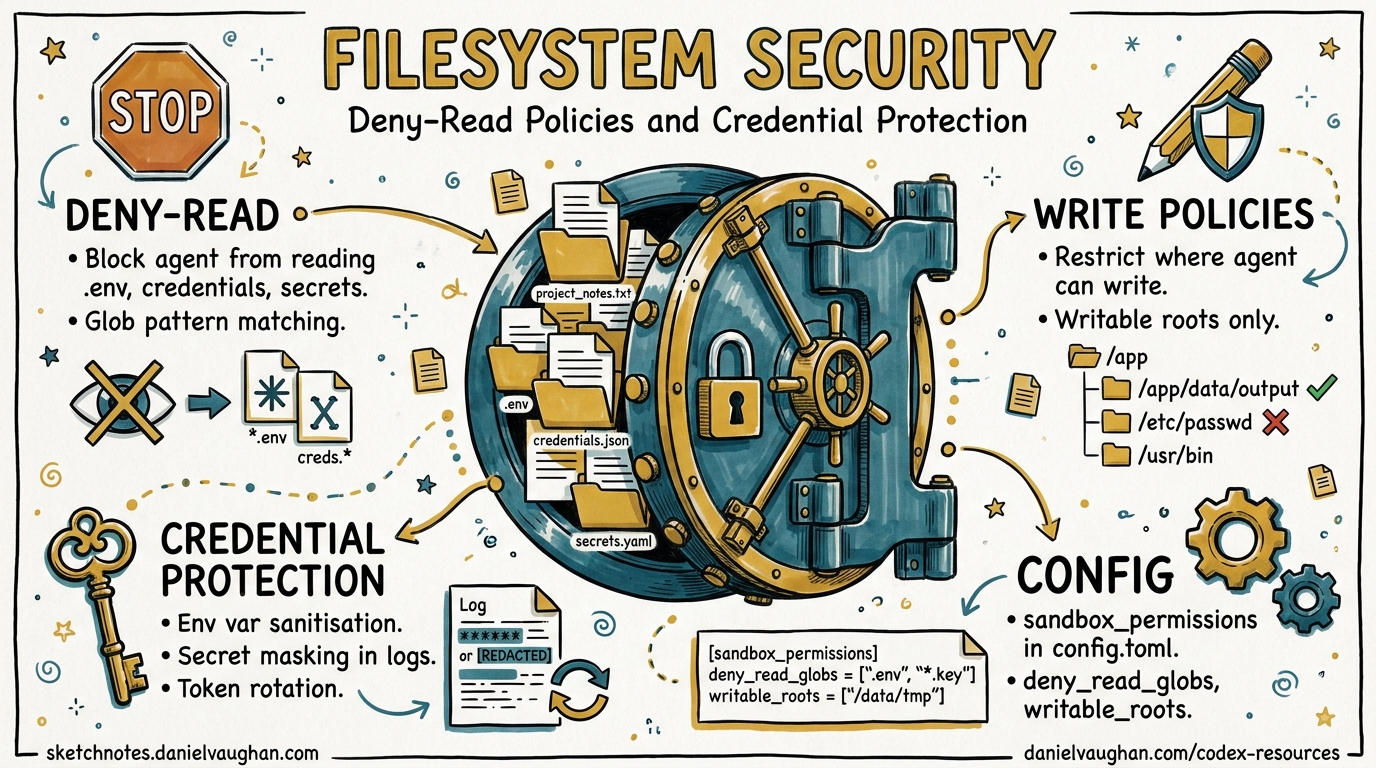
Every developer workstation is a treasure trove of secrets: .env files, SSH keys, cloud credentials in ~/.aws, API tokens scattered through shell profiles. When you hand an autonomous coding agent read access to your filesystem, those secrets become attack surface. Codex CLI v0.125 shipped deny-read glob policies, managed deny-read requirements, and isolated codex exec runs1 — giving teams the tools to enforce least-privilege file access at every layer of the configuration stack.
This article walks through the full filesystem security model, from individual developer hardening to enterprise-wide policy enforcement.
The Threat: Why Read Access Matters
Codex CLI’s default read-only sandbox mode prevents writes but still allows the agent to read files across the filesystem2. That design makes sense for code comprehension — the agent needs to read source files to be useful. But read access to credential files is a different matter entirely.
Research from Bitwarden demonstrated that coding agents routinely inherit access to .env files, ~/.aws/credentials, SSH keys, and shell history containing tokens3. A prompt injection in a dependency’s README or a malicious MCP server response could instruct the agent to read and exfiltrate these files. The CVE-2025-61260 vulnerability in Codex CLI showed that implicitly trusted project configurations could execute arbitrary commands without user approval4, making credential exfiltration a concrete rather than theoretical risk.
flowchart TD
    A[Agent receives prompt] --> B{Reads project files}
    B --> C[Source code - Intended]
    B --> D[.env files - Dangerous]
    B --> E[~/.ssh/id_rsa - Dangerous]
    B --> F[~/.aws/credentials - Dangerous]
    D --> G[Credentials in context window]
    E --> G
    F --> G
    G --> H[Potential exfiltration via<br/>tool output or model response]
    C --> I[Normal agent workflow]
Layer 1: User-Level Deny-Read Policies
The permissions.<name>.filesystem table in config.toml lets you define named permission profiles with granular path-level access control5. The critical addition in v0.125 is "none" as an access level, which denies read access entirely for matching paths or glob patterns1.
Basic Configuration
# ~/.codex/config.toml
default_permissions = "workspace"

[permissions.workspace.filesystem]
":project_roots" = { "." = "write", "**/*.env" = "none", "**/.env.*" = "none" }
"/Users/daniel/.ssh" = "none"
"/Users/daniel/.aws" = "none"
"/Users/daniel/.config/gh" = "none"
glob_scan_max_depth = 3
The :project_roots special token scopes rules relative to detected project roots5. Glob patterns like **/*.env match recursively within those roots. Absolute paths like /Users/daniel/.ssh apply system-wide regardless of the working directory.
Understanding glob_scan_max_depth
On platforms that snapshot glob matches before sandbox startup (notably macOS Seatbelt), unbounded ** patterns must be pre-expanded5. The glob_scan_max_depth key caps how deep the expansion goes. Setting it to 3 means **/*.env expands to *.env, */*.env, */*/*.env, and */*/*/*.env. For deeply nested monorepos, increase this value — but be aware that higher values increase sandbox startup time.
Multiple Permission Profiles
You can define separate profiles for different workflows:
default_permissions = "standard"

[permissions.standard.filesystem]
":project_roots" = { "." = "write", "**/*.env" = "none" }
glob_scan_max_depth = 3

[permissions.audit.filesystem]
":project_roots" = { "." = "read" }
"/var/log" = "read"
glob_scan_max_depth = 2

[permissions.ci.filesystem]
":project_roots" = { "." = "write" }
":minimal" = "read"
glob_scan_max_depth = 1
Permission profiles persist across TUI sessions, user turns, MCP sandbox state, and shell escalation as of v0.1251, meaning the agent cannot silently switch to a more permissive profile mid-session.
Layer 2: Shell Environment Policy
Deny-read policies protect files on disc, but credentials often live in environment variables. The shell_environment_policy table controls what the agent’s subprocesses can see6:
[shell_environment_policy]
inherit = "core"
ignore_default_excludes = false
exclude = ["AWS_*", "AZURE_*", "GH_TOKEN", "GITHUB_TOKEN", "NPM_TOKEN"]
set = { PATH = "/usr/local/bin:/usr/bin:/bin" }
The automatic KEY/SECRET/TOKEN filter runs first when ignore_default_excludes = false6, stripping any variable whose name contains those substrings. The exclude array adds glob-pattern overrides on top. Together, these two mechanisms ensure that even if the agent spawns a shell, it cannot access cloud credentials through the environment.
flowchart LR
    A[Host env vars] --> B{Default excludes<br/>KEY/SECRET/TOKEN}
    B -->|Stripped| C[Filtered set]
    B -->|Passed| C
    C --> D{exclude patterns<br/>AWS_*, GH_TOKEN}
    D -->|Stripped| E[Final env]
    D -->|Passed| E
    E --> F{set overrides}
    F --> G[Subprocess environment]
Layer 3: Sandbox Mode Selection
Filesystem policies operate within the broader sandbox architecture. The three modes provide different baseline guarantees2:
| Mode | Filesystem | Network | Use Case |
|---|---|---|---|
read-only |
Read anywhere (unless deny-read) | Blocked | Safe exploration |
workspace-write |
Write in project, read elsewhere (unless deny-read) | Opt-in | Active development |
danger-full-access |
Unrestricted | Unrestricted | Only in pre-isolated environments |
Deny-read policies layer on top of these modes. A workspace-write sandbox with "**/*.env" = "none" means the agent can write source files but cannot read any .env file, even within the writable workspace.
Platform-specific enforcement varies2:
- macOS: Seatbelt policies via
sandbox-execwith curated profiles matching your selected mode - Linux:
bwrapplusseccompby default; WSL2 inherits Linux semantics - Windows: Native sandbox runs as “unelevated” or “elevated”; WSL2 provides alternative isolation
# Hardened workspace-write for active development
sandbox_mode = "workspace-write"
approval_policy = "on-request"

[sandbox_workspace_write]
network_access = false
writable_roots = []
exclude_slash_tmp = true
exclude_tmpdir_env_var = true
Setting exclude_slash_tmp = true prevents the agent from using /tmp as a staging area for exfiltrated data — a technique observed in sandbox escape research7.
Layer 4: Enterprise Managed Requirements
Individual developer configuration is insufficient at scale. The requirements.toml mechanism lets administrators enforce deny-read policies that users cannot weaken8.
Enforcement Hierarchy
Requirements are applied in strict precedence order8:
- Cloud-managed requirements — ChatGPT Business/Enterprise admin console
- macOS MDM —
com.openai.codex:requirements_toml_base64preference domain - System requirements —
/etc/codex/requirements.toml(Unix) or%ProgramData%\OpenAI\Codex\requirements.toml(Windows)
Deny-Read Requirements
# /etc/codex/requirements.toml (enterprise-managed)

[permissions.filesystem]
deny_read = [
  "/home/*/.ssh",
  "/home/*/.aws",
  "/home/*/.config/gh",
  "/home/*/.gnupg",
  "./**/*.env",
  "./**/*.pem",
  "./**/*.key",
  "./**/secrets.*",
]

allowed_sandbox_modes = ["read-only", "workspace-write"]
allowed_approval_policies = ["on-request"]
When deny-read requirements are present, Codex constrains the local sandbox mode to read-only or workspace-write so it can enforce them8. A developer cannot override this by setting danger-full-access locally.
Host-Specific Sandbox Policies
For organisations with mixed environments — developer laptops alongside CI runners — the remote_sandbox_config table applies different policies by hostname8:
allowed_sandbox_modes = ["read-only"]

[[remote_sandbox_config]]
hostname_patterns = ["*.devbox.example.com", "runner-??.ci.example.com"]
allowed_sandbox_modes = ["read-only", "workspace-write"]
Layer 5: Isolated codex exec Runs
The v0.125 release introduced isolated codex exec runs that ignore user configuration and project rules1. This is critical for CI/CD pipelines where you want deterministic, policy-compliant behaviour regardless of what a repository’s .codex/config.toml might contain.
# CI pipeline: isolated exec ignores local config
codex exec \
  --sandbox workspace-write \
  --json \
  "Review this PR for security issues and output a JSON report" \
  2>/dev/null
In isolated mode, the system requirements.toml still applies, but project-level and user-level configuration layers are stripped. This prevents a malicious repository from shipping a .codex/config.toml that weakens sandbox policies — the exact attack vector that CVE-2025-61260 exploited4.
Putting It All Together: A Hardened Configuration
Here is a complete config.toml that implements defence in depth for a senior developer’s workstation:
# ~/.codex/config.toml — hardened profile
sandbox_mode = "workspace-write"
approval_policy = "on-request"
default_permissions = "hardened"
allow_login_shell = false

[sandbox_workspace_write]
network_access = false
writable_roots = []
exclude_slash_tmp = true
exclude_tmpdir_env_var = true

[permissions.hardened.filesystem]
":project_roots" = {
  "." = "write",
  "**/*.env" = "none",
  "**/.env.*" = "none",
  "**/*.pem" = "none",
  "**/*.key" = "none",
  "**/secrets.*" = "none",
  "**/.secrets" = "none",
}
"/home/daniel/.ssh" = "none"
"/home/daniel/.aws" = "none"
"/home/daniel/.config/gh" = "none"
"/home/daniel/.gnupg" = "none"
glob_scan_max_depth = 4

[permissions.hardened.network]
enabled = false

[shell_environment_policy]
inherit = "core"
ignore_default_excludes = false
exclude = ["AWS_*", "AZURE_*", "GCP_*", "GH_TOKEN", "GITHUB_TOKEN",
           "NPM_TOKEN", "DOCKER_*", "OPENAI_API_KEY"]
Verifying Your Sandbox
Codex provides sandbox testing commands to verify policy enforcement before trusting it in production2:
# macOS: test sandbox with denial logging
codex sandbox macos --log-denials cat ~/.ssh/id_rsa

# Linux: test sandbox enforcement
codex sandbox linux cat /home/daniel/.aws/credentials
If the sandbox is correctly configured, these commands should fail with a permission denied error. The --log-denials flag on macOS logs every blocked access attempt, making it straightforward to audit what the agent attempted to read.
Limitations and Caveats
Glob depth trade-offs: Shallow glob_scan_max_depth values miss deeply nested secrets; deep values slow sandbox startup. Profile your repository structure and set accordingly.
No content-based filtering: Deny-read operates on path patterns, not file contents. A credential stored in config.yaml rather than .env won’t be caught unless you add the pattern explicitly.
MCP server bypass: ⚠️ MCP servers run outside the Codex sandbox. A malicious or misconfigured MCP server could read denied files on behalf of the agent. Use the MCP server allowlist in requirements.toml to constrain which servers are permitted8.
danger-full-access overrides everything: If a user can set danger-full-access, deny-read policies in their config.toml are bypassed. Enterprise teams should enforce allowed_sandbox_modes via requirements.toml to prevent this8.
Citations
-
Codex CLI v0.125.0 Release Notes — Filesystem deny-read glob policies, permission profile persistence, isolated codex exec runs (April 24, 2026) ↩ ↩2 ↩3 ↩4
-
Codex Agent Approvals & Security Documentation — Sandbox modes, platform enforcement, protected paths ↩ ↩2 ↩3 ↩4
-
Bitwarden — “Your coding agent can read your .env file” — Agent credential exposure analysis ↩
-
SecurityWeek — “Vulnerability in OpenAI Coding Agent Could Facilitate Attacks” — CVE-2025-61260 coverage ↩ ↩2
-
Codex Configuration Reference —
permissions.<name>.filesystemtable, glob_scan_max_depth, :project_roots token ↩ ↩2 ↩3 -
Codex Advanced Configuration — shell_environment_policy, inherit modes, automatic KEY/SECRET/TOKEN filter ↩ ↩2
-
Cymulate — “The Race to Ship AI Tools Left Security Behind: Sandbox Escape” — Sandbox escape techniques and /tmp staging ↩
-
Codex Managed Configuration for Enterprises — requirements.toml, deny_read enforcement, host-specific policies, MCP server allowlists ↩ ↩2 ↩3 ↩4 ↩5 ↩6