JavaScript-to-TypeScript Migration with Codex CLI: Gradual Typing Strategies for Large Codebases
JavaScript-to-TypeScript Migration with Codex CLI: Gradual Typing Strategies for Large Codebases
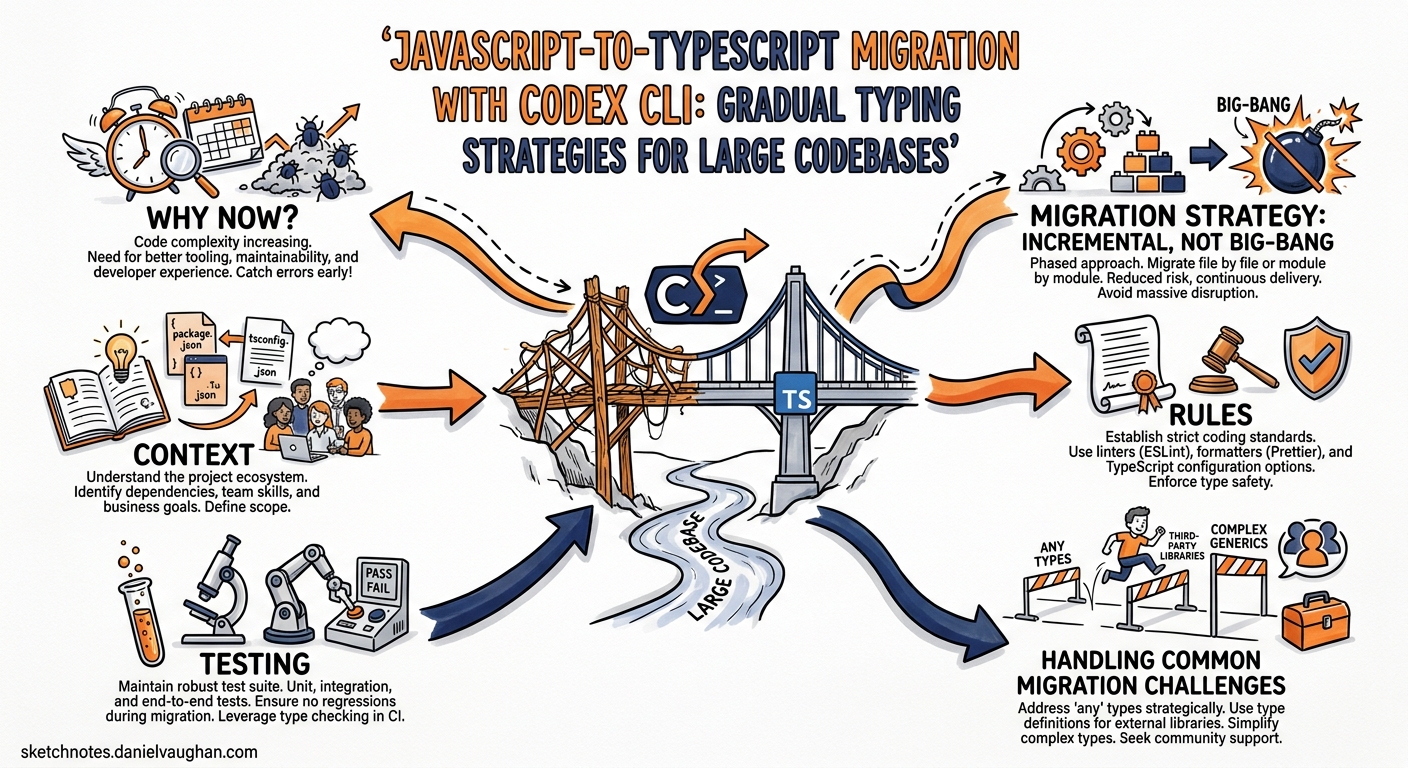
Migrating a JavaScript codebase to TypeScript remains one of the most requested — and most dreaded — modernisation tasks in 2026. With TypeScript 6.0 shipping strict mode by default and deprecating ES5 targets 1, the pressure to migrate has intensified. Meanwhile, GPT-5.5’s million-token context window 2 and Codex CLI’s parallel worktree support 3 make agent-assisted migration genuinely practical at scale for the first time.
This article walks through a battle-tested workflow for migrating large JavaScript codebases (10k–500k+ lines) to TypeScript using Codex CLI, covering incremental strategies, AGENTS.md configuration, parallel execution patterns, and validation gates.
Why Now?
Three converging factors make 2026 the year to tackle your JS-to-TS migration:
- TypeScript 6.0 defaults to
strict: true,module: "esnext", andtarget: "ES2025"1. New projects already assume strict typing, widening the gap with legacy JS codebases. - GPT-5.5 can hold an entire medium-sized codebase in context (~1M tokens), enabling cross-file type inference that previous models could not sustain 2.
- AI-assisted migration accelerates work by 30–40% compared to manual approaches, according to industry reports 4. Codex CLI’s
execmode and worktree parallelism push this further.
Migration Strategy: Incremental, Not Big-Bang
For any codebase beyond a few thousand lines, the strangler-fig pattern is the only sane approach 5. Codex CLI’s code modernisation cookbook formalises this into five phases: setup, pilot selection, inventory, design, and implementation 6.
flowchart LR
    A[Phase 0\nSetup] --> B[Phase 1\nPilot Module]
    B --> C[Phase 2\nInventory &\nDiscovery]
    C --> D[Phase 3\nDesign &\nType Contracts]
    D --> E[Phase 4\nBatch Migration\nvia Worktrees]
    E --> F[Phase 5\nValidation &\nCI Gate]
    F --> G[Repeat for\nnext module group]
Phase 0: AGENTS.md and Configuration
Create an AGENTS.md file that encodes your migration conventions so every Codex session follows the same rules:
# AGENTS.md — TypeScript Migration

## Context
This repository is being incrementally migrated from JavaScript to TypeScript.
TypeScript 6.0 with strict mode. Target: ES2025. Module: ESNext.

## Rules
- When converting a .js file to .ts, preserve all existing behaviour exactly.
- Add explicit type annotations; do not use `any` except as a temporary bridge type marked with `// TODO: narrow type`.
- Convert JSDoc @param/@returns annotations to TypeScript signatures.
- Update import paths to use .js extensions per ESM resolution rules.
- Run `tsc --noEmit` after each file conversion to verify type correctness.
- Do not modify files that are not part of the current migration batch.

## Testing
- Run `npm test` after each batch to confirm no regressions.
- If a test fails, fix the type error rather than weakening the type.
Configure your config.toml profile for migration work:
[profile.ts-migrate]
model = "gpt-5.5"
approval_policy = "unless-allow-listed"
auto_edit = true

[profile.ts-migrate.instructions]
text = "You are performing a JavaScript-to-TypeScript migration. Follow AGENTS.md strictly."
Phase 1: Pilot Module Selection
Start with a bounded, well-tested module. Ask Codex to identify candidates:
codex --profile ts-migrate \
  "Analyse this repository and propose the three best pilot modules for JS-to-TS migration. \
   Rank by: test coverage, number of dependents, and complexity. \
   Output a markdown table with file counts, LOC, and test coverage percentage."
Pick the module with the highest test coverage and fewest downstream dependents — you want a tight feedback loop with low blast radius.
Phase 2: Inventory and Type Discovery
Before converting anything, have Codex map the implicit type landscape:
codex --profile ts-migrate \
  "For the src/auth/ module: \
   1. List every exported function with inferred parameter and return types from JSDoc and usage. \
   2. Identify shared data shapes that should become interfaces or type aliases. \
   3. Flag any dynamic patterns (eval, Function constructor, prototype mutation) that need manual review. \
   Output as pilot_auth_inventory.md."
This produces an ExecPlan-style inventory document 6 that serves as both a migration map and a review artifact.
Phase 3: Type Contract Design
Generate TypeScript interfaces from the inventory:
codex --profile ts-migrate \
  "Based on pilot_auth_inventory.md, generate a types.ts file for the src/auth/ module. \
   Include all shared interfaces, type aliases, and enums. \
   Add JSDoc comments explaining each type's purpose. \
   Do not convert any .js files yet — only create the type definitions."
Review these types carefully — they form the contract that all subsequent conversions must satisfy.
Phase 4: Batch Migration with Parallel Worktrees
This is where Codex CLI’s parallel execution shines. For larger modules, split the work across isolated worktrees 3:
#!/bin/bash
# migrate-batch.sh — parallel JS-to-TS conversion
FILES=($(find src/auth -name '*.js' | sort))
BATCH_SIZE=5
BATCH_NUM=0

for ((i=0; i<${#FILES[@]}; i+=BATCH_SIZE)); do
    BATCH=("${FILES[@]:i:BATCH_SIZE}")
    BATCH_NUM=$((BATCH_NUM + 1))

    codex exec --profile ts-migrate \
      "Convert these files from JavaScript to TypeScript: ${BATCH[*]}. \
       Follow AGENTS.md rules. Import types from src/auth/types.ts. \
       Rename each file from .js to .ts. Update all internal imports. \
       Run tsc --noEmit to verify. Fix any type errors." \
      2>&1 | tee "logs/batch-${BATCH_NUM}.log" &
done

wait
echo "All batches complete. Run full test suite."
For very large migrations, use codex exec with --add-dir to expose multiple writable roots 7:
codex exec --add-dir ../shared-types \
  "Convert src/api/routes.js to TypeScript. \
   Import shared types from ../shared-types/index.ts."
flowchart TD
    subgraph Orchestrator
        S[migrate-batch.sh]
    end
    subgraph "Worktree 1"
        W1[codex exec] --> F1[auth/login.js → .ts]
        W1 --> F2[auth/session.js → .ts]
    end
    subgraph "Worktree 2"
        W2[codex exec] --> F3[auth/tokens.js → .ts]
        W2 --> F4[auth/middleware.js → .ts]
    end
    subgraph "Worktree 3"
        W3[codex exec] --> F5[auth/oauth.js → .ts]
        W3 --> F6[auth/permissions.js → .ts]
    end
    S --> W1
    S --> W2
    S --> W3
    W1 --> V[Validation Gate]
    W2 --> V
    W3 --> V
    V --> M[Merge & Full Test Suite]
Phase 5: Validation Gates
After each batch, run a multi-layered validation pipeline:
# Type-check without emitting
npx tsc --noEmit

# Run existing test suite
npm test

# Use Codex /review to catch migration-specific issues
codex --profile ts-migrate "/review --diff main \
  Focus on: type narrowing correctness, any-typed escape hatches, \
  missing null checks, and import path consistency."
The /review command analyses diffs without modifying the working tree 7, making it safe to use as a pre-merge quality gate.
Handling Common Migration Challenges
Dynamic Imports and require() Calls
codex exec --profile ts-migrate \
  "Find all CommonJS require() calls in src/ and convert them to ESM import statements. \
   Update package.json to set type: module. Fix any circular dependency issues."
JSDoc-to-TypeScript Annotation Conversion
GPT-5.5 excels at this — it can parse complex JSDoc generics and convert them to proper TypeScript signatures 2:
codex exec --profile ts-migrate \
  "Convert all JSDoc type annotations in src/utils/ to TypeScript type annotations. \
   Remove the JSDoc @param/@returns/@typedef comments after conversion. \
   Preserve all other JSDoc comments (descriptions, examples, @deprecated)."
Third-Party Libraries Without Types
codex exec --profile ts-migrate \
  "For each untyped dependency in src/auth/, check if @types/* packages exist on npm. \
   If types exist, add them to devDependencies. \
   If not, generate a minimal .d.ts declaration file in types/ directory."
CI Integration
Wire the migration validation into your CI pipeline using codex exec --json for structured output 8:
# In your GitHub Actions workflow
codex exec --json --profile ts-migrate \
  "Type-check the entire project. Report: total errors, files with errors, \
   and percentage of codebase converted to TypeScript." \
  | jq '.output' > migration-status.json
The --json flag now includes reasoning-token usage 8, enabling you to track migration cost per batch.
Model Selection for Migration Tasks
| Task | Recommended Model | Rationale |
|---|---|---|
| Type inventory and discovery | GPT-5.5 | Needs large context for cross-file inference 2 |
| Batch file conversion | GPT-5.5 | Precision matters more than speed for type correctness |
| Quick import path fixes | Codex Spark | Fast iteration at 1000+ tokens/sec 9 |
| Migration status reporting | Codex Spark | Lightweight summarisation task |
Tracking Migration Progress
Create a simple tracking script that runs after each batch:
#!/bin/bash
TOTAL_JS=$(find src -name '*.js' | wc -l)
TOTAL_TS=$(find src -name '*.ts' -o -name '*.tsx' | wc -l)
TOTAL=$((TOTAL_JS + TOTAL_TS))
PCT=$(echo "scale=1; $TOTAL_TS * 100 / $TOTAL" | bc)
echo "Migration progress: ${TOTAL_TS}/${TOTAL} files (${PCT}%)"
echo "Remaining JS files: ${TOTAL_JS}"
Pitfalls to Avoid
| Pitfall | Mitigation |
|---|---|
Agent introduces any to pass type-checks |
AGENTS.md rule: mark all any with // TODO: narrow and lint for them |
| Import paths break after rename | Use TypeScript path aliases and moduleResolution: "bundler" |
| Tests pass but types are wrong | Add tsc --noEmit as a separate CI step before test execution |
| Agent modifies files outside current batch | Use codex exec sandbox; restrict writable paths in config.toml |
| Merge conflicts between parallel batches | Each worktree targets non-overlapping file sets; merge sequentially |
Conclusion
The combination of TypeScript 6.0’s stricter defaults, GPT-5.5’s extended context window, and Codex CLI’s parallel execution model makes large-scale JS-to-TS migration a tractable problem rather than a multi-quarter odyssey. The key is treating migration as a structured, phased process — not a single prompt — with AGENTS.md encoding your conventions, ExecPlans tracking progress, and CI gates catching regressions at every checkpoint.
Start with a pilot module this week. You will be surprised how far a well-configured Codex CLI profile and a disciplined strangler-fig approach can take you.
Citations
-
Microsoft, “Announcing TypeScript 6.0”, TypeScript Blog, March 2026. https://devblogs.microsoft.com/typescript/announcing-typescript-6-0/ ↩ ↩2
-
OpenAI, “GPT-5.5 Model Documentation”, Codex Developers, April 2026. https://developers.openai.com/codex/models ↩ ↩2 ↩3 ↩4
-
OpenAI, “Worktrees — Codex App”, Codex Developers, 2026. https://developers.openai.com/codex/app/worktrees ↩ ↩2
-
Builder.io, “TypeScript vs JavaScript: AI Works Better with TS”, 2026. https://www.builder.io/blog/typescript-vs-javascript ↩
-
Martin Fowler, “StranglerFigApplication”, martinfowler.com. https://martinfowler.com/bliki/StranglerFigApplication.html ↩
-
OpenAI, “Modernizing your Codebase with Codex”, Codex Cookbook, 2026. https://developers.openai.com/cookbook/examples/codex/code_modernization ↩ ↩2
-
OpenAI, “Features — Codex CLI”, Codex Developers, 2026. https://developers.openai.com/codex/cli/features ↩ ↩2
-
OpenAI, “Changelog — Codex”, Codex Developers, April 2026. https://developers.openai.com/codex/changelog ↩ ↩2
-
OpenAI, “Codex CLI 2026 Update: GPT-5.3-Codex-Spark at 1000+ TPS”, April 2026. https://daily1bite.com/en/blog/ai-tools/openai-codex-cli-april-2026-update ↩