The Codex Native SDK: Embedding Rust-Powered Coding Agents Directly in Node.js Applications
The Codex Native SDK: Embedding Rust-Powered Coding Agents Directly in Node.js Applications
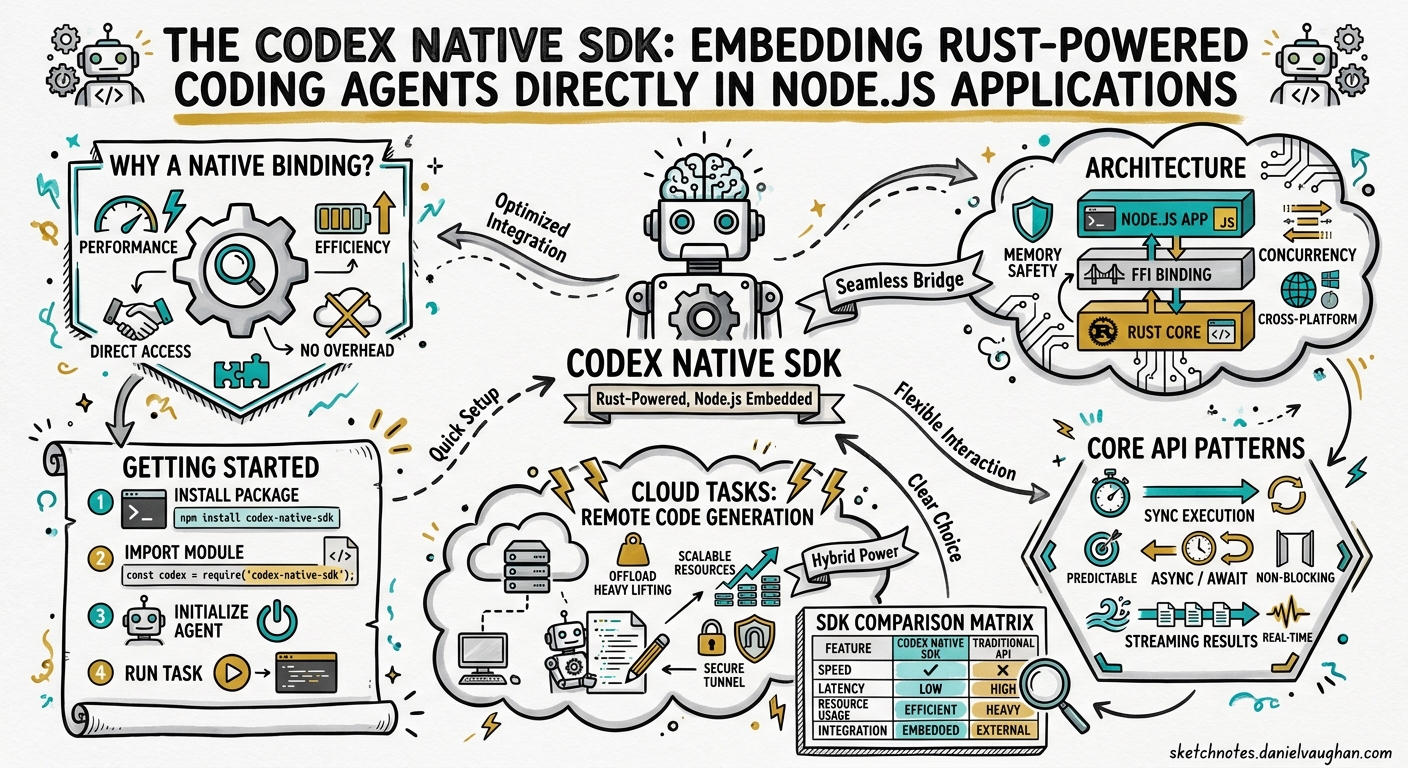
The official @openai/codex-sdk wraps the Codex CLI binary and talks to it over stdin/stdout JSONL pipes1. It works, but the process-spawning overhead, serialisation cost, and inability to register custom tools at the runtime level limit what you can build. The community @codex-native/sdk takes a different path: it compiles codex-rs — the Rust core that powers the CLI — into a native Node.js addon via napi-rs, giving your application zero-copy access to the agent runtime without ever spawning a child process2.
This article explains when and how to use the Native SDK, walks through custom tool registration, compares the two SDKs head-to-head, and covers the production patterns emerging around it.
Why a Native Binding?
The standard TypeScript SDK follows a sensible architecture: spawn codex, pipe messages in, parse messages out. For simple CI scripts or one-shot automations this is fine. But three use cases push against its limits:
- Custom tool registration — you want the agent to call your functions (database queries, internal APIs, proprietary linters) as first-class tools, not via MCP server plumbing.
- High-throughput orchestration — managing dozens of concurrent agent threads where per-process overhead and IPC serialisation become measurable.
- Embedding in Electron or server-side platforms — where forking a CLI binary is either restricted or adds unacceptable startup latency.
The Native SDK addresses all three by linking directly against codex-core through napi-rs, the mature Rust-to-Node.js bridge that powers packages like @swc/core and lightningcss3.
Architecture
graph TB
    subgraph "Node.js Process"
        A[Your Application Code] --> B["@codex-native/sdk"]
        B --> C[NAPI Bridge Layer]
        C --> D[codex-core - Rust]
        D --> E[Tokio Async Runtime]
        E --> F[OpenAI Responses API]
        B --> G[ThreadsafeFunction Callbacks]
        G --> H[Custom Tool Handlers - JS]
    end

    style A fill:#e1f5fe
    style D fill:#fff3e0
    style H fill:#e8f5e9
The key architectural decisions24:
- Direct Rust FFI via NAPI — no child process, no stdin/stdout parsing. The JavaScript thread calls into Rust through N-API’s foreign function interface, and Rust calls back through
ThreadsafeFunctionpointers. - Tokio runtime — the Rust side runs its own Tokio event loop for async I/O (API calls, file system operations, sandbox management), decoupled from Node.js’s libuv loop.
- Zero-copy event streaming — agent events surface as an async generator in JavaScript, backed by a lock-free channel on the Rust side.
- Session persistence — threads are persisted identically to the CLI (in
~/.codex/sessions), so you can start a thread natively and resume it in the TUI, or vice versa1.
Getting Started
Prerequisites
- Node.js 18+1
- Rust toolchain (for compiling the native addon)
- ripgrep (
brew install ripgrepon macOS,apt install ripgrepon Debian/Ubuntu)4 - A cloned copy of
codex-rsat a compatible release tag
Installation
# Clone codex-rs at the required release tag
git clone --branch rust-v0.45.0 https://github.com/openai/codex.git /opt/codex-rs

# Set the environment variable the build script expects
export CODEX_RUST_ROOT=/opt/codex-rs

# Install the SDK
npm install @codex-native/sdk

# Build native bindings (handles dependencies, compilation, verification)
npm run setup
The setup script compiles the napi module into native/codex-napi/index.node and runs a smoke test to verify the bridge loads correctly4. No manual Cargo invocation is required.
Authentication
The Native SDK respects the same authentication mechanisms as the CLI — OPENAI_API_KEY environment variable or OAuth credentials in ~/.codex/auth.json1:
import { CodexClientBuilder } from '@codex-native/sdk';

const client = new CodexClientBuilder()
  .withCodexHome(process.env.CODEX_HOME ?? `${process.env.HOME}/.codex`)
  .withSandboxPolicy({ mode: 'workspace-write' })
  .build();

await client.connect();
Core API Patterns
Running a Simple Thread
import { CodexClientBuilder } from '@codex-native/sdk';

const client = new CodexClientBuilder()
  .withCodexHome(`${process.env.HOME}/.codex`)
  .withSandboxPolicy({ mode: 'workspace-write' })
  .build();

await client.connect();

// Stream events from the agent
for await (const event of client.events()) {
  switch (event.type) {
    case 'AGENT_MESSAGE':
      console.log('[Agent]', event.message);
      break;
    case 'EXEC_APPROVAL_REQUEST':
      // Auto-approve in controlled environments
      client.handleCommand(event.id, true);
      break;
    case 'TASK_COMPLETE':
      console.log('[Done]', event.last_agent_message);
      break;
  }
}
Registering Custom Tools
This is the headline feature that separates the Native SDK from the standard one. Custom tools are registered as JavaScript functions that the Rust runtime can invoke via ThreadsafeFunction callbacks2:
import { CodexClientBuilder } from '@codex-native/sdk';

const client = new CodexClientBuilder()
  .withCodexHome(`${process.env.HOME}/.codex`)
  .withSandboxPolicy({ mode: 'workspace-write' })
  .build();

// Register a custom tool the agent can call
client.registerTool({
  name: 'query_internal_api',
  description: 'Query the internal service catalogue for microservice metadata',
  parameters: {
    type: 'object',
    properties: {
      service_name: { type: 'string', description: 'Service identifier' },
      include_dependencies: { type: 'boolean', default: false }
    },
    required: ['service_name']
  },
  handler: async (params) => {
    const response = await fetch(
      `https://internal-api.corp/services/${params.service_name}`,
      { headers: { Authorization: `Bearer ${process.env.INTERNAL_TOKEN}` } }
    );
    return response.json();
  }
});

await client.connect();
The agent sees query_internal_api alongside its built-in tools (shell execution, file read/write, MCP calls) and can invoke it without any MCP server overhead2.
Tool Interceptors
For cases where you want to wrap built-in Codex tools with pre/post-processing logic — audit logging, policy enforcement, metrics collection — the SDK supports interceptors2:
client.registerToolInterceptor({
  toolName: 'shell',
  before: async (params) => {
    console.log(`[Audit] Agent requesting: ${params.command}`);
    // Return modified params or throw to block execution
    return params;
  },
  after: async (result) => {
    metrics.increment('agent.shell_commands');
    return result;
  }
});
Cloud Tasks: Remote Code Generation
From v0.1.0, the Native SDK introduced cloud tasks — the ability to submit code generation requests to Codex’s cloud infrastructure with best-of-N sampling and local patch application4:
const task = await client.submitCloudTask({
  prompt: 'Refactor the payment module to use the strategy pattern',
  attempts: 3,  // best-of-3 sampling
  preflight: true  // check for conflicts before applying
});

// Preflight validation detects merge conflicts before applying diffs
if (task.preflight.conflicts.length > 0) {
  console.warn('Conflicts detected:', task.preflight.conflicts);
} else {
  await task.apply();
}
This pattern is particularly useful for automated refactoring pipelines where you want multiple solution attempts evaluated before committing to one.
SDK Comparison Matrix
| Aspect | @openai/codex-sdk |
@codex-native/sdk |
|---|---|---|
| Communication | stdin/stdout JSONL pipes | Direct Rust FFI via NAPI |
| Process model | Spawns CLI binary | In-process native addon |
| Custom tools | Not supported (use MCP) | registerTool() with JS handlers |
| Tool interceptors | Not supported | registerToolInterceptor() |
| Cloud tasks | Not supported | submitCloudTask() with best-of-N |
| Session persistence | ~/.codex/sessions |
~/.codex/sessions (compatible) |
| Structured output | JSON Schema / Zod | JSON Schema / Zod (identical) |
| Streaming | runStreamed() async generator |
events() async generator |
| Rate limit tracking | Manual | Built-in with usage projections |
| Build requirement | None (uses installed CLI) | Rust toolchain + compilation |
| Platforms | macOS, Linux, Windows | macOS, Linux, Windows4 |
| Node.js version | 18+ | 18+ |
| Maturity | Official, stable | Community, experimental |
The standard SDK remains the right choice for most CI/CD integrations and simple automations. The Native SDK shines when you need custom tools, high-throughput orchestration, or are embedding Codex into a larger application platform12.
Production Patterns
Pattern 1: Internal Developer Platform Agent
Embed Codex as a coding agent within your internal developer platform, with custom tools that query your service catalogue, deployment system, and incident database:
graph LR
    A[IDP Web UI] --> B[Agent Orchestrator]
    B --> C["@codex-native/sdk"]
    C --> D[Custom: Service Catalogue]
    C --> E[Custom: Deploy API]
    C --> F[Custom: Incident DB]
    C --> G[Built-in: Shell + Files]
    C --> H[OpenAI API]

    style C fill:#fff3e0
    style D fill:#e8f5e9
    style E fill:#e8f5e9
    style F fill:#e8f5e9
Pattern 2: Multi-Thread Orchestration
Run multiple agent threads in parallel within a single Node.js process, avoiding the overhead of spawning separate CLI instances:
const threads = await Promise.all(
  microservices.map(async (svc) => {
    const thread = client.startThread({
      workingDirectory: svc.repoPath,
    });
    return thread.run(
      `Update all dependencies to their latest stable versions and run tests`
    );
  })
);

// All threads share the same Tokio runtime and connection pool
const results = await Promise.all(threads);
Pattern 3: Approval Gateway
Build a web-based approval UI that intercepts the agent’s shell command and file patch requests:
import express from 'express';

const app = express();
const pendingApprovals = new Map();

// Agent events feed into a web dashboard
for await (const event of client.events()) {
  if (event.type === 'EXEC_APPROVAL_REQUEST') {
    pendingApprovals.set(event.id, event);
    // Notify dashboard via WebSocket
    wss.broadcast({ type: 'approval_needed', event });
  }
}

// REST endpoint for human approval
app.post('/approve/:id', (req, res) => {
  client.handleCommand(req.params.id, true);
  pendingApprovals.delete(req.params.id);
  res.json({ status: 'approved' });
});
Limitations and Caveats
The Native SDK is a community project, not an official OpenAI package. Keep these constraints in mind:
- Rust toolchain required — every developer and CI runner needs a working Rust installation to compile the native addon. Pre-built binaries are published for common platforms but may lag behind releases4.
- Version coupling — the SDK pins to specific
codex-rsrelease tags (e.g.,rust-v0.45.0). Upgrading the CLI independently can break the native bridge4. - Protocol instability — the internal NAPI interface between JavaScript and Rust is not covered by OpenAI’s stability guarantees and may change between releases4.
- MCP compatibility caveat — when MCP servers are active alongside custom tools, structured output constraints (
--output-schema) can be silently ignored, producing malformed JSON5. Test thoroughly when combining both. - No official support — bug reports and feature requests go to the community maintainer, not OpenAI.
When to Choose Which SDK
graph TD
    A[Need programmatic Codex?] --> B{Custom tools needed?}
    B -->|Yes| C{Build complexity OK?}
    C -->|Yes| D["@codex-native/sdk"]
    C -->|No| E[MCP server + @openai/codex-sdk]
    B -->|No| F{High throughput?}
    F -->|Yes| D
    F -->|No| G{CI/CD or scripting?}
    G -->|Yes| H["codex exec - no SDK needed"]
    G -->|No| I["@openai/codex-sdk"]

    style D fill:#fff3e0
    style H fill:#e1f5fe
    style I fill:#e1f5fe
For most teams, the official @openai/codex-sdk or plain codex exec covers 90% of programmatic use cases. The Native SDK is the right tool when you are building a platform that treats Codex as an embedded component rather than an external CLI — internal developer portals, custom IDE extensions, automated refactoring services, or multi-agent orchestration systems where process-per-agent overhead is unacceptable.