The Agent Skills Open Standard: Writing Portable SKILL.md Files That Work Across Codex CLI, Claude Code, and 30+ Tools
The Agent Skills Open Standard: Writing Portable SKILL.md Files That Work Across Codex CLI, Claude Code, and 30+ Tools
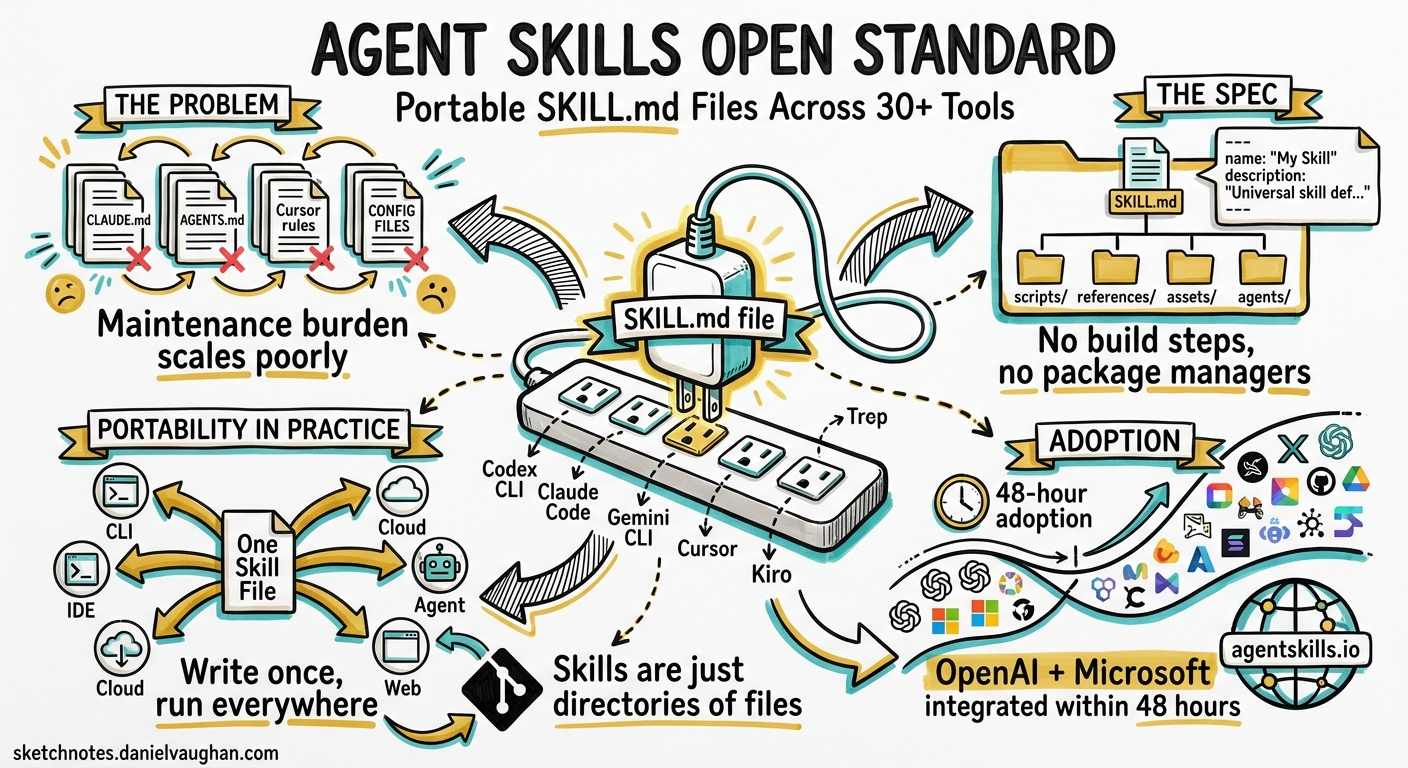
If you have invested time building skills for Codex CLI, you may not realise that those same files already work — unchanged — in Claude Code, Gemini CLI, Cursor, Kiro, and at least 28 other tools. This is not an accident. It is the result of the Agent Skills Open Standard, a specification that emerged from Anthropic’s Claude Code in late 2025 and was formally published at agentskills.io in December of that year 1. Within 48 hours of publication, both OpenAI and Microsoft had integrated support 2.
This article explains the specification, shows how Codex CLI implements it, and walks through writing a portable skill that runs identically across every adopting tool.
Why a Standard Matters
Before the standard, every coding agent had its own configuration format. Claude Code used CLAUDE.md files. Codex CLI used AGENTS.md. Cursor had its own rules system. If you wanted the same behaviour everywhere, you maintained parallel files — a maintenance burden that scaled poorly with team size.
The Agent Skills Open Standard solves this with a single directory-based format centred on a SKILL.md file 3. The specification is deliberately minimal: two required frontmatter fields, a Markdown body, and optional supporting directories. This simplicity is the standard’s greatest strength — there are no build steps, no package managers, no runtimes. Skills are just directories of files, version-controlled with Git.
The Specification
Directory Structure
my-skill/
├── SKILL.md          # Required: metadata + instructions
├── scripts/          # Optional: executable code
├── references/       # Optional: documentation
├── assets/           # Optional: templates, resources
└── agents/           # Optional: agent-specific config
    └── openai.yaml   # Codex-specific UI and policy metadata
Frontmatter Schema
The SKILL.md file uses YAML frontmatter with the following fields 3:
| Field | Required | Constraints |
|---|---|---|
name |
Yes | Max 64 characters. Lowercase letters, numbers, hyphens only. Must match the parent directory name. No leading/trailing/consecutive hyphens. |
description |
Yes | Max 1,024 characters. Describes what the skill does and when to use it. |
license |
No | License name or reference to a bundled LICENSE.txt. |
compatibility |
No | Max 500 characters. Environment requirements (required packages, network access). |
metadata |
No | Arbitrary key-value map for additional properties. |
allowed-tools |
No | Space-separated string of pre-approved tools. Experimental. |
A minimal skill:
---
name: lint-fix
description: Runs the project linter and fixes all auto-fixable violations. Use when the user asks to fix lint errors or clean up code style.
---

## Instructions

1. Detect the project's linter from config files (`eslint.config.js`, `pyproject.toml`, `.rubocop.yml`).
2. Run the linter in fix mode.
3. Report what changed and what remains unfixed.
Body Content
The Markdown body after frontmatter contains instructions the agent follows. There are no format restrictions, but the specification recommends keeping the main SKILL.md under 500 lines and moving detailed reference material to separate files in references/ 3.
Progressive Disclosure
Agents load skills in three stages 3:
flowchart LR
    A["Stage 1: Metadata\n~100 tokens per skill\nLoaded at startup"] --> B["Stage 2: Instructions\n< 5,000 tokens recommended\nLoaded on activation"]
    B --> C["Stage 3: Resources\nscripts/, references/, assets/\nLoaded on demand"]
This staged loading means you can have hundreds of skills installed without meaningful context window impact — only the name and description fields are read until a skill is actually triggered.
How Codex CLI Implements the Standard
Codex CLI scans four locations for skills, in priority order 4:
| Scope | Path | Use Case |
|---|---|---|
| REPO | .agents/skills/ in current, parent, or root directories |
Team workflows committed to the repository |
| USER | $HOME/.agents/skills/ |
Personal skill collection |
| ADMIN | /etc/codex/skills/ |
Organisation-wide defaults |
| SYSTEM | Bundled with Codex | Built-in skills shipped with the CLI |
Invocation
Skills activate in two ways:
- Explicit: Type
$skill-namein the TUI or pass it viacodex exec - Implicit: Codex matches your prompt against skill descriptions and activates the best match automatically
You can disable implicit invocation per-skill using the Codex-specific agents/openai.yaml metadata file:
# agents/openai.yaml
policy:
  allow_implicit_invocation: false
Disabling Skills
Individual skills can be disabled in ~/.codex/config.toml:
[[skills.config]]
path = "/home/user/.agents/skills/noisy-skill/SKILL.md"
enabled = false
Built-in CLI Commands
Codex ships two skill management commands 4:
$skill-creator— an interactive wizard that scaffolds a new skill directory$skill-installer [name]— installs curated skills from the openai/skills catalogue
Writing a Portable Skill: Step by Step
Here is a practical example — a skill that generates conventional commit messages from staged Git changes. This skill works identically in Codex CLI, Claude Code, Gemini CLI, Cursor, and any other conformant tool.
1. Create the Directory
mkdir -p .agents/skills/conventional-commit
2. Write SKILL.md
---
name: conventional-commit
description: >
  Generates a Conventional Commits message from staged git changes.
  Use when the user asks to commit, write a commit message, or says
  "commit this". Do NOT use for unstaged changes.
license: MIT
compatibility: Requires git
metadata:
  author: your-team
  version: "1.0"
---

## Instructions

1. Run `git diff --cached --stat` to see what is staged.
2. If nothing is staged, tell the user and stop.
3. Run `git diff --cached` to read the full diff.
4. Classify the change as one of: feat, fix, refactor, docs, test, chore, ci, perf, style, build.
5. Write a commit message following this format:

   ```text
   type(scope): subject

   body
- The subject line must be ≤ 72 characters, imperative mood, no trailing full stop.
- The body should explain why, not what.
- Present the message and ask for confirmation before committing.
Edge Cases
- Multiple unrelated changes: suggest splitting into separate commits.
- Breaking changes: add
BREAKING CHANGE:footer. - Co-authored commits: preserve existing
Co-Authored-Bytrailers.
### 3. Add Supporting Scripts (Optional)

```bash
mkdir -p .agents/skills/conventional-commit/scripts
#!/usr/bin/env python3
# scripts/validate_message.py
"""Validates a commit message against Conventional Commits spec."""
import sys
import re

PATTERN = r'^(feat|fix|refactor|docs|test|chore|ci|perf|style|build)(\(.+\))?: .{1,72}$'

message = sys.stdin.readline().strip()
if re.match(PATTERN, message):
    print("Valid")
    sys.exit(0)
else:
    print(f"Invalid: {message}")
    sys.exit(1)
4. Commit It
git add .agents/skills/conventional-commit/
git commit -m "chore: add conventional-commit skill"
Every developer who clones the repository now has the skill available in whichever agent they use.
Cross-Agent Compatibility: What Works and What Does Not
Universal Features
The core of the standard — SKILL.md with name and description frontmatter, Markdown instructions, and scripts//references//assets/ directories — works identically across all 32+ adopting tools 2.
Agent-Specific Extensions
Each tool has added its own optional extensions that other tools ignore 5:
| Extension | Tool | Purpose |
|---|---|---|
agents/openai.yaml |
Codex CLI | UI properties, invocation policy, tool dependencies |
context: fork |
Claude Code | Subagent execution context |
when_to_use list |
Claude Code | Structured trigger conditions |
user-invocable |
Claude Code | Expose as slash command |
disable-model-invocation |
Claude Code | Restrict to explicit invocation only |
These extensions are safe to include — tools that do not understand them simply ignore them. A skill can carry both agents/openai.yaml for Codex and when_to_use for Claude Code without conflict.
The Portability Rule
If your skill sticks to the core specification — standard frontmatter, Markdown instructions, and the three optional directories — it will work everywhere without modification 2. The moment you rely on agent-specific features (like Claude Code’s context: fork for subagent execution), you gain power at the cost of portability.
The Adoption Landscape
The standard’s adoption timeline tells an unusual story of rapid cross-vendor convergence 2:
timeline
    title Agent Skills Open Standard Adoption
    section 2025
        Sep 2025 : Repository created internally at Anthropic
        Oct 2025 : Skills shipped in Claude Code
        Dec 2025 : Specification published at agentskills.io
        Dec 2025 : OpenAI and Microsoft integrate within 48 hours
    section 2026
        Jan 2026 : Vercel skills.sh marketplace launches (89,000+ skills)
        Feb 2026 : AWS Kiro IDE ships compatibility
        Mar 2026 : 32+ tools adopt the standard
        May 2026 : Linux Foundation AAIF provides governance
Governance now sits with the Linux Foundation’s Agentic AI Foundation (AAIF), announced in December 2025, with 146 member organisations as of February 2026 2. This neutral governance reduces the risk of any single vendor steering the standard for competitive advantage.
Skills vs MCP: Complementary, Not Competing
A common question: why not just use MCP servers instead of skills?
The answer is that they solve different problems. MCP provides structured API access — a typed interface to external systems (databases, APIs, file systems). Skills provide procedural knowledge — instructions for how to accomplish a task using whatever tools are available 6.
flowchart TB
    subgraph "MCP Server"
        direction TB
        M1["Typed tool interface"]
        M2["JSON-RPC protocol"]
        M3["Runtime process"]
    end
    subgraph "Agent Skill"
        direction TB
        S1["Markdown instructions"]
        S2["No runtime needed"]
        S3["Git-versioned files"]
    end
    Agent["Coding Agent"] --> M1
    Agent --> S1
    M1 -.->|"How to call the API"| M2
    S1 -.->|"When and why to use it"| S3
A well-designed workflow uses both: an MCP server that provides tools for interacting with your CI system, and a skill that teaches the agent when to check CI, how to interpret failures, and what to do about them.
Practical Recommendations
Structure for progressive disclosure. Keep SKILL.md under 500 lines. Put detailed references in references/. This matters because every token loaded is a token not available for reasoning.
Write trigger-friendly descriptions. The description field is how agents decide whether to activate your skill. “Helps with code” will rarely trigger. “Runs ESLint in fix mode on staged JavaScript and TypeScript files when the user asks to fix lint errors” will trigger reliably.
Validate before committing. Use the official validation tool 3:
npx skills-ref validate ./my-skill
Use compatibility sparingly. Most skills do not need it. Include it only when your skill genuinely requires specific system packages or network access.
Commit skills to the repository. Team skills belong in .agents/skills/ within the repo, not in individual developers’ home directories. This ensures consistency and makes skills subject to code review.
Test across agents. Before declaring a skill portable, verify it in at least Codex CLI, Claude Code, and one other tool. The specification is young enough that implementation differences still surface occasionally.
What to Watch
The specification is stable but still evolving. The allowed-tools field remains experimental 3. The Vercel marketplace at skills.sh is rapidly growing but quality varies — treat community skills with the same scrutiny you would apply to any third-party dependency. OpenAI’s own skills catalogue provides a curated baseline with .system, .curated, and .experimental tiers 7.
The most significant development to watch is whether the AAIF governance process leads to a formal versioned specification with backwards-compatibility guarantees — something the standard currently lacks.
Citations
-
Anthropic, “Agent Skills Open Standard — Specification,” agentskills.io, December 2025. https://agentskills.io/specification ↩
-
Paperclipped, “Agent Skills Open Standard Explained — Interoperability Guide 2026,” paperclipped.de, March 2026. https://www.paperclipped.de/en/blog/agent-skills-open-standard-interoperability/ ↩ ↩2 ↩3 ↩4 ↩5
-
Agent Skills, “Specification — Agent Skills,” agentskills.io, 2026. https://agentskills.io/specification ↩ ↩2 ↩3 ↩4 ↩5 ↩6
-
OpenAI, “Agent Skills — Codex OpenAI Developers,” developers.openai.com, 2026. https://developers.openai.com/codex/skills -
Agensi, “SKILL.md Format Reference: Frontmatter Fields & Templates,” agensi.io, 2026. https://www.agensi.io/learn/skill-md-format-reference ↩
-
Agensi, “What Is the Agent Skills Open Standard? (2026 Explainer),” agensi.io, 2026. https://www.agensi.io/learn/agent-skills-open-standard ↩
-
OpenAI, “Skills Catalog for Codex,” github.com/openai/skills, 2026. https://github.com/openai/skills ↩