Cross-Agent Skill Portability: Managing Skills Across Codex CLI, Claude Code, and Copilot
Cross-Agent Skill Portability: Managing Skills Across Codex CLI, Claude Code, and Copilot
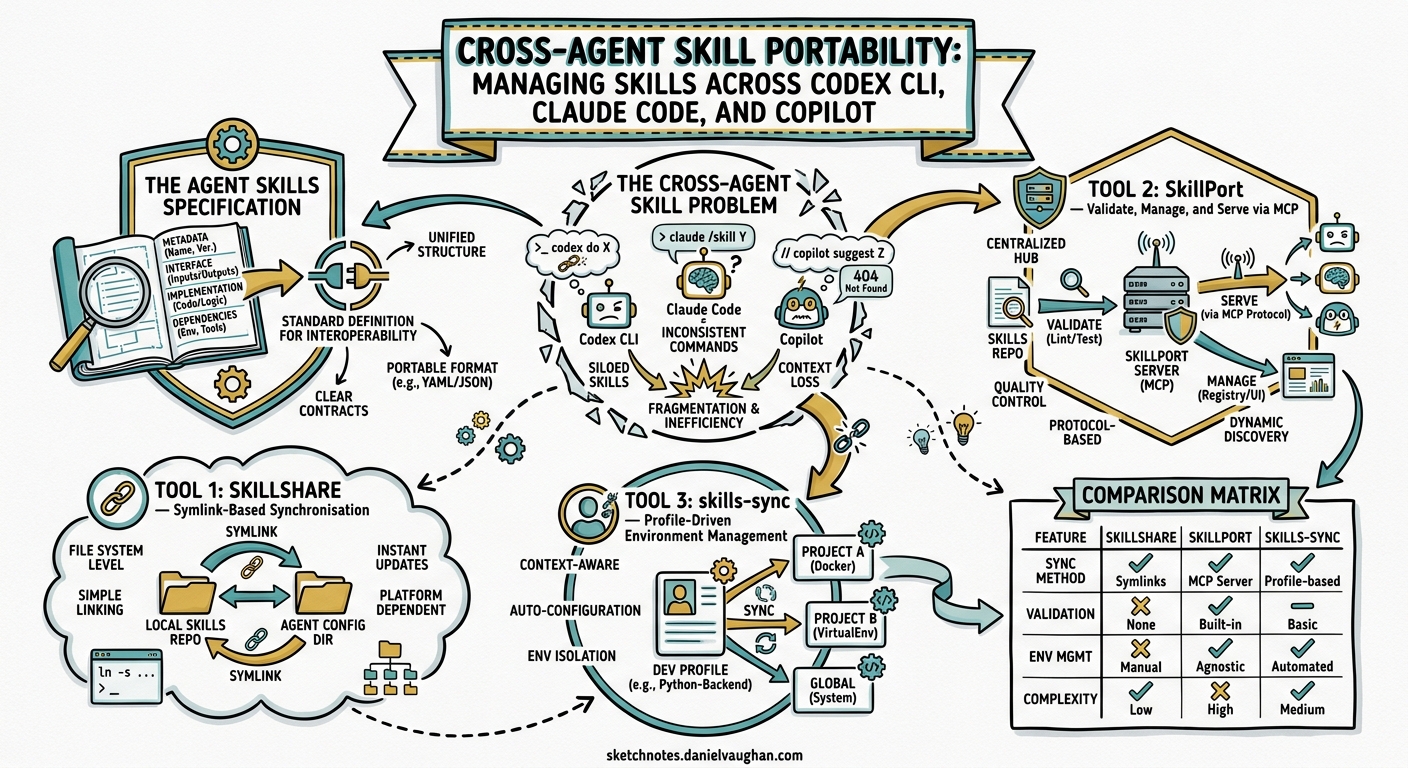
The Agent Skills specification, originally developed by Anthropic and released as an open standard in late 2025, has become the lingua franca for extending AI coding agents1. A skill authored for Claude Code now runs unchanged inside Codex CLI, GitHub Copilot, Cursor, Google Antigravity, and over thirty other platforms2. But portability on paper creates a management problem in practice: how do you keep skills synchronised across five different agents on the same machine, enforce team-wide standards, audit for prompt injection, and avoid the drift that accumulates when each tool has its own directory convention?
This article examines three community tools — Skillshare, SkillPort, and skills-sync — that solve different facets of this problem, and shows how to integrate each with Codex CLI workflows.
The Cross-Agent Skill Problem
Every major coding agent now reads .agents/skills/ directories2, but each has its own quirks:
| Agent | Skill directories scanned | MCP config location | Notes |
|---|---|---|---|
| Codex CLI | .agents/skills/, ~/.agents/skills/ |
~/.codex/config.toml |
Also reads $HOME/.codex/skills/ |
| Claude Code | .claude/skills/, ~/.claude/skills/ |
~/.claude.json |
Legacy .claude/ path still supported |
| GitHub Copilot | .agents/skills/, ~/.agents/skills/ |
VS Code settings | Uses gh skill install since April 20263 |
| Cursor | .agents/skills/, ~/.cursor/skills/ |
.cursor/mcp.json |
Also reads .cursorrules |
| Gemini CLI | .agents/skills/, ~/.agents/skills/ |
Gemini config | Reads GEMINI.md for instructions |
A team running Codex CLI as their primary agent but using Claude Code for review and Copilot in VS Code faces three synchronisation headaches:
- Skill scatter — the same skill installed in three different directories
- MCP drift — server configurations diverging across
config.toml,claude.json, and VS Code settings - Version pinning — no mechanism to ensure all agents use the same skill revision
The Agent Skills Specification
Before examining tools, it is worth understanding the standard they all build on. The agentskills.io specification defines a skill as a directory containing a SKILL.md file with YAML frontmatter1:
my-skill/
  SKILL.md          # Required: metadata + instructions
  scripts/           # Optional: executable helpers
  references/        # Optional: documentation
  assets/            # Optional: templates, examples
The frontmatter follows a constrained format1:
---
name: my-skill
description: Short description for progressive disclosure
version: 1.2.0
license: Apache-2.0
author: team-name
tags: [testing, ci]
---

# My Skill

Full instructions loaded only when the skill is activated...
The progressive disclosure pattern is critical for context window management: at startup, agents load only the frontmatter (~100 tokens per skill), expanding the full instruction body only when the skill is selected4. This keeps the system prompt lean even with dozens of installed skills.
Tool 1: Skillshare — Symlink-Based Synchronisation
| Repository: runkids/skillshare | Language: Go | Stars: ~1.6k | License: MIT |
Skillshare takes a filesystem-first approach: maintain one canonical skills directory, then create symlinks (or NTFS junctions on Windows) into each agent’s expected location5.
Installation and Setup
# macOS / Linux
curl -fsSL https://raw.githubusercontent.com/runkids/skillshare/main/install.sh | sh

# Homebrew
brew install skillshare

# Initialise — detects installed agents automatically
skillshare init
Core Workflow
# Install skills from a Git repository
skillshare install anthropics/skills

# Sync to all detected targets (Codex CLI, Claude Code, Copilot, etc.)
skillshare sync

# Sync agents configuration alongside skills
skillshare sync --all

# Security audit — scans for prompt injection patterns
skillshare audit
The sync command creates symlinks from ~/.config/skillshare/skills/ into each agent’s directory. Updates to the source propagate to all targets on the next sync5.
Security Auditing
Skillshare’s built-in audit system scans for prompt injection and data exfiltration patterns — a meaningful differentiator given the supply chain risks inherent in community-published skills5:
# Audit all installed skills
skillshare audit

# Audit a specific skill before installation
skillshare audit --path ./downloaded-skill/
Codex CLI Integration
After skillshare sync, Codex CLI detects skills in ~/.agents/skills/ automatically. No additional configuration is required. For project-level skills, commit a .skillshare/ directory to the repository; Skillshare will sync project-scoped skills alongside global ones5.
Filtering with .skillignore
Not every skill suits every agent. Skillshare supports .skillignore files and per-target filtering via SKILL.md metadata, so you can exclude heavyweight skills from agents with tighter context budgets5.
Tool 2: SkillPort — Validate, Manage, and Serve via MCP
| Repository: gotalab/skillport | Language: Python | Stars: ~379 | License: MIT |
SkillPort takes a different approach: rather than symlinking files, it validates skills against the specification, manages their lifecycle, and serves them to agents via MCP using a search-first pattern6.
Installation
# Recommended: uv for isolated installation
uv tool install skillport

# Or via pip
pip install skillport
Validation-First Workflow
# Validate skills against the agentskills.io specification
skillport validate ./my-skills/ --json

# Install from GitHub
skillport add anthropics/skills skills/

# List installed skills
skillport list

# Generate AGENTS.md skill documentation table
skillport doc
The validate command catches missing frontmatter fields, invalid name formats, and specification violations before deployment6 — essential for teams enforcing skill quality standards.
MCP Server Mode
SkillPort’s distinctive feature is its MCP server, which implements the progressive disclosure pattern as three tools6:
sequenceDiagram
    participant Agent as Codex CLI
    participant SP as SkillPort MCP
    participant FS as Skill Directory

    Agent->>SP: list_skills()
    SP->>FS: Scan SKILL.md frontmatter
    SP-->>Agent: [{name, description}, ...]
    Note over Agent: ~100 tokens per skill

    Agent->>SP: activate_skill("pdf-processing")
    SP->>FS: Load full SKILL.md body
    SP-->>Agent: Complete instructions + scripts

    Agent->>SP: read_skill_file("pdf-processing", "scripts/convert.py")
    SP->>FS: Read referenced file
    SP-->>Agent: File contents
Codex CLI Configuration
Add SkillPort as an MCP server in ~/.codex/config.toml:
[mcp_servers.skillport]
command = "uvx"
args = ["skillport", "serve"]

[mcp_servers.skillport.env]
SKILLPORT_SKILLS_DIR = "/home/dev/.agents/skills"
Per-Agent Filtering
SkillPort supports environment-variable-based filtering, enabling different skill subsets for different agents6:
# Expose only testing-related skills to Codex CLI
SKILLPORT_ENABLED_CATEGORIES="testing,ci" uvx skillport serve
Tool 3: skills-sync — Profile-Driven Environment Management
| Repository: ryanreh99/skills-sync | Language: JavaScript | Stars: moderate | License: MIT |
skills-sync occupies the most opinionated position: it manages named profiles, each containing a curated set of skills and MCP configurations, with drift detection and manifest-based reproducibility7.
Installation
npm i -g @ryanreh99/skills-sync
Profile Workflow
# Initialise with seed profiles
skills-sync init --seed

# Switch to a profile
skills-sync use personal

# Register an upstream skill source
skills-sync profile add-upstream --source https://github.com/anthropics/skills

# Search discoverable skills
skills-sync search skills --query "testing" --scope discoverable

# Sync to all agents
skills-sync sync
Drift Detection
The standout feature is drift detection — comparing expected state with what is actually installed across agents7:
# Inventory what each agent currently has
skills-sync agents inventory

# Check for drift between expected and actual state
skills-sync workspace sync --dry-run
This catches the common scenario where someone manually installs a skill in Claude Code but forgets to add it to the team profile.
Manifest Export for Teams
# Export workspace manifest for sharing
skills-sync workspace manifest export > team-manifest.json

# Import on another machine
skills-sync workspace manifest import < team-manifest.json

# Reconcile differences
skills-sync workspace manifest reconcile
Comparison Matrix
| Feature | Skillshare | SkillPort | skills-sync |
|---|---|---|---|
| Sync mechanism | Symlinks / junctions | MCP server | File copy + config write |
| Skill validation | Security audit only | Full spec validation | Basic |
| MCP serving | No | Yes (search-first) | No |
| Drift detection | No | No | Yes |
| Profile management | No | Per-agent filtering | Named profiles |
| Team sharing | .skillshare/ in repo |
Manifest export | Manifest import/export |
| Security scanning | Built-in audit | Validation checks | No |
| Offline capable | Yes | Yes | Yes |
| Runtime dependency | None (Go binary) | Python 3.10+ | Node.js |
| Agents supported | 50+ | MCP-compatible | 5 major agents |
Practical Patterns for Codex CLI Teams
Pattern 1: Skillshare for Solo Developers
For individual developers using Codex CLI alongside Claude Code, Skillshare’s zero-dependency symlink approach is the fastest path5:
skillshare install anthropics/skills
skillshare install your-org/team-skills
skillshare sync
skillshare audit
Pattern 2: SkillPort for Context-Sensitive Workflows
When skills are numerous and context window budgets matter, SkillPort’s MCP server loads only what is needed. This pairs well with Codex CLI’s supports_parallel_tool_calls flag for fast skill discovery6:
[mcp_servers.skillport]
command = "uvx"
args = ["skillport", "serve"]
supports_parallel_tool_calls = true
Pattern 3: skills-sync for Regulated Teams
For teams requiring reproducible environments and drift auditing, skills-sync’s profile and manifest system provides the governance layer7:
# CI job: verify no drift from team baseline
skills-sync workspace sync --dry-run --strict
Pattern 4: Combining Tools
These tools are not mutually exclusive. A practical stack:
- Skillshare for installation and security auditing
- SkillPort for MCP-based progressive disclosure in Codex CLI
- skills-sync for team-wide profile governance
flowchart LR
    A[Git Skill Repos] --> B[Skillshare]
    B -->|symlinks| C[~/.agents/skills/]
    C --> D[SkillPort MCP]
    D -->|progressive disclosure| E[Codex CLI]
    D -->|progressive disclosure| F[Claude Code]
    G[skills-sync] -->|drift check| C
    G -->|manifest| H[Team CI]
Enterprise Considerations
For organisations using Codex CLI’s managed configuration (requirements.toml), skill governance adds another layer. Consider:
- Skill allowlists — restrict which community skills are permitted via
requirements.tomldeny-read policies blocking unapproved skill directories8 - Audit trails — Skillshare’s
auditcommand can be integrated into pre-commit hooks - Supply chain verification —
gh skillsupports signature verification and provenance tracking since April 20263 - MCP schema overhead — SkillPort adds three tools to the MCP schema; monitor schema bloat if running alongside other MCP servers
Known Limitations
- Symlink fragility — Skillshare’s symlinks break if the source directory moves; copy mode is available as a fallback5
- MCP cold start — SkillPort adds latency on first skill activation as it loads the full instruction body6
- Profile lock-in — skills-sync profiles are workspace-specific; cross-machine sync requires manual manifest transfer7
- Windows support — all three tools work on Windows, but NTFS junctions (Skillshare) and WSL considerations (skills-sync) add complexity
Citations
-
Agent Skills Specification — agentskills.io ↩ ↩2 ↩3
-
Agent Skills — Codex CLI — OpenAI Developers ↩ ↩2
-
gh skill command: One Standard to Rule Claude Code, Copilot, Cursor, and Gemini — Groundy ↩ ↩2
-
The SKILL.md Pattern: How to Write AI Agent Skills That Actually Work — Bibek Poudel, Medium, February 2026 ↩
-
Skillshare — Sync skills across all AI CLI tools — GitHub ↩ ↩2 ↩3 ↩4 ↩5 ↩6 ↩7
-
SkillPort — Bring Agent Skills to Any AI Agent — GitHub ↩ ↩2 ↩3 ↩4 ↩5 ↩6
-
skills-sync — AI skills and MCP configuration management — GitHub ↩ ↩2 ↩3 ↩4
-
Agent Approvals and Security — Codex CLI — OpenAI Developers ↩