Codex CLI for Game Prototyping: From Design Document to Playable Build with Godot, Phaser, and Agent Skills
Codex CLI for Game Prototyping: From Design Document to Playable Build with Godot, Phaser, and Agent Skills
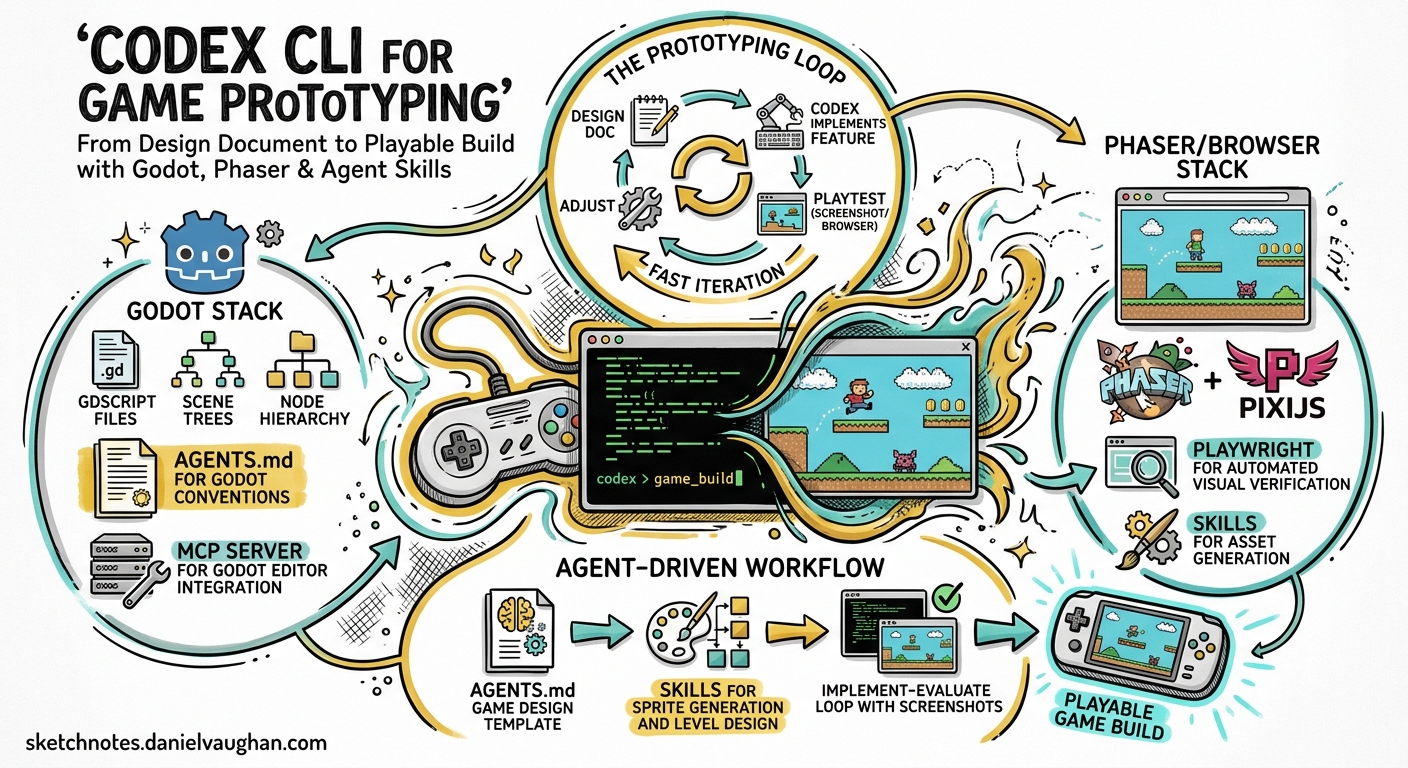
Game prototyping rewards fast iteration above all else. You need to get a concept on screen, playtest it, throw away what fails, and refine what sticks — ideally within hours, not weeks. Codex CLI’s agent loop maps neatly onto this cadence: describe a mechanic, let the agent scaffold it, verify it visually, and prompt again. OpenAI now lists game development as a first-class use case collection 1, and a growing ecosystem of community skills, MCP servers, and AGENTS.md templates makes the workflow production-ready.
This article covers two stacks — Godot 4.x for native 2D/3D games and Phaser/PixiJS for browser games — walking through the AGENTS.md patterns, skill configurations, MCP integrations, and the implement–evaluate loop that lets Codex CLI drive a game from design document to playable build.
The Game Prototyping Loop
Traditional game prototyping follows a tight cycle: design → implement → playtest → adjust. With Codex CLI, the cycle becomes:
graph LR
    A[DESIGN-DOCUMENT.md] --> B[Codex implements feature]
    B --> C[Playwright evaluates build]
    C --> D{Pass?}
    D -->|Yes| E[Log to PROGRESS.md]
    D -->|No| F[Codex auto-corrects]
    F --> C
    E --> G[Next feature prompt]
    G --> B
Three documents anchor the workflow 2:
DESIGN-DOCUMENT.md— game objectives, layout, mechanics, win/fail states, visual direction, and tech stack.PROGRESS.md— a rolling log the agent reads each turn, acting as session memory and reducing context noise after compaction.AGENTS.md— the tooling contract: build commands, coding standards, testing expectations, and safety rails.
This structure was demonstrated by a community developer who built a complete 2D Phaser game with zero manual coding, crediting “harness engineering” with progressive disclosure as the key enabler 2.
AGENTS.md for Game Projects
A game-specific AGENTS.md differs from a typical web application’s. It needs to handle engine-specific build systems, asset pipelines, and the fact that “correctness” often means “looks right on screen” rather than “tests pass”.
Godot 4.x Template
# .codex/config.toml — Godot project profile
[profiles.godot]
model = "gpt-5.5"
sandbox = "workspace-write"

[profiles.godot.tools.web_search]
mode = "cached"
allowed_domains = ["docs.godotengine.org", "github.com/godotengine"]
The companion AGENTS.md should specify:
# AGENTS.md — Godot 4.x Project

## Build & Verify
- Run `godot --headless --import` before any code changes to ensure resources import cleanly.
- Validate GDScript with `gdformat --check --use-spaces=4` and `gdlint`.
- Build C# targets with `dotnet build` when Mono is active; check exit code zero.
- Never commit `.godot/` or `.import/` directory changes.

## Coding Standards
- GDScript: 4-space indentation, class_name declarations at the top, PascalCase for nodes, snake_case for variables and functions.
- Scene files (.tscn): Prefer composition over inheritance. Keep scene trees shallow (≤ 5 levels deep).
- Signals: Declare with `signal` keyword at the top of the script, connect in `_ready()`.

## Asset Pipeline
- Place sprites in `res://assets/sprites/`, audio in `res://assets/audio/`.
- Use the $imagegen skill for placeholder art. Save prompts to `assets/prompts/` for batch regeneration.
- Target 16×16 or 32×32 pixel art for 2D prototypes unless the design document specifies otherwise.
The CODEXVault_GODOT project 3 provides a battle-tested setup.sh that installs Godot 4.6 Mono, .NET 8, GDToolkit, and pre-commit hooks in a headless sandbox — essential because Codex CLI’s sandbox cannot run a display server. The setup script uses graceful failure logging and timeout guards (20 seconds for gdformat) to prevent agent hangs 3.
Phaser / Browser Game Template
For browser games, the recommended stack is Next.js with Phaser or PixiJS for rendering, optionally backed by Fastify with WebSockets for multiplayer 1:
# AGENTS.md — Phaser Browser Game

## Tech Stack
- Phaser 3.80+ for rendering and physics.
- Next.js 15 for the application shell.
- TypeScript strict mode enabled.

## Build & Verify
- `npm run dev` starts the development server on port 3000.
- `npx playwright test` runs the evaluation checklist after each feature.
- Never modify `package-lock.json` manually.

## Game Architecture
- One Phaser.Scene per game state (Boot, Menu, Play, GameOver).
- Keep game config in `src/config/game.config.ts`.
- Physics bodies: use Arcade for prototypes, Matter.js only if the design document requires joints or complex shapes.
Skills That Matter for Game Dev
Codex CLI’s skills system — directories containing a SKILL.md with YAML frontmatter 4 — is where game development workflows truly accelerate.
Built-In Skills
| Skill | Game Dev Use |
|---|---|
$imagegen |
Generate sprites, backgrounds, UI elements via gpt-image-2. Save prompts for batch consistency 1. |
$playwright-interactive |
Play the game in a live browser, inspect state, iterate on controls and timing 1. |
$jupyter-notebook |
Prototype procedural generation algorithms, visualise level layouts, tune difficulty curves. |
Community Skills
The ecosystem now offers game-engine-specific skill packs:
- Phaser skills — the official Phaser repository ships AI agent skills covering scenes, physics, input, animations, tilemaps, tweens, particles, and cameras 5.
- PixiJS skills — maintained by the PixiJS team, 25 focused skills across Application, Assets, Graphics, Filters, Mesh, and Performance 6.
- GodotPrompter — 45 domain-specific skills for Godot 4.x covering project setup, architecture, gameplay systems, input handling, physics, 2D/3D systems, animation, shaders, audio, and UI 7.
- godot-skill — a portable skill for scene editing workflows including batch transactions, node configuration, Control layout, script attachment, and signal wiring 8.
Install a community skill pack into your project:
# Clone Phaser skills into the project skills directory
git clone https://github.com/phaserjs/phaser.git /tmp/phaser-ref
cp -r /tmp/phaser-ref/.agents/skills/* .agents/skills/
MCP Servers for Game Engines
For Godot, several MCP servers bridge the gap between Codex CLI and the live editor 9:
# .codex/config.toml — Godot MCP server
[[mcp_servers]]
name = "godot"
command = "npx"
args = ["-y", "@anthropic/godot-mcp-server"]
These servers let agents inspect scenes, edit nodes and scripts, diagnose UI layout issues, work with signals, search project files, and inspect resources — without the agent guessing at API calls that may not exist 9. This matters because AI agents frequently misuse Godot classes or call non-existent methods when operating without structured engine context 9.
For browser games, the built-in Playwright integration serves as the “MCP equivalent” — Codex can launch the dev server, navigate to the game, interact with it, and capture screenshots for visual verification.
The Implement–Evaluate Loop
The most effective pattern for game prototyping is progressive prompting with an automated evaluation checklist 2. Rather than describing the entire game in one prompt, build incrementally:
graph TD
    A[Prompt 1: Player movement] --> B[Evaluate: character moves correctly]
    B --> C[Prompt 2: Tilemap and collision]
    C --> D[Evaluate: walls block movement]
    D --> E[Prompt 3: NPC interactions]
    E --> F[Evaluate: dialogue triggers on contact]
    F --> G[Prompt 4: Sound effects]
    G --> H[Evaluate: audio plays on events]
    H --> I[Prompt 5: Menu and game over]
    I --> J[Evaluate: full game loop works]
Each evaluation step uses Playwright (for browser games) or headless Godot validation (for native games). A practical evaluation checklist in Playwright:
// tests/game-eval.spec.ts
import { test, expect } from '@playwright/test';

test('player spawns and can move', async ({ page }) => {
  await page.goto('http://localhost:3000');
  // Wait for Phaser to initialise
  await page.waitForFunction(() =>
    (window as any).__PHASER_GAME__?.isRunning
  );
  // Verify player sprite exists
  const playerExists = await page.evaluate(() => {
    const scene = (window as any).__PHASER_GAME__
      .scene.getScene('Play');
    return scene?.player !== undefined;
  });
  expect(playerExists).toBe(true);
});

test('collision prevents wall pass-through', async ({ page }) => {
  await page.goto('http://localhost:3000');
  // Simulate movement into wall, verify position unchanged
  // ...
});
The godogen project 10 takes this further with frame-grounded self-repair: agents judge progress from captured screenshots rather than compilation success alone. A visual defect caught on screen drives the next iteration, preventing the common failure mode where the agent declares success because the build compiled but the game renders incorrectly.
Subagent Parallelism for Larger Games
For prototypes beyond a single scene, Codex CLI’s subagent system 11 maps naturally onto game architecture:
Spawn one subagent per game system:
- Agent 1: Player controller and input handling (src/player/)
- Agent 2: Level generation and tilemap loading (src/levels/)
- Agent 3: UI and HUD implementation (src/ui/)
- Agent 4: Audio manager and sound effects (src/audio/)
Wait for all, then run integration tests.
Configure subagent limits in config.toml:
[agents]
max_threads = 4
max_depth = 1
job_max_runtime_seconds = 300
Keep max_depth = 1 to prevent subagents from spawning their own subagents — game systems have enough cross-cutting concerns that recursive delegation tends to create conflicts 11.
Practical Recipe: Browser Platformer in One Session
A complete session flow for a browser platformer:
# 1. Scaffold the project
codex "Create a Next.js project with Phaser 3. \
  Follow the DESIGN-DOCUMENT.md for game mechanics. \
  Use TypeScript strict mode. \
  Set up the Phaser game config with Arcade physics."

# 2. Generate placeholder assets
codex "$imagegen Generate a 32x32 pixel art sprite sheet \
  for a platformer character: idle, run (4 frames), jump. \
  Save to public/assets/player.png"

# 3. Implement core loop
codex "Implement the Play scene: player movement, \
  gravity, platform collision. Run Playwright tests \
  after each change."

# 4. Non-interactive asset batch
codex exec "Generate all remaining placeholder sprites \
  listed in DESIGN-DOCUMENT.md#assets" \
  --profile godot -m gpt-5.5
What Does Not Work Well (Yet)
Honest caveats for game prototyping with Codex CLI:
- Physics tuning. Numeric feel — jump height, acceleration curves, friction — still needs human hands on a controller. The agent can set values, but evaluating whether a jump “feels right” is not automatable. ⚠️
- 3D workflows. Godot 3D scene setup requires visual spatial reasoning that current models handle poorly. Stick to 2D or pre-built 3D templates.
- Real-time multiplayer. WebSocket synchronisation, client-side prediction, and rollback netcode involve subtle timing bugs that agents generate more often than they fix. ⚠️
- Audio timing. Syncing sound effects to animation frames requires frame-precise testing that Playwright’s timing resolution cannot reliably verify.
Citations
-
Game development — Codex use cases — OpenAI Developers, accessed 2026-05-10. ↩ ↩2 ↩3 ↩4
-
Show: 2D game built using Codex and agent skills (zero code) — OpenAI Developer Community, 2026. ↩ ↩2 ↩3
-
CODEXVault_GODOT — GitHub, BulletProof CODEX Godot-focused scripts for AGENTS.md, accessed 2026-05-10. ↩ ↩2
-
Skills — Codex CLI — OpenAI Developers, accessed 2026-05-10. ↩
-
Phaser AI Agent Skills — Phaser GitHub, agent skills covering game subsystems, accessed 2026-05-10. ↩
-
PixiJS Skills — PixiJS official, 25 focused skills maintained by the PixiJS team, accessed 2026-05-10. ↩
-
GodotPrompter — Agentic skills framework for Godot 4.x — GitHub, 45 domain-specific skills, accessed 2026-05-10. ↩
-
godot-skill — Portable Godot project development skill — GitHub, scene editing workflows and bundled scripts, accessed 2026-05-10. ↩
-
Godot MCP Servers — GitHub, MCP server for interfacing with Godot engine, accessed 2026-05-10. ↩ ↩2 ↩3
-
godogen — Autonomous game development for Godot — GitHub, frame-grounded self-repair with screenshot evaluation, accessed 2026-05-10. ↩
-
Subagents — Codex — OpenAI Developers, accessed 2026-05-10. ↩ ↩2