Codex CLI as an MCP Server: Building Multi-Agent Workflows with the OpenAI Agents SDK
Codex CLI as an MCP Server: Building Multi-Agent Workflows with the OpenAI Agents SDK
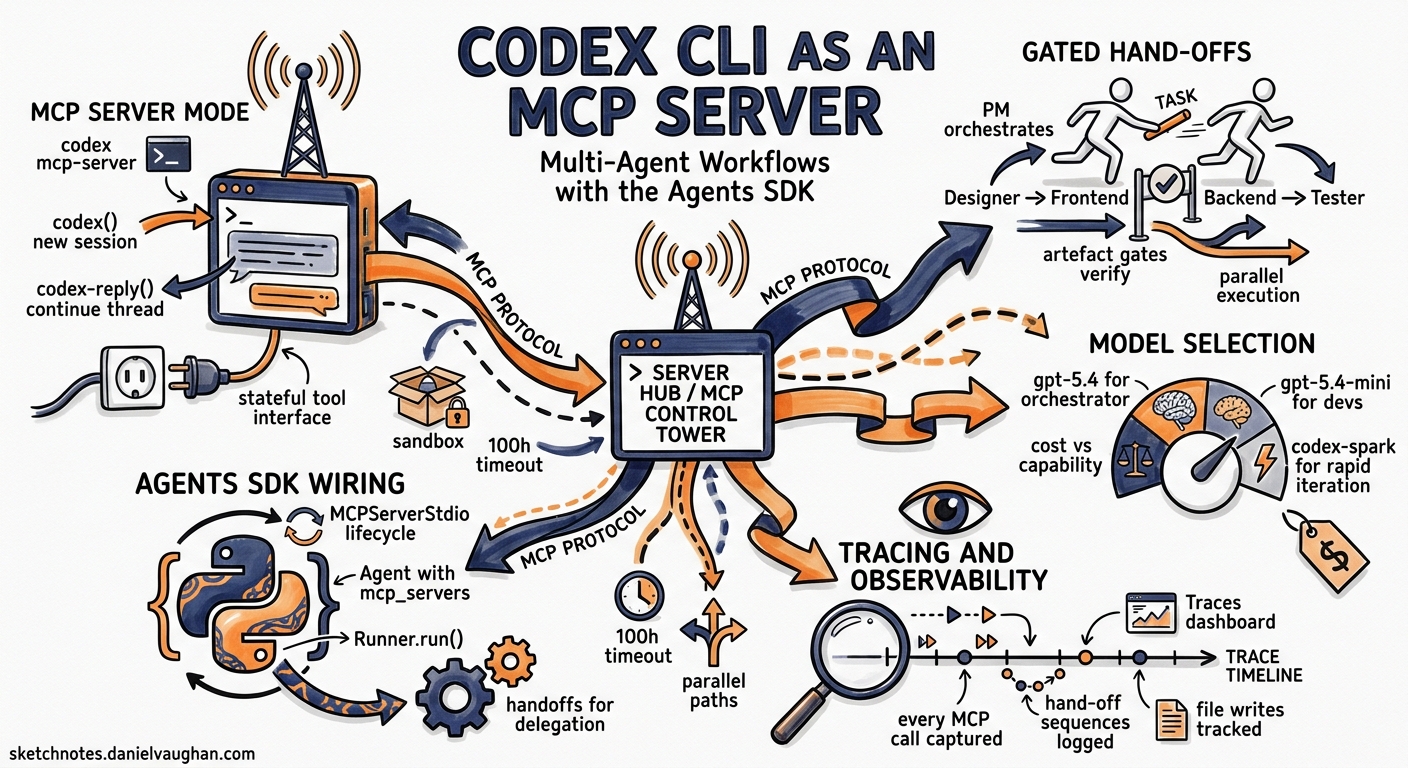
Codex CLI is primarily a terminal-based coding agent, but it has a second life as an MCP server that other agents can invoke programmatically. Combined with the OpenAI Agents SDK, this turns Codex into a sandboxed execution engine inside multi-agent workflows — complete with tracing, hand-offs, and guardrails. This article walks through the architecture, setup, and practical patterns for building these systems.
Why Run Codex as an MCP Server?
The codex exec command handles single-shot non-interactive tasks well enough[^1]. But it operates in isolation — there is no session continuity, no inter-agent coordination, and no structured hand-off protocol. Running codex mcp-server exposes two tools over the Model Context Protocol[^2]:
codex()— creates a new Codex session with a prompt, approval policy, sandbox mode, model override, and working directory.codex-reply()— continues an existing session by referencing athreadIdreturned from a previous call.
This stateful, tool-based interface lets orchestrating agents treat Codex as a controllable subprocess rather than a fire-and-forget script.
graph LR
    A[Agents SDK Runner] -->|MCPServerStdio| B[codex mcp-server]
    B --> C["codex() — new session"]
    B --> D["codex-reply() — continue session"]
    C --> E[Sandbox: file writes, shell commands]
    D --> E
    E --> F[Traced output + artifacts]
Setup
Prerequisites
You need Codex CLI installed (v0.129.0 or later) and the Python Agents SDK[^3]:
npm install -g codex
python -m venv .venv && source .venv/bin/activate
pip install openai openai-agents python-dotenv
Set your API key:
export OPENAI_API_KEY="sk-..."
Launching the MCP Server
The server starts via codex mcp-server, but in practice you never launch it manually — the Agents SDK manages its lifecycle through MCPServerStdio[^4]:
from agents.mcp import MCPServerStdio

async with MCPServerStdio(
    name="Codex CLI",
    params={
        "command": "npx",
        "args": ["-y", "codex", "mcp-server"],
    },
    client_session_timeout_seconds=360000,
) as codex_mcp_server:
    # Agents defined here can call codex() and codex-reply()
    ...
The 360,000-second timeout (100 hours) is intentional — Codex sessions can run for extended periods, and you do not want the MCP connection dropped mid-task[^4].
Inspecting Available Tools
For debugging, the MCP Inspector lets you verify the server exposes the expected tools before wiring up agents:
npx @modelcontextprotocol/inspector codex mcp-server
Single-Agent Pattern: Scoped Execution
The simplest pattern wraps a single agent around the Codex MCP server. The agent receives a task, calls codex() with appropriate sandbox constraints, and returns the result.
from agents import Agent, Runner

developer = Agent(
    name="Developer",
    instructions=(
        "You build web applications. Save all files in the current "
        "directory. Always call codex with "
        '"approval-policy": "never" and "sandbox": "workspace-write".'
    ),
    mcp_servers=[codex_mcp_server],
)

result = await Runner.run(developer, "Build a calculator in HTML/CSS/JS")
print(result.final_output)
Two parameters matter here:
| Parameter | Value | Effect |
|---|---|---|
approval-policy |
never |
No human approval prompts — essential for automated pipelines[^5] |
sandbox |
workspace-write |
Agent can write to the working directory but nothing outside it[^5] |
For read-only analysis tasks (code review, documentation extraction), use sandbox: read-only instead.
Multi-Agent Orchestration: The Gated Hand-Off Pattern
The OpenAI Cookbook demonstrates a five-agent team with the Project Manager as the orchestrating node[^6]. The key design pattern is gated hand-offs — the PM validates that upstream agents have produced their deliverables before advancing to the next phase.
sequenceDiagram
    participant PM as Project Manager
    participant D as Designer
    participant FE as Frontend Dev
    participant BE as Backend Dev
    participant T as Tester

    PM->>PM: Create REQUIREMENTS.md, TEST.md, AGENT_TASKS.md
    PM->>D: Hand off design task
    D->>D: Produce design_spec.md, wireframe.md
    D->>PM: Return with artefacts
    PM->>PM: Verify /design/ files exist
    par Parallel execution
        PM->>FE: Hand off frontend task
        PM->>BE: Hand off backend task
    end
    FE->>PM: Return with /frontend/ artefacts
    BE->>PM: Return with /backend/ artefacts
    PM->>PM: Verify all artefacts exist
    PM->>T: Hand off testing task
    T->>PM: Return test results
Defining the Orchestrator
The PM agent uses handoffs to delegate and enforces artefact gates in its instructions:
from openai.types.shared import Reasoning
from agents import ModelSettings

project_manager = Agent(
    name="Project Manager",
    instructions="""You coordinate a development team. Process:
1. Create REQUIREMENTS.md, TEST.md, AGENT_TASKS.md using Codex MCP
   with {"approval-policy":"never","sandbox":"workspace-write"}.
2. Hand off to Designer. Verify /design/design_spec.md exists before
   proceeding.
3. Hand off to Frontend and Backend in parallel.
4. Verify /frontend/index.html AND /backend/server.js exist.
5. Hand off to Tester with all artefacts.
6. Report final status.""",
    model="gpt-5.4",
    model_settings=ModelSettings(
        reasoning=Reasoning(effort="medium")
    ),
    handoffs=[designer, frontend_dev, backend_dev, tester],
    mcp_servers=[codex_mcp_server],
)
Specialised Agents
Each agent receives a tightly scoped context — only the planning documents it needs — preventing assumption drift[^6]:
designer = Agent(
    name="Designer",
    instructions=(
        "Your only source of truth is AGENT_TASKS.md and "
        "REQUIREMENTS.md. Deliverables: design_spec.md and "
        "wireframe.md in /design/. Use Codex MCP with "
        '{"approval-policy":"never","sandbox":"workspace-write"}.'
    ),
    model="gpt-5.4",
    mcp_servers=[codex_mcp_server],
    handoffs=[project_manager],
)
The handoffs=[project_manager] return path is critical — without it, the Designer cannot return control to the PM after completing its work.
Running the Workflow
result = await Runner.run(
    project_manager,
    "Build a multiplayer tic-tac-toe game with WebSocket backend",
    max_turns=30,
)
The max_turns parameter caps total agent interactions across all hand-offs. Set it high enough for complex workflows but not so high that a misbehaving agent can spin indefinitely.
Session Continuity with codex-reply
When a Codex session requires multi-turn interaction — iterating on a design, debugging a build failure, or refining generated code — use codex-reply() with the threadId from the initial response[^2]:
# Agent instructions can reference this pattern:
# 1. Call codex() with the initial prompt
# 2. Read structuredContent.threadId from the response
# 3. Call codex-reply() with the threadId and follow-up prompt
The Agents SDK handles this automatically when an agent’s instructions tell it to iterate. The thread persists within the MCP server process, maintaining full conversation context including file state.
Tracing and Observability
Every MCP call, hand-off, and tool invocation is automatically captured in OpenAI’s Traces dashboard[^7]. Each trace records:
- Prompts and responses for every agent turn
- MCP server invocations with parameters and latency
- Hand-off sequences showing the full delegation chain
- File writes and shell commands executed within the sandbox
Access traces at https://platform.openai.com/trace to debug failed workflows, identify bottlenecks, and audit what each agent actually did.
graph TD
    A[Trace Root] --> B[PM Agent Turn 1]
    B --> C[codex MCP: create REQUIREMENTS.md]
    B --> D[Hand-off to Designer]
    D --> E[Designer Turn 1]
    E --> F[codex MCP: create design_spec.md]
    E --> G[Hand-off back to PM]
    G --> H[PM Turn 2: verify artefacts]
    H --> I[Parallel hand-offs]
    I --> J[Frontend codex MCP calls]
    I --> K[Backend codex MCP calls]
Model Selection for Multi-Agent Workflows
Not every agent needs the same model. The Agents SDK lets you assign models per agent, and this matters for cost control in workflows with many turns[^8]:
| Role | Recommended Model | Rationale |
|---|---|---|
| Orchestrator/PM | gpt-5.4 |
Needs strong reasoning for gating logic |
| Specialised devs | gpt-5.4-mini |
Fast, cost-efficient for scoped coding tasks |
| Code review | gpt-5.3-codex |
Deep code understanding |
| Rapid iteration | gpt-5.3-codex-spark |
1,000+ tokens/s for quick prototyping[^9] |
Practical Considerations
Workspace Isolation
All agents sharing a single codex mcp-server process write to the same filesystem. For workflows where agents must work in isolated directories, set the cwd parameter in each codex() call to a distinct subdirectory.
Error Handling
If a Codex session fails (sandbox violation, model error, timeout), the MCP server returns an error response. The orchestrating agent should be instructed to handle failures gracefully — retry with adjusted parameters, skip the failing task, or escalate to a human.
Cost Implications
Each codex() call starts a new agent session with its own token budget. A five-agent workflow with 30 turns can consume significant tokens. Monitor costs through the Traces dashboard and consider:
- Using
gpt-5.4-minifor agents that perform straightforward tasks - Setting
max_turnsconservatively - Caching results in files rather than re-generating them across agents
Current Limitations
- No streaming to the orchestrator: the Agents SDK receives complete responses from Codex MCP, not streaming tokens[^4].
- Single process: all agents share one
codex mcp-serverprocess. For true parallelism across many agents, you may need multiple MCP server instances. - Chat Completions deprecation: Codex’s Chat Completions support is deprecated; ensure your Agents SDK version uses the Responses API[^8].
- Thread cleanup: long-running MCP server processes accumulate thread state in memory. For production use, implement periodic restarts or use the Python SDK’s thread management instead[^10].
When to Use This vs. Alternatives
| Approach | Best For |
|---|---|
codex exec |
Single-shot CI tasks, scripts, cron jobs |
codex mcp-server + Agents SDK |
Multi-agent workflows with hand-offs and tracing |
openai-codex Python SDK |
Programmatic embedding in Python applications with fine-grained thread control |
| Native subagents | Codex-to-Codex delegation within a single CLI session |
The MCP server approach sits in a sweet spot: more controllable than codex exec, more composable than the Python SDK, and with built-in observability through the Agents SDK’s tracing infrastructure.
Citations
| [^1]: [Non-interactive mode — Codex CLI | OpenAI Developers](https://developers.openai.com/codex/noninteractive) — codex exec documentation |
| [^2]: [Use Codex with the Agents SDK | OpenAI Developers](https://developers.openai.com/codex/guides/agents-sdk) — official guide for Codex + Agents SDK integration |
| [^3]: [Agents SDK | OpenAI API](https://developers.openai.com/api/docs/guides/agents) — Agents SDK installation and setup |
| [^4]: [Building Consistent Workflows with Codex CLI & Agents SDK | OpenAI Cookbook](https://developers.openai.com/cookbook/examples/codex/codex_mcp_agents_sdk/building_consistent_workflows_codex_cli_agents_sdk) — full cookbook example with code |
| [^5]: [Agent Approvals & Security — Codex | OpenAI Developers](https://developers.openai.com/codex/agent-approvals-security) — approval policy and sandbox mode documentation |
| [^6]: [Building Consistent Workflows with Codex CLI & Agents SDK | OpenAI Cookbook](https://cookbook.openai.com/examples/codex/codex_mcp_agents_sdk/building_consistent_workflows_codex_cli_agents_sdk) — multi-agent orchestration patterns |
| [^7]: [Integrations and observability | OpenAI API](https://developers.openai.com/api/docs/guides/agents/integrations-observability) — tracing and observability documentation |
| [^8]: [Models — Codex | OpenAI Developers](https://developers.openai.com/codex/models) — available models and configuration |
| [^9]: [Introducing GPT-5.3-Codex-Spark | OpenAI](https://openai.com/index/introducing-gpt-5-3-codex-spark/) — Codex-Spark model announcement |
| [^10]: [SDK — Codex | OpenAI Developers](https://developers.openai.com/codex/sdk) — openai-codex Python SDK documentation |