Codex CLI as an MCP Server: Building Multi-Agent Workflows with the Agents SDK
Codex CLI as an MCP Server: Building Multi-Agent Workflows with the Agents SDK
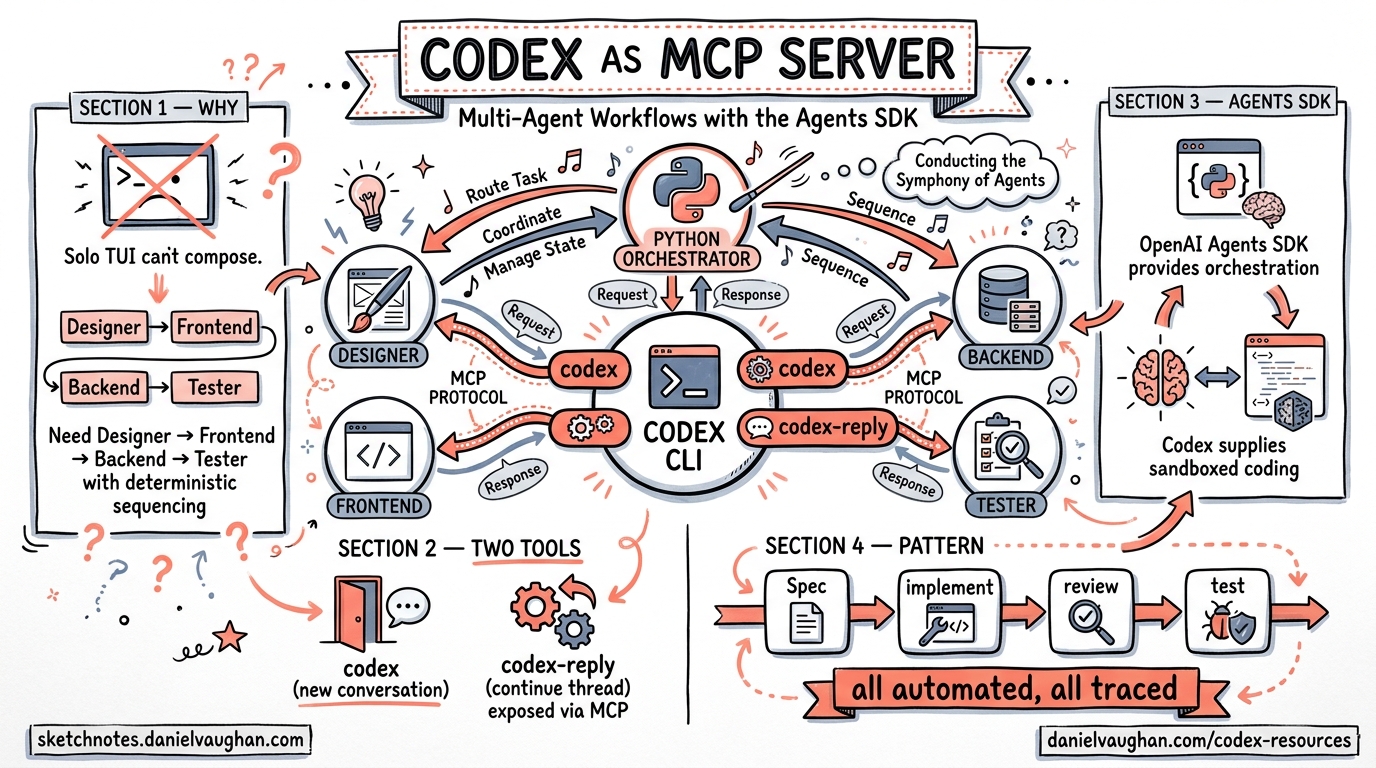
Running Codex CLI as a Model Context Protocol (MCP) server unlocks a fundamentally different operating mode: instead of one developer interacting with one agent, you can orchestrate entire teams of specialised agents through Python code. The OpenAI Agents SDK provides the orchestration layer, while Codex supplies the sandboxed coding capability. This article covers the architecture, configuration, and production patterns for building these workflows.
Why Run Codex as an MCP Server?
The interactive TUI is excellent for solo work, but it cannot be composed. When you need a Designer agent to produce a specification, a Frontend agent to implement it, a Backend agent to build the API, and a Tester agent to verify the lot — all with deterministic sequencing and full traceability — you need Codex exposed as a tool that other agents can invoke programmatically 1.
The codex mcp-server command transforms Codex from an interactive terminal application into a long-running process that exposes two MCP tools 2:
codex— creates a new conversation with configurable approval policy, sandbox mode, model, and base instructionscodex-reply— continues an existing conversation using athreadId
This is the same sandboxed execution engine, the same model access, the same filesystem controls — just with a machine-readable interface instead of a human-readable one.
Architecture Overview
graph TB
    subgraph "Agents SDK (Python)"
        PM[Project Manager Agent]
        D[Designer Agent]
        FE[Frontend Developer Agent]
        BE[Backend Developer Agent]
        T[Tester Agent]
    end

    subgraph "MCP Transport"
        MCP[codex mcp-server<br/>stdio transport]
    end

    subgraph "Codex Runtime"
        S1[Sandbox 1]
        S2[Sandbox 2]
        S3[Sandbox 3]
    end

    PM -->|handoff| D
    PM -->|handoff| FE
    PM -->|handoff| BE
    PM -->|handoff| T
    D --> MCP
    FE --> MCP
    BE --> MCP
    T --> MCP
    MCP --> S1
    MCP --> S2
    MCP --> S3
The Agents SDK manages the conversation graph — which agent runs next, what context it receives, and how results flow between agents. Codex MCP handles the actual code generation and execution inside sandboxed environments 1.
Prerequisites
Before building multi-agent workflows, ensure you have:
- Codex CLI installed (
npm install -g @openai/codexor vianpx) 3 - Python 3.10+ with the Agents SDK (
pip install openai-agents) 4 - Node.js 18+ (required for
npxtransport) - An OpenAI API key with access to your chosen model
Initialising the MCP Server
The Agents SDK connects to Codex via MCPServerStdio, which manages the server lifecycle:
from agents.mcp import MCPServerStdio

async with MCPServerStdio(
    name="Codex CLI",
    params={
        "command": "npx",
        "args": ["-y", "codex", "mcp-server"],
    },
    client_session_timeout_seconds=360000,
) as codex_mcp_server:
    # All agent definitions go here
    pass
The client_session_timeout_seconds value of 360,000 seconds (100 hours) prevents premature disconnection during long-running workflows 1. The "-y" flag auto-confirms the npx package prompt.
Single-Agent Pattern
Start with the simplest case — one agent with Codex as its tool:
from agents import Agent, Runner

developer = Agent(
    name="Developer",
    instructions="""You are a senior developer. Use the codex tool
    to write clean, tested code. Always pass:
    - approval-policy: never
    - sandbox: workspace-write
    """,
    mcp_servers=[codex_mcp_server],
)

result = await Runner.run(
    developer,
    "Create a Python CLI that converts CSV files to JSON"
)
print(result.final_output)
The agent calls the codex MCP tool, which spawns a sandboxed Codex session. The approval-policy: never setting allows autonomous execution without human approval gates 2. For production use, consider on-request or untrusted policies instead.
Multi-Agent Orchestration
The real power emerges with multiple specialised agents coordinated by a Project Manager. This mirrors enterprise workflows like JIRA task orchestration 1:
designer = Agent(
    name="Designer",
    instructions="""You are a UI/UX designer. Use the codex tool to
    create design_spec.md with wireframes, colour palette, and
    component hierarchy. Pass sandbox: workspace-write.""",
    mcp_servers=[codex_mcp_server],
)

frontend_dev = Agent(
    name="Frontend Developer",
    instructions="""You are a frontend developer. Read design_spec.md
    and implement the UI using HTML, CSS, and JavaScript.
    Pass sandbox: workspace-write, approval-policy: never.""",
    mcp_servers=[codex_mcp_server],
)

backend_dev = Agent(
    name="Backend Developer",
    instructions="""You are a backend developer. Build the API layer
    using Node.js/Express. Pass sandbox: workspace-write,
    approval-policy: never.""",
    mcp_servers=[codex_mcp_server],
)

tester = Agent(
    name="Tester",
    instructions="""You are a QA engineer. Write and run tests against
    the implementation. Verify all acceptance criteria from
    REQUIREMENTS.md. Pass sandbox: workspace-write.""",
    mcp_servers=[codex_mcp_server],
)

project_manager = Agent(
    name="Project Manager",
    model="gpt-5",
    instructions="""You coordinate a software team. Follow this sequence:
    1. Create REQUIREMENTS.md and AGENT_TASKS.md
    2. Hand off to Designer — verify design_spec.md exists before proceeding
    3. Hand off to Frontend and Backend developers (can run in parallel)
    4. Hand off to Tester for final verification
    Always verify output files exist before advancing.""",
    mcp_servers=[codex_mcp_server],
    handoffs=[designer, frontend_dev, backend_dev, tester],
)

result = await Runner.run(
    project_manager,
    "Build a browser-based bug tracking dashboard",
    max_turns=30,
)
The Gated Handoff Pattern
The critical design pattern here is gated handoffs: the Project Manager verifies that required artefacts exist before advancing to the next phase 1. This prevents downstream agents from operating on incomplete inputs:
sequenceDiagram
    participant PM as Project Manager
    participant D as Designer
    participant FE as Frontend Dev
    participant BE as Backend Dev
    participant T as Tester

    PM->>PM: Create REQUIREMENTS.md
    PM->>D: Handoff: design phase
    D->>D: Create design_spec.md
    D-->>PM: Return control
    PM->>PM: Verify design_spec.md exists

    par Parallel implementation
        PM->>FE: Handoff: frontend build
        PM->>BE: Handoff: backend build
    end

    FE-->>PM: Return control
    BE-->>PM: Return control
    PM->>PM: Verify implementation files
    PM->>T: Handoff: testing phase
    T-->>PM: Test results
Codex SDK: The Programmatic Alternative
For scenarios where the MCP protocol adds unnecessary complexity, the Codex SDK provides direct programmatic control 5:
import { Codex } from "@openai/codex-sdk";

const codex = new Codex();
const thread = codex.startThread();
const result = await thread.run(
    "Diagnose and fix the CI failures in this repository"
);
from codex_app_server import Codex

with Codex() as codex:
    thread = codex.thread_start(model="gpt-5.4")
    result = thread.run("Refactor the auth module to use JWT tokens")
The SDK is better suited when you need thread-level control within your own CI/CD pipelines or internal tooling, rather than agent-to-agent orchestration 5.
Subagent Configuration
For workflows that stay within Codex itself (rather than using the external Agents SDK), the built-in subagent system provides lighter-weight orchestration. Configure it in config.toml 6:
[agents]
max_threads = 6
max_depth = 1
job_max_runtime_seconds = 1800
Custom agent definitions live in ~/.codex/agents/ (personal) or .codex/agents/ (project-scoped) 6:
name = "security_auditor"
description = "Read-only security review agent"
developer_instructions = """
Audit all source files for security vulnerabilities.
Focus on injection, auth bypass, and data exposure.
Return structured JSON with findings.
"""
model = "gpt-5.4"
sandbox_mode = "read-only"
When to Use Which
| Capability | Subagents | Agents SDK + MCP |
|---|---|---|
| Setup complexity | Minimal (TOML config) | Moderate (Python orchestrator) |
| Sequencing control | Implicit (Codex decides) | Explicit (gated handoffs) |
| Parallel execution | Automatic fan-out | Programmatic control |
| Cross-tool integration | Codex tools only | Any MCP-compatible tool |
| Observability | CLI /agent command |
OpenAI Traces dashboard |
| Best for | Quick parallel tasks | Deterministic pipelines |
Observability and Tracing
Every multi-agent run generates traces in the OpenAI Traces dashboard, capturing 1:
- Prompts and responses for each agent turn
- MCP tool calls with parameters and return values
- Handoff events between agents
- Execution duration per step
- File writes and sandbox operations
This is invaluable for debugging workflows where Agent B produces unexpected output because Agent A’s handoff context was incomplete.
graph LR
    subgraph "Traces Dashboard"
        T1[PM: Create requirements<br/>Duration: 45s]
        T2[Designer: design_spec.md<br/>Duration: 120s]
        T3[Frontend: Implementation<br/>Duration: 180s]
        T4[Backend: API build<br/>Duration: 150s]
        T5[Tester: Verification<br/>Duration: 90s]
    end
    T1 --> T2 --> T3
    T2 --> T4
    T3 --> T5
    T4 --> T5
Production Hardening
Approval Policies
Never use approval-policy: never in production multi-agent workflows. Instead, use on-request to require human approval for destructive operations, or define hook-based guardrails in config.toml 2:
[hooks.pre_tool_use.codex]
command = "python3 /opt/hooks/validate_tool_call.py"
description = "Validate MCP tool calls before execution"
Timeout Management
Set realistic timeouts at multiple layers:
# MCP server session timeout
client_session_timeout_seconds = 3600  # 1 hour

# Agent runner turn limit
result = await Runner.run(agent, prompt, max_turns=20)
# Subagent job timeout
[agents]
job_max_runtime_seconds = 900  # 15 minutes per job
Error Handling
Wrap the runner in proper error handling to catch MCP disconnections and agent failures:
from agents import Runner, AgentError

try:
    result = await Runner.run(project_manager, task, max_turns=30)
except AgentError as e:
    logger.error(f"Agent {e.agent_name} failed: {e}")
    # Implement retry or fallback logic
Practical Applications
The Agents SDK + Codex MCP pattern scales to real-world engineering challenges:
- Large-scale refactoring — decompose a 500-file framework migration into per-module agents running in parallel 1
- Documentation generation — one agent explores the codebase, another writes API docs, a third generates architecture diagrams
- Continuous QA pipelines — integrate with CI to spawn review agents on every pull request
- Multi-service deployments — coordinate agents across frontend, backend, and infrastructure repositories
The OpenAI Cookbook provides a complete worked example building a browser game (“Bug Busters”) through five coordinated agents, with an end-to-end execution time of approximately 11 minutes 1.
Summary
Running Codex CLI as an MCP server bridges the gap between interactive coding assistance and programmatic workflow automation. The two-tool interface (codex and codex-reply) is deliberately simple, pushing orchestration complexity into the Agents SDK where it belongs. Start with single-agent patterns, add gated handoffs for sequencing, and use the Traces dashboard to debug the inevitable surprises.
Citations
-
OpenAI Cookbook, “Building Consistent Workflows with Codex CLI & Agents SDK,” April 2026. https://developers.openai.com/cookbook/examples/codex/codex_mcp_agents_sdk/building_consistent_workflows_codex_cli_agents_sdk ↩ ↩2 ↩3 ↩4 ↩5 ↩6 ↩7 ↩8
-
OpenAI Developers, “Use Codex with the Agents SDK,” April 2026. https://developers.openai.com/codex/guides/agents-sdk ↩ ↩2 ↩3
-
OpenAI Developers, “CLI — Codex,” April 2026. https://developers.openai.com/codex/cli ↩
-
OpenAI Developers, “Agents SDK,” 2026. https://openai.github.io/openai-agents-python/ ↩
-
OpenAI Developers, “SDK — Codex,” April 2026. https://developers.openai.com/codex/sdk ↩ ↩2
-
OpenAI Developers, “Subagents — Codex,” April 2026. https://developers.openai.com/codex/subagents ↩ ↩2