Codex CLI with Linear MCP: Sprint Automation, Issue Decomposition, and Cycle-Driven Development
Codex CLI with Linear MCP: Sprint Automation, Issue Decomposition, and Cycle-Driven Development
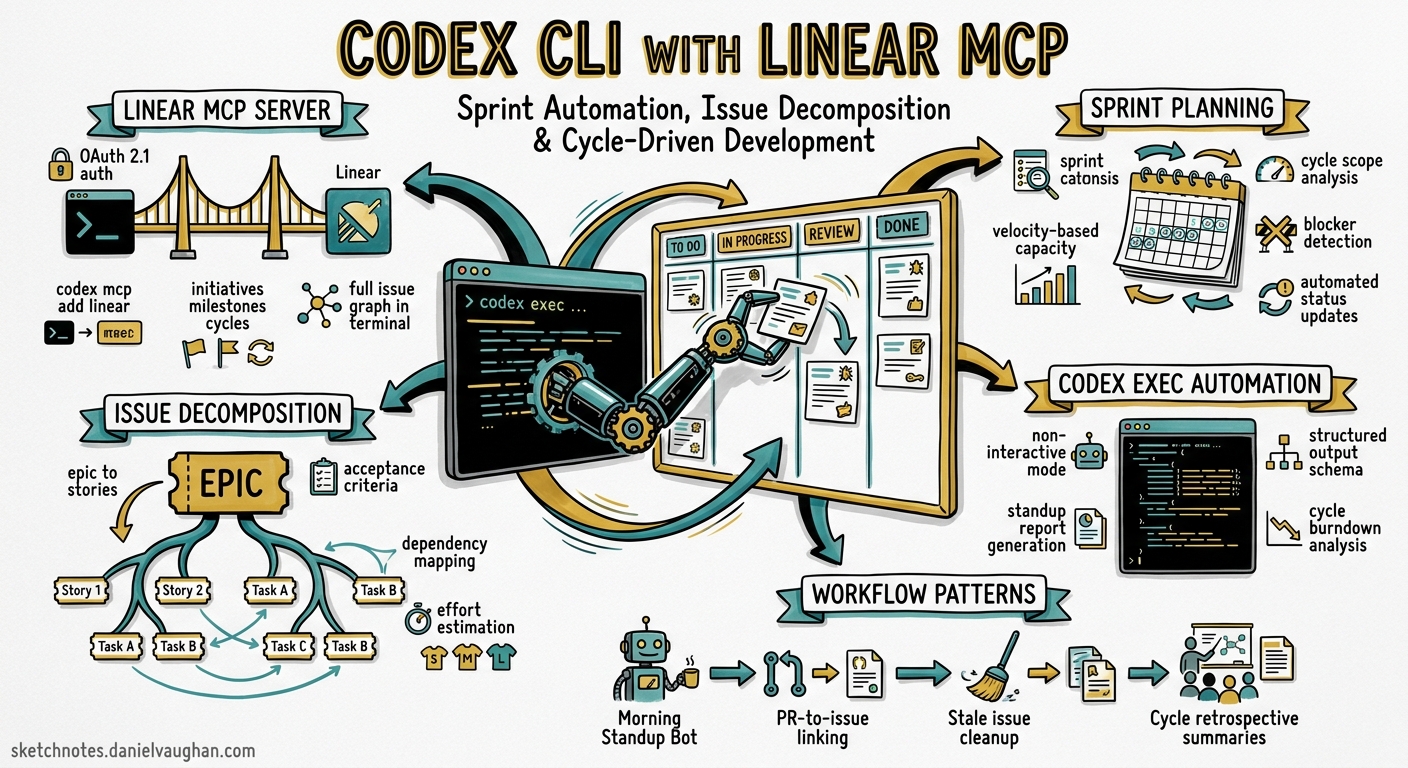
Why Linear MCP Matters for Terminal-First Developers
Senior developers who live in the terminal face a context-switching tax every time they tab into a browser to check sprint status, decompose an epic, or update issue progress. The Linear MCP server — a centrally hosted, authenticated remote MCP endpoint — eliminates that friction by exposing Linear’s full issue graph directly inside Codex CLI sessions1.
Since the February 2026 update, the server supports initiatives, milestones, project updates, and cycle management alongside core issue CRUD2. Combined with Codex CLI’s codex exec non-interactive mode and --output-schema structured output, this creates a programmable sprint automation layer that runs entirely from your terminal or CI pipeline.
Setting Up the Linear MCP Server
Quick Setup via CLI
codex mcp add linear --url https://mcp.linear.app/mcp
codex mcp login linear --scopes read,write
The codex mcp add command registers the server in ~/.codex/config.toml, and login triggers the OAuth 2.1 dynamic client registration flow3.
Manual Configuration
For teams preferring explicit configuration or using API keys:
[mcp_servers.linear]
url = "https://mcp.linear.app/mcp"
bearer_token_env_var = "LINEAR_API_KEY"
Set the environment variable in your shell profile:
export LINEAR_API_KEY="lin_api_xxxxxxxxxxxx"
Verifying the Connection
codex mcp list --json | jq '.[] | select(.name == "linear")'
A successful configuration shows the server as connected with available tools listed.
Core Sprint Workflow Patterns
Pattern 1: Epic Decomposition into Sprint-Ready Issues
The most powerful pattern is feeding Codex an epic description and having it create properly sized, dependency-ordered issues directly in Linear.
codex exec "Read Linear project PRJ-42 and decompose the epic 'Migrate auth to OIDC' \
into sprint-sized issues. Each issue should be completable in 1-3 days. \
Set priority based on dependency order. Add implementation notes to each \
issue description. Create the issues in Linear under cycle 'Sprint 24'." \
--model gpt-5.5 \
--reasoning high
This leverages Codex’s ability to call Linear MCP tools iteratively — reading the project context, analysing dependencies, then creating issues with appropriate labels, priorities, and cycle assignments4.
Pattern 2: Sprint Planning from Backlog Analysis
codex exec "Analyse the backlog for team 'Platform' in Linear. \
Identify the top 8 issues by priority that fit within 40 story points. \
Check for dependency conflicts. Move selected issues into the next \
unstarted cycle. Post a sprint planning summary as a project update." \
--model gpt-5.5 \
--reasoning medium
Pattern 3: Structured Sprint Reports
Using --output-schema for machine-readable sprint health data:
codex exec "Generate a sprint health report for the active cycle \
of team 'Backend'. Include velocity, burndown status, blocked issues, \
and at-risk items." \
--output-schema ./schemas/sprint-report.json \
-o ./reports/sprint-24-health.json
Where sprint-report.json defines:
{
  "type": "object",
  "properties": {
    "cycle_name": { "type": "string" },
    "velocity_points": { "type": "number" },
    "completed_count": { "type": "integer" },
    "in_progress_count": { "type": "integer" },
    "blocked_issues": {
      "type": "array",
      "items": {
        "type": "object",
        "properties": {
          "id": { "type": "string" },
          "title": { "type": "string" },
          "blocker_reason": { "type": "string" }
        }
      }
    },
    "at_risk": { "type": "array", "items": { "type": "string" } },
    "recommendation": { "type": "string" }
  },
  "required": ["cycle_name", "velocity_points", "blocked_issues"]
}
Cycle-Driven Development Workflow
The following workflow integrates Linear MCP into the daily development loop:
flowchart TD
    A[Developer starts work] --> B[codex: fetch my assigned issues from active cycle]
    B --> C{Issues available?}
    C -->|Yes| D[codex: read issue context and acceptance criteria]
    D --> E[Implement in codex interactive session]
    E --> F[codex: update Linear issue status to 'In Review']
    F --> G[codex: post implementation notes as comment]
    G --> H{More issues?}
    H -->|Yes| B
    H -->|No| I[codex: generate cycle progress update]
    C -->|No| J[codex: pull next priority from backlog into cycle]
    J --> D
Daily Standup Automation
Create a skill file at .codex/skills/standup.md:
# Standup Report Generator

## When to use
Run at the start of each working day to generate a standup summary.

## Instructions
1. Query Linear for my issues updated in the last 24 hours
2. Categorise into: completed yesterday, working on today, blocked
3. Check if any issues are approaching cycle end without completion
4. Output a concise standup report
Invoke with:
codex "Run the standup skill and post the summary as a comment on today's daily thread in project 'Platform'"
AGENTS.md Integration
Encode Linear workflow standards in your repository’s AGENTS.md:
## Linear Integration Standards

- All code changes MUST reference a Linear issue ID in commit messages (format: `PRJ-123`)
- When completing implementation, update the Linear issue status to "In Review"
- Sub-tasks discovered during implementation should be created as sub-issues, not comments
- Sprint scope changes require a project update with justification
- Use cycle IDs, not names, when programmatically assigning issues to sprints
This ensures Codex maintains Linear hygiene whether running interactively or via codex exec5.
CI Pipeline Integration
Automatic Issue Updates on PR Merge
# .github/workflows/linear-sync.yml
name: Sync Linear on Merge
on:
  pull_request:
    types: [closed]

jobs:
  update-linear:
    if: github.event.pull_request.merged == true
    runs-on: ubuntu-latest
    steps:
      - uses: openai/codex-action@v1
        with:
          codex-args: |
            --model gpt-5.5
            --reasoning low
          prompt: |
            Extract Linear issue IDs from this PR title and body:
            Title: ${{ github.event.pull_request.title }}
            Body: ${{ github.event.pull_request.body }}

            For each issue found:
            1. Move status to "Done"
            2. Add a comment linking to the merged PR
            3. If this completes all sub-issues of a parent, update parent status
        env:
          LINEAR_API_KEY: ${{ secrets.LINEAR_API_KEY }}
Sprint Burndown Alerts
Schedule a daily check for sprint health:
name: Sprint Health Check
on:
  schedule:
    - cron: '0 9 * * 1-5'  # Weekdays at 9am

jobs:
  check-sprint:
    runs-on: ubuntu-latest
    steps:
      - uses: openai/codex-action@v1
        with:
          codex-args: --model gpt-5.5 --reasoning low
          prompt: |
            Check the active cycle for team 'Backend'.
            If more than 30% of points remain with less than 2 days left,
            post a warning project update flagging at-risk items.
            Otherwise, post a healthy status update.
        env:
          LINEAR_API_KEY: ${{ secrets.LINEAR_API_KEY }}
Model Selection for Linear Workflows
| Task | Recommended Model | Reasoning Effort |
|---|---|---|
| Issue decomposition | gpt-5.5 | High |
| Status updates | gpt-5.3 or Spark | Low |
| Sprint planning | gpt-5.5 | Medium |
| Backlog prioritisation | gpt-5.5 | High |
| Standup generation | gpt-5.3 | Low |
Issue decomposition benefits from higher reasoning because it requires understanding dependency graphs and estimating scope6. Status updates are mechanical and benefit from Spark’s speed.
Anti-Patterns to Avoid
Over-automating triage. Codex can auto-assign issues via Linear’s triage rules7, but blindly routing everything to the agent without human review of priority and scope leads to sprint bloat.
Ignoring cycle boundaries. Programmatically adding issues mid-sprint without capacity checks undermines the cycle’s purpose. Always query remaining capacity before injection.
Treating decomposition as deterministic. The same epic decomposed twice may yield different issue structures. Pin decomposition outputs by reviewing and adjusting before committing to the cycle.
Skipping the OAuth flow for shared machines. Using personal API keys in shared CI environments leaks individual attribution. Prefer OAuth with service accounts for team pipelines.
Known Limitations
- SSE endpoint deprecation: Linear is phasing out
https://mcp.linear.app/ssein favour ofhttps://mcp.linear.app/mcp(Streamable HTTP)2. Update configurations before the two-month deprecation window completes. - output-schema and MCP conflict: When using
--output-schema, Codex cannot simultaneously call MCP tools and produce structured output in the same turn8. Structure your prompts to complete MCP operations first, then format the final response. - Rate limiting: Heavy automation against Linear’s MCP endpoint may hit rate limits. Batch operations where possible rather than issuing individual tool calls per issue.
- Read-only with restricted API keys: Direct token authentication with restricted Linear API keys provides read-only access1. Write operations require full OAuth or unrestricted keys.
Practical Example: Full Sprint Setup
Combining all patterns into a single sprint kickoff command:
codex exec "For team 'Backend' in Linear:
1. Close the current active cycle and generate a retrospective summary
2. Create a new cycle named 'Sprint 25' starting Monday for 2 weeks
3. Review the backlog and select issues totalling ~40 points, prioritising:
   - Blocked items that are now unblocked
   - High-priority bugs
   - Items with external deadlines
4. Assign selected issues to Sprint 25
5. Post a sprint planning update to the Backend project
6. List any items that were incomplete in the previous sprint and recommend whether to carry forward or deprioritise" \
--model gpt-5.5 \
--reasoning high
This single invocation replaces a 30-minute planning ceremony with a reviewable output that the team lead can approve or adjust.
Citations
-
Linear, “MCP Server Documentation,” linear.app/docs/mcp, accessed May 2026. ↩ ↩2
-
Linear, “Linear MCP for Product Management — Changelog,” linear.app/changelog/2026-02-05-linear-mcp-for-product-management, February 2026. ↩ ↩2
-
OpenAI, “Command Line Options — Codex CLI,” developers.openai.com/codex/cli/reference, accessed May 2026. ↩
-
OpenAI, “Non-interactive Mode — Codex CLI,” developers.openai.com/codex/noninteractive, accessed May 2026. ↩
-
OpenAI, “Custom Instructions with AGENTS.md,” developers.openai.com/codex/guides/agents-md, accessed May 2026. ↩
-
OpenAI, “Best Practices — Codex,” developers.openai.com/codex/learn/best-practices, accessed May 2026. ↩
-
OpenAI, “Use Codex in Linear,” developers.openai.com/codex/integrations/linear, accessed May 2026. ↩
-
OpenAI, “Features — Codex CLI,” developers.openai.com/codex/cli/features, accessed May 2026. ↩