Codex CLI as an MCP Server: Exposing Agent Capabilities to the Agents SDK and Other MCP Clients
Codex CLI as an MCP Server: Exposing Agent Capabilities to the Agents SDK and Other MCP Clients
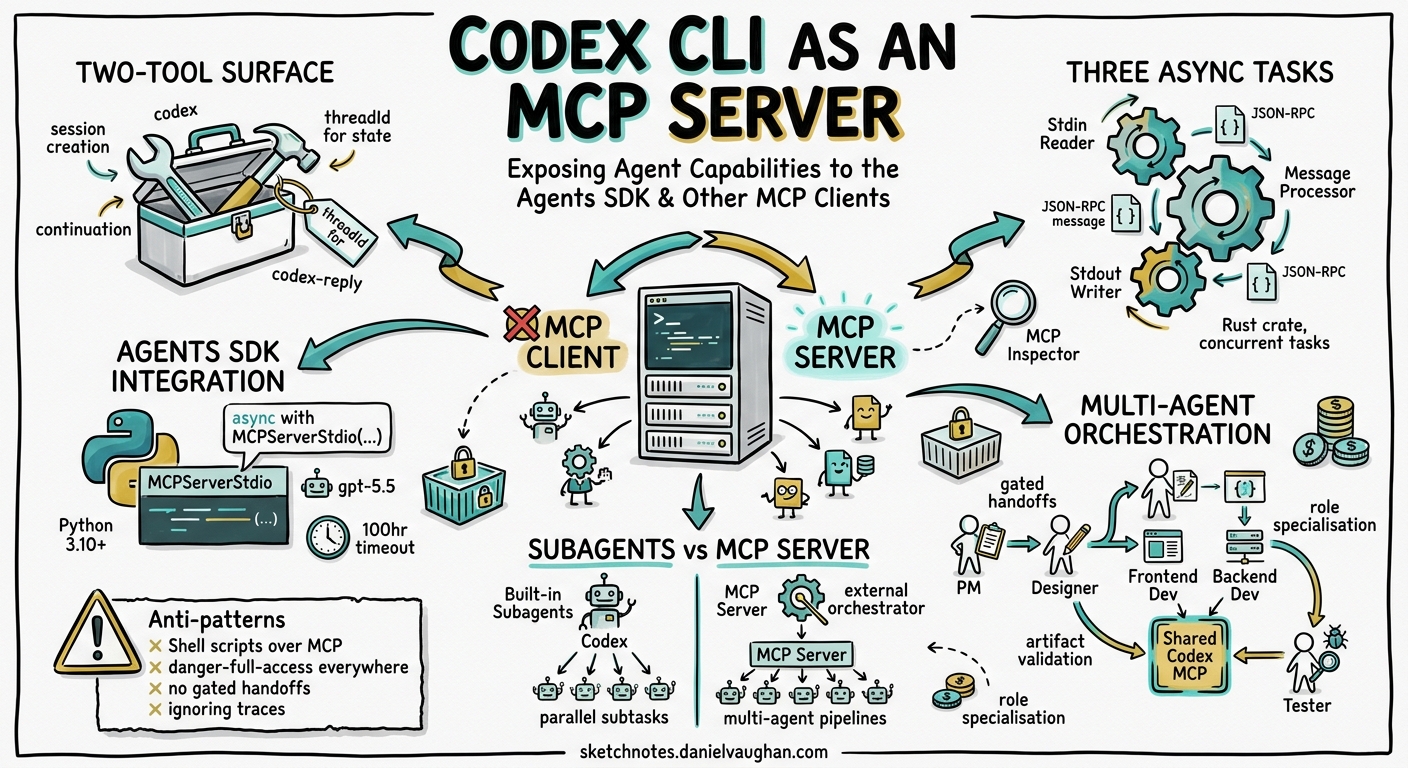
Most developers know Codex CLI as an MCP client — it connects to external MCP servers like Linear, Supabase, or Apollo to pull tools into its agent loop. Fewer realise that Codex CLI can flip the relationship entirely and run as an MCP server itself, exposing its full coding agent capabilities — file editing, command execution, sandboxed environments — as callable tools for other agents and orchestration frameworks1.
This inversion unlocks a powerful pattern: treating Codex as a composable building block inside larger multi-agent systems rather than as a standalone terminal tool. The OpenAI Agents SDK, Claude Code, Cursor, and any MCP-compliant client can delegate coding tasks to Codex without shelling out to the CLI or parsing its output23.
This article covers the codex mcp-server architecture, practical integration patterns with the Agents SDK, multi-agent orchestration workflows, and the operational considerations that matter when Codex becomes a tool rather than the top-level agent.
The codex mcp-server Subcommand
Running codex mcp-server starts Codex as a stdio-based JSON-RPC server that speaks the Model Context Protocol (MCP spec version 2025-03-26)4. The server exposes two tools:
| Tool | Purpose | Key Parameters |
|---|---|---|
codex |
Start a new coding session | prompt (required), model, approval-policy, sandbox, cwd, base-instructions, config, profile |
codex-reply |
Continue an existing session | prompt (required), threadId (required) |
The codex tool returns a threadId alongside its response content. Subsequent turns pass that threadId to codex-reply, maintaining full conversation context across multiple invocations1.
Sandbox and Approval Policies
When Codex runs as a server, the calling agent controls the sandbox and approval posture via tool parameters:
sandbox:read-only,workspace-write, ordanger-full-accessapproval-policy:untrusted(every action requires approval),on-request(only flagged actions), ornever(fully autonomous)1
For automated pipelines, "approval-policy": "never" with "sandbox": "workspace-write" is the standard configuration — the calling agent trusts Codex to modify files within the project but not to execute arbitrary system commands5.
Architecture: Three Async Tasks
The codex-mcp-server crate (written in Rust, like the rest of Codex CLI) runs three concurrent async tasks4:
flowchart LR
    A[MCP Client] -->|JSON-RPC stdin| B[Stdin Reader]
    B -->|IncomingMessage| C[Message Processor]
    C -->|CallToolRequest| D[ThreadManager]
    D -->|Events| C
    C -->|OutgoingMessage| E[Stdout Writer]
    E -->|JSON-RPC stdout| A
    C -.->|codex/event notifications| E
- Stdin Reader — deserialises line-delimited JSON from stdin into
IncomingMessageobjects and forwards them to the processor channel. - Message Processor — routes requests to handlers.
CallToolRequestmessages spawn an async task viarun_codex_tool_session(), which creates a full Codex session through theThreadManagerconfigured withSessionSource::Mcp. - Stdout Writer — serialises
OutgoingMessageobjects (responses andcodex/eventnotifications) back to the client4.
Session multiplexing is supported: multiple threads share a single MCP connection via threadId metadata in notification _meta fields, enabling concurrent multi-agent workflows over one server process4.
Integration with the OpenAI Agents SDK
The canonical integration uses MCPServerStdio from the Python Agents SDK to launch Codex as a child process15:
from agents import Agent, Runner
from agents.mcp import MCPServerStdio

async with MCPServerStdio(
    name="Codex CLI",
    params={
        "command": "npx",
        "args": ["-y", "@openai/codex", "mcp-server"],
    },
    client_session_timeout_seconds=360000,
) as codex_mcp_server:

    developer = Agent(
        name="Developer",
        instructions="""You are a senior developer. Use the codex tool
        with approval-policy 'never' and sandbox 'workspace-write'
        to implement code changes. Always verify files exist before
        reporting completion.""",
        model="gpt-5.5",
        mcp_servers=[codex_mcp_server],
    )

    result = await Runner.run(
        developer,
        "Refactor the authentication module to use JWT refresh tokens",
    )
The client_session_timeout_seconds is set to 360,000 (100 hours) because coding tasks can run for minutes rather than seconds — the default MCP timeout is far too short5.
Prerequisites
- Node.js 18+ (for
npxto launch Codex) - Python 3.10+ (for the Agents SDK)
OPENAI_API_KEYin the environment- Packages:
openai-agents,python-dotenv1
Multi-Agent Orchestration Patterns
The real power emerges when multiple specialised agents share the same Codex MCP server. The OpenAI Cookbook demonstrates a five-role orchestration pattern5:
flowchart TD
    PM[Project Manager] -->|handoff| D[Designer]
    D -->|handoff| FE[Frontend Developer]
    D -->|handoff| BE[Backend Developer]
    FE -->|handoff| T[Tester]
    BE -->|handoff| T
    T -->|results| PM

    subgraph "Shared MCP Server"
        MCP[codex mcp-server]
    end

    FE -.->|codex tool| MCP
    BE -.->|codex tool| MCP
    T -.->|codex tool| MCP
Each agent has a focused role:
- Project Manager — decomposes requirements into
REQUIREMENTS.md,AGENT_TASKS.md, andTEST.md. Does not use the Codex tool directly. - Designer — produces UI/UX specifications and design documents.
- Frontend/Backend Developers — invoke the
codextool withworkspace-writesandbox to generate and modify code. - Tester — validates deliverables against acceptance criteria using
codexinread-onlysandbox mode5.
Gated Handoffs
The critical pattern is gating handoffs on artifact existence. Each agent verifies that required files from the previous stage exist before proceeding:
tester = Agent(
    name="Tester",
    instructions="""Before running tests, verify these files exist:
    - src/components/App.tsx
    - src/api/routes.ts
    - TEST.md
    If any are missing, request the appropriate developer to complete
    their work before proceeding.""",
    model="gpt-5.5",
    mcp_servers=[codex_mcp_server],
)
Without gated handoffs, agents advance prematurely and produce work against incomplete dependencies5.
Cross-Agent Delegation: Codex for Claude Code
Community wrappers like codex-as-mcp and the agentic-developer-mcp server enable Claude Code, Cursor, and other MCP clients to delegate coding sub-tasks to Codex23. The pattern is straightforward: the outer agent analyses the problem, identifies a discrete coding task, and delegates it to Codex via the MCP tool:
# ~/.claude/config.toml (or equivalent MCP client config)
[mcp_servers.codex]
command = "npx"
args = ["-y", "@openai/codex", "mcp-server"]
This creates an asymmetric collaboration where the orchestrating agent handles reasoning and planning whilst Codex handles the sandboxed file manipulation3.
Debugging with the MCP Inspector
The MCP Inspector provides a visual debugging interface for the server’s tool calls and responses1:
npx @modelcontextprotocol/inspector codex mcp-server
This launches a web UI where you can:
- Send
codexandcodex-replytool calls manually - Inspect the JSON-RPC messages flowing over stdio
- Monitor
codex/eventnotifications in real time - Verify
threadIdhandling across multi-turn conversations
Model Selection for MCP-Served Codex
When Codex runs as an MCP server, the calling agent can override the model per invocation via the model parameter on the codex tool. Current model options6:
| Model | Best For | Notes |
|---|---|---|
gpt-5.5 |
Complex multi-file refactors, architecture changes | Highest capability, highest cost |
gpt-5.4 |
Standard development tasks | Good cost-performance balance |
gpt-5.3-codex |
Long-running agentic tasks | 25% faster than predecessor7 |
gpt-5.3-codex-spark |
Rapid edits, targeted fixes | 1000+ tokens/s on Cerebras hardware, 128k context8 |
For orchestrated workflows, a common pattern routes complex tasks to gpt-5.5 and simpler validation or formatting tasks to gpt-5.3-codex-spark for speed6.
Subagents vs. MCP Server: When to Use Which
Codex CLI already has a built-in subagent system that spawns parallel worker threads. When should you use the MCP server pattern instead?
| Criterion | Built-in Subagents | MCP Server |
|---|---|---|
| Orchestrator | Codex is the top-level agent | External agent (Agents SDK, Claude, Cursor) orchestrates |
| Language | N/A (Codex manages internally) | Python, TypeScript, or any MCP client |
| Concurrency control | max_threads in config (default 6)9 |
Managed by the calling framework |
| Sandbox inheritance | Children inherit parent sandbox | Each call specifies its own sandbox |
| Session state | Shared within the Codex session | Isolated per threadId |
| Use case | Parallel subtasks within one coding session | Multi-agent pipelines, CI/CD integration, cross-tool orchestration |
Use built-in subagents when Codex is already the right top-level agent and you want parallel execution. Use the MCP server when Codex needs to be one component in a larger system9.
Operational Considerations
Timeout Configuration
The default MCP tool timeout of 60 seconds is insufficient for most coding tasks. Set client_session_timeout_seconds to at least 300,000 (83 hours) in the Agents SDK, or configure tool_timeout_sec in config.toml when consuming Codex from other MCP clients1.
Token Consumption
Each MCP-invoked Codex session consumes tokens independently. In a five-agent orchestration where three agents call Codex, expect 3× the token usage compared to a single Codex session. Monitor costs using the traces dashboard, which captures all MCP server invocations with execution times5.
Approval Elicitation
When approval-policy is set to untrusted or on-request, the MCP server uses the MCP elicitation protocol to surface approval requests to the calling client. The client must implement the elicitation handler; otherwise, the session blocks indefinitely. For automated workflows, always use "approval-policy": "never"4.
Thread Lifecycle
Threads created via the codex tool persist until the MCP server process terminates. Long-running orchestrations that create many threads will accumulate memory. Consider scoping each major task to a fresh codex invocation rather than extending threads indefinitely with codex-reply4.
Anti-Patterns
- Wrapping Codex in a shell script instead of MCP — Parsing CLI output is fragile. The MCP server provides structured JSON responses and event notifications. Use it.
- Sharing sandbox: danger-full-access across all agents — Grant the minimum sandbox level each agent needs. Testers should run in
read-only; only developers needworkspace-write. - Skipping gated handoffs — Without artifact validation between agent stages, downstream agents produce work against missing dependencies.
- Using
codex-replyacross unrelated tasks — EachthreadIdaccumulates context. Starting a newcodexsession for each distinct task keeps context clean and avoids confusion. - Ignoring the traces dashboard — Multi-agent orchestrations are opaque without observability. Always review traces to identify bottlenecks and failed handoffs5.
Known Limitations
- No streaming to the MCP client — The server emits
codex/eventnotifications during execution, but the final tool response arrives only when the session completes. Long tasks appear to hang from the client’s perspective4. - Single-process concurrency — All threads share one
codex mcp-serverprocess. CPU-bound operations (like sandbox setup) serialise across threads. - No resume after crash — If the MCP server process dies, all in-flight
threadIdsessions are lost. The calling agent must handle retries. output-schemanot supported — ThecodexMCP tool does not support the--output-schemaflag available incodex exec. Structured output must be parsed from the text response.
Conclusion
Running codex mcp-server transforms Codex CLI from an interactive terminal tool into a composable coding agent that any MCP-compliant system can invoke. The two-tool surface — codex for session creation, codex-reply for continuation — is deliberately minimal, keeping integration straightforward whilst exposing the full power of Codex’s sandboxed execution environment.
For teams building multi-agent systems with the OpenAI Agents SDK, Codex-as-MCP-server is the cleanest path to delegating coding tasks without reimplementing file editing, command execution, or sandbox isolation. For teams using Claude Code or Cursor, community wrappers provide the same capability with minimal configuration.
The pattern is simple: let the orchestrator orchestrate; let Codex code.
Citations
-
Use Codex with the Agents SDK — OpenAI Developers ↩ ↩2 ↩3 ↩4 ↩5 ↩6 ↩7
-
MCP Server Implementation (codex-mcp-server) — DeepWiki ↩ ↩2 ↩3 ↩4 ↩5 ↩6 ↩7
-
Building Consistent Workflows with Codex CLI & Agents SDK — OpenAI Cookbook ↩ ↩2 ↩3 ↩4 ↩5 ↩6 ↩7 ↩8
-
[Models — Codex OpenAI Developers](https://developers.openai.com/codex/models) -
[Subagents — Codex OpenAI Developers](https://developers.openai.com/codex/subagents)