Codex CLI for Mobile Development: iOS with XcodeBuildMCP, Android CLI Skills, and React Native Plugin Workflows
Codex CLI for Mobile Development: iOS with XcodeBuildMCP, Android CLI Skills, and React Native Plugin Workflows
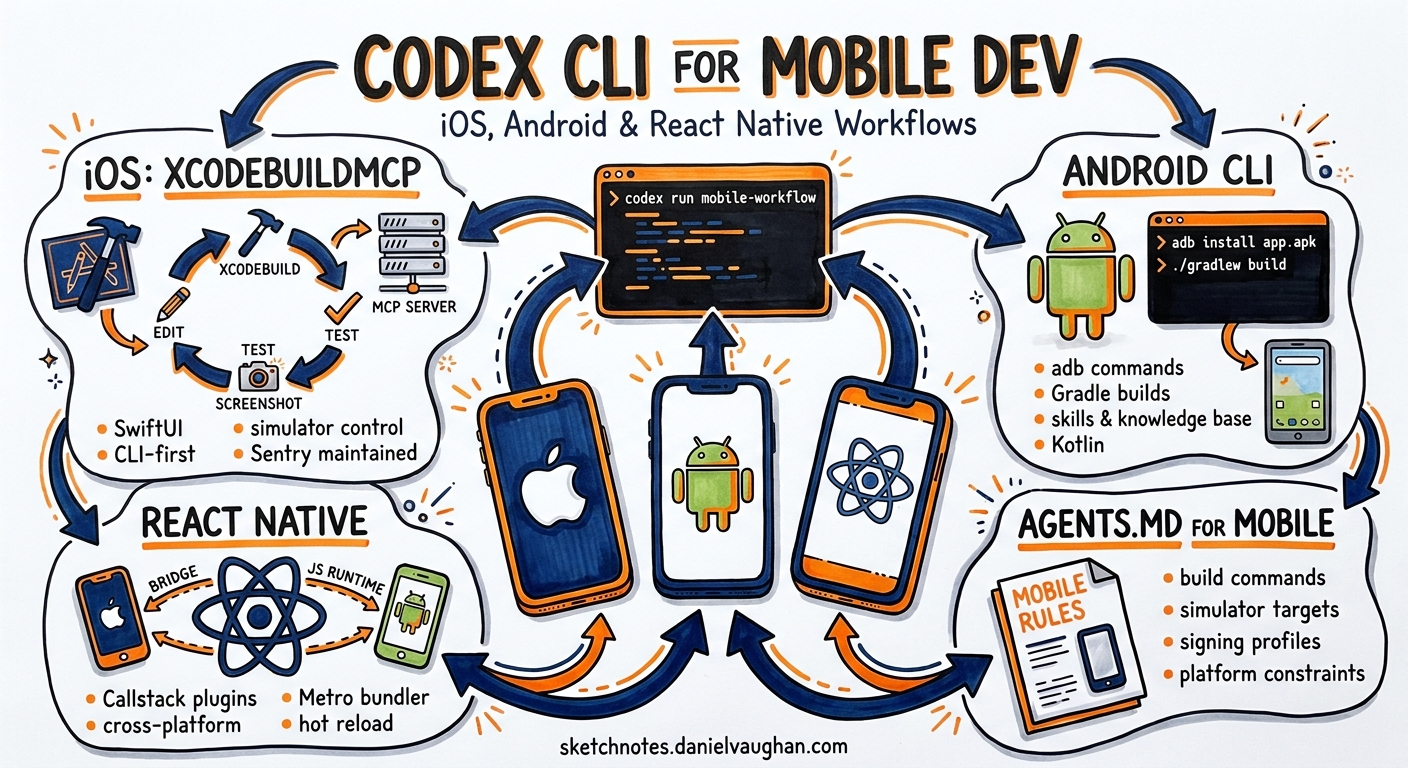
Mobile development has historically been hostile to terminal-first agent workflows. Platform toolchains assume GUI interaction, build systems are opaque, and validation requires simulators or physical devices. Yet Codex CLI now supports genuine end-to-end mobile development across iOS, Android, and cross-platform frameworks — not through brittle workarounds, but through purpose-built MCP servers, platform-native CLIs, and community plugins that keep the agent in a tight build-test-iterate loop.
This article covers the three pillars of Codex CLI mobile development in 2026: XcodeBuildMCP for iOS and macOS, Google’s Android CLI with its skills and knowledge base system, and Callstack’s React Native plugins for cross-platform work.
iOS Development: XcodeBuildMCP and CLI-First SwiftUI
OpenAI’s official guidance for iOS development with Codex is explicit: stay CLI-first 1. The recommended stack centres on SwiftUI for UI, xcodebuild or Tuist for builds, and XcodeBuildMCP for the agentic feedback loop.
XcodeBuildMCP Configuration
XcodeBuildMCP is a Model Context Protocol server maintained by Sentry that provides Codex with scheme inspection, simulator control, screenshot capture, and build automation 2. Installation is straightforward:
brew tap getsentry/xcodebuildmcp
brew install xcodebuildmcp
Configure it in your project’s .codex/config.toml:
[mcp_servers.xcodebuildmcp]
command = "npx"
args = ["-y", "xcodebuildmcp@latest", "mcp"]
Alternatively, XcodeBuildMCP v2.1.0+ ships an init subcommand that auto-detects Codex CLI and writes the configuration automatically 2.
The CLI-First Build Loop
The key principle is maintaining a tight validation loop after every change. OpenAI recommends running the narrowest command that proves the affected contract, expanding to broader builds only after narrower checks pass 1:
graph LR
    A["Codex edits SwiftUI view"] --> B["xcodebuild build<br/>-scheme MyApp"]
    B --> C{Build succeeds?}
    C -->|Yes| D["xcodebuild test<br/>-only-testing:TargetTests"]
    C -->|No| A
    D --> E{Tests pass?}
    E -->|Yes| F["Screenshot capture<br/>via XcodeBuildMCP"]
    E -->|No| A
    F --> G["Visual verification"]
AGENTS.md for iOS Projects
A well-structured AGENTS.md for an iOS project encodes build commands, conventions, and constraints that Codex needs:
# Project: MyApp (iOS)

## Build
- `xcodebuild -scheme MyApp -destination 'platform=iOS Simulator,name=iPhone 16'`
- Always use `xcodebuild`, never open Xcode GUI
- Target iOS 18+ deployment

## Conventions
- SwiftUI only — no UIKit unless wrapping a legacy component
- Use @Observable and @Environment for state management
- Prefer Tuist for project generation over manual .xcodeproj edits

## Testing
- `xcodebuild test -scheme MyAppTests`
- Run tests after every structural change
Recommended Skills
OpenAI documents several iOS-specific skills that Codex can leverage 1:
| Skill | Purpose |
|---|---|
| SwiftUI expert | General best practices and conventions |
| Liquid Glass expert | iOS 26+ design API adoption |
| SwiftUI performance audit | View update bottleneck identification |
| Swift concurrency expert | Async/await and compiler warning resolution |
| SwiftUI view refactor | File decomposition and consistency |
These skills follow the Agent Skills open standard and can be installed via android skills add or placed directly in .agents/skills/ 3.
Android Development: Google’s Android CLI
Google launched Android CLI on 16 April 2026 as an official command-line interface purpose-built for agent workflows 4. It wraps sdkmanager, avdmanager, adb, and parts of Gradle into a single android binary, reducing LLM token usage by 70% compared to raw tool invocations 4.
Installation and Agent Setup
# Download from developer.android.com/tools/agents
# Then initialise for agent use:
android init
The init command installs the android-cli skill into detected agents, including Codex CLI 5. Skills are placed in the agent’s standard skill directory — for Codex, that means .agents/skills/.
Core Workflow
Android CLI provides a complete development workflow from project creation through deployment:
# Scaffold a new project
android create --output=./MyApp --name=com.example.myapp empty-activity-agp-9

# Install required SDK packages
android sdk install platforms/android-35 build-tools/35.0.0

# Create and start an emulator
android emulator create --profile=medium_phone
android emulator start medium_phone

# Build with Gradle (no dedicated subcommand — edit build.gradle.kts directly)
cd MyApp && ./gradlew assembleDebug

# Deploy to emulator
android run --apks=app/build/outputs/apk/debug/app-debug.apk
The Knowledge Base
Android CLI includes a built-in documentation search that queries the Android Knowledge Base — current guidance from developer.android.com, Firebase, Google Developers, and Kotlin docs 5:
# Search for guidance
android docs search 'Jetpack Compose performance optimisation'

# Fetch specific topic using kb:// URL
android docs fetch kb://android/topic/performance/overview
This is particularly valuable for Codex sessions because it provides authoritative, up-to-date context without consuming web search credits or risking stale documentation.
Skills System
Google’s skills follow the same SKILL.md standard used by Codex, Claude Code, and other agents 4:
# List available skills
android skills list --long

# Search for relevant skills
android skills find 'edge-to-edge'

# Install specific skills for Codex
android skills add --agent='codex' edge-to-edge

# Install all skills
android skills add --all
Screen Capture and UI Automation
Android CLI provides agent-friendly UI interaction tools that Codex can use for visual verification 5:
# Capture screenshot with annotated UI element labels
android screen capture --annotate --output=annotated.png

# Get UI layout hierarchy as JSON
android layout --output=hierarchy.json

# Resolve visual label to tap coordinates
android screen resolve --screenshot=annotated.png --string="input tap #5"
The --annotate flag draws labelled bounding boxes around UI elements, giving Codex a visual reference for the current screen state — essential for verifying layout changes without manual inspection.
AGENTS.md for Android Projects
# Project: MyApp (Android)

## Build
- `./gradlew assembleDebug` for debug builds
- `./gradlew test` for unit tests
- `android run --apks=app/build/outputs/apk/debug/app-debug.apk` for deployment

## Conventions
- Kotlin only — no Java for new code
- Jetpack Compose for all UI
- Use `android docs search` before implementing unfamiliar APIs
- Target API 35+, minSdk 28

## Validation
- After UI changes: `android screen capture --annotate --output=screen.png`
- After layout changes: `android layout --diff`
Cross-Platform: React Native with Callstack Plugins
Callstack released two Codex plugins in 2026 that bundle expertise for React Native development and testing 6.
Installation
# Install plugins
npx codex-plugin add callstackincubator/agent-skills

# Or project-specific
npx codex-plugin add callstackincubator/agent-skills --project
Building React Native Apps Plugin
This plugin bundles three skills 6:
- Callstack Best Practices — performance-focused guidance covering profiling, startup time, rendering behaviour, memory issues, bundle size, and native integration trade-offs
- Vercel Best Practices — architectural patterns covering app structure and development approaches
- Upgrading React Native — structured version migration support including template comparisons, dependency alignment, and platform-specific changes
Testing React Native Apps Plugin
The testing plugin combines test authoring with device automation 6:
- React Native Testing — test structure and assertions using React Native Testing Library
- Agent Device — simulator, emulator, and physical device interaction: app launch, navigation, input, screenshots, logs, performance analysis, and UI inspection
- Dogfood — turns the agent into an exploratory QA tester powered by Agent Device
graph TD
    A["Codex builds feature"] --> B["Agent Device<br/>launches on simulator"]
    B --> C["Dogfood skill<br/>exploratory testing"]
    C --> D["Screenshot + log<br/>capture"]
    D --> E{Issues found?}
    E -->|Yes| F["React Native Testing skill<br/>writes regression test"]
    F --> A
    E -->|No| G["Feature complete"]
Sandbox Considerations
Mobile development workflows require careful sandbox configuration because build tools need filesystem access beyond the working directory and network access for dependency resolution 7:
# .codex/config.toml for mobile projects
sandbox_mode = "workspace-write"

[sandbox_workspace_write]
writable_roots = [
    "~/Library/Developer/CoreSimulator",   # iOS Simulator data
    "~/.android",                           # Android SDK and AVD
    "~/.gradle",                            # Gradle caches
    "/tmp"
]
network_access = true  # Required for pod install, gradle sync
For teams requiring tighter controls, consider using permission profiles that grant network access only during dependency resolution phases 8.
Model Selection for Mobile Work
Mobile development sessions tend to be context-heavy — build system configuration, platform APIs, and UI framework patterns all compete for the context window. The model selection matrix matters:
| Task | Recommended Model | Rationale |
|---|---|---|
| Greenfield scaffolding | GPT-5.5 | Complex multi-file generation benefits from stronger reasoning 9 |
| UI iteration | GPT-5.3-Codex | Faster turnaround for incremental SwiftUI/Compose edits 9 |
| Build debugging | GPT-5.5 | Build system errors require broader context understanding 9 |
| Test generation | GPT-5.3-Codex | Pattern-following task, speed matters more than reasoning 9 |
Switch models mid-session with /model when transitioning between task types.
Practical Workflow: End-to-End iOS Feature
Here is a complete workflow for adding a new feature to an existing iOS project:
# Start Codex with XcodeBuildMCP configured
codex --profile ios

# Prompt
"Add a settings screen with dark mode toggle and notification preferences.
Use @Observable for state. Write the view, the model, and a unit test.
Build and run in Simulator after each change."
Codex will:
- Create the
SettingsView.swiftandSettingsModel.swiftfiles - Run
xcodebuild buildvia XcodeBuildMCP to verify compilation - Write
SettingsModelTests.swiftand run targeted tests - Launch the Simulator and capture a screenshot for visual verification
- Iterate if any step fails
The entire loop stays terminal-first. No Xcode GUI interaction required.
Anti-Patterns
- Opening Xcode GUI mid-session. This breaks the agent’s understanding of project state. Stick to
xcodebuildand XcodeBuildMCP. - Skipping
android init. Without it, Codex lacks the Android CLI skill and falls back to rawadbcommands — verbose and error-prone. - Full project builds after every edit. Use targeted scheme and test builds. Full builds waste tokens and time.
- Ignoring platform-specific AGENTS.md. Mobile projects need explicit build commands and deployment targets. Generic AGENTS.md files lead to the agent guessing at platform conventions.
- Running without
network_access = true. Pod install, Gradle sync, and SPM resolution all require network. Sandbox failures here are cryptic and waste entire turns.
Known Limitations
- Android CLI has no
gradlesubcommand. When Codex needs to modify dependencies or build flavours, it must editbuild.gradle.ktsdirectly 5. This works but lacks the validation that a dedicated command would provide. - XcodeBuildMCP requires macOS. There is no Linux or Windows equivalent for iOS builds. CI workflows need macOS runners.
- Android CLI disables
android emulatoron Windows 5. Windows users must use physical devices or WSL with Android SDK. - Context window pressure. Mobile projects with complex build systems can exhaust context quickly. Use
model_auto_compact_token_limitaggressively and keep AGENTS.md concise.
Citations
-
OpenAI, “Build for iOS — Codex Use Cases,” developers.openai.com/codex/use-cases/native-ios-apps (accessed 2026-05-18) ↩ ↩2 ↩3
-
Sentry, “XcodeBuildMCP — MCP server for iOS/macOS projects,” github.com/getsentry/XcodeBuildMCP (accessed 2026-05-18) ↩ ↩2
-
OpenAI, “Agent Skills — Codex,” developers.openai.com/codex/skills (accessed 2026-05-18) ↩
-
Google, “Android CLI and skills: Build Android apps 3x faster using any agent,” android-developers.googleblog.com/2026/04/build-android-apps-3x-faster-using-any-agent.html (accessed 2026-05-18) ↩ ↩2 ↩3
-
Google, “Overview of Android CLI,” developer.android.com/tools/agents/android-cli (accessed 2026-05-18) ↩ ↩2 ↩3 ↩4 ↩5
-
Callstack, “Announcing Codex Plugins for React Native Development,” callstack.com/blog/announcing-codex-plugins-for-react-native-development (accessed 2026-05-18) ↩ ↩2 ↩3
-
OpenAI, “Sandbox — Codex Concepts,” developers.openai.com/codex/concepts/sandboxing (accessed 2026-05-18) ↩
-
OpenAI, “Advanced Configuration — Codex,” developers.openai.com/codex/config-advanced (accessed 2026-05-18) ↩
-
OpenAI, “Models — Codex,” developers.openai.com/codex/models (accessed 2026-05-18) ↩ ↩2 ↩3 ↩4