Codex CLI for Embedded and Firmware Development: PlatformIO MCP, Zephyr Workflows, and AGENTS.md for Hardware Teams
Codex CLI for Embedded and Firmware Development: PlatformIO MCP, Zephyr Workflows, and AGENTS.md for Hardware Teams
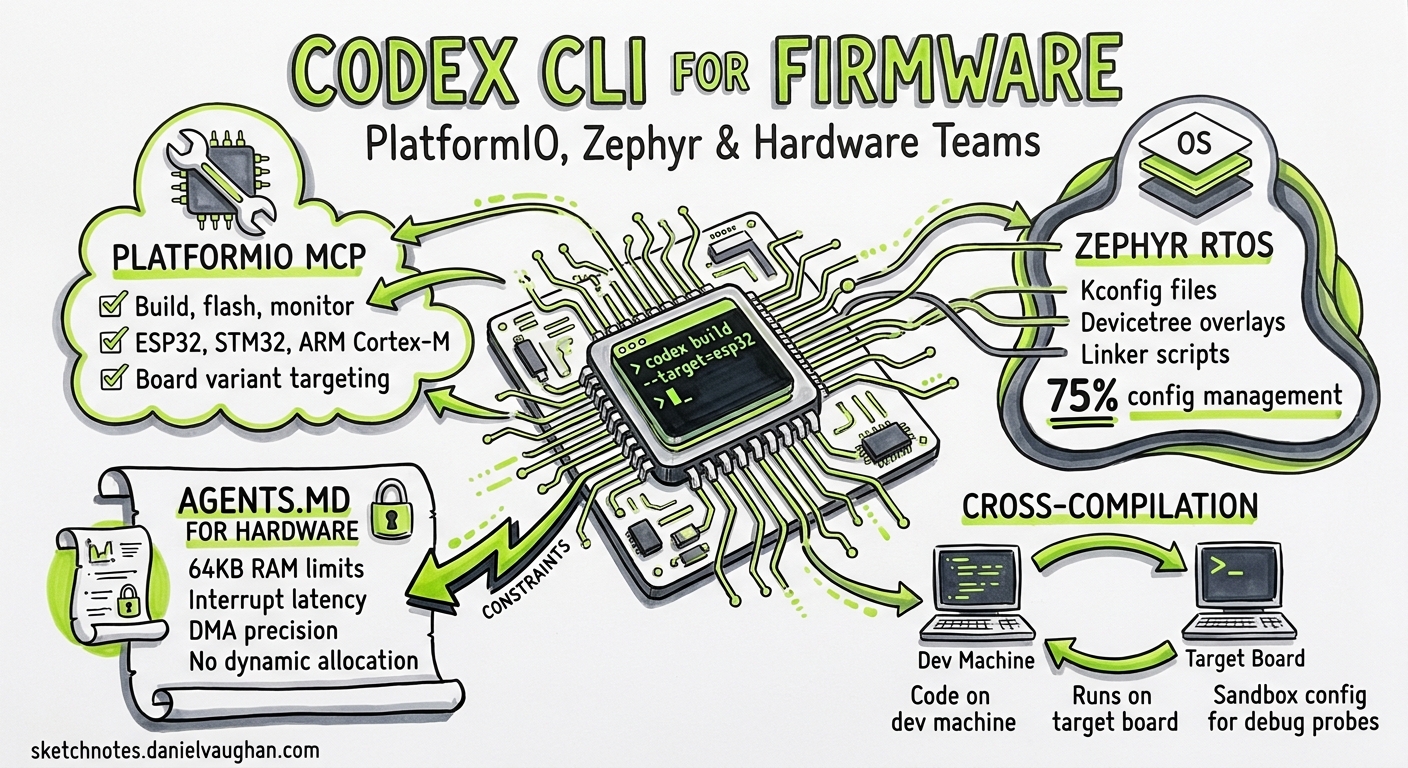
Codex CLI articles cover Go, Rust, Python, Swift, Kotlin, Zig — practically every application-level language. Embedded firmware has been conspicuously absent. That gap matters because firmware teams face exactly the problems agentic coding solves well: mechanical boilerplate (register definitions, peripheral init sequences), cross-compilation targeting dozens of board variants, and build systems that punish configuration drift. This article bridges that gap with concrete patterns for using Codex CLI v0.133 1 with PlatformIO, Zephyr RTOS, and bare-metal C projects.
Why Firmware Development Benefits from Agentic Coding
Embedded development is dominated by configuration management — an estimated 75% of the work involves Kconfig files, devicetree overlays, linker scripts, and build system plumbing rather than application logic 2. This is precisely the kind of mechanical, specification-driven work where an LLM agent excels, provided it has the right context and tooling.
The challenges are real, though:
- Cross-compilation: the code runs on a target board, not the development machine
- Hardware access: serial ports, debug probes, and JTAG adapters sit outside any sandbox
- Memory constraints: firmware targets may have 64 KB of RAM — the agent must respect hard limits
- Deterministic timing: RTOS task scheduling, interrupt latency, and DMA transfers demand precision
Codex CLI handles the first two through MCP tool servers and sandbox configuration. The second two require careful AGENTS.md instructions.
PlatformIO MCP Server: Build, Flash, and Monitor from the Agent
The PlatformIO MCP server (v2.2.1, May 2026) 3 exposes the full PlatformIO workflow as MCP tools that Codex can invoke directly:
| Tool | Purpose |
|---|---|
list_boards |
Discover supported boards with optional filtering |
get_board_info |
Retrieve MCU specs, flash size, RAM, clock speed |
list_devices |
Detect connected hardware via USB/serial |
init_project |
Scaffold a new PlatformIO project for a target board |
build_project |
Compile firmware for the configured environment |
upload_firmware |
Flash compiled binary to connected device |
start_monitor |
Open serial monitor with configurable baud rate |
search_libraries |
Find PlatformIO libraries by keyword |
install_library |
Add a library dependency to the project |
Installation
# Install PlatformIO Core (prerequisite)
pip install platformio

# Install MCP server for Codex CLI
npx platformio-mcp install --codex
This writes the MCP configuration to your Codex config. Alternatively, configure manually in ~/.codex/config.toml:
[mcp_servers.platformio]
command = "npx"
args = ["-y", "platformio-mcp"]
A Typical Firmware Session
> @platformio list_boards --filter esp32

> Create a new ESP32-S3 project using the Arduino framework with
  WiFi station mode, an HTTP server on port 80, and OTA update support.
  Use the esp32-s3-devkitc-1 board. After writing the code, build it
  and report any compilation errors.
Codex calls init_project, writes src/main.cpp and platformio.ini, then calls build_project — all within a single turn. If compilation fails, it reads the error output and self-corrects.
Zephyr RTOS Workflows
For teams using Zephyr, MCP servers exist that wrap the west meta-tool 4:
[mcp_servers.zephyr]
command = "npx"
args = ["-y", "@hakehuang/zephyr_mcp"]
The Zephyr MCP server provides tools for project initialisation, west build, west flash, version detection, Kconfig verification, and build system introspection 5. This lets Codex navigate Zephyr’s notoriously complex build system without hallucinating configuration keys.
flowchart LR
    A[Developer Prompt] --> B[Codex CLI v0.133]
    B --> C{MCP Tool Call}
    C --> D[PlatformIO MCP]
    C --> E[Zephyr MCP]
    D --> F[pio build / flash]
    E --> G[west build / flash]
    F --> H[Target Board]
    G --> H
    H --> I[Serial Monitor Output]
    I --> B
AGENTS.md for Firmware Projects
The AGENTS.md file is where you encode hardware constraints that the model cannot infer. A firmware AGENTS.md must be more prescriptive than a typical web project — the agent has no way to discover that your target has 256 KB of flash without being told.
Root-Level AGENTS.md
# AGENTS.md — Firmware Project

## Target Hardware
- MCU: STM32F411CEU6 (ARM Cortex-M4, 100 MHz)
- Flash: 512 KB
- RAM: 128 KB
- RTOS: FreeRTOS 10.6.1
- Framework: STM32 HAL

## Build System
- PlatformIO with custom board definition in `boards/`
- Build: `pio run -e production`
- Flash: `pio run -e production -t upload`
- Test: `pio test -e native` (host-based unit tests only)
- Monitor: `pio device monitor -b 115200`

## Coding Constraints
- No dynamic memory allocation after RTOS scheduler starts
- All tasks must have statically allocated stacks
- ISR functions must complete within 10 µs
- Use HAL_GPIO, HAL_UART, HAL_SPI — never access registers directly
- Prefer `configASSERT()` over silent failure
- sizeof(struct) matters — pack structs for DMA transfers
- All string literals in flash: use `const` and PROGMEM where applicable

## Conventions
- Header guards: `#ifndef PROJECT_MODULE_H`
- Function naming: `module_verb_noun()` (e.g., `sensor_read_temperature()`)
- Error returns: use `enum project_err_t`, never bare ints
- Every public function must have a Doxygen comment
Subdirectory AGENTS.md for Drivers
# AGENTS.md — drivers/

## Driver Conventions
- Each peripheral driver gets its own .c/.h pair
- Drivers must not include FreeRTOS headers — use callback registration
- All DMA buffers must be cache-aligned (32-byte boundary on Cortex-M7)
- Test drivers against the mock HAL in `test/mocks/`
This hierarchical loading means Codex picks up the global constraints at the repository root and the driver-specific rules when working in drivers/ 6.
Sandbox and Permission Configuration
Firmware development requires capabilities that conflict with Codex’s default sandbox. Flashing a board requires serial port access; monitoring requires persistent connections. Configure your permission profile accordingly:
# ~/.codex/config.toml

[sandbox]
mode = "workspace-write"
network_access = true  # needed for PlatformIO library downloads

[sandbox.workspace_write]
writable_roots = [
  ".",
  "/tmp"
]
For the PlatformIO MCP server to flash devices, it runs outside the sandbox as an MCP tool server — the agent calls the tool, and the tool server handles hardware access 7. This is the correct architecture: Codex proposes the flash command, the MCP server executes it with real device access, and the result streams back.
⚠️ Security note: if you grant danger-full-access sandbox mode to allow direct serial port access from shell commands, the agent has unrestricted filesystem and network access. Prefer the MCP-mediated approach where the tool server handles device I/O.
Practical Patterns
Pattern 1: Board Bring-Up Checklist
> I'm bringing up a new custom board based on ESP32-C3.
  The schematic shows: GPIO2=LED, GPIO4/5=I2C (BME280),
  GPIO6/7=UART1 (GPS NEO-6M), GPIO10=ADC (battery voltage divider).
  Create a PlatformIO project that initialises all peripherals,
  blinks the LED, reads the BME280, parses NMEA from the GPS,
  and logs battery voltage. Use ESP-IDF framework, not Arduino.
Codex generates platformio.ini with the esp32-c3-devkitm-1 board and ESP-IDF framework, creates driver files for each peripheral, and a main app_main() that starts FreeRTOS tasks for each subsystem.
Pattern 2: FreeRTOS Task Audit
> Audit all FreeRTOS tasks in this project. For each task, report:
  name, priority, stack size, stack high-water mark estimate,
  and whether it uses any blocking calls inside critical sections.
  Flag any priority inversion risks.
This leverages Codex’s ability to trace call graphs across files — something tedious to do manually in a 50-file firmware project.
Pattern 3: Peripheral Register Documentation
> Read the SPI driver in drivers/spi_flash.c and generate a markdown
  table documenting every register access: register name, address offset,
  read/write, bit fields used, and the purpose of each access.
Pattern 4: Cross-Target Verification with codex exec
# Build firmware for three board variants in CI
for env in esp32_dev stm32f411 nrf52840; do
  codex exec \
    --model gpt-5.4-mini \
    --sandbox workspace-write \
    --approval-policy on-request \
    "Build the $env PlatformIO environment. If compilation fails,
     fix the errors and rebuild. Report the final binary size." \
    2>/dev/null
done
This uses codex exec in non-interactive mode 8 to verify that firmware compiles cleanly across all target boards — a common CI requirement for multi-platform firmware projects.
Model Selection for Firmware Work
Firmware code generation demands precision — a wrong register offset or a misaligned DMA buffer causes hard faults, not soft errors. Model selection matters more here than in web development:
| Task | Recommended Model | Reasoning Effort |
|---|---|---|
| Peripheral driver implementation | GPT-5.5 | High — register-level accuracy critical |
| Kconfig/devicetree changes | GPT-5.4 | Medium — structured configuration |
| Build system fixes | GPT-5.4-mini | Low — mechanical pattern matching |
| Code review and audit | GPT-5.5 | High — need to catch timing and memory bugs |
| Documentation generation | GPT-5.4-mini | Low — prose from existing code |
Switch models mid-session with /model gpt-5.5 when transitioning from build fixes to driver implementation 9.
Limitations
- Model training data: GPT-5.5 has strong coverage of popular MCU families (ESP32, STM32, nRF52) but weaker knowledge of niche architectures (Renesas RA, Silicon Labs EFM32). Always verify generated register addresses against datasheets 10.
- No hardware-in-the-loop: Codex cannot observe real-time behaviour. It can flash firmware and read serial output, but it cannot attach a debugger, set breakpoints, or read JTAG traces.
- Timing verification: the agent can write code with correct RTOS task priorities, but it cannot measure actual interrupt latency or verify deadline compliance.
- Binary size awareness: while Codex can read linker map files, it does not have a mental model of flash/RAM budgets across compilation units. Include budget thresholds in AGENTS.md.
- Peripheral state: the agent reasons about code, not silicon. If your SPI peripheral is in an unexpected state due to a brown-out, the agent cannot diagnose it from code alone.
The Feedback Loop That Works
The most effective firmware workflow with Codex CLI follows a tight cycle:
flowchart TD
    A[Write / Edit Code] --> B[Build via MCP]
    B --> C{Compilation OK?}
    C -->|No| A
    C -->|Yes| D[Flash via MCP]
    D --> E[Monitor Serial Output]
    E --> F{Behaviour Correct?}
    F -->|No| A
    F -->|Yes| G[Commit]
Each step in this loop is mediated by MCP tools, giving Codex direct access to build output and serial logs. The agent reads compiler errors, fixes them, rebuilds — the same self-correcting loop that works for application code, now extended to cross-compiled firmware.
Getting Started
- Install PlatformIO Core:
pip install platformio - Install the PlatformIO MCP server:
npx platformio-mcp install --codex3 - Create your project’s AGENTS.md with hardware constraints
- Configure sandbox with
network_access = truefor library downloads - Start a session:
codex --model gpt-5.5 "Initialise the SPI peripheral for the onboard flash chip"
Firmware development has been the last holdout against agentic coding tools — the hardware dependency, cross-compilation complexity, and unforgiving nature of bare-metal programming made it seem unsuitable. With MCP tool servers bridging the hardware gap and AGENTS.md encoding the constraints that datasheets define, Codex CLI is now a viable pair-programming partner for embedded teams.
Citations
-
OpenAI Codex CLI v0.133.0 Release — GitHub, May 2026 ↩
-
Embedded Firmware Development with Claude Code — Devicetree, Kconfig, and Debugging — ReversetoBuild, 2026 ↩
-
PlatformIO MCP Server v2 — GitHub, v2.2.1, May 2026 ↩ ↩2
-
Zephyr MCP Server by hakehuang — Glama MCP Directory, 2026 ↩
-
MCP Zephyr West Context Server — LobeHub MCP, 2026 ↩
-
Custom Instructions with AGENTS.md — OpenAI Developers, 2026 ↩
-
Sandbox Configuration — Codex — OpenAI Developers, 2026 ↩
-
Non-interactive Mode — Codex — OpenAI Developers, 2026 ↩
-
Features — Codex CLI — OpenAI Developers, 2026 ↩
-
Embedded Systems & Firmware Skill for Claude Code — MCP Market, 2026 ↩