Beyond the Prompt: Codex CLI Mastery
Beyond the Prompt: Codex CLI Mastery
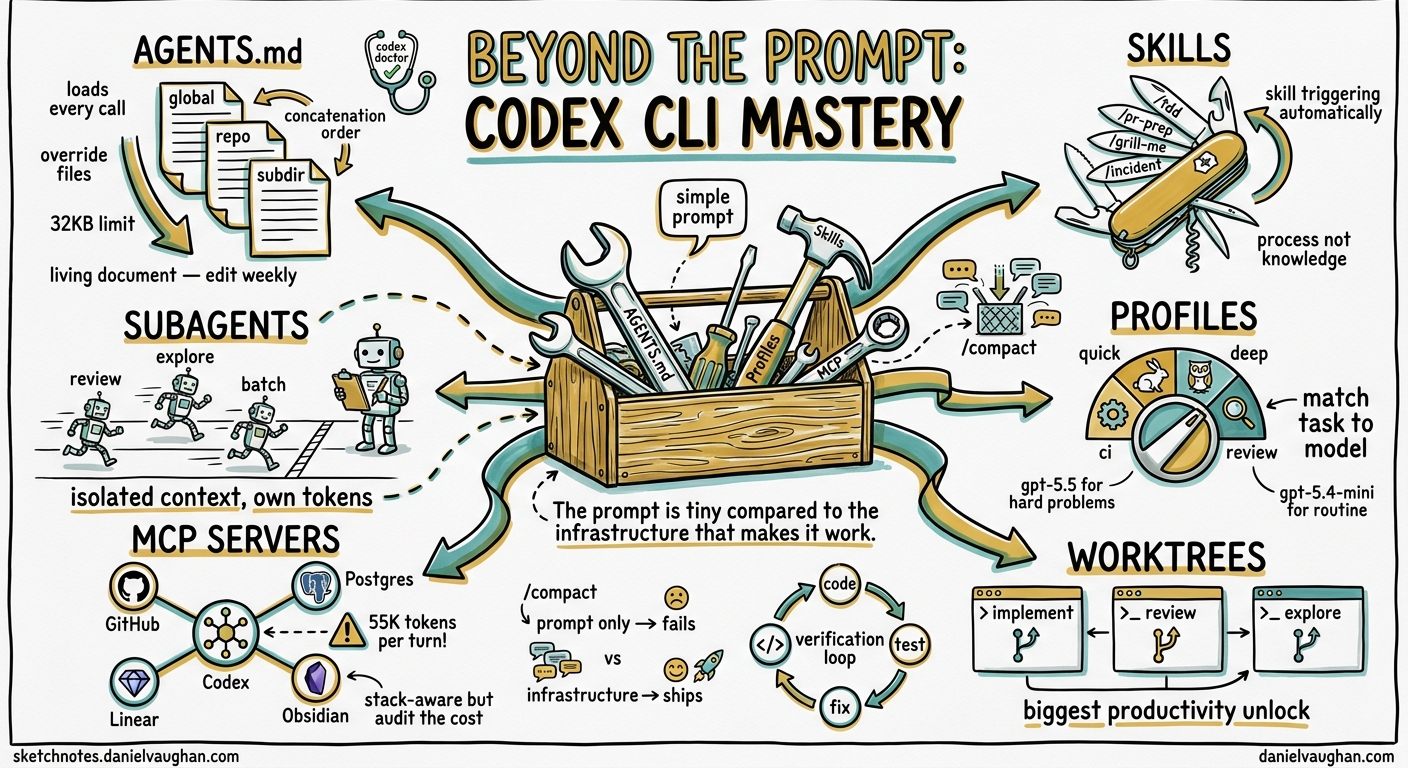
Most developers install Codex CLI, type a prompt and wait. When the output disappoints, they type a longer one. This is the wrong lever. The gap between passable suggestions and shipping entire features hands-free is not prompt quality but infrastructure: directory layout, AGENTS.md, skills, subagents, profiles, MCP servers and verification loops. This guide covers everything between installation and genuine mastery. Current as of v0.135.0, May 2026.
For a worked example of these techniques applied to a real framework, see The Gravel Path: Google ADK 2.0 Edition, which configures a full AGENTS.md harness, MCP servers, hooks and skills for building agent applications with Codex CLI.
Give Codex a way to verify its own work
Without a feedback loop, you are the only signal. With one, Codex iterates until the code passes. A single line in AGENTS.md transforms output quality:
After every code change, run `npm test` and fix failures before responding.
That is not a prompt trick. It is a structural decision that turns Codex from a suggestion engine into a self-correcting agent. Every tactic in this guide follows the same logic: move intelligence from your prompts into your project configuration, where it compounds across sessions rather than evaporating at the end of each one.
Without a verification command, a typical session produces code that looks correct but fails at runtime:
You: "Add input validation to the signup endpoint"
Codex: [writes validation code with a typo in the schema field name]
> You discover the bug manually 20 minutes later
With a verification command in AGENTS.md:
You: "Add input validation to the signup endpoint"
Codex: [writes validation code]
Codex: [runs npm test, sees one failure]
Codex: [fixes the typo, runs npm test, all green]
> Working code, no manual review needed
The model already knows how to write tests and fix bugs. The missing piece is the instruction to do so automatically. That instruction lives in AGENTS.md, not in your prompt.
AGENTS.md: the operating system for your agent
AGENTS.md is the most important file in a Codex CLI project. It loads at session start and ships with every API call as part of the system prompt1. Think of it as the .editorconfig of the agentic era: instead of tab width it governs reasoning, tool use, coding conventions and verification behaviour.
The discovery hierarchy
Codex walks the filesystem on every run, concatenating instruction files from root downward1:
1. ~/.codex/AGENTS.override.md    <- highest-precedence global override
   OR ~/.codex/AGENTS.md          <- standard global defaults

2. <git-root>/AGENTS.override.md  <- repo override
   OR <git-root>/AGENTS.md        <- repo-level instructions

3. <subdirectory>/AGENTS.md       <- directory-scoped rules
   (repeated for every subdirectory Codex enters)
Files closer to your current directory override earlier guidance because they appear later in the combined prompt1. Codex stops adding files once their combined size reaches project_doc_max_bytes (32 KiB by default)1. Each directory contributes at most one file.
flowchart TD
    A["~/.codex/AGENTS.md\n(global defaults)"] --> B["<git-root>/AGENTS.md\n(repo rules)"]
    B --> C["<subdir>/AGENTS.md\n(scoped rules)"]
    C --> D[Combined system prompt]
    D --> E[Every API call]

    O1["~/.codex/AGENTS.override.md"] -.->|overrides| A
    O2["<git-root>/AGENTS.override.md"] -.->|overrides| B

    style D fill:#4ecdc4,stroke:#333
    style O1 fill:#f9d71c,stroke:#333
    style O2 fill:#f9d71c,stroke:#333
What belongs in AGENTS.md
Brevity matters. Every token in AGENTS.md is sent with every API call. Include only rules that would cause Codex to produce wrong output if removed2:
- Build and test commands.
Run pytest -x after changes. Run mypy --strict before committing. - Package manager.
Use pnpm, not npm or yarn. - Architecture constraints.
All API handlers live in src/handlers/. Never import from src/internal/ outside that package. - Type system distinctions.
This project uses strict TypeScript. Never use any. - Convention traps.
Date fields use ISO 8601 with timezone. Never store epoch milliseconds.
General programming knowledge does not belong here, nor do style preferences your linter already enforces. If ESLint catches it, AGENTS.md does not need to say it.
How AGENTS.md evolves
A real AGENTS.md grows through failure. Here is how one might evolve over a month on a Node.js API project:
Week one (after installation):
Run `npm test` after changes. Use pnpm.
Week two (after a PR reviewer catches missing types):
Run `npm test` after changes. Use pnpm.
All exported functions must have explicit return types.
Never use `any` — use `unknown` and narrow.
Week three (after Codex writes a migration without updating the schema):
Run `npm test` after changes. Use pnpm.
All exported functions must have explicit return types.
Never use `any` — use `unknown` and narrow.
When modifying a database table, update both the migration AND the Drizzle schema.
Run `pnpm db:generate` after schema changes.
Week four (after Codex imports from an internal package it should not touch):
Run `npm test` after changes. Use pnpm.
All exported functions must have explicit return types.
Never use `any` — use `unknown` and narrow.
When modifying a database table, update both the migration AND the Drizzle schema.
Run `pnpm db:generate` after schema changes.
Never import from `@internal/` outside the `packages/internal` directory.
API route handlers live in `src/routes/`. Do not create handler files elsewhere.
Every line exists because something went wrong without it. If removing a line would not cause a failure, it should not be there.
AGENTS.local.md: your private layer
AGENTS.local.md sits alongside AGENTS.md but is gitignored. Use it for personal feedback loops that do not apply to the whole team. When a PR reviewer corrects the same mistake repeatedly, add it here. Over weeks, the local file accumulates the reviewer’s patterns and Codex applies them automatically.
<!-- AGENTS.local.md -->
- When adding a new database column, always generate a migration file.
- My PR reviewer insists on explicit return types for all exported functions.
- Prefer early returns over nested conditionals.
- Always run `pnpm lint:fix` before committing — I forget this constantly.
Subdirectory scoping
Not every rule belongs at the repo root. A payments service has different security requirements to a marketing site. Subdirectory AGENTS.md files scope rules precisely:
myproject/
├── AGENTS.md                    # Shared: pnpm, TypeScript strict, test commands
├── services/
│   ├── payments/
│   │   └── AGENTS.md            # PCI compliance: no logging of card data, audit trail required
│   └── marketing/
│       └── AGENTS.md            # Performance budget: no client bundle > 50KB
└── packages/
    └── shared/
        └── AGENTS.md            # No side effects, pure functions only, 100 per cent test coverage
When Codex operates inside services/payments/, it sees the repo-root rules plus the payments-specific rules. When it operates in services/marketing/, it sees different scoped guidance. The model never needs the full rule set for every context; it only sees what is relevant.
The Gravel Path series3 uses this pattern extensively: a root AGENTS.md for shared toolchain rules, a backend/AGENTS.md for ADK-specific workflow and evaluation rules, and a frontend/AGENTS.md for React, Next.js and design-token rules. Each layer is short and focused because it only covers its own domain.
The .codex directory
The .codex directory at project root organises everything beyond AGENTS.md4:
.codex/
├── config.toml          # Project-level configuration
├── skills/              # Reusable prompt-based capabilities
│   ├── tdd/
│   │   └── SKILL.md
│   └── review/
│       └── SKILL.md
├── agents/              # Subagent definitions (TOML)
│   └── security-audit.toml
└── hooks/               # Event-driven automation
    └── hooks.json
Understanding all four subsystems, skills, subagents, hooks and config, is what separates casual use from mastery.
Skills: the unit of reusable expertise
A skill is a directory containing a SKILL.md file5. The Agent Skills standard, governed at agentskills.io, is supported by more than 38 platforms including Codex CLI, Claude Code, Gemini CLI, Cursor, GitHub Copilot, VS Code, Junie and Roo Code5. Any task you perform daily warrants conversion to a skill.
Anatomy of a skill
.codex/skills/tdd/
├── SKILL.md           # Instructions and metadata
└── templates/
    └── test-scaffold.ts
The SKILL.md front matter declares the skill’s identity and when it should be used. Per the agentskills.io specification5, valid frontmatter fields are name, description, license, compatibility, metadata and allowed-tools. The name must match the parent directory name, use only lowercase letters, numbers and hyphens, and stay under 64 characters. The description should say both what the skill does and when to activate it, because agents use it for automatic matching:
---
name: tdd
description: >
  Enforce test-driven development workflow. Use when implementing a feature
  or fixing a bug to ensure the red-green-refactor cycle is followed.
---

## Instructions

1. Write a failing test first. Run it. Confirm it fails.
2. Write the minimum implementation to make it pass.
3. Run the full test suite.
4. Refactor if needed, re-running tests after each change.
5. Never skip the red-green-refactor cycle.
Invoke manually with /tdd in the TUI, or let Codex activate it automatically when the description matches the current task.
Skills support progressive disclosure: agents load only the name and description at startup (around 100 tokens per skill), then load the full SKILL.md body only when the skill activates. Keep the body under 500 lines and move detailed reference material to a references/ subdirectory5.
Skills worth building
| Skill | Purpose |
|---|---|
/tdd |
Enforce red-green-refactor before any implementation |
/grill-me |
Challenge your design before writing code, find edge cases |
/pr-prep |
Run linter, type-checker, tests, then draft a PR description |
/migration |
Generate database migration from schema diff |
/incident |
Structured incident response: gather logs, identify root cause, draft fix |
/security-scan |
Check for dependency vulnerabilities, secrets in code, injection vectors |
/perf-budget |
Measure bundle size and runtime performance against defined thresholds |
Skills encode process, not knowledge. A /tdd skill does not teach Codex what TDD is. It enforces the discipline of writing the test first, running it and iterating. That behavioural constraint produces better code.
A worked example: /pr-prep
This skill runs before every pull request to catch the issues reviewers always find:
---
name: pr-prep
description: >
  Prepare code for pull request submission. Use when the user says
  "ready for PR", "prepare for review" or wants pre-submission checks.
---

## Instructions

1. Run the full test suite. If any test fails, fix it before continuing.
2. Run the linter (`pnpm lint`). Fix all warnings and errors.
3. Run the type checker (`pnpm typecheck`). Fix all type errors.
4. Check for `console.log` statements — remove any that are not intentional.
5. Check for TODO comments added in this branch — either resolve them or document why they remain.
6. Generate a PR description covering:
   - What changed and why
   - How to test the changes
   - Any migration or deployment notes
7. Show me the final diff and PR description for approval.
This eliminates the most common PR feedback loop. The reviewer no longer needs to say ‘you left a console.log in’ or ‘the linter is failing’. Those issues are caught before the PR exists.
Subagents: isolated context for specialised work
Subagents are child agents spawned by a parent session6. Each runs in its own context window with its own system prompt, tools and permissions. The parent orchestrates; the children execute.
When to use subagents
- Code review. A review subagent examines diffs without implementation bias, catching security issues, convention violations and missing tests.
- Parallel exploration. Three competing approaches investigated simultaneously, each in a separate context, with results compared afterwards.
- Batch operations. Refactoring the same pattern across dozens of files, each subagent handling a subset.
- Long-running investigation. Debugging a complex issue across many files without polluting the main session’s context.
Defining a subagent
Subagent definitions live in .codex/agents/ as TOML files6:
# .codex/agents/security-review.toml
name = "security-review"
description = "Review code changes for security vulnerabilities"
model = "gpt-5.4"
model_reasoning_effort = "high"

[instructions]
content = """
You are a security reviewer. Examine the diff for:
- Injection vulnerabilities (SQL, XSS, command injection)
- Authentication and authorisation gaps
- Secrets or credentials in code
- Unsafe deserialisation
Report findings with severity, location and recommended fix.
"""
The cost trade-off
Subagents consume their own tokens. There is no free parallelism6. A parent spawning three subagents pays for four separate model invocations. The value comes from three places:
- Context isolation. Each subagent works with a clean context focused on its task, not a bloated shared history.
- Latency reduction. Three parallel subagents return in wall-clock time equal to the slowest, not the sum of all three.
- Quality improvement. A review subagent with its own instructions produces better reviews than asking the implementation agent to review its own work.
For a simple code change, subagents are overhead. For a 50-file refactor with a security audit, they pay for themselves.
Profiles: match the tool to the task
Since v0.134.0, --profile is the sole activation path for named permission profiles7. The legacy [profile.*] syntax is rejected. Profiles let you switch between configurations without editing files:
# ~/.codex/config.toml

[permissions.quick]
model = "gpt-5.4-mini"
model_reasoning_effort = "low"
model_verbosity = "low"

[permissions.deep]
model = "gpt-5.5"
model_reasoning_effort = "high"
plan_mode_reasoning_effort = "xhigh"

[permissions.review]
model = "gpt-5.4"
model_reasoning_effort = "high"

[permissions.ci]
model = "gpt-5.4-mini"
model_reasoning_effort = "low"
model_verbosity = "low"
# Routine file edits — fast, cheap
codex --profile quick "rename all .jsx files to .tsx"

# Complex architecture work — slow, expensive, high quality
codex --profile deep "design the event sourcing layer"

# Code review — balanced
codex --profile review "review the last 3 commits"

# CI pipeline — headless, minimal cost
codex --profile ci exec "check for type errors"
A quick profile on gpt-5.4-mini with low reasoning burns a fraction of the tokens that a deep session on gpt-5.5 with xhigh reasoning consumes8. Matching profile to task is one of the most effective habits you can build.
Built-in profiles
Codex ships with three built-in profiles you can extend4:
:read-only— can read files but cannot write or execute:workspace— can read and write within the project directory:danger-full-access— unrestricted filesystem and network access
Custom profiles support an extends key for inheritance:
[permissions.safe-write]
extends = ":workspace"
model = "gpt-5.4-mini"
model_reasoning_effort = "medium"
The current model lineup
As of May 2026, these models are available in Codex CLI9:
| Model | Best for |
|---|---|
| gpt-5.5 | Newest frontier model; complex coding, computer use, research workflows |
| gpt-5.4 | Flagship; recommended default for professional work |
| gpt-5.4-mini | Fast subagent work; responsive coding tasks |
| gpt-5.3-codex | Coding specialist for complex software engineering |
| gpt-5.3-codex-spark | Near-instant, real-time coding iteration (ChatGPT Pro only) |
| gpt-5.2 | Previous generation; coding and agentic tasks |
Set your default in config.toml:
model = "gpt-5.5"
Or override per session:
codex -m gpt-5.4-mini "quick formatting fix"
Choosing the right model
The choice is not ‘always use the best one’. Each model has a distinct cost-quality profile:
- gpt-5.5 for architectural decisions, complex refactors, security audits, anything where a wrong answer costs more than the extra tokens.
- gpt-5.4 as the daily driver. A solid default for most professional work.
- gpt-5.4-mini for routine operations: renaming, formatting, simple test writing, batch file changes. Fast and cheap.
- gpt-5.3-codex when you need deep code understanding without the general reasoning of gpt-5.4 or gpt-5.5.
- gpt-5.3-codex-spark for tight feedback loops where latency matters more than depth. Delivers 1,000+ tokens per second.
MCP servers: making Codex stack-aware
Model Context Protocol (MCP) servers connect Codex to external systems: GitHub, Linear, Postgres, Figma, documentation sites and internal APIs10. Without MCP, Codex can only read files. With MCP, Codex becomes aware of your entire stack.
Configuration
# .codex/config.toml
[mcp_servers.github]
command = "npx"
args = ["-y", "@modelcontextprotocol/server-github"]

[mcp_servers.postgres]
command = "npx"
args = ["-y", "@modelcontextprotocol/server-postgres"]
env = { DATABASE_URL = "postgresql://localhost:5432/mydb" }

[mcp_servers.linear]
command = "npx"
args = ["-y", "@modelcontextprotocol/server-linear"]
env = { LINEAR_API_KEY = "${LINEAR_API_KEY}" }
The token cost trap
Every MCP server injects its full tool catalogue into every request. A GitHub MCP server with 93 tools consumes roughly 55,000 tokens per turn11. Three loaded services, GitHub, Slack and Sentry, can consume 143,000 tokens, or 72 per cent of a 200,000-token context window, before any work begins11. The equivalent CLI commands (gh pr create, curl) use 150 to 250 tokens each.
Before connecting five servers and wondering why your context fills instantly, audit what you need. If you only use GitHub for PR creation, the built-in shell tools (gh pr create) cost a fraction of that.
Rule of thumb: connect MCP servers you use every session. For occasional needs, use shell commands or enable the server only when required.
LLM routing as a partial mitigation. Frameworks such as RouteLLM12 route requests between a strong model (gpt-5.5) and a cheaper one (gpt-5.4-mini) based on query complexity, claiming up to 85 per cent cost reduction while maintaining 95 per cent of the strong model’s quality. In a Codex workflow with heavy MCP overhead, routing simple tool-selection turns to a cheaper model reduces the per-turn cost of carrying that schema. This does not eliminate the token overhead, the schema still ships with every request, but it reduces the price per token on turns that do not need frontier reasoning. Profile-based model switching (see above) achieves a similar effect manually; a router automates the decision.
A three-tier memory pattern
For knowledge-intensive work, MCP servers enable a three-tier memory system:
- Hot storage — the conversation context (current session, ephemeral)
- Warm storage — project documentation and notes accessible via a filesystem or dedicated notes MCP server
- Cold storage — external systems (Notion, Obsidian, Confluence) holding architectural decisions and historical context
For Obsidian vaults, the most widely adopted MCP integration is obsidian-local-rest-api13, an Obsidian plugin (2,400+ stars on GitHub) that serves an MCP endpoint directly from a running Obsidian instance. It uses Streamable HTTP transport with API-key authentication, not a standalone npm package.
To set it up:
- Install the ‘Local REST API’ plugin in Obsidian (Settings, Community Plugins, browse for ‘Local REST API’).
- Enable the plugin and copy the API key from Settings, Local REST API.
- Configure Codex CLI to connect via the HTTP endpoint:
# .codex/config.toml — Obsidian via obsidian-local-rest-api plugin
[mcp_servers.obsidian]
url = "https://127.0.0.1:27124/mcp/"
headers = { Authorization = "Bearer YOUR_API_KEY_HERE" }
For Claude Code, the equivalent command is:
claude mcp add --transport http obsidian https://127.0.0.1:27124/mcp/ \
  --header "Authorization: Bearer YOUR_API_KEY_HERE"
Obsidian must be running for the endpoint to be available. The plugin provides tools for reading, writing, searching and listing vault contents, giving Codex direct access to architectural decision records, incident reports, meeting notes and any other knowledge stored in your vault, without loading it permanently into the conversation window.
Parallel sessions with git worktrees
Running multiple Codex instances across git worktrees is one of the biggest productivity gains available today. Three independent sessions, one implementing, one reviewing, one exploring, operate on isolated copies of your repository without interference.
# Create worktrees for parallel work
git worktree add ../myproject-review review-branch
git worktree add ../myproject-explore explore-branch

# Terminal 1: implementation
cd myproject && codex --profile deep

# Terminal 2: code review
cd ../myproject-review && codex --profile review

# Terminal 3: exploration
cd ../myproject-explore && codex --profile quick
Each session has its own working directory, git state and context window. The implementing agent never sees the reviewer’s findings until you merge. This isolation prevents context contamination and lets each agent focus on its specialised task.
When worktrees beat subagents
Worktrees and subagents both enable parallelism, but they serve different purposes:
| Dimension | Worktrees | Subagents |
|---|---|---|
| Isolation | Full filesystem isolation | Shared filesystem, separate context |
| Persistence | Survives session end | Ephemeral, dies with parent |
| Cost | One API session each | Tokens from parent’s quota |
| Use case | Long-running parallel workstreams | Short-lived delegated tasks |
| Orchestration | Manual (you switch terminals) | Automatic (parent manages) |
Use worktrees for independent, long-running sessions. Use subagents when a parent needs to delegate and collect results within a single session.
Essential slash commands
The TUI exposes commands that control sessions, context and behaviour without leaving the terminal14:
| Command | What it does |
|---|---|
/compact |
Lossy summarisation of conversation history; frees context capacity |
/status |
Shows model, token usage, git branch and sandbox mode |
/clear |
Resets session history completely |
/permissions |
Inspects the active permission profile |
/model <name> |
Switches model mid-session |
/plugins |
Lists installed plugins |
/undo |
Reverts the last file changes made by Codex |
/diff |
Shows pending file changes as a unified diff |
The compaction discipline
Manual /compact at roughly 60 per cent context usage produces better summaries than waiting for automatic compaction at 95 per cent15. After two or three automatic compactions, the model loses track of early decisions. Treat compaction as a deliberate phase transition: finish investigation, compact, then start implementation with a clean context.
Customise the compaction prompt in config.toml to preserve what matters most:
compact_prompt = "Summarise focusing on architectural decisions, file paths modified, and test results. Discard exploration dead-ends."
Hooks: event-driven automation
Hooks execute shell commands at specific points in the Codex workflow16. Codex CLI supports five hook event types, each firing at a different point in the agent loop. Configure them in .codex/hooks.json:
| Event | Fires when | Matcher |
|---|---|---|
SessionStart |
When a session begins, resumes or is cleared | Matches against source: startup, resume or clear |
UserPromptSubmit |
When the user submits a prompt | Matcher ignored; all handlers fire |
PreToolUse |
Before any tool execution | Regex against tool name (e.g. ^Bash$) |
PostToolUse |
After a tool completes | Regex against tool name |
Stop |
When the agent decides to stop | Matcher ignored; all handlers fire |
Hooks use a nested JSON schema where each event type maps to an array of handler groups. Each group has an optional matcher (a regex pattern) and a hooks array of commands16:
Practical hook examples
Auto-format after every Bash tool execution:
{
  "hooks": {
    "PostToolUse": [
      {
        "matcher": "^Bash$",
        "hooks": [
          {
            "type": "command",
            "command": "npx prettier --write $(git diff --name-only)",
            "timeout": 10,
            "statusMessage": "Formatting changed files..."
          }
        ]
      }
    ]
  }
}
Log session start and stop for cost tracking:
{
  "hooks": {
    "SessionStart": [
      {
        "matcher": "startup",
        "hooks": [
          {
            "type": "command",
            "command": "echo $(date -Iseconds) session_start >> ~/.codex/session-log.csv"
          }
        ]
      }
    ],
    "Stop": [
      {
        "hooks": [
          {
            "type": "command",
            "command": "echo $(date -Iseconds) session_stop >> ~/.codex/session-log.csv"
          }
        ]
      }
    ]
  }
}
Hooks run outside the model’s context. They consume no tokens and cannot be overridden by the model’s reasoning. This makes them ideal for enforcement the model should not negotiate away.
Note that v0.133.0 added extension observation events for subagent lifecycle (SubagentStart, SubagentStop) and async approval17, but these are extension events, not hooks.json events. The hooks system is limited to the five events above.
The codex exec pipeline
For automation and CI/CD, codex exec skips the TUI entirely and returns structured output18:
# Single-shot execution
codex exec "write unit tests for src/auth.ts" --model gpt-5.4-mini

# Piped workflows
cat failing-tests.txt | codex exec "fix these test failures" --model gpt-5.4

# With a specific profile for CI
codex --profile ci exec "run type-check and report errors"
Combined with --profile ci, this is the most token-efficient way to run batch operations. Use it in CI pipelines, pre-commit hooks and scripted maintenance tasks.
A CI integration example
# .github/workflows/codex-review.yml
name: Codex Code Review
on: [pull_request]
jobs:
  review:
    runs-on: ubuntu-latest
    steps:
      - uses: actions/checkout@v4
      - name: Install Codex CLI
        run: npm install -g @openai/codex
      - name: Review PR diff
        run: |
          git diff origin/main...HEAD > /tmp/diff.txt
          codex --profile ci exec \
            "Review this diff for security issues, missing tests, and convention violations." \
            < /tmp/diff.txt > review-results.txt
      - name: Post review comments
        run: node scripts/post-review-comments.js review-results.txt
Session management: resume, clear, restart
Resuming sessions
The --resume flag continues a previous session, preserving context and conversation history:
# Resume the last session
codex --resume

# Resume a specific session by ID
codex --resume <session-id>
This is valuable for multi-day tasks or when you step away and return. Prompt caching means resumed sessions benefit from cached system prompts, reducing token costs on the first turn back. Cache reads cost 0.1x the base input price, a 90 per cent saving per cached token8.
When to clear versus when to resume
- Resume when you are continuing the same task and need the earlier context (debugging, iterative implementation).
- Clear (
/clear) when you are switching tasks and the old context would be noise. - New session when the previous session has been compacted multiple times and quality is degrading.
Codex doctor
Since v0.135.0, codex doctor diagnoses configuration and environment issues before they derail a session17:
codex doctor
It checks:
- API key validity and permissions
- Model access (can you reach your configured model?)
- MCP server connectivity (are all declared servers responding?)
- config.toml syntax and key validity
- Sandbox compatibility (is your OS and kernel supported?)
- AGENTS.md file discovery (which files would load?)
- Environment, Git, terminal, app-server and thread inventory diagnostics
Run it after installation, after changing configuration and whenever something feels wrong. Five seconds of diagnostics saves 20 minutes of debugging a cryptic error three turns into an expensive session.
Troubleshooting common problems
Context window exceeded on the first turn
Your MCP servers are injecting too many tool definitions. Run /status to check token usage, then audit your MCP configuration. Remove servers you do not need for this session. Three loaded servers can consume 72 per cent of a 200,000-token context window before any work begins11.
Codex ignores AGENTS.md rules
Check the file size. If your combined AGENTS.md files exceed project_doc_max_bytes (32 KiB by default), later files are silently dropped1. Verify file names too: only AGENTS.md and AGENTS.override.md are discovered by default unless you configure project_doc_fallback_filenames.
Quality degrades mid-session
You are probably past two compactions. Check /status for context usage. Either /compact manually with a targeted summary prompt, or start a fresh session. Long sessions with multiple compactions produce measurably worse output15.
Subagents produce generic output
The subagent inherits the parent’s model unless overridden. Check your TOML definition. If the subagent runs on gpt-5.4-mini with low reasoning but needs deep analysis, override the model and reasoning settings in the agent definition.
Profile not activating
Since v0.134.0, the only valid syntax is [permissions.<name>] in config.toml, activated with codex --profile <name>7. The old [profile.*] syntax is silently rejected. Run /permissions in the TUI to inspect your active profile.
Daily habits of effective Codex users
The patterns that separate productive Codex users from frustrated ones are not about prompting:
-
Edit AGENTS.md multiple times per week. It is a living document. When Codex makes a mistake, add a rule. When a rule becomes unnecessary, remove it.
-
Use gpt-5.5 with high or xhigh reasoning for complex work. Do not default to the cheapest model for everything. The cost difference between gpt-5.4-mini and gpt-5.5 is large, but so is the quality difference on architectural decisions and complex refactors.
-
Start fresh sessions between phases. Investigation and implementation have different context needs. Compact or clear between them.
-
Treat configuration as the primary work. Writing a good skill or tuning a profile takes 30 minutes and pays off across hundreds of sessions. Writing a better prompt takes 30 seconds and pays off once.
-
Run
codex doctorafter any config change. Catch problems before they cost you tokens and time. -
Audit MCP servers quarterly. Remove servers you have not used in a month. Each idle server burns tokens silently on every turn.
-
Build one skill per week. Start with your most repetitive task. Within a month you will have a library that eliminates your most common friction points.
-
Check
/statusfrequently. Context awareness prevents surprise compactions and degraded output. Make it a habit every few turns on long sessions.
The mastery progression
| Level | Focus | Key investment |
|---|---|---|
| Beginner | Typing prompts, waiting for output | None |
| Intermediate | AGENTS.md, profiles, /compact discipline |
Two hours of config work |
| Advanced | Skills, subagents, MCP servers, worktree parallelism | One to two days building infrastructure |
| Expert | Hooks, codex exec pipelines, CI integration, cross-agent orchestration |
Ongoing refinement |
Most developers plateau at intermediate. The jump to advanced requires investing time in infrastructure rather than prompts, and accepting that the 30 minutes spent writing a skill saves hours across future sessions.
Conclusion
Codex CLI becomes powerful through infrastructure investment, not superior prompting. The prompt is the last mile. Everything before it, AGENTS.md, skills, subagents, profiles, MCP servers, hooks and worktree isolation, determines whether that last mile produces throwaway suggestions or production-ready code.
The developers who get the most from Codex CLI are not writing better prompts. They are building better environments for the agent to operate in. Start with AGENTS.md. Add a verification command. Create one skill for your most common task. The compound returns begin immediately.
Citations
-
AGENTS.md Guide — Codex CLI — OpenAI Developers ↩ ↩2 ↩3 ↩4 ↩5
-
Boris Cherny — CLAUDE.md design philosophy, adapted for AGENTS.md ↩
-
Codex CLI Subagents: TOML Format, Parallelism and spawn_agents_on_csv — Codex Resources ↩ ↩2 ↩3
-
Codex CLI Performance Optimisation: Token Overhead, Hidden Costs and Tuning Tactics — Codex Resources ↩ ↩2
-
MCP Token Trap: Why Your AI Agent Burns 35x More Tokens Than a CLI — OnlyCLI ↩ ↩2 ↩3
-
obsidian-local-rest-api: Secure REST API and MCP Server for Obsidian — GitHub ↩
-
Codex CLI TUI Shortcuts and Slash Commands: The Complete Reference — Codex Resources ↩
-
Why Is My Codex CLI Token Usage Suddenly So High? — BSWEN ↩ ↩2
-
Codex CLI Hooks: Complete Guide to Events, Policy and Patterns — Codex Resources ↩ ↩2
-
codex exec: Unix Pipeline Integration and Structured Output — Codex Resources ↩