The Honest 2026 Verdict: When to Choose Codex CLI and When to Choose Claude Code
The Honest 2026 Verdict: When to Choose Codex CLI and When to Choose Claude Code
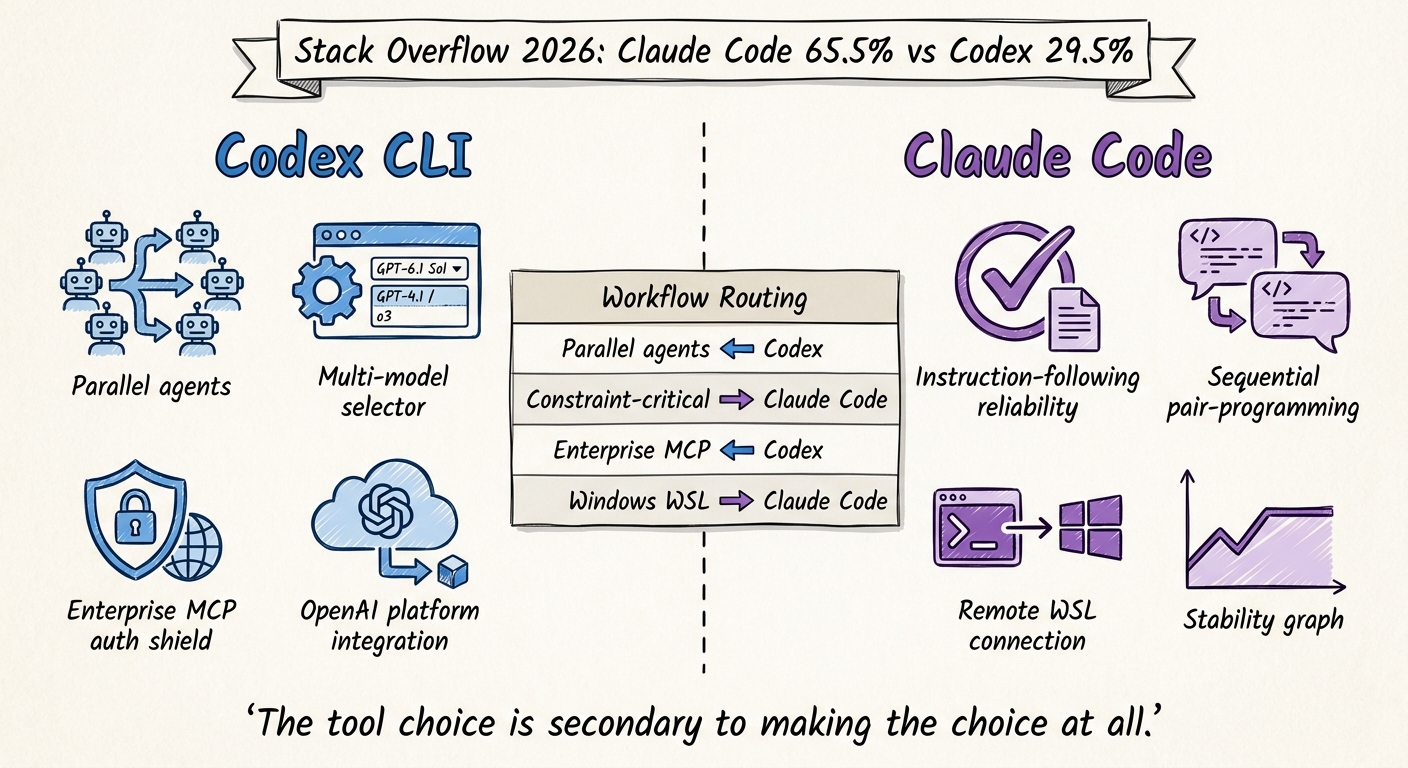
Data anchor: Stack Overflow Developer Survey 2026 — Claude Code 65.5% adoption, Codex CLI 29.5% Context: OpenAI’s 28 Days of Shipping sprint (Oct–Nov 2026) explicitly framed as a retention response Scope: Individual developers and engineering teams; excludes Codex Web and Claude.ai
The Stack Overflow 2026 Developer Survey produced a number that OpenAI’s product team clearly found uncomfortable: Claude Code at 65.5% developer adoption versus Codex CLI at 29.5%. That gap is the acknowledged context behind OpenAI’s “28 Days of Shipping” sprint — the community says so openly, and OpenAI has not contradicted them.
But adoption statistics are not workflow recommendations. A 65/35 split tells you something about the current state of the market; it does not tell you which tool is right for your work. This article attempts the more useful comparison: a direct, unromantic assessment of where each tool is genuinely stronger, and what the choice actually depends on.
What They Are (and Are Not)
Both tools put an AI coding agent in your terminal. Both can read your codebase, write code, run commands, and work multi-step problems. Both have AGENTS.md support. Both use capable frontier models. The surface similarity is real.
The differences are in emphasis, architecture, and the specific bets each product has made.
Codex CLI is OpenAI’s agent runtime for the terminal. Its primary value proposition is deep OpenAI platform integration: model switching between GPT-6.1 Sol (ultrafast), GPT-4.1 (balanced), and the reasoning models; native MCP tool integration with enterprise auth; Codex Cloud for parallel multi-agent tasks; and the Guardian subagent for risk-scoped approvals. It is the product through which OpenAI is rolling out its most ambitious agentic features.
Claude Code is Anthropic’s agent CLI. Its primary value proposition is instruction-following reliability and a development workflow that feels more like a junior colleague than an automated tool. It is tightly optimised for the sequential, interactive coding workflow: read, plan, execute, verify. Its remote WSL support — the most-upvoted open request in Codex’s own ideas forum — is a feature Codex still does not have.
Where Codex CLI Is Genuinely Stronger
Multi-model flexibility
If your workflow requires different models for different tasks — GPT-6.1 Sol for quick refactors, GPT-4.1 for nuanced architectural work, o3 for deep reasoning on complex problems — Codex CLI is the only place to run those models in an agentic context. Claude Code uses Claude. Codex CLI uses the OpenAI model family.
This matters more than it might seem for teams that use OpenAI APIs directly and want the same model in their agentic tooling and their application. Consistency between development-time model use and production model use reduces one category of “works in dev, breaks in prod” surprises.
Parallel multi-agent workflows
Codex Cloud enables genuine parallel task execution: spawn multiple specialist agents, have them work concurrently on disjoint parts of the problem, collect results. The /agents view in Codex Desktop visualises this. The community tooling built around it (ctx-kit, estafeta) extends it.
Claude Code is fundamentally sequential. It does one thing at a time, extremely well. If your workflow is “research the problem, then implement, then review” — sequential stages — that is fine. If your workflow is “have three agents simultaneously refactor three modules and verify no conflicts” — parallel execution — Codex Cloud is the only current option in this class of tool.
Enterprise MCP authentication
v0.164.0’s enterprise MCP auth overhaul — single sign-on via account grant reuse, credential-rotation resilience, authority rechecking, structured error messages — is genuinely the state of the art for deploying an agent CLI against enterprise tool infrastructure. If your organisation runs internal MCP servers with OAuth-protected endpoints, Codex CLI’s auth model is significantly more mature than the alternatives.
The OpenAI platform integration flywheel
If you are already invested in the OpenAI ecosystem — using the API, monitoring via OpenAI’s usage dashboard, deploying on Azure OpenAI, running fine-tuned models — Codex CLI plugs into that stack. Session logs, token consumption, model usage all flow through the same account. There is operational coherence in keeping your agentic development tooling inside the platform you are already running.
Where Claude Code Is Genuinely Stronger
Instruction-following reliability
This is Claude Code’s headline advantage, and the community evidence for it is consistent. The acknowledge-apologise-re-violate pattern documented in GPT-6.1 Sol — where the model confirms constraints, follows them briefly, then violates them — does not have a widely reported equivalent in Claude Code. Claude models are trained with a specific emphasis on following multi-turn instructions reliably, and that training shows in the agentic context.
For workflows where AGENTS.md constraints are safety-relevant — do not commit, do not touch production credentials, do not make outbound calls — the reliability gap is material. Claude Code is not perfect, but it holds constraints under normal session conditions without requiring workarounds.
Interactive pair-programming feel
Claude Code’s interaction model is closer to a conversation with a thoughtful junior developer than an automated execution pipeline. It asks more clarifying questions. It explains what it is about to do before doing it. It flags ambiguity rather than resolving it arbitrarily.
This is slower. It is also, for many developers, what “pair programming with AI” should feel like. If you are working on unfamiliar code, or implementing something where the requirements are not fully specified, Claude Code’s habit of asking rather than assuming reduces the rework rate.
Remote WSL support
Claude Code’s ability to connect to and control a remote WSL environment is, as measured by Codex’s own community votes (18 upvotes, top open Ideas request), the single most wanted feature that Codex CLI does not have. For developers on Windows who do their actual development work in WSL — which is a large fraction of enterprise Windows developers — this is a daily-driver blocker in Codex’s absence.
macOS and Linux stability
The October 2026 cross-platform crisis — Linux 47-49 GB OOM crash, Windows P0 self-termination at 30+ crashes per day, macOS TUI bootstrap failure — has no equivalent in Claude Code at the time of writing. Claude Code is not without bugs. But it has not had a week where critical crashes were simultaneously reported on all three major platforms.
Stability has operational cost. Teams that cannot rely on Codex Desktop to stay running cannot build workflows on it. Claude Code is the lower-variance choice for teams whose primary concern is “will this work reliably every day.”
The Workflow-Type Guide
Rather than a single recommendation, the honest answer is that the right tool depends on your primary workflow type.
| Workflow type | Better choice | Why |
|---|---|---|
| Quick, high-volume code edits and refactors | Codex CLI (GPT-6.1 Sol) | 8x speed advantage is real and matters for iterative work |
| Security-sensitive tasks with hard constraints | Claude Code | Better instruction-following reliability; fewer constraint violations |
| Parallel multi-agent task execution | Codex CLI (Codex Cloud) | No Claude Code equivalent at this time |
| Sequential interactive pair programming | Claude Code | Interaction model optimised for conversation, not automation |
| Enterprise MCP tool integration | Codex CLI | v0.164.0 enterprise auth overhaul has no equivalent |
| Windows development via WSL | Claude Code | Remote WSL support; Codex lacks this feature |
| OpenAI API-integrated development | Codex CLI | Platform coherence; same models in dev and production |
| Reliability-first, low-tolerance-for-breakage | Claude Code | Lower variance; no cross-platform crisis equivalent in Oct 2026 |
| Long multi-step agentic workflows | Mixed | Codex for parallel; Claude Code for sequential with constraints |
What the 65/35 Gap Actually Tells You
The adoption gap is real but it is not an endorsement of one tool’s technical superiority over the other. It reflects a few specific advantages Claude Code had earlier in 2026:
- First-mover advantage in the agent CLI category. Claude Code reached a usable state for daily-driver workflows before Codex CLI had a comparable multi-step agentic experience.
- Stability. In a category where developers need to trust a tool with their codebase, Claude Code had fewer critical regressions at critical moments.
- Instruction-following. The acknowledge-apologise-re-violate pattern, if it had existed in early Claude Code, would have been a severe competitive disadvantage. It did not. That led to word-of-mouth recommendations in professional networks.
None of those advantages are permanent. OpenAI’s sprint work is directly addressing the stability and speed dimensions. The enterprise MCP auth work is competitive differentiation that Claude Code does not match. If v0.165.0’s observability work produces reliable tracing and compliance logs, the instruction-following trust gap may narrow.
The 65/35 number is a snapshot of October 2026. Whether it represents a durable market structure or a moment that OpenAI’s sprint is actively reversing is a question the November data will answer.
The Practical Recommendation
If you are choosing your primary tool today:
Choose Codex CLI if: you are on the OpenAI API platform, you need multi-model flexibility or parallel multi-agent execution, you are deploying against enterprise MCP servers, or speed is the overriding constraint for your workflow.
Choose Claude Code if: constraint reliability is safety-critical for your use case, you work on Windows via WSL, you are on a team where “the agent did something we didn’t ask it to” is an unacceptable outcome, or you have been burned by Codex’s October platform regressions.
Use both if: you have different workflow types that map cleanly to each tool’s strengths, and you are willing to manage the context-switching overhead. ctx-kit and estafeta are explicitly designed to work with Codex CLI sessions; they have no formal Claude Code integration, but the handoff patterns are tool-agnostic.
The worst choice is neither: defaulting to no agent CLI and doing everything by hand, while your competitors build the workflow infrastructure that makes AI-augmented development 2x faster across a team of 10. That gap compounds. The tool choice is secondary to making the choice at all.