Codex CLI and Jira: Issue-Driven Development with the Atlassian MCP Server
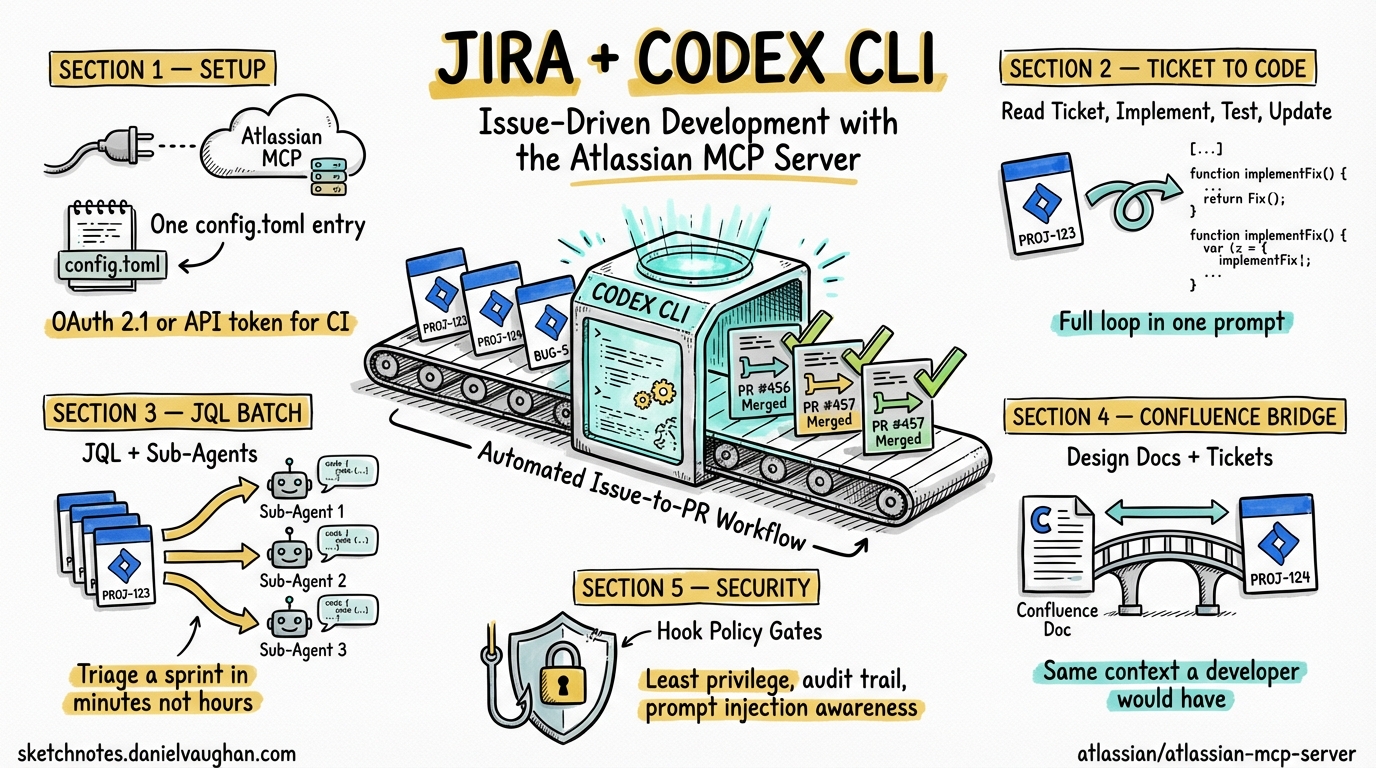
Codex CLI and Jira: Issue-Driven Development with the Atlassian MCP Server
Most engineering teams track work in Jira. Most AI coding agents ignore Jira entirely. The result is a workflow gap: you read a ticket, context-switch to the terminal, explain the task to the agent from scratch, implement it, then switch back to Jira to update the ticket. Every step is manual. Every step loses context.
The Atlassian MCP Server eliminates this gap by giving Codex CLI direct, authenticated access to Jira (and Confluence and Compass) through the Model Context Protocol 1. The agent can read tickets, search with JQL, create issues, update status, and pull Confluence pages — all without leaving the terminal. This article covers setup, practical workflows, and the patterns that make issue-driven agentic development work.
Setting Up the Atlassian MCP Server
The Atlassian MCP Server is a cloud-hosted service at mcp.atlassian.com — there is nothing to install locally beyond the MCP transport proxy. It connects to your Atlassian Cloud instance and respects your existing Jira permissions: if you cannot see a project in Jira, the agent cannot see it either 1.
Configuration
Add the server to your Codex CLI configuration in ~/.codex/config.toml:
[mcp_servers.atlassian]
type = "command"
command = ["npx", "-y", "mcp-remote", "https://mcp.atlassian.com/v1/mcp"]
The mcp-remote package handles the OAuth 2.1 flow. On first connection, a browser window opens for Atlassian authentication. Subsequent sessions reuse the cached token 1.
Headless Authentication for CI
For codex exec in CI pipelines or automated environments where no browser is available, use an API token instead of OAuth:
- An organisation admin enables “Rovo MCP” API tokens in Atlassian Administration
- Generate a scoped token under your Atlassian profile
- Pass it via environment variable or
.envfile
export ATLASSIAN_MCP_TOKEN="your-scoped-api-token"
codex exec "Pick up PROJ-1234, implement it, and move it to In Review"
AGENTS.md Optimisation
Without guidance, the agent wastes tokens discovering your Jira project structure. Add defaults to your project’s AGENTS.md:
## Jira Integration

- Jira project key: **PROJ**
- Confluence space: **ENG**
- Cloud URL: https://yourcompany.atlassian.net
- Default search limit: 10 results
- When searching Jira, always use JQL with `project = PROJ`
- When creating issues, default to type: Task unless specified otherwise
- Always include acceptance criteria in the description
This reduces the MCP discovery overhead from 3-4 exploratory tool calls to zero, saving roughly 2,000-4,000 tokens per session 2.
Core Workflows
1. Ticket-to-Implementation
The most natural workflow: point the agent at a ticket and let it implement the work.
codex "Read PROJ-1234 from Jira, implement the feature described in the acceptance criteria, \
      write tests, and update the ticket status to In Review when done"
What happens:
- The agent calls the Jira MCP tool to fetch PROJ-1234’s summary, description, and acceptance criteria
- It reads the relevant source files based on the ticket context
- It implements the changes and writes tests
- It runs the test suite to verify
- It updates the Jira ticket status and adds a comment summarising what was done
The key advantage over copy-pasting the ticket description into a prompt: the agent sees the full ticket context — description, acceptance criteria, comments, linked issues, priority, labels — and can reference related tickets if needed.
2. JQL-Driven Batch Work
JQL search lets the agent find and process multiple tickets:
codex "Search Jira for 'project = PROJ AND labels = tech-debt AND status = To Do' \
      and for each issue, assess the codebase, estimate complexity, \
      and add a comment with your assessment and suggested approach"
For bulk implementation, combine JQL search with sub-agent delegation:
codex "Search Jira for 'project = PROJ AND fixVersion = v2.4 AND status = To Do' \
      and implement each ticket using a sub-agent. Update each ticket to In Review when done."
Each ticket gets its own sub-agent with a fresh context window, preventing the accumulated context from previous tickets from degrading performance on later ones 3.
3. Sprint Triage
At the start of a sprint, the agent can help triage and refine the backlog:
codex "Search Jira for 'project = PROJ AND sprint in openSprints() AND status = To Do'. \
      For each issue: read the description, check if acceptance criteria are present, \
      check if the referenced code files exist and are relevant, \
      and add a comment with a complexity estimate (S/M/L) and any missing information."
This produces a structured triage in minutes rather than hours, with each assessment grounded in actual codebase analysis rather than estimation from memory.
4. Spec-to-Backlog
The Atlassian MCP Server includes a spec-to-backlog skill template that converts a specification document into structured Jira tickets 1:
codex "Read the PRD at docs/features/payment-refunds.md. \
      Break it into implementation tasks and create Jira tickets in PROJ \
      with type: Story, labels: [payments, q2-2026], and fixVersion: v2.5. \
      Each ticket should have clear acceptance criteria derived from the PRD."
The agent creates properly structured tickets with descriptions, acceptance criteria, labels, and version assignments — work that typically takes a PM thirty minutes to an hour.
5. Confluence-Enriched Implementation
When tickets reference architecture decisions or design documents in Confluence, the agent can pull that context directly:
codex "Read PROJ-1234 from Jira. The ticket references a design doc in Confluence — \
      find and read it. Implement the feature following the architecture described \
      in the design doc."
The bidirectional Jira + Confluence access means the agent works with the same context a human developer would: the ticket for what to build, the design doc for how to build it.
Patterns That Work
The Ticket-Branch-PR Loop
The highest-value pattern combines Jira with Git:
codex "Read PROJ-1234 from Jira. Create a branch named feature/PROJ-1234-short-description. \
      Implement the feature, write tests, commit, push, create a PR, \
      and update the Jira ticket with the PR link."
This closes the entire loop — from ticket to deployable PR — in a single prompt. The agent handles the mechanical choreography while you review the output.
Status Reports from Code Reality
Rather than asking developers to update tickets, let the agent generate status from the code:
codex "Search Jira for 'project = PROJ AND sprint in openSprints()'. \
      For each In Progress ticket, check git log for recent commits mentioning the ticket key. \
      Generate a sprint status summary with: tickets with recent commits (active), \
      tickets with no commits in 3+ days (stalled), and tickets not yet started."
Cross-Referencing Bugs and Code
When a bug ticket comes in, the agent can correlate the reported behaviour with the codebase:
codex "Read PROJ-5678 (bug report). Search the codebase for the component mentioned in the ticket. \
      Identify the likely root cause, write a failing test that reproduces the bug, \
      fix it, and update the ticket with what you found."
Security Considerations
The Atlassian MCP Server operates with your Jira permissions — it can do anything you can do. This has implications:
Least privilege matters. If you use Codex CLI with --full-auto and the Atlassian MCP, the agent can create, modify, and transition any ticket you have access to without confirmation. For exploratory or batch operations, use suggest approval mode so you can review each Jira action before it executes 4.
Audit trail. Every action the agent takes through the MCP appears in Atlassian’s audit log under your user account. This is useful for traceability but means you are accountable for the agent’s actions. Review the agent’s planned Jira operations before approving them.
Prompt injection risk. Ticket descriptions and comments are user-supplied text that the agent reads and acts on. A malicious ticket description could attempt to manipulate the agent into performing unintended actions — creating tickets in other projects, modifying unrelated issues, or exfiltrating information to external services. Sandbox mode (workspace-write) limits the blast radius by constraining file system and network access, but Jira API calls operate outside the sandbox 5.
Token scope. For CI automation, use the narrowest possible API token scope. A token scoped to a single Jira project cannot be exploited to access other projects even if the agent is compromised.
Hook-Based Policy Gates
Use Codex CLI hooks to enforce Jira policies programmatically:
{
  "hooks": {
    "on_tool_call": [
      {
        "match": "mcp__atlassian__*",
        "command": "scripts/jira-policy-check.sh",
        "description": "Validate Jira operations against team policy"
      }
    ]
  }
}
The hook script can enforce rules like: no ticket transitions to Done without a PR link, no bulk operations on more than 10 tickets at once, or no modifications to tickets outside the current sprint 6.
Context Window Budget
The Atlassian MCP Server exposes approximately 15-20 tools. At roughly 150-200 tokens per tool schema, that is 3,000-4,000 tokens of schema overhead loaded at session start 2. Codex CLI’s tool search with deferred loading mitigates this — tools not needed early in the session are loaded on demand rather than upfront 7.
A typical Jira ticket fetch returns 500-1,500 tokens depending on description length. Confluence pages are larger — plan for 2,000-5,000 tokens per page. When processing multiple tickets, the sub-agent delegation pattern keeps the parent session lean: each sub-agent reads one ticket, implements it, and returns a concise summary 3.
# config.toml — budget-conscious Jira integration
[context]
auto_compact_threshold = 0.70   # compact early when doing batch ticket work

[mcp_servers.atlassian]
type = "command"
command = ["npx", "-y", "mcp-remote", "https://mcp.atlassian.com/v1/mcp"]
Limitations
Cloud only. The Atlassian MCP Server requires Atlassian Cloud. Jira Data Center and Jira Server (on-premises) are not supported. Teams running on-prem Jira need a custom MCP server wrapping the Jira REST API.
OAuth browser requirement. Initial authentication requires a browser for the OAuth 2.1 consent flow. The API token alternative requires organisation admin enablement, which may involve bureaucratic overhead in large enterprises.
No webhooks. The MCP connection is pull-only — the agent queries Jira when prompted but does not receive real-time notifications when tickets change. For event-driven workflows (trigger agent on ticket creation), you need an external orchestrator like NanoClaw or a Jira automation rule that invokes codex exec 8.
Rate limits. Atlassian Cloud APIs have rate limits. Batch operations on dozens of tickets may hit throttling. The agent does not currently implement automatic backoff for MCP tool calls — if you hit rate limits, reduce batch size or add delays between operations.
Key Takeaways
- The Atlassian MCP Server gives Codex CLI authenticated, permission-respecting access to Jira, Confluence, and Compass through a single
config.tomlentry. - The ticket-to-implementation workflow — read ticket, implement, test, update status — closes the loop between project management and code in a single prompt.
- JQL search enables batch operations: triage, complexity estimation, bulk implementation with sub-agent delegation, and status reporting from code reality.
- Confluence integration means the agent works with the same context a developer would: tickets for what to build, design docs for how to build it.
- Security requires attention: least-privilege tokens,
suggestapproval mode for exploratory work, hook-based policy gates for automated pipelines, and awareness of prompt injection risk from user-supplied ticket content. - AGENTS.md defaults for project key, space ID, and search limits eliminate 2,000-4,000 tokens of discovery overhead per session.
Citations
-
Atlassian MCP Server — GitHub. Cloud-hosted MCP server for Jira, Confluence, and Compass integration with AI coding agents. OAuth 2.1 and API token authentication, permission-respecting access, pre-built skill templates. https://github.com/atlassian/atlassian-mcp-server ↩ ↩2 ↩3 ↩4
-
Codex CLI MCP Integration — Configuration and token overhead for MCP servers. https://codex.danielvaughan.com/2026/03/26/codex-cli-mcp-integration/ ↩ ↩2
-
Codex CLI Subagents: TOML Format, Parallelism and spawn_agents_on_csv — Sub-agent delegation for batch operations with independent context windows. https://codex.danielvaughan.com/2026/03/26/codex-cli-subagents-toml-parallelism/ ↩ ↩2
-
Codex CLI Approval Modes and Sandbox Security Model — Approval modes including suggest, auto-edit, and full-auto with their security implications. https://codex.danielvaughan.com/2026/03/26/codex-cli-approval-modes-sandbox-security/ ↩
-
Codex CLI Security Hardening — Sandbox modes, network restrictions, and MCP server trust boundaries. https://codex.danielvaughan.com/2026/03/27/security-hardening-codex-cli/ ↩
-
Codex CLI Hooks Deep Dive: SessionStart, Stop and userpromptsubmit — Hook-based policy enforcement for tool calls. https://codex.danielvaughan.com/2026/03/26/codex-cli-hooks-deep-dive/ ↩
-
GPT-5.4 Computer Use and Tool Search in Codex CLI — Deferred tool loading reducing MCP schema token overhead. https://codex.danielvaughan.com/2026/03/31/gpt54-computer-use-tool-search-codex-cli/ ↩
-
NanoClaw: Building an Always-On Agentic Assistant with Codex CLI — External orchestration for event-driven agent workflows. https://codex.danielvaughan.com/2026/04/09/nanoclaw-codex-cli-always-on-agentic-assistant/ ↩